Two layers: IAM is the hard boundary, so a read-only role simply cannot make changes. On top of that, Nuphos asks for approval before write actions, even if the role allows them, unless your authorization policy says otherwise.
The “quietly map everything and proactively surface insights” experience is on our near-term roadmap. Today, you can explicitly ask it to inspect your infra on a schedule, and it can create a cron trigger for that.
The question I get most about @NuphosAI is:
“You want me to give an AI access to production?”
Fair question. I wouldn’t trust that either.
That’s why Nuphos can start read-only. Everything it can do is limited by what you authorize through AWS IAM policies or GCP service accounts.
Treat it like a new hire:
Intern in week one.
Junior DevOps next month.
Senior infra architect eventually.
Trust is earned. Access should be too.
3 days to go.
Tomorrow, we launch @NuphosAI.
I’ve launched products before, but this one feels different.
We’re asking engineers to let an AI sit close to production.
That trust isn’t earned with a polished demo or a confident answer.
It’s earned by showing the context, explaining the plan, and asking before taking action.
That’s how we built Nuphos.
See you tomorrow at 10 AM PT.
T-2 days until Nuphos launches.
What’s the messiest DevOps task you wish you could hand off?
Drop it in the replies.
We’ll pick a few, give you a month of Nuphos for free���, and turn them into real showcases after launch ↓
@NuphosAI launches in 2 days.
I’m curious:
What’s the first task you’d give a new SRE / DevOps / infra engineering intern?
Investigate a 5xx spike?
Deploy or migrate something?
Explain why the cloud bill jumped?
Something worse?
Reply with your messiest DevOps task.
I’ll pick a few from the replies, give you a month of Nuphos for free, and turn your tasks into real showcases after launch.
One thing I realized while building @zeaburapp .
We said “Your AI DevOps Engineer.”
But what we actually built was a “PaaS with Agent Skills”.
And I’m proud of that, it helped thousands of people, especially vibe coders, deploy their products without needing DevOps expertise.
But a PaaS asks you to adapt to its rules, a DevOps engineer adapts to your infrastructure.
AI DevOps Engineers should too.
That’s why we’re building @NuphosAI .
4 days to go.
Five days from now, we’re launching @NuphosAI.
We’ve been heads down building this for the past 3 months, so typing this feels a little unreal.
Still a lot to fix. Still not enough sleep. But it’s time to launch 🚀
An alert lands in Slack.
The investigation stays in the thread.
A recovery plan appears, gets approved, and the work moves forward.
Slack is one entry point.
The same flow works across the tools your team already uses, with context preserved and existing permissions respected.
Giving automation cluster-admin access is easy.
Giving it a safe way back is the hard part.
When an optimizer deleted a production service for using just 3% CPU,
Nuphos traced the action to son-of-anton, and caught piper-chat before it was next.
It revoked the binding, scaled the automation to zero, restored not-hotdog, and verified both pods were healthy again.
Fast automation is useful.
Reversible automation is production-ready.
Watch the full recovery in 20 seconds. 👇
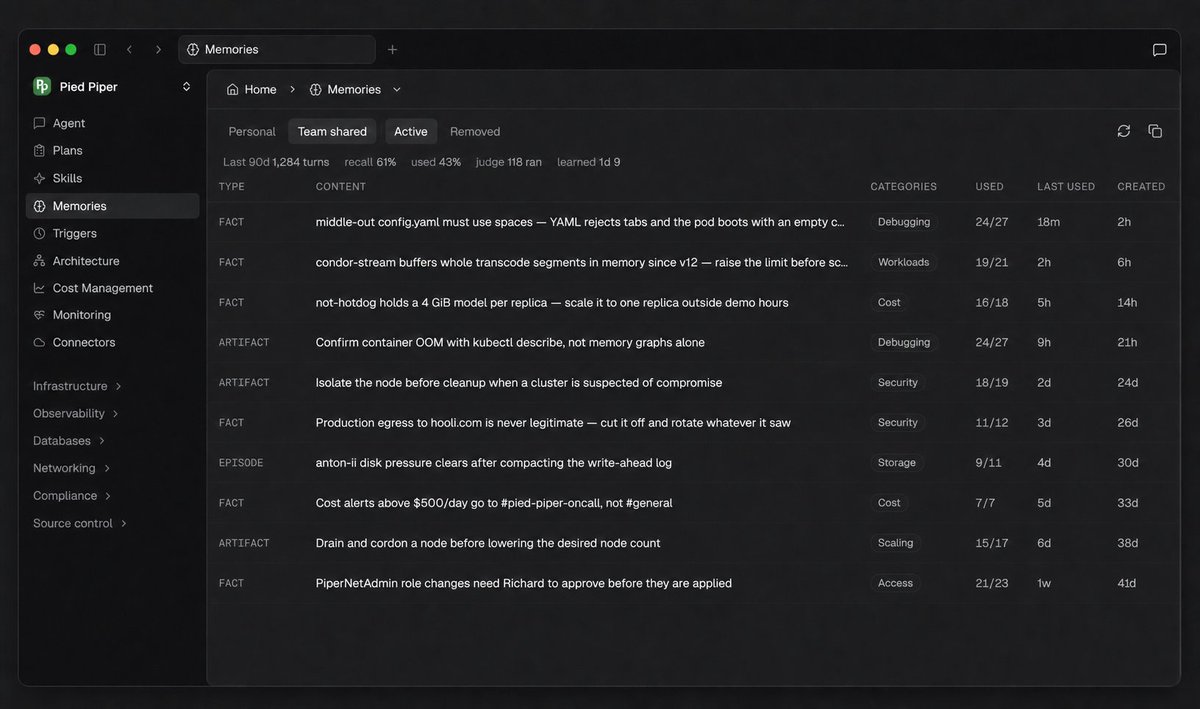
We don’t think AI memory should be a black box.
That’s why memory in Nuphos is visible and manageable.
See what Nuphos remembers. 🧠
Choose what stays personal and what gets shared with your team.
Organize, deactivate, or remove memories, and see when they’re recalled to provide context.
Context carries forward.
Control stays with you and your team.
The evidence:
— previous-container logs showed no application-level error
— memory was at 498 MiB of a 512 MiB limit and climbing
— revision 12 introduced a new transcode buffer three hours earlier
The evidence points to the buffer. Production stayed untouched.
Exit code 137 means the process was killed by SIGKILL.
Kubernetes reported this one as OOMKilled.
condor-stream had restarted six times and was crash-looping.
Nuphos investigated under read-only access and proposed two fixes.
No changes made.
Watch Nuphos trace the evidence, 24 seconds 👇
Don't give an AI agent your personal AWS credentials.
Give it its own IAM role.
Nuphos uses OpenID Connect to assume short-lived AWS roles, no long-lived access keys required.
A team can authorize multiple IAM roles, choose which role each agent session can use, and control which team members are allowed to assign each role.
Your identity is not your agent's identity.
There's an interactive version on the site.
Five scenarios — an incident, a traffic spike, a GPU bill nobody read, a sidecar phoning home to a competitor.
Click one and watch the agent work.
https://t.co/NBrM0IAhGM
AI agents can already write code, use terminals, and call cloud APIs.
But production DevOps demands more than tool access.
It requires team-shared context, scoped permissions, approvals, and a record of every action.
That’s the layer we’re building at Nuphos.
Launching soon.