$NYSERA is live on @ponsdotfamily The contract address is below.
CA : 0x1476418794458c61999d475f6abc84b6e80a6cdf
Here's what you can actually use today. Shipped.
→ Nysera CLI (v0.2.0), open source. Give it one task. It plans the task into lanes, runs the lanes that don't depend on each other in parallel, and routes every lane to the model that fits the job: plan, code, test, docs, deep, quick, research, review.
→ Real verification. Add --test "npm test" and the crew runs your own tests after the lanes. If they fail, a fixer model reads the error, repairs the files and tries again, up to 2 times. A lane is only "verified" when a check actually passed. Otherwise it stays "reported."
→ No silent downgrade. When a model times out or a provider rejects it, the lane moves down its fallback chain, and the board shows the switch. You always know which model did the work.
→ One OpenRouter key, every provider. OpenAI, Claude, Gemini, DeepSeek, Qwen, Kimi, Mistral and more, without an account per lab.
→ Nysera Desktop (v0.1.5), free for macOS (Apple silicon) and Windows, or right in your browser. Your bots in one window: Nysera (lead coding agent), Aria (research) and Juno (ops & deploys).
→ Try it with zero setup: a live crew demo on https://t.co/4ykvd4LLbK with up to 4 lanes, offline mock mode (NYSERA_MOCK=1), and a chat with Nysera herself.
All of it is built in public, with the code on GitHub under nysera-dev. That's the standard we hold ourselves to everywhere: evidence before "done."
Only trust a contract address posted by @nyseraapp. Nothing here is financial advice.
Use the product → https://t.co/4ykvd4LLbK
Read the code → https://t.co/M1aFHOr4Xq
Spend thinking where it matters.
Every category in Nysera has its own model chain and its own reasoning effort. That one design choice decides where your OpenRouter credit actually goes.
High effort, strongest models:
→ plan: claude-sonnet-latest → gpt-latest → gemini-pro-latest → deepseek-chat
→ deep: claude-sonnet-latest → gemini-pro-latest → gpt-latest
→ research: gemini-pro-latest → claude-sonnet-latest → kimi-latest
→ review: gpt-latest → gemini-pro-latest → claude-sonnet-latest
Medium effort:
→ code: claude-sonnet-latest → deepseek-chat → gpt-latest
→ test: claude-sonnet-latest → deepseek-chat → gpt-latest
Low effort, fast models:
→ docs: gpt-mini-latest → gemini-flash-latest → deepseek-chat
→ quick: gemini-flash-latest → deepseek-chat → gpt-mini-latest
So planning and reviewing get serious thinking time, because a bad plan or a missed bug costs you far more than the tokens. Renaming things, small edits and docs go to fast models that cost a fraction as much.
In a single chat, every message costs the same, whether it's a hard design question or fixing a typo. In a crew, the work decides.
Don't like a default? nysera model set changes any chain, and nysera doctor checks every model ID still exists before your next run.
→ https://t.co/ToxRV3mpkZ
Meet the crew inside Nysera Desktop.
Desktop puts your bots and coding agents in one window. Each has a role, and you can talk to whichever fits the job:
→ Nysera, lead coding agent.
Plans, writes and reviews code. Point her at a folder and she runs the work as parallel lanes on your own OpenRouter key, the same way the CLI does.
→ Aria, research.
Comparing approaches, reading up on a library, weighing SQLite against Postgres for a side project. The kind of question where you want a careful answer, not a fast one.
→ Juno, ops & deploys.
The one you talk to about getting things running and shipped.
Every lane still follows the same rules: routed models, visible fallbacks, verified only when a check passed.
Desktop v0.1.5 is a free download for macOS (Apple silicon) and Windows. It always runs real models on your key. Builds aren't code-signed yet, so the first launch needs "Open Anyway" on macOS or "More info → Run anyway" on Windows.
Don't want to install? You can use Desktop right in the browser.
→ https://t.co/JxtZjL6StI
Use case #2: docs that keep up with your code.
Docs go stale because updating them is boring, not because it's hard. That's exactly the kind of work a crew should take off your plate.
nysera run "update the README for the new CLI flags" --write
Here's how the routing handles it:
→ docs lanes run on the docs chain: gpt-mini-latest → gemini-flash-latest → deepseek-chat, with low reasoning effort. Fast, inexpensive models, because rewriting a README doesn't need a frontier model thinking for a minute.
→ If part of the job is harder, like working out which flags actually changed, the planner can give it its own lane in a category with a stronger chain.
→ A reviewer then checks each lane. The review chain is gpt-latest → gemini-pro-latest → claude-sonnet-latest, with high effort, because catching a wrong flag name is the part that actually matters.
→ --write applies the result, with backups, so a bad edit is never a disaster.
Cheap models for the writing. Strong models for the checking. You don't choose per prompt, the category does it.
Want different defaults? nysera model set docs changes the chain in one command.
→ https://t.co/ToxRV3mpkZ
Hey @HeyResearch 👋
We just submitted Nysera to HEY Research Lab. It's an AI agent tool (CLI + Desktop) built by a small team on Robinhood Chain.
Would love a review and approval when you get a chance 🙏
site : https://t.co/cLyPKktTeO
repo : https://t.co/AChVjwDCLk
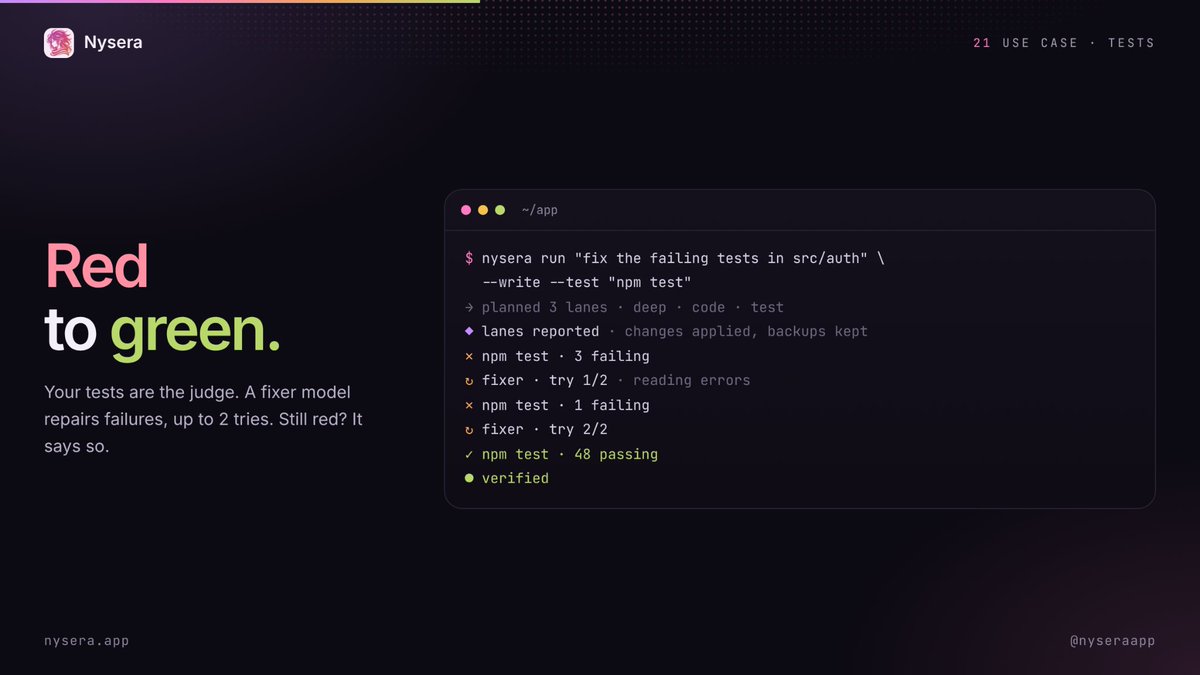
Use case #1: red to green.
You've got a failing test suite and a deadline. This is where Nysera feels most different from a chat window.
nysera run "fix the failing tests in src/auth" --write --test "npm test"
What happens next:
→ The planner splits the job into lanes, usually 2 to 7. Here: one to read the failures, one to fix the code, one to check the tests themselves are right.
→ Lanes that can run in parallel do. Each one runs on its category's model chain.
→ --write applies the changes to your files, with backups.
→ Then Nysera runs npm test. Your command, in your project.
→ Still red? A fixer model reads the actual error output, repairs the files and runs the tests again. Up to 2 tries by default (--fix changes that).
→ Green → the lanes are marked verified.
→ Still red after the tries → the lanes stay "reported." Nysera tells you it didn't get there, instead of pretending.
That last part matters most. A tool that sometimes fails but always tells you is one you can actually work with.
Works with any test runner: npm test, pytest, go test, cargo test. If it exits with success or failure, Nysera can use it.
→ https://t.co/E7IRX3VyAm
Your key. Your machine. Your choice of models.
A lot of people asked how Nysera handles keys and data, so here's the whole path, with nothing hidden:
1. Your machine.
The CLI and the Desktop app run locally. Your OpenRouter key is saved in ~/.nysera/config.json (or read from OPENROUTER_API_KEY). Run logs are written to .nysera/runs/ in your project, so the history of every run stays with you.
2. OpenRouter.
Every model call goes through your own OpenRouter key. That's how one key reaches every provider, and it's also why billing and rate limits are between you and OpenRouter.
3. The model that runs each lane.
Each lane is sent to a model from its category's chain. The run log names which model actually answered, including any fallback.
What doesn't happen:
→ Your key is never sent to Nysera.
→ No hidden model swaps. A fallback is always shown.
→ Nothing is applied to your files unless you pass --write, and --write keeps backups.
The CLI is open source under the MIT license, so you don't have to take our word for any of this. Read the code.
→ https://t.co/M1aFHOr4Xq
→ https://t.co/4ykvd4LLbK
Same task. Two ways to run it.
On the left: a single chat. One model, one thread. Plan, then code, then tests, then docs, each step waiting for the one before it. At the end it says "done," and nothing has actually been checked.
On the right: a Nysera crew. The planner splits the task into lanes. Lanes that don't depend on each other run at the same time, each on the model chain for its category. One model times out, the lane falls back, and the board shows it. Then your own tests run. They fail once, a fixer model repairs the files, they pass, and only then does the crew say "verified."
The video is an illustration, not a benchmark. Real timing depends on your task, your models and your providers. But the shape is real, and it's the whole reason Nysera exists:
→ parallel where it can be,
→ the right model for each kind of work,
→ every fallback visible,
→ and "done" only when a check passed.
Try the same thing on your own repo:
nysera run "your task" --write --test "npm test"
Or watch a real crew run in your browser first, no install needed.
→ https://t.co/4ykvd4LLbK
Questions we got this week, answered straight.
"Is Nysera free?"
The CLI is open source (MIT) and the Desktop app is a free download. The models themselves run on your own OpenRouter key, so you pay OpenRouter for what you use, at their prices. Nysera doesn't add a fee on top.
"Where does my API key live?"
On your machine. nysera setup saves it to ~/.nysera/config.json, or you can set OPENROUTER_API_KEY in your environment. It is not sent to us.
"Does my code leave my machine?"
Honest answer: the parts of your task a lane needs are sent to the model that runs it, through OpenRouter, the same as with any AI coding tool. Nysera tells you which model handled each lane, so you always know where the work went.
"Do I need to install anything to try it?"
No. You can run a live crew (up to 4 lanes) right on https://t.co/4ykvd4LLbK, use Desktop in the browser, or try the CLI offline with NYSERA_MOCK=1, no key needed.
"Which platforms?"
CLI: macOS, Linux and Windows with Node.js 18+. Desktop: macOS (Apple silicon) and Windows. The builds aren't code-signed yet, so macOS asks for "Open Anyway" and Windows SmartScreen asks for "More info → Run anyway."
"Is it on npm?"
Not yet. Install straight from GitHub: npm i -g github:nysera-dev/nysera
More questions? Reply here, we'll answer them all.
→ https://t.co/4ykvd4LLbK
Shipped last week. Small things, done properly.
Building in public means showing the unglamorous commits too. Here's what changed on https://t.co/4ykvd4LLbK between 16 and 19 November:
→ Chat never hangs on an empty reply.
If a model returns nothing, the chat with Nysera now recovers instead of sitting there spinning. Small fix, big difference when you're actually trying to ask something.
→ Proper link previews.
https://t.co/4ykvd4LLbK now has 1200×630 preview images for the main site, the CLI and Desktop, plus a title and description for X. Paste the link anywhere and it finally looks like Nysera.
→ Previews that X can actually read.
We added a robots.txt that lets X's crawler fetch the card, switched to lighter baseline JPEGs, and moved the image to a new URL so X drops its old cached version.
→ Calmer reveal animation.
Sections still fade and slide in as you scroll, but we removed the blur. Faster to read, easier on lower-end devices.
None of this is a headline feature. It's the kind of work that makes a product feel solid when you use it every day, and we'd rather ship ten of those than promise one big thing we can't back up.
Every change is in the open on GitHub under nysera-dev.
→ https://t.co/4ykvd4LLbK
The CA is out. Here's what doesn't change.
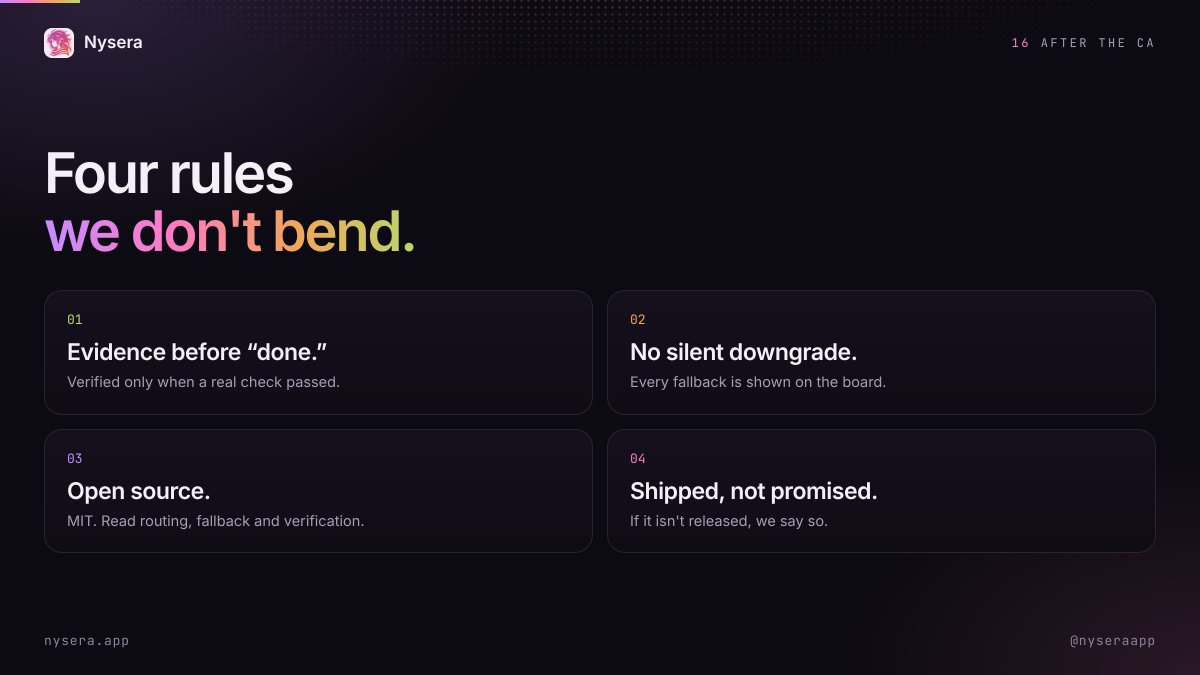
A token is a new chapter for the community. It is not a new product, and it doesn't rewrite how we build. So, for the record, these are the four rules Nysera has followed since day one, and will keep following:
01 · Evidence before "done."
A lane is only "verified" when a real check passed: your own --test command, or the reviewer model. A failed test keeps it "reported." No exceptions, no shortcuts to make a run look better than it was.
02 · No silent downgrade.
When a model times out or a provider rejects it, the lane moves down its fallback chain and the board shows the switch. You always know which model did the work.
03 · Open source.
The CLI is MIT-licensed and lives on GitHub under nysera-dev. You can read how routing, fallback and verification work, line by line.
04 · Shipped, not promised.
We talk about what you can use today. If something isn't released, we say it isn't released. No invented dates, no invented features.
Those rules apply to our posts as much as to our code. If we ever break one, call it out.
Everything that exists right now:
→ Nysera CLI v0.2.0 (alpha)
→ Nysera Desktop v0.1.5 for macOS (Apple silicon) and Windows
→ A live crew demo and a chat with Nysera on the website
→ https://t.co/4ykvd4LLbK
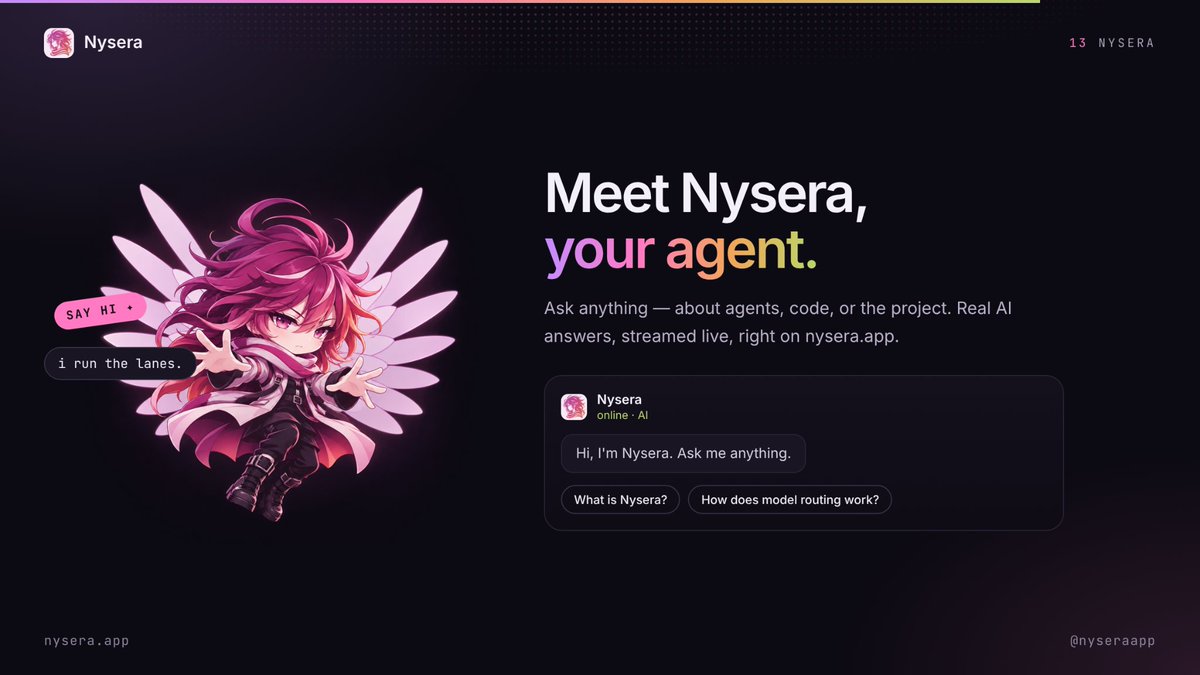
Meet Nysera, your agent.
Every crew needs a lead. This is ours.
Nysera is the lead coding agent inside the app — the one you talk to while the rest of the crew works in lanes behind her. And she has her own home on the website.
Scroll to the bottom of https://t.co/4ykvd4Ldmc and you'll find a chat with Nysera. Ask her anything — about agents, about code, about the project itself. These are real AI answers, streamed live, not a canned FAQ.
A few things to try:
→ “What is Nysera?”
→ “How does model routing work?”
→ “Write a hello world in Rust.”
→ Or ask her what she'd do with a task from your own backlog.
Tap the mascot while you're there. She'll tell you what she does. (Spoiler: she runs the lanes.)
Like any AI, Nysera can make mistakes — so check anything important. That's exactly why the real crew only marks work as verified after a check passes.
Go say hi and tell us the best thing she answered. We'll share our favourites.
→ https://t.co/sMwQK9f3ox
One OpenRouter key. Every provider.
To build a crew that uses the right model for every lane, you'd normally need an account, an API key, a billing setup and an SDK for every lab you want to use.
Nysera skips all of that. Every model call goes through OpenRouter, so one key covers the whole lineup the crew can route to:
OpenAI · Claude · Gemini · Kimi · DeepSeek · Qwen · Mistral · MiniMax · Gemma · Moonshot · NVIDIA · Doubao · Hunyuan · Bedrock
What that gives you in practice:
→ One place to manage spend, instead of a dozen dashboards.
→ Fallback chains that cross providers. If one lab has an outage, the lane moves to a model from a different one.
→ Freedom to change your mind. Swap a model in any chain with nysera model set — no new account, no code changes.
You still decide what runs where. The 8 work categories — plan, code, test, docs, deep, quick, research, review — each have their own ordered chain, and you can tune every one of them.
Bring one key. Get the whole crew.
→ https://t.co/ToxRV3mpkZ
Install once. Set up once.
Getting the Nysera CLI running takes three commands. Here's the full walkthrough.
Step 01 — Install the command
You need Node.js 18 or newer, on macOS, Linux or Windows. It installs straight from GitHub:
npm i -g github:nysera-dev/nysera
(Prefer to read the code first? Clone the repo and run npm link instead.)
Step 02 — Set it up
nysera setup
Paste your OpenRouter key (https://t.co/JvpEPpZXLa). It's saved locally in ~/.nysera/config.json, or you can set OPENROUTER_API_KEY in your environment instead.
Step 03 — Check everything
nysera doctor
Doctor checks Node, your key, and that every model in your chains exists. If it flags something, fix it there — before it shows up as a confusing failure halfway through a run.
Then your first real run:
nysera run "your task"
Add --write when you want it to apply changes, and --test "…" when you want them verified.
Bonus: the install section on the site has a ready-made prompt you can paste into your own AI agent, and it'll install and set up Nysera for you.
Full guide → https://t.co/E7IRX3VyAm
NYSERA Desktop — your bots and coding agents, in one window.
Not everyone wants to live in a terminal, so the crew comes as an app too.
Inside Desktop you get a small team of bots, each with its own role:
→ Nysera — lead coding agent. Plans, writes and reviews code, or starts a session and lets the crew work in lanes.
→ Aria — research.
→ Juno — ops and deploys.
Sessions are kept in the sidebar, you can switch the model for a conversation from the top bar, and everything runs on the same routing and lane system as the CLI.
Getting started:
1. Download v0.1.5 — free — for macOS (Apple silicon) or Windows.
2. Open Settings and add your OpenRouter key, or turn on demo mode to look around first.
3. Ask Nysera for something real.
One honest note: the macOS build isn't code-signed yet. The first time you open it, go to System Settings → Privacy & Security and press “Open Anyway.” That's expected for an early alpha.
Don't want to install anything? You can use Desktop right in your browser on the website.
Download or try it in the browser → https://t.co/JxtZjL6StI
“Done” means a test passed.
This is the flag that changes how you use AI for code:
nysera run "add a /health endpoint" --write --test "npm test"
Here's what happens:
1. Nysera plans the task and runs the lanes — plan, code, tests.
2. The lanes report their work.
3. Nysera runs your own test command. Not a test the model invented on the spot — the command you gave it, in your project.
4. If it fails, a fixer model reads the actual error output, repairs the files and runs the tests again. Up to 2 tries.
5. Pass → the lanes become verified. The test output is saved with the run.
6. Still failing → the lanes stay reported. Nysera tells you it didn't make it, instead of pretending.
It works with whatever you already use: --test "npm test", --test "pytest", or any command that exits with success or failure.
The reason this matters is simple. A model saying “I've added the endpoint and the tests pass” is a claim. Your test runner saying it is evidence. Nysera only trusts the second one.
If you only try one thing in Nysera, try --test on a small, real task in your own repo.
→ https://t.co/4ykvd4LLbK
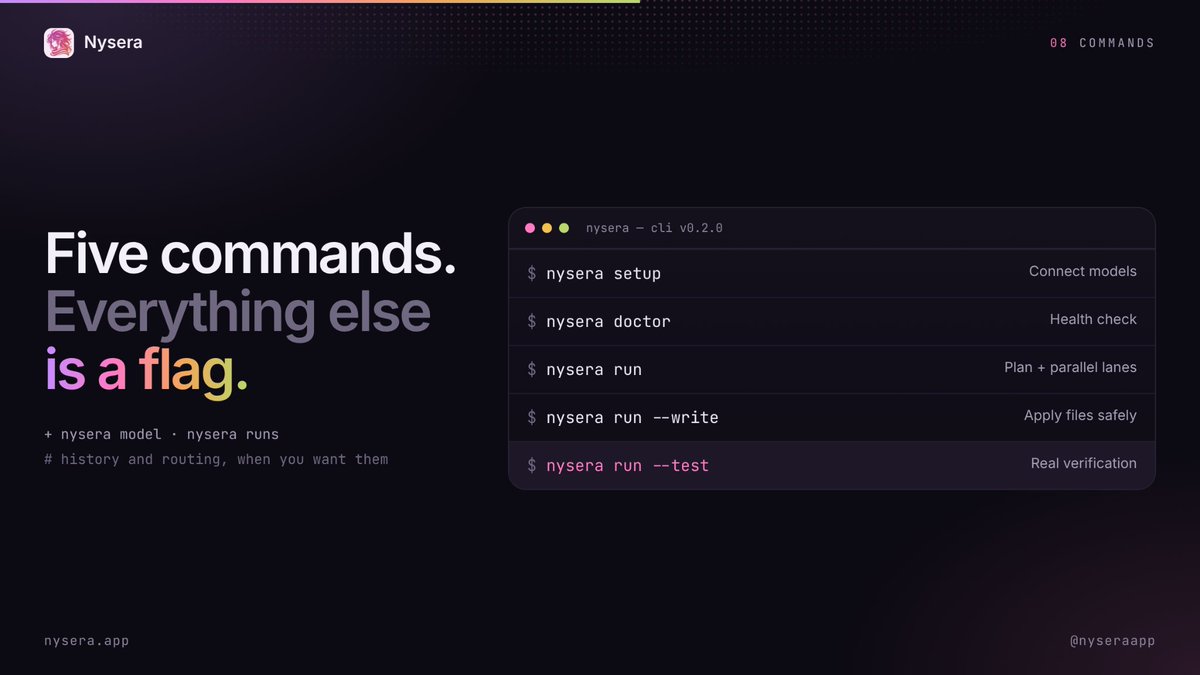
Five commands. Everything else is a flag.
The Nysera CLI is deliberately small. This is the whole core:
nysera setup
Connect your models. Paste one OpenRouter key and you have access to every provider in the default chains.
nysera doctor
Health check. Verifies Node, your key, and that every model in your chains actually exists.
nysera run "your task"
Plan the task into lanes and run them in parallel.
nysera run --write
When you want the crew's changes applied to your files, safely.
nysera run --test "npm test"
Real verification. Runs your test command after the lanes, lets a fixer model repair failures, and only marks lanes verified when the tests pass.
Plus two you'll reach for later:
→ nysera model — see and edit the model chain for each category
→ nysera runs — look back through the history of your runs
That's it. No config files to write before you can start, no dashboard to set up, no framework to learn. If you can run a command in a terminal, you can run a crew.
Install:
npm i -g github:nysera-dev/nysera
Docs → https://t.co/E7IRX3VyAm
Every status names its stage.
In most AI tools there are only two states: “thinking” and “done.” The problem is that “done” covers everything from “verified by tests” to “the model stopped typing.”
Nysera splits that into four honest stages, and every lane on the board is always in exactly one of them:
01 · planned — the lane is in the plan. Nothing has run yet.
02 · running — a model from that lane's chain is working on it right now.
03 · reported — the model answered. Nobody has checked the result yet.
04 · verified — your --test command passed, or the reviewer model passed the work.
The difference between 03 and 04 is the whole point.
“Reported” means: here's what the model produced, treat it as a draft.
“Verified” means: something independent actually checked it.
A failed test keeps a lane at reported. It never gets promoted just because the model sounded confident.
This makes a run easy to read at a glance. If everything is green and verified, you can move on. If a lane is stuck at reported, you know exactly where to look before you ship.
Evidence before “done.” Always.
→ https://t.co/4ykvd4LLbK