Cancelled Canva.
Cancelled CapCut.
Cancel ChatGpt
Decided to just see what Claude could do.
30 days of content. Under an hour. Here are the 7 prompts i used:👇
4/ Get Your First 100 Clients Without Ads
Prompt:
> “Give me 10 free strategies to get my first 100 clients through social media and direct messages (DMs).”
Ask for:
Message scripts
Outreach angles
Content strategies
Organic customer acquisition methods
This will help you attract and convert your first customers without spending money on advertising. 🚀
🚨BREAKING: CLAUDE can now run your entire social media on autopilot mode like a $700/hour social media manager for free.
Here are 7 CLAUDE prompts that you should try:
People are now building income sources using Claude… in just days.
Not months. Not years. Just prompts.
Here are 10 prompts you can copy directly and start earning from them 👇
How to Learn Claude in 12 Days
(This will save you 2+ hours every day)
Most people use Claude like a chatbot.
Ask a question. Get an answer. Repeat.
Big mistake.
Claude is becoming an operating system for knowledge work.
Here's a 12-day roadmap based on real Claude workflows:
☀️ DAY 1: Build CLI Tools
Goal: Turn ideas into working tools.
→ Open Claude Code
→ Describe a tool in plain English
→ Let Claude generate and run it
No frameworks. No boilerplate. Just describe → build.
☀️ DAY 2: Create an MCP Server
Goal: Give Claude new capabilities.
→ Pick a tool or API you use often
→ Define endpoints and authentication
→ Let Claude generate the server
Now Claude can interact with your systems directly.
☀️ DAY 3: Build a Personal RAG
Goal: Make Claude remember your knowledge.
→ Upload notes, docs, and PDFs
→ Connect Google Drive, Notion, or Gmail
→ Ask questions across everything
Your second brain becomes searchable.
☀️ DAY 4: Understand Any Codebase
Goal: Learn unfamiliar code fast.
→ Drop in a GitHub repo
→ Ask for architecture breakdowns
→ Follow guided walkthroughs
Hours of reading become minutes.
☀️ DAY 5: Practice Interviews
Goal: Improve faster than studying alone.
→ Pick a role
→ Choose an interview type
→ Let Claude act as interviewer
Get feedback after every answer.
☀️ DAY 6: Automate the Browser
Goal: Stop doing repetitive web tasks.
→ Tell Claude what you need
→ Let it navigate websites
→ Complete tasks automatically
Research becomes delegation.
☀️ DAY 7: Tailor Every Resume
Goal: Apply smarter.
→ Paste a job description
→ Upload your resume
→ Ask Claude to optimize for ATS
Customized applications in minutes.
☀️ DAY 8: Schedule Cloud Routines
Goal: Work while you sleep.
→ Create recurring tasks
→ Schedule reports or research
→ Wake up to completed work
Productivity without active effort.
☀️ DAY 9: Design Faster
Goal: Go from idea to visual.
→ Describe a landing page
→ Describe a pitch deck
→ Let Claude generate drafts
Blank-page syndrome disappears.
☀️ DAY 10: Run Multi-Agent Reviews
Goal: Get multiple perspectives.
→ Assign different review roles
→ Let agents inspect code independently
→ Compare recommendations
One review becomes many.
☀️ DAY 11: Use Auto Mode
Goal: Delegate entire workflows.
→ Give Claude a specification
→ Let it plan, code, test, and review
→ Ship end-to-end
You manage outcomes, not steps.
☀️ DAY 12: Build Custom Skills
Goal: Create reusable expertise.
→ Save recurring workflows
→ Turn prompts into commands
→ Reuse them forever
Your best workflows become one-click actions.
Most people use Claude for answers.
Power users use Claude for systems.
The difference isn't intelligence.
It's setup.
Do this instead of scrolling:
→ Save this post
→ Start Day 1 today (10 minutes)
→ Complete one day at a time
→ Come back in 12 days
You'll never use AI the same way again. 🚀
Follow @ameliahazelai for more info
20 NotebookLM Prompts
To Learn Faster, Think Deeper & Research Smarter
01. Instant Summary
Turn long documents into digestible insights.
Prompt: “Summarize this source into the 10 most important ideas, key arguments, and practical takeaways in plain English.”
02. Beginner Explanation
Make complex topics easy to understand.
Prompt: “Explain this material as if I am a complete beginner. Use simple analogies, step-by-step logic, and avoid jargon.”
03. Deep Dive Breakdown
Understand the topic layer by layer.
Prompt: “Break this source into core concepts, hidden assumptions, expert-level nuances, and what most readers usually miss.”
04. Compare Sources
Spot agreements and contradictions.
Prompt: “Compare all uploaded sources. Show where they agree, where they conflict, and what unique insights each source contributes.”
05. Study Notes Builder
Create clean notes instantly.
Prompt: “Turn this content into structured study notes with headings, bullet points, definitions, and memorable examples.”
06. Flashcards Generator
Convert information into active recall.
Prompt: “Generate 25 high-quality flashcards from this material with question on front and concise answer on back.”
07. Quiz Me
Test your understanding.
Prompt: “Create a progressive quiz from easy to difficult based only on this source. Wait for my answers and grade me.”
08. Memory Hooks
Make information stick.
Prompt: “Create mnemonics, analogies, and memory anchors that help me retain the most important parts of this content.”
09. Timeline Extraction
Organize events chronologically.
Prompt: “Extract every important event, milestone, or development from these sources and arrange them into a clean timeline.”
10. Key Quotes Finder
Find the strongest supporting evidence.
Prompt: “Pull out the most impactful quotes, data points, and evidence from these sources that I can cite in writing or presentations.”
11. Research Gaps
See what’s missing.
Prompt: “Identify unanswered questions, weak arguments, missing evidence, and research gaps across these materials.”
12. Debate Both Sides
Sharpen critical thinking.
Prompt: “Present the strongest arguments for and against the main thesis of these sources as if two experts were debating.”
13. Turn Into Framework
Extract repeatable systems.
Prompt: “Convert the ideas in these sources into a practical framework, checklist, or repeatable system I can apply.”
14. Content Repurposing
Turn research into publishable content.
Prompt: “Use these sources to generate a LinkedIn post, article outline, tweet thread, and newsletter idea.”
15. Expert Interview Mode
Ask the notebook questions.
Prompt: “Act as the world’s top expert on these uploaded materials. I will ask questions answer only from the sources.”
16. Executive Briefing
Condense for busy decision making.
Prompt: “Create a 5-minute executive briefing with only the most strategic insights, implications, and action points.”
17. Lesson Plan Creator
Transform notes into a curriculum.
Prompt: “Turn this notebook into a 7-day learning plan with daily lessons, exercises, and checkpoints.”
18. Idea Generator
Use sources for new thinking.
Prompt: “Generate 20 original ideas, opportunities, or applications inspired by the uploaded materials.”
19. Simplify for Teaching
Prepare to explain to others.
Prompt: “Rewrite the key ideas from these sources into a teaching script that I can explain to someone in 5 minutes.”
20. Action Plan
Move from knowledge to execution.
Prompt: “Based on everything in these sources, create a practical action plan with first steps, priorities, and deadlines.”
❤️ Like
🔁 Retweet
🔖 Bookmark
Followv Nadia -with-Ai for more such posts
Anthropic just dropped a 31-page prompting guide.
Here's everything you actually need (in 10 rules):
1. You write "review this contract" and pray.
Fix: Name every output. "Review this contract. Flag risks per clause. Rate severity 1-5. Return as a table."
2: You say "summarize this" on a 40-page report.
Fix: 4.8 sizes the answer to the input. Cap it: "5 bullets. Each under 15 words. Start each with an action verb."
3: You write "don't use jargon. don't be salesy."
Fix: Negative instructions don't stick.
Flip them: "Write in plain English a 16-year-old could read aloud."
4: You type "can you help me with the email?"
Fix: Each verb ships something. For example: "Go to Gmail. Find [contact]. Write the send-ready reply. Under 90 words. Tone: confident, casual."
5: You wait for Claude to web search on its own.
Fix: Claude opus 4.8 calls fewer tools than 4.6.
Force it: "Use web search aggressively. Verify every claim with at least 2 sources."
6: You miss the warm tone from old Claude.
Fix: Claude opus 4.8 is direct. Almost zero emojis. Paste 2-3 sentences in the voice you want.
Tell Claude to match the rhythm.
7: You ask for "a landing page" & get bare minimum.
Fix: Drop this one line on every creative task
→ "Go beyond the basics."
It's from Anthropic's own doc.
8: You forget Claude 4.8 doesn't reason by default.
Fix: They call it "Thinking." Effort: High
Add this at the end: "Think before answering (maximum reasoning)." Free upgrade. Every time.
9: You rewrite the same prompt 14 times a week.
Fix: A skill is a command with instructions pre-built.
Write the same prompt twice? Make it a skill.
10: You assume Claude knows what you meant.
Fix: Old Claude 4.6 guessed.
New Claude 4.8 does exactly what you typed.
Spell it out. Output. Order. Length. Tone. Format.
If you don't say it, you don't get it.
To go even further & download my .md files directly:
Step 1. Go to https://t.co/psB7XxAv8w.
Step 2. Subscribe for free. Don't pay anything.
Step 3. Open my welcome email (most skip this).
Step 4. Hit the automatic reply button inside.
Step 5. Download my .md files from my Notion.
Bonus. Enjoy my best copy-paste prompts, too.
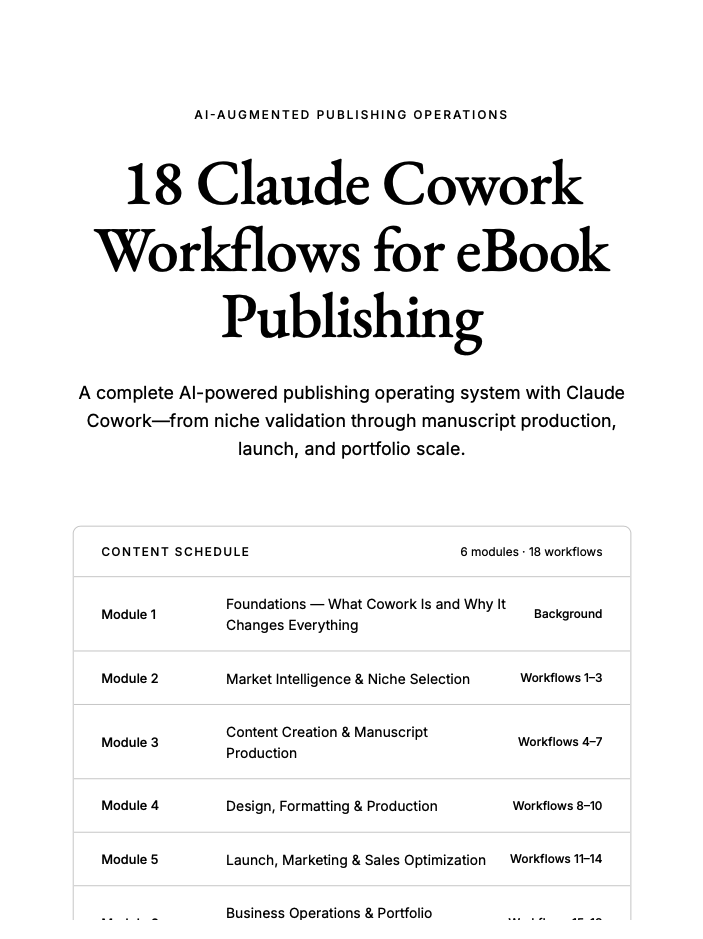
I've compiled my most valuable document yet:
18 Claude cowork workflows for eBook Publishing (44 pages).
These are the exact workflows I use to publish AI eBooks and generate $50,000/month.
I might charge for this in the future, but for now...
Reply "Claude" and I’ll DM it to you for free (must follow)
After 11 months of using Claude, I can say it’s the technology that has changed my life.
Here are 8 prompts I use daily that have transformed my day to day; they could do the same for you:👇
Save them🔥
Claude just dropped 13 FREE AI courses (with certificates).
No $500 course needed.
No “guru” required.
Just real skills — straight from Anthropic.
Here’s the full list:
👇
1. Claude 101
https://t.co/2v0N3fDphO
2. AI Fluency: Frameworks & Foundations
https://t.co/ZQYIA2It0m
3. Introduction to Agent Skills
https://t.co/qeNsbYkguL
4. Building with the Claude API
https://t.co/WlR2kzVKVj
5. Claude Code in Action
https://t.co/AGI3MfGngR
6. Introduction to Model Context Protocol
https://t.co/lk0f5c4udY
7. MCP: Advanced Topics
https://t.co/bNGLaLNCJ5
8. AI Fluency for Students
https://t.co/F3h77MqsXO
9. AI Fluency for Educators
https://t.co/1LUd0mtd6Y
10. Teaching AI Fluency
https://t.co/0M3p2B06Gr
11. AI Fluency for Nonprofits
https://t.co/QBKmRtcSwO
12. Claude with Amazon Bedrock
https://t.co/buzQBS30NO
13. Claude with Google Vertex AI
https://t.co/I7MNzyTFe8
—
If you go through even HALF of these…
You’ll be ahead of 95% of people using AI.
Most people won’t.
Because they’re still:
• Watching random YouTube videos
• Buying overpriced courses
• “Learning AI” without actually building
Don’t be that person.
Do this instead:
1. Save this post (you’ll come back to it)
2. Pick 1 course → start today
3. Share it with someone who needs this
Free. Practical. No excuses.
Stop telling Claude, "do this."
Stop telling Claude, "write code."
Stop telling Claude, "fix this error."
You're actually treating a senior AI like a junior intern.
Here are 8 prompts you can copy and paste directly:


![tec_safwan's tweet photo. Over 80 AI tools to finish months of work in mere minutes🪄
1. 𝐑𝐞𝐬𝐞𝐚𝐫𝐜𝐡
- ChatGPT
- Copilot
- Gemini
- Abacus
- Perplexity
2. 𝐈𝐦𝐚𝐠𝐞
- Fotor
- Dalle 3
- Stability AI
- Midjourney
- Microsoft Designer
3. 𝐂𝐨𝐩𝐲𝐖𝐫𝐢𝐭𝐢𝐧𝐠
- Rytr
- Copy AI
- Writesonic
- Adcreative AI
4. 𝐖𝐫𝐢𝐭𝐢𝐧𝐠
- Jasper
- HIX AI
- Jenny AI
- Textblaze
- Quillbot
5. 𝐖𝐞𝐛𝐬𝐢𝐭𝐞
- 10Web
- Durable
- Framer
- Style AI
6. 𝐕𝐢𝐝𝐞𝐨
- Klap
- Opus
- Eightify
- InVideo
- HeyGen
- Runway
- ImgCreator AI
- Morphstudio .xyz
7. 𝐌𝐞𝐞𝐭𝐢𝐧𝐠
- Tldv
- Otter
- Noty AI
- Fireflies
8. 𝐒𝐄𝐎
- VidIQ
- Seona AI
- BlogSEO
- Keywrds ai
9. 𝐂𝐡𝐚𝐭𝐛𝐨𝐭
- Droxy
- Chatbase
- Mutual info
- Chatsimple
10. 𝐏𝐫𝐞𝐬𝐞𝐧𝐭𝐚𝐭𝐢𝐨𝐧
- Decktopus
- Slides AI
- Gamma AI
- Designs AI
- Beautiful AI
11. 𝐀𝐮𝐭𝐨𝐦𝐚𝐭𝐢𝐨𝐧
- Make
- Zapier
- Xembly
- Bardeen
12. 𝐏𝐫𝐨𝐦𝐩𝐭𝐬
- FlowGPT
- Alicent AI
- PromptBox
- Promptbase
- Snack Prompt
13. 𝐔𝐈/𝐔𝐗
- Figma
- Uizard
- UiMagic
- Photoshop
14. 𝐃𝐞𝐬𝐢𝐠𝐧
- Canva
- Flair AI
- Designify
- Clipdrop
- Autodraw
- Magician design
15. 𝐋𝐨𝐠𝐨 𝐆𝐞𝐧𝐞𝐫𝐚𝐭𝐨𝐫
- Looka
- Designs AI
- Brandmark
- Stockimg AI
- Namecheap
16. 𝐀𝐮𝐝𝐢𝐨
- Lovo ai
- Eleven labs
- Songburst AI
- Adobe Podcast
17. 𝐏𝐫𝐨𝐝𝐮𝐜𝐭𝐢𝐯𝐢𝐭𝐲
- Merlin
- Tinywow
- Notion AI
- Adobe Sensei
- Personal AI
18. 𝐒𝐨𝐜𝐢𝐚𝐥 𝐦𝐞𝐝𝐢𝐚 𝐦𝐚𝐧𝐚𝐠𝐞𝐦𝐞𝐧𝐭
- Tapilo
- Typefully
- Hypefury
- TweetHunter
[Bookmark this post🔖]
Must follow @tec_safwan for more AI tools smart creators use 🪄👇](https://pbs.twimg.com/media/HJsTQ6YbIAAFGvX.jpg)


![rubenhassid's tweet photo. Anthropic just dropped a 31-page prompting guide.
Here's everything you actually need (in 10 rules):
1. You write "review this contract" and pray.
Fix: Name every output. "Review this contract. Flag risks per clause. Rate severity 1-5. Return as a table."
2: You say "summarize this" on a 40-page report.
Fix: 4.8 sizes the answer to the input. Cap it: "5 bullets. Each under 15 words. Start each with an action verb."
3: You write "don't use jargon. don't be salesy."
Fix: Negative instructions don't stick.
Flip them: "Write in plain English a 16-year-old could read aloud."
4: You type "can you help me with the email?"
Fix: Each verb ships something. For example: "Go to Gmail. Find [contact]. Write the send-ready reply. Under 90 words. Tone: confident, casual."
5: You wait for Claude to web search on its own.
Fix: Claude opus 4.8 calls fewer tools than 4.6.
Force it: "Use web search aggressively. Verify every claim with at least 2 sources."
6: You miss the warm tone from old Claude.
Fix: Claude opus 4.8 is direct. Almost zero emojis. Paste 2-3 sentences in the voice you want.
Tell Claude to match the rhythm.
7: You ask for "a landing page" & get bare minimum.
Fix: Drop this one line on every creative task
→ "Go beyond the basics."
It's from Anthropic's own doc.
8: You forget Claude 4.8 doesn't reason by default.
Fix: They call it "Thinking." Effort: High
Add this at the end: "Think before answering (maximum reasoning)." Free upgrade. Every time.
9: You rewrite the same prompt 14 times a week.
Fix: A skill is a command with instructions pre-built.
Write the same prompt twice? Make it a skill.
10: You assume Claude knows what you meant.
Fix: Old Claude 4.6 guessed.
New Claude 4.8 does exactly what you typed.
Spell it out. Output. Order. Length. Tone. Format.
If you don't say it, you don't get it.
To go even further & download my .md files directly:
Step 1. Go to https://t.co/psB7XxAv8w.
Step 2. Subscribe for free. Don't pay anything.
Step 3. Open my welcome email (most skip this).
Step 4. Hit the automatic reply button inside.
Step 5. Download my .md files from my Notion.
Bonus. Enjoy my best copy-paste prompts, too.](https://pbs.twimg.com/media/HJoSjWJa0AA7KX8.jpg)
![Nayak__Ai's tweet photo. Over 80 AI tools to finish months of work in mere minutes🪄
1. 𝐑𝐞𝐬𝐞𝐚𝐫𝐜𝐡
- ChatGPT
- Copilot
- Gemini
- Abacus
- Perplexity
2. 𝐈𝐦𝐚𝐠𝐞
- Fotor
- Dalle 3
- Stability AI
- Midjourney
- Microsoft Designer
3. 𝐂𝐨𝐩𝐲𝐖𝐫𝐢𝐭𝐢𝐧𝐠
- Rytr
- Copy AI
- Writesonic
- Adcreative AI
4. 𝐖𝐫𝐢𝐭𝐢𝐧𝐠
- Jasper
- HIX AI
- Jenny AI
- Textblaze
- Quillbot
5. 𝐖𝐞𝐛𝐬𝐢𝐭𝐞
- 10Web
- Durable
- Framer
- Style AI
6. 𝐕𝐢𝐝𝐞𝐨
- Klap
- Opus
- Eightify
- InVideo
- HeyGen
- Runway
- ImgCreator AI
- Morphstudio .xyz
7. 𝐌𝐞𝐞𝐭𝐢𝐧𝐠
- Tldv
- Otter
- Noty AI
- Fireflies
8. 𝐒𝐄𝐎
- VidIQ
- Seona AI
- BlogSEO
- Keywrds ai
9. 𝐂𝐡𝐚𝐭𝐛𝐨𝐭
- Droxy
- Chatbase
- Mutual info
- Chatsimple
10. 𝐏𝐫𝐞𝐬𝐞𝐧𝐭𝐚𝐭𝐢𝐨𝐧
- Decktopus
- Slides AI
- Gamma AI
- Designs AI
- Beautiful AI
11. 𝐀𝐮𝐭𝐨𝐦𝐚𝐭𝐢𝐨𝐧
- Make
- Zapier
- Xembly
- Bardeen
12. 𝐏𝐫𝐨𝐦𝐩𝐭𝐬
- FlowGPT
- Alicent AI
- PromptBox
- Promptbase
- Snack Prompt
13. 𝐔𝐈/𝐔𝐗
- Figma
- Uizard
- UiMagic
- Photoshop
14. 𝐃𝐞𝐬𝐢𝐠𝐧
- Canva
- Flair AI
- Designify
- Clipdrop
- Autodraw
- Magician design
15. 𝐋𝐨𝐠𝐨 𝐆𝐞𝐧𝐞𝐫𝐚𝐭𝐨𝐫
- Looka
- Designs AI
- Brandmark
- Stockimg AI
- Namecheap
16. 𝐀𝐮𝐝𝐢𝐨
- Lovo ai
- Eleven labs
- Songburst AI
- Adobe Podcast
17. 𝐏𝐫𝐨𝐝𝐮𝐜𝐭𝐢𝐯𝐢𝐭𝐲
- Merlin
- Tinywow
- Notion AI
- Adobe Sensei
- Personal AI
18. 𝐒𝐨𝐜𝐢𝐚𝐥 𝐦𝐞𝐝𝐢𝐚 𝐦𝐚𝐧𝐚𝐠𝐞𝐦𝐞𝐧𝐭
- Tapilo
- Typefully
- Hypefury
- TweetHunter
[Bookmark this post🔖]
Must follow @Nayak__Ai for more AI tools smart creators use 🪄👇](https://pbs.twimg.com/media/HJp5x0Na8AAbe8V.jpg)


