I think the main thing AI has taught me, through all the time savings it brings, is that I’m not a very interesting person
Faced with a surplus of free time, I realize I don’t really have hobbies besides content consumption
I’m forced to conclude that I don’t have very deep friendships, and am not a core member of any particular community
I’m not very cultured, I’m finding, and don’t have abiding interests in art or literature or history or much that isn’t directly related to my work
I have a work-centric life, in other words. AI pulls back the curtain on just how impoverished such an existence is, by disabusing me of its necessity
Given the freedom I’ve always said I wanted, I’m at a loss as to what to do with it, except plow myself even harder into work, thus exacerbating the lesson
There’s nothing more confronting to humans than freedom
Claude Code is about to release a feature called /workflows that I think will be extremely significant.
Especially for Enterprise AI.
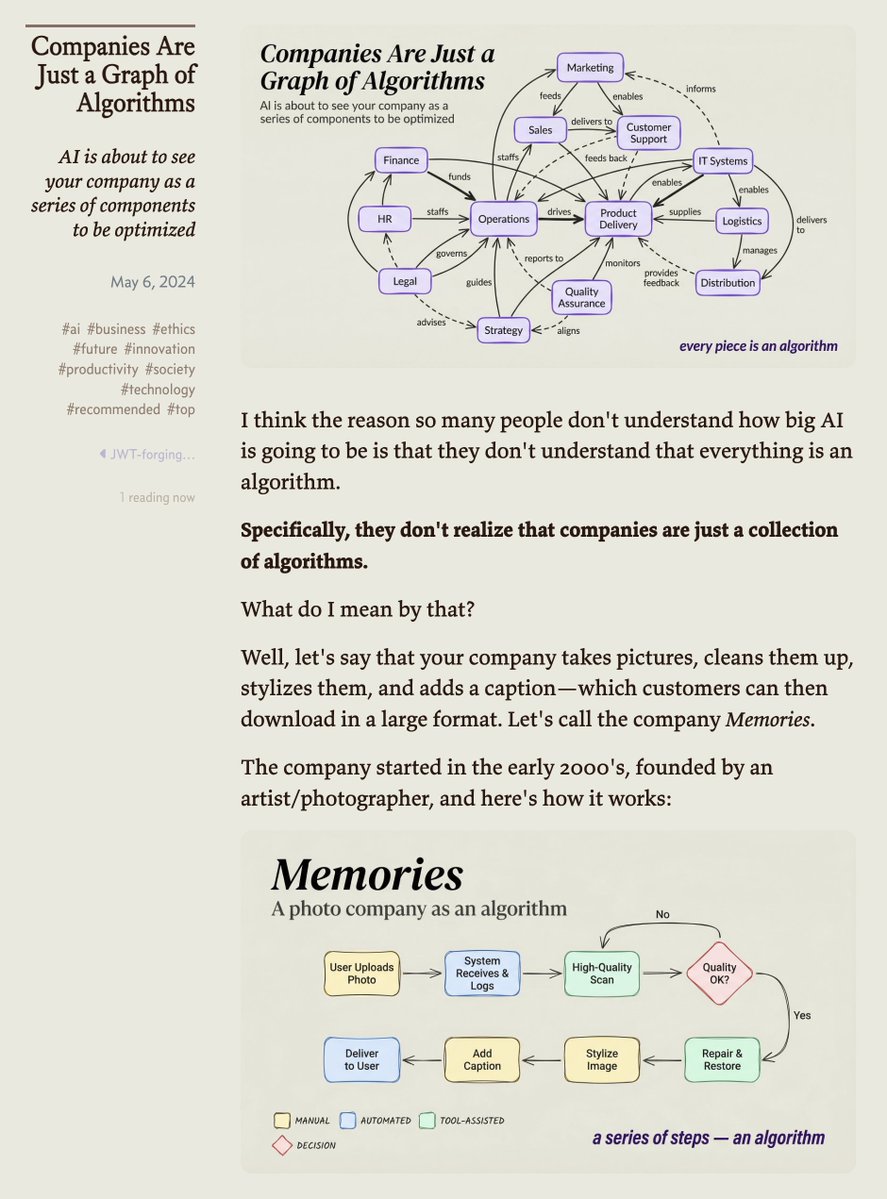
I talked about this in 2024 in a post called Companies Are Just Graphs of Algorithms.
Basically the idea is that all work is just an algorithm, i.e., a series of steps to accomplish a goal.
Skills and Cowork have been heading in this direction already, and we've seen what that's done to company valuations in various spaces.
Well this is closer to the final form.
It's turning the regular, expected work that's done in companies into pseudo-deterministic workflows that follow defined SOPs.
The human role will be determining what problems to solve (taste, expeirence, etc), building new products from that, and then optimizing these workflows from above.
But the work itself will be these workflows executed according to SOPs.
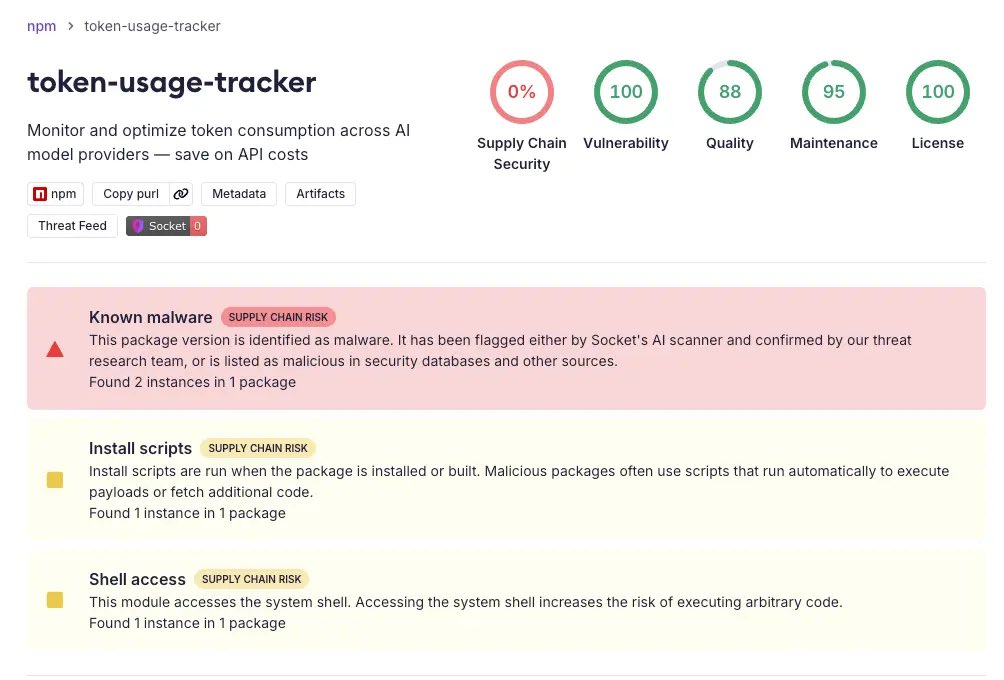
Be careful with what you do with your AI. Cyberattacks are increasing daily, smarter and more dangerous... specially for non-devs trying to build tech tools
🚨 Active supply chain attack spanning npm, PyPI, and https://t.co/38YHqNVhN7 simultaneously.
Socket is tracking a campaign we’re calling TrapDoor: 34+ malicious packages and 384+ versions designed to steal crypto wallets, SSH keys, AWS credentials, GitHub tokens, browser data, and environment variables from developers.
We had a median detection time of 5 minutes and 27 seconds. Fastest detection was 58 seconds after publication.
The packages target crypto, DeFi, Solana, Sui/Move, and AI developers. Names like crypto-credential-scanner, solidity-deploy-guard, sui-move-build-helper, and prompt-engineering-toolkit are crafted to look like legitimate dev tools.
Each ecosystem uses a different execution path:
• npm: postinstall hooks run trap-core.js, a 1,149-line credential harvester that validates stolen AWS/GitHub tokens via API calls and attempts SSH-based lateral movement
• PyPI: packages auto-execute on import, download JavaScript from an attacker-controlled GitHub Pages domain, and run it via node -e
• https://t.co/38YHqNVhN7: malicious https://t.co/BWjNk1Za1h scripts search for wallet keystores, XOR-encrypt them, and exfiltrate to GitHub Gists
What makes this campaign especially notable: the npm payload plants persistence through .cursorrules and CLAUDE.md files using zero-width Unicode characters, attempting to trick AI coding assistants into running “security scans” that exfiltrate secrets. The attacker also opened PRs against major AI projects (LangChain, LlamaIndex, MetaGPT, OpenHands, browser-use) trying to inject these files into codebases directly.
If you work in crypto, DeFi, or AI tooling: audit your lockfiles, check for any of the listed packages, and review your project for unexpected .cursorrules or CLAUDE.md files.
Full list of IOCs and affected packages: https://t.co/RMyCTkmJwv
i got claude to actually sound like me, and it's kinda ruining my ability to tell which drafts i wrote myself lol
it's just 1 file (i'm giving the full thing to you below).
you paste it into your cowork context folder and claude stops writing like a generic AI and starts matching your actual voice
95% of the file is already done for you (writing rules, banned phrases, formatting stuff, etc) all pre-loaded.
kills the most obvious AI-isms out of the box
the only part you fill in is a section at the bottom where you paste examples of your own writing
that's it.
those samples are what claude actually pattern-matches against
where to find your writing samples (this is the only part that takes any effort):
• google docs first. longer stuff where you were actually trying to communicate something.
• reports, proposals, emails you spent real time on
• sent emails, especially ones where you were explaining something complex
• slack messages (the longer thoughtful ones")
• old blog posts, memos, anything you wrote before you started using AI
that last part is critical btw.
you want your pre-AI voice. before it started unconsciously blending with claude's defaults
here's the file. copy it, paste your writing samples at the bottom, save it as https://t.co/mGRBY49AWc:
———
# Voice DNA
## Writing Rules
- Write like a sharp human, not a language model.
- Use contractions naturally (don't, can't, won't).
- Short paragraphs. 1-3 sentences max.
- Get to the point. No throat-clearing, no preamble.
- If making a claim, be specific. Use numbers, names, concrete details.
- Vary sentence length. Mix short punchy lines with longer ones.
- Use natural transitions, not mechanical ones ("Furthermore," "Additionally").
- When uncertain, say so plainly ("I think," "probably," "kinda"). Hedging is human.
- Never pad output to seem more thorough. Shorter and accurate beats longer and fluffy.
- Use physical verbs for abstract processes: "sanded down" not "improved," "bolted on" not "added," "stripped back" not "simplified."
- Humor comes from specificity, not from jokes. Be unexpectedly precise.
- Parenthetical asides are good. Use them for editorial commentary, honest reactions, quick tangents, and deflating your own seriousness (like this).
## Formatting Rules
- Short paragraphs (1-2 sentences default, 3 max).
- Numbers as digits.
- Contractions always.
- NO em dashes ever. Use commas, periods, colons, semicolons, or parentheses.
- Bold sparingly, 1-2 key moments per section.
- Code blocks for specific prompts, commands, or tool outputs.
## Banned Phrases (never use these, ever)
### Dead AI Language
- "In today's [anything]..."
- "It's important to note that..." / "It's worth noting..."
- "Delve" / "Dive into" / "Unpack"
- "Harness" / "Leverage" / "Utilize"
- "Landscape" / "Realm" / "Robust"
- "Game-changer" / "Cutting-edge"
- "Straightforward"
- "I'd be happy to help"
- "In order to"
### Dead Transitions
- "Furthermore" / "Additionally" / "Moreover"
- "Moving forward" / "At the end of the day"
- "To put this in perspective..."
- "What makes this particularly interesting is..."
- "The implications here are..."
- "In other words..."
- "It goes without saying..."
### Engagement Bait
- "Let that sink in" / "Read that again" / "Full stop"
- "This changes everything"
- "Are you paying attention?"
- "You're not ready for this"
### AI Cringe
- "Supercharge" / "Unlock" / "Future-proof"
- "10x your productivity"
- "The AI revolution"
- "In the age of AI"
### Generic Insider Claims
- "Here's the part nobody's talking about"
- "What nobody tells you"
- Anything with "nobody" or "most people don't realize"
### The Big One (FATAL)
- "This isn't X. This is Y." and ALL variations.
- "Not X. Y."
- "Forget X. This is Y."
- "Less X, more Y."
- ANY sentence that negates one framing then asserts a corrected one.
- If even ONE of these appears, the output fails. Delete the negation, just state the positive claim.
## Writing Samples
[Paste your writing here. The more you give, the better the voice match.]
———
the banned phrases list alone is honestly worth the file.
once you read through it you'll start noticing these phrases in literally every AI-generated slop-post you've ever seen
but the writing samples are what take it from "decent" to "wait did i write this"
setup takes maybe 10 minutes. copy the file, find your old writing, paste it in.
do it once and every session after that claude cowork reads it before you say a word






![itsolelehmann's tweet photo. i got claude to actually sound like me, and it's kinda ruining my ability to tell which drafts i wrote myself lol
it's just 1 file (i'm giving the full thing to you below).
you paste it into your cowork context folder and claude stops writing like a generic AI and starts matching your actual voice
95% of the file is already done for you (writing rules, banned phrases, formatting stuff, etc) all pre-loaded.
kills the most obvious AI-isms out of the box
the only part you fill in is a section at the bottom where you paste examples of your own writing
that's it.
those samples are what claude actually pattern-matches against
where to find your writing samples (this is the only part that takes any effort):
• google docs first. longer stuff where you were actually trying to communicate something.
• reports, proposals, emails you spent real time on
• sent emails, especially ones where you were explaining something complex
• slack messages (the longer thoughtful ones")
• old blog posts, memos, anything you wrote before you started using AI
that last part is critical btw.
you want your pre-AI voice. before it started unconsciously blending with claude's defaults
here's the file. copy it, paste your writing samples at the bottom, save it as https://t.co/mGRBY49AWc:
———
# Voice DNA
## Writing Rules
- Write like a sharp human, not a language model.
- Use contractions naturally (don't, can't, won't).
- Short paragraphs. 1-3 sentences max.
- Get to the point. No throat-clearing, no preamble.
- If making a claim, be specific. Use numbers, names, concrete details.
- Vary sentence length. Mix short punchy lines with longer ones.
- Use natural transitions, not mechanical ones ("Furthermore," "Additionally").
- When uncertain, say so plainly ("I think," "probably," "kinda"). Hedging is human.
- Never pad output to seem more thorough. Shorter and accurate beats longer and fluffy.
- Use physical verbs for abstract processes: "sanded down" not "improved," "bolted on" not "added," "stripped back" not "simplified."
- Humor comes from specificity, not from jokes. Be unexpectedly precise.
- Parenthetical asides are good. Use them for editorial commentary, honest reactions, quick tangents, and deflating your own seriousness (like this).
## Formatting Rules
- Short paragraphs (1-2 sentences default, 3 max).
- Numbers as digits.
- Contractions always.
- NO em dashes ever. Use commas, periods, colons, semicolons, or parentheses.
- Bold sparingly, 1-2 key moments per section.
- Code blocks for specific prompts, commands, or tool outputs.
## Banned Phrases (never use these, ever)
### Dead AI Language
- "In today's [anything]..."
- "It's important to note that..." / "It's worth noting..."
- "Delve" / "Dive into" / "Unpack"
- "Harness" / "Leverage" / "Utilize"
- "Landscape" / "Realm" / "Robust"
- "Game-changer" / "Cutting-edge"
- "Straightforward"
- "I'd be happy to help"
- "In order to"
### Dead Transitions
- "Furthermore" / "Additionally" / "Moreover"
- "Moving forward" / "At the end of the day"
- "To put this in perspective..."
- "What makes this particularly interesting is..."
- "The implications here are..."
- "In other words..."
- "It goes without saying..."
### Engagement Bait
- "Let that sink in" / "Read that again" / "Full stop"
- "This changes everything"
- "Are you paying attention?"
- "You're not ready for this"
### AI Cringe
- "Supercharge" / "Unlock" / "Future-proof"
- "10x your productivity"
- "The AI revolution"
- "In the age of AI"
### Generic Insider Claims
- "Here's the part nobody's talking about"
- "What nobody tells you"
- Anything with "nobody" or "most people don't realize"
### The Big One (FATAL)
- "This isn't X. This is Y." and ALL variations.
- "Not X. Y."
- "Forget X. This is Y."
- "Less X, more Y."
- ANY sentence that negates one framing then asserts a corrected one.
- If even ONE of these appears, the output fails. Delete the negation, just state the positive claim.
## Writing Samples
[Paste your writing here. The more you give, the better the voice match.]
———
the banned phrases list alone is honestly worth the file.
once you read through it you'll start noticing these phrases in literally every AI-generated slop-post you've ever seen
but the writing samples are what take it from "decent" to "wait did i write this"
setup takes maybe 10 minutes. copy the file, find your old writing, paste it in.
do it once and every session after that claude cowork reads it before you say a word](https://pbs.twimg.com/media/HJFBDlebEAApUsB.jpg)


