MODULE 1
Assignment 3
TAKE A SIMPLE WEBSITE AND IMAGINE HOW IT WAS FIRST DESIGNED, THEN DEVELOPED. IDENTIFY WHICH PART IS DESIGN AND WHICH PART IS DEVELOPMENT.
Introduction
A website is created in two major stages: design and development.
MODULE 1
Assignments 1
THINK OF A WEBSITE YOU USE OFTEN. TRY TO IDENTIFY WHAT PART IS FRONTEND (WHAT YOU SEE) AND WHAT MIGHT BE HAPPENING IN THE BACKEND (BEHIND THE SCENES).
# used go Google homepage #
The most infuriating sight!!! A policeman gruesomely murders a man in broad daylight in Delta. This man is clearly restrained and poses no threat whatsoever. What kind of ANIMALISTIC behaviour is this @PoliceNG ?!!!
The Techmayor Co. community feed just got an upgrade!
📸 One-click branded screenshots to share on your socials
💬 Live comments, replies and reactions
👁️ Post views and engagement tracking
Clean. Focused. Built around learning.
Join us → https://t.co/pyGeQ5WwJm 🎁
A MENTAL HEALTH APP SUPPORT DESIGN -ONBOARDING SCREEN
Designed Update on my project Sanemind 🥹
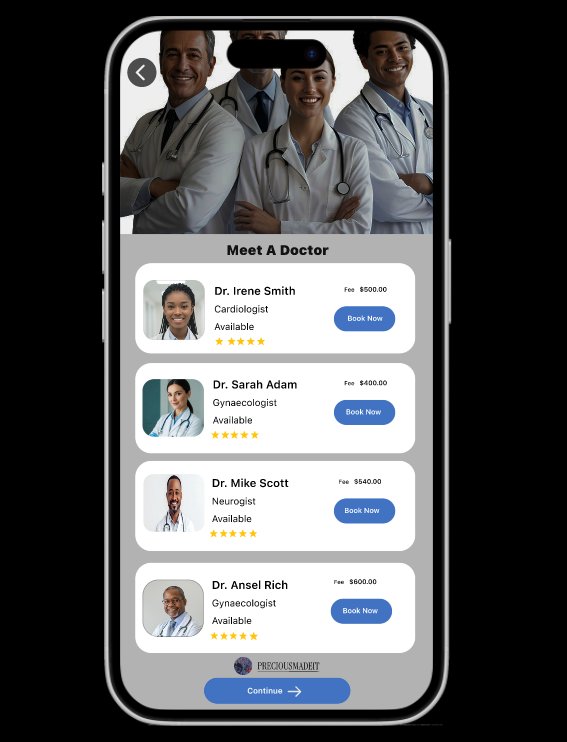
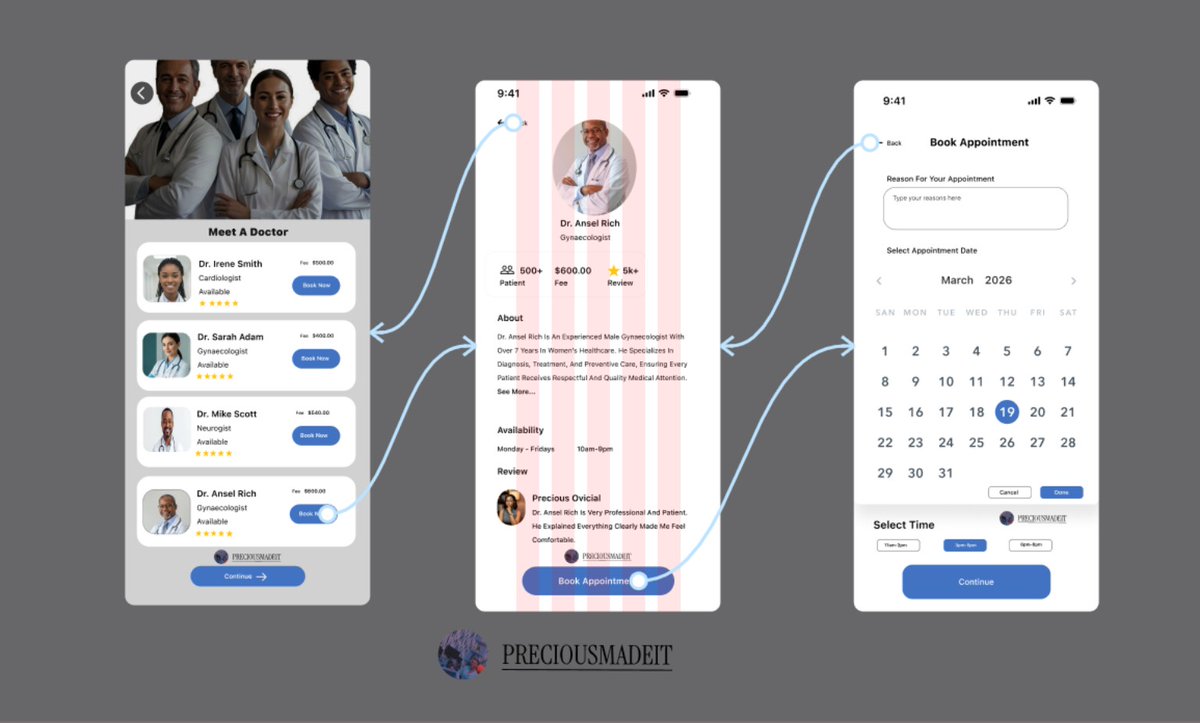
Appointment booking UI
I designed the booking experience
Choose a doctor
Pick a date
Book instantly
What do you think?
Day 18/100 with @TechmayorCo
Your React app feels slow?
Check:
• Unnecessary re-renders
• Large bundle size
• Heavy images
Optimization isn’t advanced. It’s awareness.
Performance thinking matters at @techmayorco
What’s your go-to performance trick?
Day 17/100 with @TechmayorCo
Folder structure matters more than people admit.
Today’s project structure:
/features
/components
/utils
Feature-based organization scales better than random folders.
We teach structure before speed at @techmayorco
How do you organize your projects?
Day 16/100 with @TechmayorCo
Stop overusing useEffect. Many state issues don’t need it.
If you can derive state directly from props or existing state, do that.
Less complexity. Few bugs
We focus on understanding fundamentals at @TechmayorCo
What’s your most misused React hook?
Day 15/100 with @TechmayorCo
If your React component is over 250 lines, you probably need to split it.
Today I refactored a dashboard component into:
• Layout
• Card
• Chart
• Filter
Cleaner logic. Easy to maintain.
Clean code.
How do you decide when to split components?
Day 14/100 with @TechmayorCo
How to design job-ready UI as a frontend dev:
Master spacing before color
Learn layout systems (grid, flex)
Study real SaaS products
Design with purpose, not trends
Think in components
This approach is what we’re building at @techmayorco
Day 13 100 Days with @TechmayorCo
If your UI feels “off”, check your typography
Today I rebuilt a landing page and changed:
• Font weights
• Line height
• Heading
The difference was huge.
Typography does more than color.
We teach design fundamentals like this @TechmayorCo
Day 12 of 100 Days with @TechmayorCo
3 UI mistakes beginners make:
• Too many colors
• Inconsistent spacing
• Weak typography
Clean UI isn’t about being fancy.
It’s about being disciplined.
We fix these early at @TechmayorCo
What was your biggest UI struggle starting?
Hello fam 👋
been Sick these past few days and couldn't continue my 100 Days Challenge. I am back now 🤩🫨 stronger and better.
Let's get the 100 days started 😃😀
Day 10 of 100 days with @TechmayorCo
What's the most challenging part of frontend dev for you? 🤔 Layout, responsiveness, or something else? Share your thoughts! 💬 #FrontendDev#100DaysToCode#WebDev