System Design Series - Day 30/30
Deployment Strategies That Prevent Disasters
The most dangerous moment in engineering is deploying to production.
Most junior engineers know one strategy: push it and hope.
Here are 5 deployment strategies that separate junior from senior engineers 👇
1. Strategy 1: Rolling Deployment
The most common and safest starting point.
Instead of updating all servers at once, update one server at a time.
- Server 1: Updated and healthy
- Server 2: Updated and healthy
- Server 3: Updated and healthy
If Server 2 fails health check:
Stop deployment.
Only Server 1 and 2 are affected.
Roll back Server 2.
Server 3 stays on the old version.
Zero total downtime.
Built-in safety net.
2. Strategy 2: Blue-Green Deployment
Run two identical production environments.
- Blue: Current live version (serving all traffic)
- Green: New version (deployed but receiving zero traffic)
Steps:
1. Deploy new version to Green
2. Run full test suite on Green
3. Switch traffic from Blue to Green (instant)
4. If problems: Switch back to Blue (instant rollback)
Zero downtime.
Instant rollback.
Gold standard for zero-risk deployments.
Cost: Double the infrastructure (worth it for critical systems).
3. Strategy 3: Canary Deployment
Named after canary birds in coal mines.
Instead of switching all traffic at once:
- Deploy new version
- Send 5% of traffic to new version
- Monitor for 30 minutes
- If stable: Increase to 20% → 50% → 100%
If problems at any stage: Route 100% back to old version.
Only 5% of users are ever affected.
Used by Netflix, Google, and Amazon for every major release.
4. Strategy 4: Feature Flags
Ship code without activating features.
Deploy the new checkout flow to production.
Feature flag is OFF.
- Internal team: ON for employees only
- Beta users: ON for 10% of users
- Full rollout: ON for everyone
Problems during rollout?
Turn the flag OFF.
Instant rollback without redeploying.
Tools: LaunchDarkly, Unleash (open source), or simple database boolean.
Separates deployment from release.
5. Strategy 5: Database Migration Safety
The deployment strategy nobody teaches but everyone needs.
You cannot change database schema and deploy code simultaneously.
Old code running while migration runs = broken queries.
The safe pattern (backwards compatible migrations):
- Week 1: Add new column (nullable, old code ignores it)
- Week 2: Deploy new code (uses new column if present)
- Week 3: Backfill data in new column
- Week 4: Remove old column
Never break existing queries during migration.
This is why experienced engineers fear schema changes more than new features.
Which deployment strategy does your team currently use?
Reply with the number (1-5).
This concludes the System Design Series.
Thank you for following along for 30 days.
#SystemDesign #Deployment #Backend
As a backend engineer.
Please learn:
- System Design (scalability, microservices)
-APIs (REST, GraphQL, gRPC)
-Database Systems (SQL, NoSQL)
-Distributed Systems (consistency, replication)
-Caching (Redis, Memcached)
-Security (OAuth2, JWT, encryption)
-DevOps (CI/CD, Docker, Kubernetes)
-Performance Optimization (profiling, load balancing)
-Cloud Services (AWS, GCP, Azure)
-Monitoring (Prometheus, Grafana)
Pick up a language..
Stop jumping from one language to the other...
10 System Design concepts every developer should master:
1. Scalability — design systems that handle increasing traffic and users
2. Load Balancing — distribute traffic across multiple servers efficiently
3. Caching — improve performance by storing frequently accessed data
4. Databases — understand SQL, NoSQL, replication, and sharding
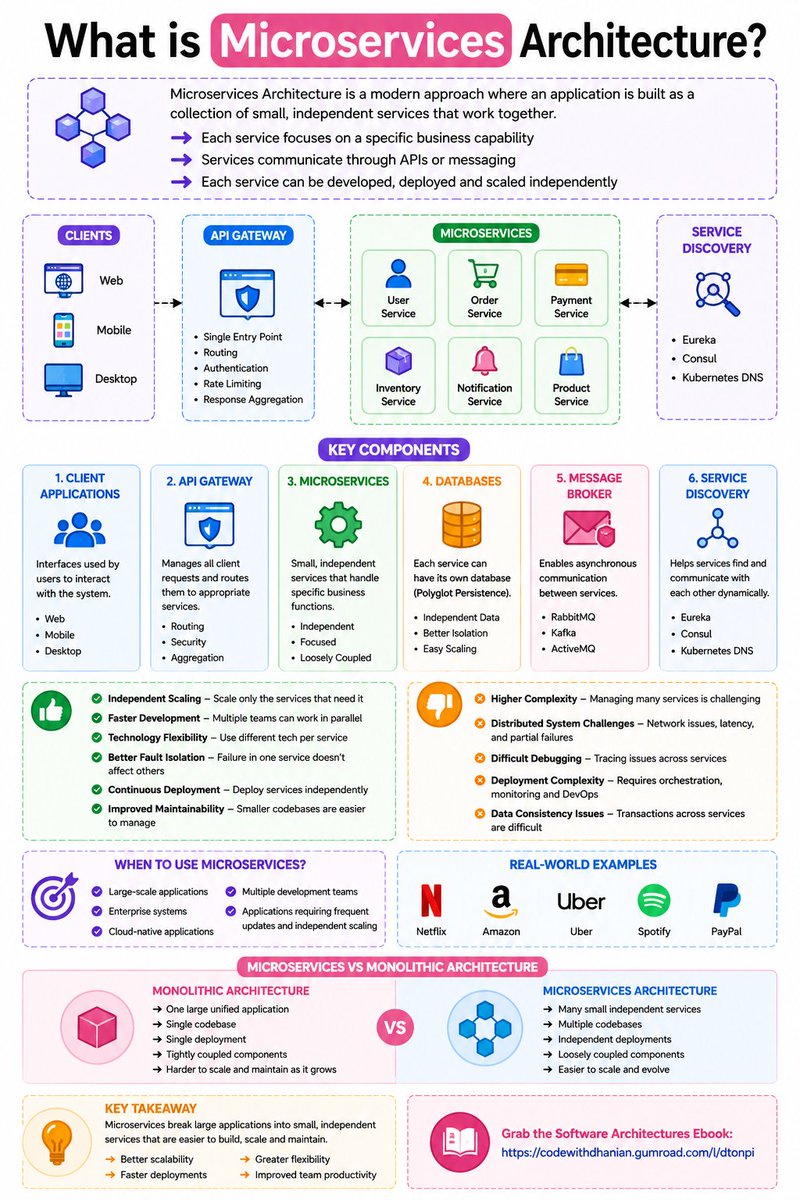
5. Microservices — break applications into independent services
6. Message Queues — enable asynchronous communication between services
7. API Gateway — manage routing, authentication, and rate limiting
8. Fault Tolerance — build systems that continue working during failures
9. Distributed Systems — manage communication across multiple machines
10. Monitoring & Logging — track system health, errors, and performance
Grab the System Design Ebook: https://t.co/WIMretQFPE
If I Had 6–12 Months to Become a Backend Engineer in the AI Era, I’d Do This
Stage 1 — Programming & AI Foundations
Build strong technical fundamentals first
• Choose one backend language (Java / JavaScript / Python / Go / Rust)
• Syntax, functions, loops, and data structures
• Object-Oriented Programming (OOP)
• Problem-solving fundamentals
• Using AI to accelerate learning and debugging
Stage 2 — Internet & Backend Fundamentals
Understand how backend systems work
• How the internet works
• HTTP and HTTPS
• REST APIs fundamentals
• Request–response lifecycle
• JSON and status codes
• Client-server architecture
Stage 3 — Backend Frameworks
Learn a production-ready backend framework
Java → Spring Boot
JavaScript → Node.js (Express / Fastify)
Python → Django / FastAPI
Go → Gin / Fiber
Rust → Actix-Web / Axum
Learn:
• Routing
• Controllers and services
• Middleware
• Dependency Injection
• Environment configuration
• AI-assisted code generation
Stage 4 — Databases & Data Modeling
Master how backend systems store data
• SQL (PostgreSQL / MySQL)
• NoSQL (MongoDB / Redis)
• CRUD operations
• Relationships and joins
• Indexing and optimization
• Database schema design
• ORMs and query builders
Stage 5 — Authentication & Security
Build secure backend applications
• JWT authentication
• Sessions and cookies
• OAuth 2.0 basics
• Password hashing
• Role-based access control
• Environment variables and secrets
• CORS and rate limiting
• AI-assisted security reviews
Stage 6 — Backend APIs & Integrations
Connect systems together
• REST API design
• API versioning
• File uploads
• Third-party API integration
• Webhooks
• API documentation (Swagger/OpenAPI)
• Error handling and validation
Stage 7 — Advanced Backend Engineering
Go beyond CRUD applications
• Caching with Redis
• Pagination and filtering
• WebSockets and real-time systems
• Background jobs and queues
• Message brokers (Kafka / RabbitMQ)
• Event-driven architecture
• AI-assisted performance optimization
Stage 8 — System Design & Scalability
Think like a backend engineer
• Monolith vs microservices
• Load balancing
• Horizontal and vertical scaling
• Stateless architecture
• Database scaling basics
• Fault tolerance and retries
• High availability concepts
Stage 9 — DevOps & Cloud Deployment
Ship backend systems to production
• Linux basics
• Git and GitHub workflows
• Docker and Docker Compose
• CI/CD pipelines
• Cloud deployment (AWS / GCP / Azure / Render)
• Nginx and reverse proxies
• Monitoring and logging
Stage 10 — Real-World Backend Projects
Build production-level systems
• Authentication API
• E-commerce backend
• Chat server
• File storage service
• AI-powered backend API
• SaaS-style backend system
Stage 11 — Portfolio & Engineering Readiness
Show backend depth and architecture skills
• Clean project structure
• API documentation
• Database diagrams
• Deployment links
• GitHub repositories
• Architecture explanations
• Show how AI was used responsibly
Stage 12 — Career & Continuous Growth
Prepare for backend engineering roles
• Backend interview preparation
• System design interviews
• Problem-solving practice
• Open-source contributions
• Freelancing and remote opportunities
• Staying updated in the AI era
Grab the Backend Engineering Ebook
Backend Engineering: From Fundamentals to Scalable Systems
https://t.co/t9mqUuRbjx
Many developers can't explain the difference between authentication and authorization.
But that confusion is just the start.
Auth has 4 layers. Mixing them up costs you in production.
Here's what you need to know.
First, let's separate two things everyone conflates:
Authentication → Who are you? Prove it.
Authorization → What are you allowed to do?
Picking JWT doesn't answer both questions.
JWT is a signed container for claims. It can carry identity and authorization info, but it is not an authorization system by itself
The "JWT vs OAuth" debate comes from this exact confusion.
They're not competing options.
OAuth handles delegated authorization; Google gives your app permission to act on your behalf.
JWT is often how that authorization gets packaged and passed around.
You don't pick one or the other. You use both.
Sessions vs tokens is the same story.
Sessions are stateful → simpler for monoliths
Tokens are portable → usually better for distributed systems
But it’s not absolute.
You can still use centralized session storage with microservices.
You just introduced another dependency and a latency hop.
mTLS confuses everyone who thinks tokens are "enough."
JWT proves a user's identity to a service. (The token should be signed and validated)
mTLS proves a service's identity to another service; can also authenticate clients that are not services (CLI, agents, devices)
Two different problems. Two different layers.
One doesn't replace the other.
Simply put:
Layer 1 → Identity: Who are you?
Layer 2 → Authentication: Prove it
Layer 3 → Authorization: What can you do?
Layer 4 → Secure transport: TLS / mTLS (can also do authentication)
Every auth tool lives in exactly one of these layers.
What would you add?
10 Golden Rules to Write Clean Code:
1. 𝐀𝐯𝐨𝐢𝐝 𝐌𝐚𝐠𝐢𝐜 𝐍𝐮𝐦𝐛𝐞𝐫𝐬 𝐚𝐧𝐝 𝐒𝐭𝐫𝐢𝐧𝐠𝐬
Hard-coded literals hide intent. Instead of writing 7, ADMIN, or ACTIVE directly in multiple places, extract them into named constants or enums.
2. 𝐔𝐬𝐞 𝐌𝐞𝐚𝐧𝐢𝐧𝐠𝐟𝐮𝐥 𝐍𝐚𝐦𝐞𝐬
A good name tells you what something represents and why it exists. If you need a comment to explain a variable, the name probably needs improvement.
3. 𝐅𝐚𝐯𝐨𝐫 𝐄𝐚𝐫𝐥𝐲 𝐑𝐞𝐭𝐮𝐫𝐧𝐬 𝐎𝐯𝐞𝐫 𝐃𝐞𝐞𝐩 𝐍𝐞𝐬𝐭𝐢𝐧𝐠
Handle invalid cases upfront. This keeps the main logic flat, readable, and easier to reason about.
4. 𝐀𝐯𝐨𝐢𝐝 𝐋𝐨𝐧𝐠 𝐏𝐚𝐫𝐚𝐦𝐞𝐭𝐞𝐫 𝐋𝐢𝐬𝐭𝐬
Too many arguments usually mean the function is doing too much or the data belongs together. Wrap related values into a single object, record or config.
5. 𝐊𝐞𝐞𝐩 𝐅𝐮𝐧𝐜𝐭𝐢𝐨𝐧𝐬 𝐒𝐦𝐚𝐥𝐥 𝐚𝐧𝐝 𝐅𝐨𝐜𝐮𝐬𝐞𝐝
A function should do one thing well. If you can’t summarize it in one sentence, it may be time to split it.
6. 𝐊𝐞𝐞𝐩 𝐂𝐨𝐝𝐞 𝐃𝐑𝐘
Don’t Repeat Yourself.
Repeated logic often leads to repeated bugs. If the same logic appears in multiple places, extract it into a reusable function, class, or module.
7. 𝐀𝐩𝐩𝐥𝐲 𝐊𝐈𝐒𝐒 𝐏𝐫𝐢𝐧𝐜𝐢𝐩𝐥𝐞
Keep it Simple Stupid.
Prefer simple, obvious solutions over clever abstractions.
If someone can’t understand it quickly, it isn’t simple.
8. 𝐏𝐫𝐞𝐟𝐞𝐫 𝐂𝐨𝐦𝐩𝐨𝐬𝐢𝐭𝐢𝐨𝐧 𝐎𝐯𝐞𝐫 𝐈𝐧𝐡𝐞𝐫𝐢𝐭𝐚𝐧𝐜𝐞
Inheritance creates tight coupling when overused. Use it only when there is a true “is-a” relationship. For flexible behavior, composition is often cleaner and easier to change.
9. 𝐂𝐨𝐦𝐦𝐞𝐧𝐭 𝐎𝐧𝐥𝐲 𝐖𝐡𝐞𝐧 𝐍𝐞𝐜𝐞𝐬𝐬𝐚𝐫𝐲
Good code explains what. Good comments explain why. If a comment only repeats the code, the code probably needs refactoring.
10. 𝐖𝐫𝐢𝐭𝐞 𝐆𝐨𝐨𝐝 𝐂𝐨𝐦𝐦𝐢𝐭 𝐌𝐞𝐬𝐬𝐚𝐠𝐞𝐬
Commit messages document your project’s history. Avoid vague messages like fix bug or update code. A good commit message clearly explains what changed and why it changed.
What other clean code rule would you add to this list?
♻️ Repost to help others learn these clean code rules.
10 projects to get cracked as a dev:
0. Notification system
1. Video processing queue
2. Search autocomplete
3. Real-time leaderboard
4. File upload service
5. Email delivery service
6. Analytics event pipeline
7. Chat application
8. Distributed job runner
9. Social feed generation
You run Redis in Docker.
docker compose down.
docker compose up.
All your cached data is gone.
Session store wiped.
Users logged out everywhere.
What did you forget
to configure?
If you want to become a Software Architect
You need to answer these interview questions 👇
Most developers focus on frameworks, tools, and syntax.
But architecture is about clarity, trade-offs, and long-term thinking.
Take a few minutes and check how many you can answer with confidence.
Your gaps will show you exactly what to learn next.
These are interview questions for Architects PART 2.
You can find PART 1 in my profile (posted 2 weeks ago).
📌 Save this post for future reference!
——
♻️ Repost to help others level up as Architects
➕ Follow me ( @AntonMartyniuk ) to improve your .NET and Architecture Skills