Discord has cleared up the rumor that posting grid-style images could get your account permanently banned.
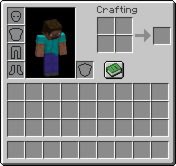
The company said a bug in its moderation system mistakenly flagged some images with grid patterns, including spreadsheets, chessboards, and even Minecraft inventory screenshots, as illegal content.
A second bug also stopped some of those accounts from being automatically restored.
According to Discord, about 200 accounts were wrongly banned over the weekend, and all of them have now been reinstated. The company also revealed the same issue affected more than 8,200 accounts between May and last week, and every one of those accounts has now been restored.
Discord apologized for the mistake, confirmed the bug has been fixed, and said it’s updating its systems to help prevent similar false bans in the future.
There’s currently a vulnerability in Discord’s AI moderation that detects any and all square grid images, such as spreadsheets, chessboards, Minecraft inventories, white & gray transparent backgrounds… as CSAM and will permanently ban your account.
To keep your account safe, I would recommend NOT sending any sort of images anywhere until this vulnerability is fixed. If you are a server owner or admin, I would highly recommend to disable all image and gif/embed perms in your server for the time being.
To @discord@discord_support, this vulnerability needs to be fixed immediately with all false bans overturned. Additionally, AI moderation needs to be scrapped and replaced with humans. This is exactly why companies shouldn’t be using clankers to decide whether accounts should be banned or not. Losing a Discord account to something as unfair as this can be extremely devastating and affect users severely, and every day millions of users are affected by false AI bans. This needs to be stopped.
If you would like to spread awareness about this, feel free to like & repost.
@drfdfdszxmjnjjj@dangitshere_@SpaceBasedFox He didnt keep his landing gear down in the video so that it would make a more dramatic ending otherwise with skill you could have landed with 2 landing gear till it slows down enough to not explode from a high speed impact
do you understand what just happened to your computer..
Google Chrome secretly downloaded a 4GB AI model onto your device. Without asking.. Without telling you..
It's called weights.bin. It lives deep in your system folders. It powers Gemini Nano - Google's on-device AI.
And if you delete it? Chrome re-downloads it automatically. Like nothing happened.
Just Google deciding your hard drive is their storage unit.
At 1 billion Chrome users - that's 4 BILLION gigabytes of data pushed silently across the internet.
The carbon footprint alone equals tens of thousands of cars running for a year.
Check your disk right now:
📁 %LOCALAPPDATA%\Google\Chrome\User Data\OptGuideOnDeviceModel
To stop it: chrome://flags → disable Optimization Guide On Device Model → restart Chrome → delete the folder.
Reshare so people know what's sitting on their computers.
🚨GOOGLE JUST SILENTLY DOWNLOADED A 4GB AI MODEL TO YOUR COMPUTER WITHOUT ASKING.. WITHOUT TELLING YOU.. AND WITHOUT ANY WAY TO STOP IT..
If you use Chrome.. There's a good chance a 4 gigabyte file is sitting on your hard drive right now that you never agreed to download..
It's called Gemini Nano.. Google's on-device AI model.. A security researcher just proved it installs itself with zero clicks.. Zero prompts.. Zero notifications..
Alexander Hanff set up a completely fresh Chrome profile.. Didn't click anything.. Didn't scroll.. Didn't type a single keystroke.. Just opened the browser and watched..
14 minutes and 28 seconds later.. Chrome had silently scanned his hardware.. Read his GPU, RAM, and storage.. Then wrote a 4GB file to his hard drive.. No permission dialog.. Nothing..
Chrome's own logs show the download begins BEFORE the settings page where you could opt out is even loaded.. The file starts installing before the refusal button exists..
As of Chrome 148.. Any website you visit can trigger this download.. One line of JavaScript.. You click a link to read a blog post.. That click counts as "user activation".. And Chrome silently pulls 4GB in the background..
No install prompt.. No consent dialog.. Google's own docs admit this..
Your laptop overheats.. Storage disappears.. Battery drains.. And you have no idea why..
The model doesn't even work well.. Cloud requests take 1.3 seconds.. The local model at worst case takes over 9 minutes for a single response..
Google is using your storage, electricity, and bandwidth to run an AI that's 40 times slower than their own servers..
And the "AI Mode" button in Chrome's address bar.. Doesn't even use the local model.. It sends everything to Google's cloud anyway..
You pay the storage penalty.. The heat penalty.. The bandwidth penalty.. And the visible AI feature ignores the local file entirely..
Because Chrome fails to clean up old versions.. Users are finding 12GB or more of duplicate AI files stacked on their drives..
Palo Alto Networks found a vulnerability where a browser extension could hijack the local AI model's permissions.. Accessing your webcam.. Microphone.. Local files.. Through an AI you never installed..
Here's how to check if it's on your machine..
Windows.. C:\Users\[YourName]\AppData\Local\Google\Chrome\User Data\Default\OptGuideOnDeviceModel\
Mac.. ~/Library/Application Support/Google/Chrome/Default/OptGuideOnDeviceModel/
If there's a file called weights.bin.. Google downloaded their AI to your computer without asking..
To stop it.. Type chrome://flags.. Search "optimization-guide-on-device-model" and disable it.. Search "prompt-api-for-gemini-nano" and disable that too.. Restart Chrome.. Then manually delete the folder..
If you don't disable the flags first.. Chrome redownloads the 4GB file on next launch..
Firefox requires explicit opt-in for AI.. Apple Intelligence requires explicit consent.. Chrome just takes your hard drive..
Google didn't ask to use your storage.. Your electricity.. Your bandwidth..
They just took it.




![EvanLuthra's tweet photo. 🚨GOOGLE JUST SILENTLY DOWNLOADED A 4GB AI MODEL TO YOUR COMPUTER WITHOUT ASKING.. WITHOUT TELLING YOU.. AND WITHOUT ANY WAY TO STOP IT..
If you use Chrome.. There's a good chance a 4 gigabyte file is sitting on your hard drive right now that you never agreed to download..
It's called Gemini Nano.. Google's on-device AI model.. A security researcher just proved it installs itself with zero clicks.. Zero prompts.. Zero notifications..
Alexander Hanff set up a completely fresh Chrome profile.. Didn't click anything.. Didn't scroll.. Didn't type a single keystroke.. Just opened the browser and watched..
14 minutes and 28 seconds later.. Chrome had silently scanned his hardware.. Read his GPU, RAM, and storage.. Then wrote a 4GB file to his hard drive.. No permission dialog.. Nothing..
Chrome's own logs show the download begins BEFORE the settings page where you could opt out is even loaded.. The file starts installing before the refusal button exists..
As of Chrome 148.. Any website you visit can trigger this download.. One line of JavaScript.. You click a link to read a blog post.. That click counts as "user activation".. And Chrome silently pulls 4GB in the background..
No install prompt.. No consent dialog.. Google's own docs admit this..
Your laptop overheats.. Storage disappears.. Battery drains.. And you have no idea why..
The model doesn't even work well.. Cloud requests take 1.3 seconds.. The local model at worst case takes over 9 minutes for a single response..
Google is using your storage, electricity, and bandwidth to run an AI that's 40 times slower than their own servers..
And the "AI Mode" button in Chrome's address bar.. Doesn't even use the local model.. It sends everything to Google's cloud anyway..
You pay the storage penalty.. The heat penalty.. The bandwidth penalty.. And the visible AI feature ignores the local file entirely..
Because Chrome fails to clean up old versions.. Users are finding 12GB or more of duplicate AI files stacked on their drives..
Palo Alto Networks found a vulnerability where a browser extension could hijack the local AI model's permissions.. Accessing your webcam.. Microphone.. Local files.. Through an AI you never installed..
Here's how to check if it's on your machine..
Windows.. C:\Users\[YourName]\AppData\Local\Google\Chrome\User Data\Default\OptGuideOnDeviceModel\
Mac.. ~/Library/Application Support/Google/Chrome/Default/OptGuideOnDeviceModel/
If there's a file called weights.bin.. Google downloaded their AI to your computer without asking..
To stop it.. Type chrome://flags.. Search "optimization-guide-on-device-model" and disable it.. Search "prompt-api-for-gemini-nano" and disable that too.. Restart Chrome.. Then manually delete the folder..
If you don't disable the flags first.. Chrome redownloads the 4GB file on next launch..
Firefox requires explicit opt-in for AI.. Apple Intelligence requires explicit consent.. Chrome just takes your hard drive..
Google didn't ask to use your storage.. Your electricity.. Your bandwidth..
They just took it.](https://pbs.twimg.com/media/HHllpnRbUAA7IOT.jpg)


![EvanLuthra's tweet photo. 🚨GOOGLE JUST SILENTLY DOWNLOADED A 4GB AI MODEL TO YOUR COMPUTER WITHOUT ASKING.. WITHOUT TELLING YOU.. AND WITHOUT ANY WAY TO STOP IT..
If you use Chrome.. There's a good chance a 4 gigabyte file is sitting on your hard drive right now that you never agreed to download..
It's called Gemini Nano.. Google's on-device AI model.. A security researcher just proved it installs itself with zero clicks.. Zero prompts.. Zero notifications..
Alexander Hanff set up a completely fresh Chrome profile.. Didn't click anything.. Didn't scroll.. Didn't type a single keystroke.. Just opened the browser and watched..
14 minutes and 28 seconds later.. Chrome had silently scanned his hardware.. Read his GPU, RAM, and storage.. Then wrote a 4GB file to his hard drive.. No permission dialog.. Nothing..
Chrome's own logs show the download begins BEFORE the settings page where you could opt out is even loaded.. The file starts installing before the refusal button exists..
As of Chrome 148.. Any website you visit can trigger this download.. One line of JavaScript.. You click a link to read a blog post.. That click counts as "user activation".. And Chrome silently pulls 4GB in the background..
No install prompt.. No consent dialog.. Google's own docs admit this..
Your laptop overheats.. Storage disappears.. Battery drains.. And you have no idea why..
The model doesn't even work well.. Cloud requests take 1.3 seconds.. The local model at worst case takes over 9 minutes for a single response..
Google is using your storage, electricity, and bandwidth to run an AI that's 40 times slower than their own servers..
And the "AI Mode" button in Chrome's address bar.. Doesn't even use the local model.. It sends everything to Google's cloud anyway..
You pay the storage penalty.. The heat penalty.. The bandwidth penalty.. And the visible AI feature ignores the local file entirely..
Because Chrome fails to clean up old versions.. Users are finding 12GB or more of duplicate AI files stacked on their drives..
Palo Alto Networks found a vulnerability where a browser extension could hijack the local AI model's permissions.. Accessing your webcam.. Microphone.. Local files.. Through an AI you never installed..
Here's how to check if it's on your machine..
Windows.. C:\Users\[YourName]\AppData\Local\Google\Chrome\User Data\Default\OptGuideOnDeviceModel\
Mac.. ~/Library/Application Support/Google/Chrome/Default/OptGuideOnDeviceModel/
If there's a file called weights.bin.. Google downloaded their AI to your computer without asking..
To stop it.. Type chrome://flags.. Search "optimization-guide-on-device-model" and disable it.. Search "prompt-api-for-gemini-nano" and disable that too.. Restart Chrome.. Then manually delete the folder..
If you don't disable the flags first.. Chrome redownloads the 4GB file on next launch..
Firefox requires explicit opt-in for AI.. Apple Intelligence requires explicit consent.. Chrome just takes your hard drive..
Google didn't ask to use your storage.. Your electricity.. Your bandwidth..
They just took it.](https://pbs.twimg.com/media/HHllsTWaYAA1fe0.jpg)





