Introducing OpenShip.
An open-source application platform for building, deploying, operating, and scaling applications on infrastructure you own.
Replace deployment tools, managed services, and infrastructure workflows with one open-source platform.
Available today:
- Mail Server (Built in. One click).
• Runs on your own VPS
• Unlimited domains
• Unlimited mailboxes
• Modern webmail included
• Connect with Gmail, Outlook, Apple Mail, Thunderbird, or any IMAP/SMTP client
• Send email directly from your applications using SMTP
• No mailbox subscriptions or API fees
• High email deliverability
- Deployment:
• Deploy any stack
• Git-based deployments
• Zero-downtime deployments
• One-click rollbacks
• Development, Staging, and Production environments
• Multi-branch deployments with isolated environments • Deploy to VPSs, dedicated servers, cloud VMs, or your homelab
- Services:
Provision the services your applications need in one click.
Replace multiple managed providers with services running on your own infrastructure.
• Supabase
• PostgreSQL
• MySQL
• MariaDB
• MongoDB
• Redis
• MinIO
• Meilisearch
• Qdrant
• RabbitMQ
• Kafka
• ClickHouse
• Elasticsearch
...and deploy any other service alongside your applications.
- Operate:
• Live deployment logs
• Live request logs
• Real-time traffic analytics
• Automated backups
• Monitoring
• Secrets management
• Domains
• Automatic SSL
• Environment variables
• Scheduled jobs
• Health checks
-Multi Environments:
• Separate Development, Staging, and Production environments
• Deploy every branch independently
• Test changes before production
• Isolated services, secrets, and configuration per environment
- Security & Teams:
• Team management
• Role-based access control
• IP allow/block rules
• Rate limiting
• Security rules
- Developer Experience:
• Web dashboard
• Native desktop application
• CLI
• REST API
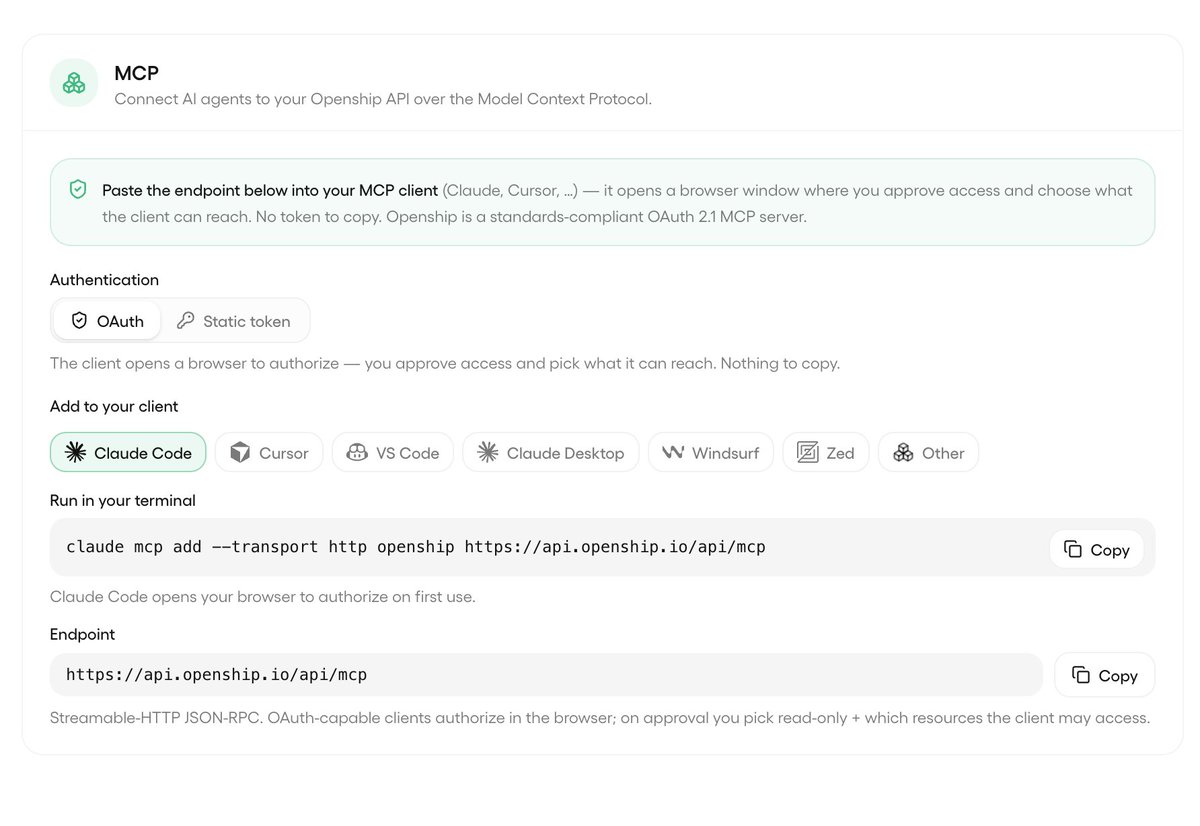
• MCP support for AI agents, just add the mcp and your agent can do the work for you
• Manage your infrastructure without living in SSH
- Coming Soon:
• Multi-server clustering for applications and databases
• One-click load balancing
• Horizontal scaling across multiple servers
• Built-in high availability and failover
• Scale from a single VPS to a cluster with the same workflow
• Just add servers. OpenShip handles the rest.
Open source.
Already have a Docker Compose project?
Keep it.
OpenShip turns it into a complete production deployment pipeline.
• Deploy directly from Git
• Automatically redeploy on every push
• Create isolated environments for every branch
• Route any service to its own domain with one click
• Automatic SSL
• Environment variables per service
* Live logs
* Terminal access
* Health checks
* Rollbacks
* Manage every service independently from the UI
No platform-specific configuration.
No reverse proxy setup.
No deployment scripts.
Your existing Docker Compose project, deployed and managed like a modern PaaS.
That's exactly how OpenShip runs itself.
Introducing OpenShip.
An open-source application platform for building, deploying, operating, and scaling applications on infrastructure you own.
Replace deployment tools, managed services, and infrastructure workflows with one open-source platform.
Available today:
- Mail Server (Built in. One click).
• Runs on your own VPS
• Unlimited domains
• Unlimited mailboxes
• Modern webmail included
• Connect with Gmail, Outlook, Apple Mail, Thunderbird, or any IMAP/SMTP client
• Send email directly from your applications using SMTP
• No mailbox subscriptions or API fees
• High email deliverability
- Deployment:
• Deploy any stack
• Git-based deployments
• Zero-downtime deployments
• One-click rollbacks
• Development, Staging, and Production environments
• Multi-branch deployments with isolated environments • Deploy to VPSs, dedicated servers, cloud VMs, or your homelab
- Services:
Provision the services your applications need in one click.
Replace multiple managed providers with services running on your own infrastructure.
• Supabase
• PostgreSQL
• MySQL
• MariaDB
• MongoDB
• Redis
• MinIO
• Meilisearch
• Qdrant
• RabbitMQ
• Kafka
• ClickHouse
• Elasticsearch
...and deploy any other service alongside your applications.
- Operate:
• Live deployment logs
• Live request logs
• Real-time traffic analytics
• Automated backups
• Monitoring
• Secrets management
• Domains
• Automatic SSL
• Environment variables
• Scheduled jobs
• Health checks
-Multi Environments:
• Separate Development, Staging, and Production environments
• Deploy every branch independently
• Test changes before production
• Isolated services, secrets, and configuration per environment
- Security & Teams:
• Team management
• Role-based access control
• IP allow/block rules
• Rate limiting
• Security rules
- Developer Experience:
• Web dashboard
• Native desktop application
• CLI
• REST API
• MCP support for AI agents, just add the mcp and your agent can do the work for you
• Manage your infrastructure without living in SSH
- Coming Soon:
• Multi-server clustering for applications and databases
• One-click load balancing
• Horizontal scaling across multiple servers
• Built-in high availability and failover
• Scale from a single VPS to a cluster with the same workflow
• Just add servers. OpenShip handles the rest.
Open source.
You don't even want to know what sending 80,000 emails would cost you in 1 week.
Postmark: $100+
SendGrid: $90+
Resend: $80+
Mailgun: $80+
OpenShip: $0.
Deploy it on your 5$ VPS.
Unlimited domains.
Unlimited inboxes.
No per-email bill.
No vendor lock-in.
And yes - it works with one-click setup.
No deep infrastructure work.
Just add a few DNS records, and you're ready to go.
We have migrated OpenShip From AGPL-3 to Apache-2.0 License to be more OpenSource friendly, and looking forward to switch to MIT Later.
Thank you all for your support.
Introducing OpenShip.
An open-source application platform for building, deploying, operating, and scaling applications on infrastructure you own.
Replace deployment tools, managed services, and infrastructure workflows with one open-source platform.
Available today:
- Mail Server (Built in. One click).
• Runs on your own VPS
• Unlimited domains
• Unlimited mailboxes
• Modern webmail included
• Connect with Gmail, Outlook, Apple Mail, Thunderbird, or any IMAP/SMTP client
• Send email directly from your applications using SMTP
• No mailbox subscriptions or API fees
• High email deliverability
- Deployment:
• Deploy any stack
• Git-based deployments
• Zero-downtime deployments
• One-click rollbacks
• Development, Staging, and Production environments
• Multi-branch deployments with isolated environments • Deploy to VPSs, dedicated servers, cloud VMs, or your homelab
- Services:
Provision the services your applications need in one click.
Replace multiple managed providers with services running on your own infrastructure.
• Supabase
• PostgreSQL
• MySQL
• MariaDB
• MongoDB
• Redis
• MinIO
• Meilisearch
• Qdrant
• RabbitMQ
• Kafka
• ClickHouse
• Elasticsearch
...and deploy any other service alongside your applications.
- Operate:
• Live deployment logs
• Live request logs
• Real-time traffic analytics
• Automated backups
• Monitoring
• Secrets management
• Domains
• Automatic SSL
• Environment variables
• Scheduled jobs
• Health checks
-Multi Environments:
• Separate Development, Staging, and Production environments
• Deploy every branch independently
• Test changes before production
• Isolated services, secrets, and configuration per environment
- Security & Teams:
• Team management
• Role-based access control
• IP allow/block rules
• Rate limiting
• Security rules
- Developer Experience:
• Web dashboard
• Native desktop application
• CLI
• REST API
• MCP support for AI agents, just add the mcp and your agent can do the work for you
• Manage your infrastructure without living in SSH
- Coming Soon:
• Multi-server clustering for applications and databases
• One-click load balancing
• Horizontal scaling across multiple servers
• Built-in high availability and failover
• Scale from a single VPS to a cluster with the same workflow
• Just add servers. OpenShip handles the rest.
Open source.
New version of OpenShip (v0.1.10 beta) is now Live
comes with:
- Full Multi language support: English, Arabic, Spanish, French, Portuguese, Japanese, and Chinese
- General bug fixes, all download links is now live and working along with cli deployments
@MathesonStep We have dedicated revers proxy settings and more advanced options to come soon
What is your current setup? Docker?
If docker that would be a native import not much work
curl -fsSL https://t.co/LytwycTGa2 | sh
or
npm i -g openship
It already supports basic deployments, but it doesn't cover the entire platform yet.
We're looking forward to more community contributions, or we'll continue implementing the remaining features after the stable release.
Connect Claude Code or Cursor to the OpenShip MCP and let your AI manage your deployments
OpenShip supports finevgrained MCP and personal access token permissions, so you can grant access only to the resources you choose
Available in the self hosted version too.
Alright, we were waiting for someone to ask this.
One of OpenShip's biggest differentiators is its flexible architecture.
OpenShip isn't tied to a single deployment model - you choose the one that fits your infrastructure.
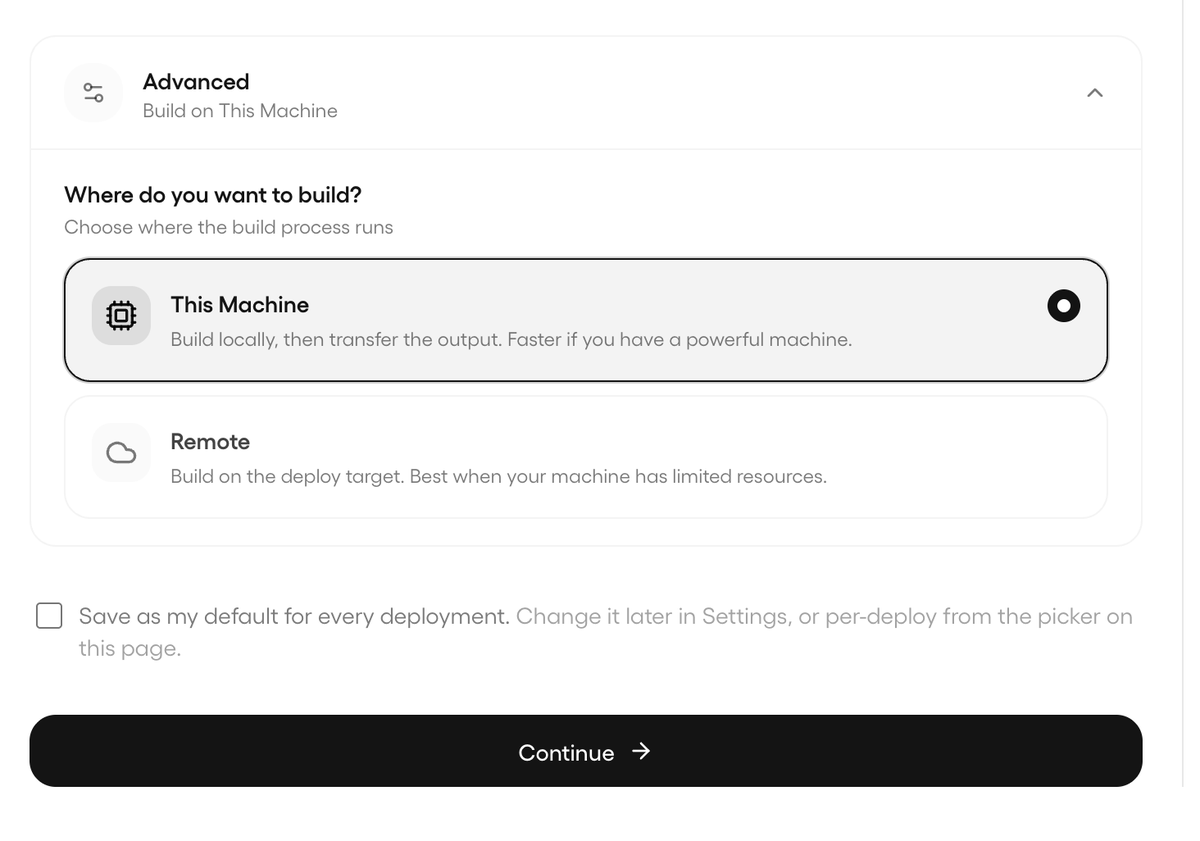
Run everything directly on your server, or use the native desktop mode.
With the desktop mode, you can chose to build your project, the deployment daemon runs locally, and your server only runs your applications.
This significantly reduces the resources required by the deployment platform, making it a great fit for small VPSs, dedicated servers, and homelabs.
but if you need the built-in CI/CD, one switch to Run OpenShip on your server.
if you Want maximum efficiency, Run it from your desktop and remotely manage your servers.
Same platform. Different workflows.
Just Use the architecture that fits your needs.
Not exactly. With Dockploy, you still need to install their agent (daemon) on every server using their installation script.
With OpenShip, there's no daemon or agent running on your server.
You simply provide the server credentials (or authenticate, if you're using Desktop Mode),
and OpenShip operate directly when needed.