27 Claude hacks that most people don't know about. Save this.
Most people open Claude and start typing. That's why they get average output.
The people getting 10x results do this instead:
→ Brief it like a contractor. Tell it who you are, what the project is, what good looks like, and what to avoid. Before you ask anything.
→ Build a voice profile. Feed it 3-5 examples of your writing. Say "match this tone." It will.
→ Keep a banned list. Words it should never use. Phrases you hate. Formats that don't work for you. Tell it once.
→ Store your best prompts. When something works, save it. Reuse it. Build a personal prompt library.
→ Plan before prompting. Tell Claude the plan first. Then ask it to execute. Planning and building in the same prompt gives you worse output on both.
→ Add a quality checklist. Before it gives you the final answer, tell it to check against 3-4 criteria you care about.
→ Connect it to your tools. Claude works with Notion, Google Docs, Slack, and more. Most people never set this up.
The difference between average and exceptional Claude output isn't intelligence. It's setup.
10 minutes of setup saves hours of back and forth.
Codex's 𝗯𝘂𝗶𝗹𝘁-𝗶𝗻 𝗯𝗿𝗼𝘄𝘀𝗲𝗿 has almost replaced my Chrome. Starting work now just means opening Codex, the browser lives inside it.
When I build web pages, my most used move:
→ have it open a reference project in the built-in browser
→ 𝗶𝘁 𝗺𝗼𝘃𝗲𝘀 𝘁𝗵𝗲 𝗺𝗼𝘂𝘀𝗲 𝗶𝘁𝘀𝗲𝗹𝗳, clicks button after button, watches how modals, hovers and page transitions behave
→ then it copies those interactions into my own page
I used to take screenshots and write a paragraph describing the interaction I wanted. That step is gone, it sees for itself.
It's a full browser. Browsing and logins work like normal. I even watch the 𝗪𝗼𝗿𝗹𝗱 𝗖𝘂𝗽 in it, AI working in one pane, football in the other.
The two modes that make this precise:
→ with 𝗱𝗲𝘃𝗲𝗹𝗼𝗽𝗲𝗿 𝗺𝗼𝗱𝗲 on, it can inspect the DOM and applied styles
→ in 𝗮𝗻𝗻𝗼𝘁𝗮𝘁𝗶𝗼𝗻 𝗺𝗼𝗱𝗲, you can click an element and leave a comment, so it knows exactly which button you mean
Localhost works the same way, it clicks through the change itself to verify before handing it back.
I barely open Chrome these days.
Anyone else watching their regular browser use drop like this?
Someone turned Claude into an entire company.
42 skills, organised like a real org chart (links below):
Here is every department, and where to get each one.
Developers
Superpowers → https://t.co/pPPxKoPEwD
Context7 → https://t.co/3Kk9U8PG1T
Skill Creator → https://t.co/Lanao7tpOh
MCP Builder → https://t.co/Lanao7tpOh
Webapp Testing → https://t.co/Lanao7tpOh
Claude-Mem → https://t.co/yTb8qxqa7S
Designers
UI UX Pro Max → https://t.co/MQTtS9flwt
Taste → https://t.co/AEq4GZc60x
Frontend Design → https://t.co/AEq4GZc60x
Transitions → https://t.co/Z7JOt7lJb2
Web Artifacts → https://t.co/Lanao7tpOh
Brand Guidelines → https://t.co/Lanao7tpOh
Marketing
45 skills to run your marketing, from copywriting to SEO to lead magnets.
Access them all here → https://t.co/OWo258NM7L
Social Media
17 skills to run your social media, from post writing to Reels to thumbnails.
Access them all here → https://t.co/2qawCgAyQF
Finance
8 skills to run your finances, from statements to reconciliation to audits.
Access them all here → https://t.co/X6dVFcZBIJ
Small Business
31 skills to run your small business, from cash flow to payroll to invoicing.
Access them all here → https://t.co/7Prb2sXVpI
Legal
9 skills to handle your legal work, from contract review to NDAs to compliance.
Access them all here → https://t.co/GKaZzGYPOr
Every skill on the chart is real and installable from the links above.
Same departments. Same output. No payroll.
Bookmark this.
A collection of over twenty Claude skills designed for founders and marketers that automate tasks like standard operating procedure creation, landing page optimization, and viral social media post generation.
https://t.co/v2EAfkX0Dl
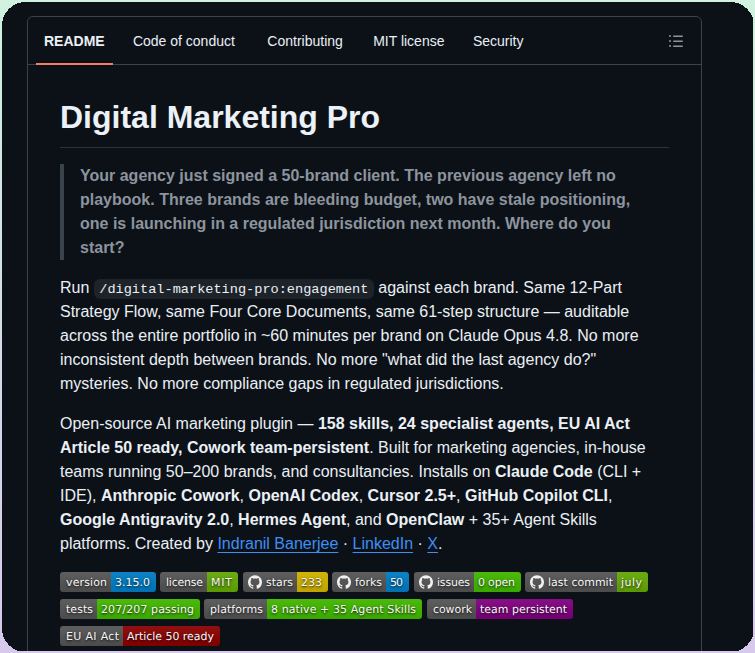
Digital Marketing Pro is an open-source AI marketing plugin with 158 skills and 24 specialist agents, supporting Claude Code, Codex, Cursor, Copilot CLI, Antigravity, and OpenClaw. It provides a 12-part strategy flow to standardize multi-brand portfolio management for agencies handling 50-200 clients.
https://t.co/44mvcJQPN1
New in Claude Code: /checkup
Run /checkup to:
1. Clean up unused skills/MCPs/plugins and save context
2. Dedup your local CLAUDE.md against the checked in CLAUDE.md
3. Break up root CLAUDE.md into nested CLAUDE.md's + skills
4. Turn off slow hooks
5. Update your Claude Code to the latest version
6. Enable auto mode by default
7. Pre-approve frequently denied read-only commands
.. And a few other goodies.
/checkup confirms with you before making any changes. Enjoy!
🚨BREAKING: Claude Fable 5 can now build, host, and publish websites with a domain name, just like a WordPress engineer.
Here are 8 prompts you can use plus steps 👇
Anthropic CEO:
"I have engineers within anthropic who don’t write any code, they just let Claude write the code and they edit it and look it over"
"At anthropic writing code means designing the next version of Claude it self, so we essentially have Claude designing the next version of Claude itself, not completely but most of it"
In the last 52 days, the Claude team dropped 50+ major feature launches.
bookmark this. read it today.
IBKR retail clients averaged 19.20% in 2025, beating the S&P 500’s 17.9%. The best-informed investors choose Interactive Brokers. Your capital is at risk.
🚨 BREAKING: Claude can now build a full Instagram business that runs on autopilot. For free.
Here are 8 prompts to own Instagram:
(Save this is very important).
Introducing Avatars in @ElevenCreative.
The best AI voices, now with a face. Create studio-grade talking videos from a script, a voice, and an avatar - all in one place.
Most people are overlooking Gemini 3.1 Pro for video editing.
But with the right prompts, it turns into a full post-production assistant.
These 7 prompts can transform messy footage into a polished video faster than most editors 👇
(Save this 🔖 you’ll need it later)
50 Websites that feel illegal to know:
DOWNLOADS & MEDIA
1. https://t.co/rdzt5NKiYa — download any video from socials
2. https://t.co/mbPoajKCT7 — Photoshop but completely free
3. https://t.co/JUUJHWhJMg — disposable email in one click
4. https://t.co/IIqYngF3P1 — 100+ free tools in one site
5. https://t.co/STmZPuudAA — access any old webpage ever
6. https://t.co/tnFkRssIRv — millions of free textbooks
7. https://t.co/7pv7w1TfVP — free research papers
8. https://t.co/Hza5eclv6b — find free app alternatives
9. https://t.co/HkSAidxDfT — find where to stream anything
10. https://t.co/AEGXWl06kL — 70K free classic books
RESEARCH & LEARNING
11. https://t.co/Q2zWQ2dmC9 — free PDF downloads
12. https://t.co/eMNFK1Hfa0 — free courses from top unis
13. https://t.co/flM4oWPfGC — solve any math instantly
14. https://t.co/CzgMMh73dk — remove backgrounds in one click
15. https://t.co/PslsO6B9xJ — erase objects from photos
16. https://t.co/g3MF5u3Ukg — remove video backgrounds free
17. https://t.co/gFAX4gSlYz — compress any image free
18. https://t.co/Flwdf1OTEm — hand draw diagrams free
19. https://t.co/mFbb1hZGT7 — turn code into beautiful art
20. https://t.co/raNRRDrcRJ — stunning code screenshots
TRAVEL, SHOPPING & SAFETY
21. https://t.co/b0DjLQMs3t — track any flight in real time
22. https://t.co/CIPxvHJnGD — track Amazon price history
23. https://t.co/V2GF0gvOzb — check if you were hacked
24. https://t.co/8lrxIxfenw — scan any file for malware
25. https://t.co/oYdP9tREsi — send self destructing messages
26. https://t.co/3lpJeAG0Vb — share files that auto delete
27. https://t.co/hL48u3bukt — save any webpage forever
28. https://t.co/UnVGKx5QjB — delete yourself from any site
29. https://t.co/NdSsYQMW6V — listen to any radio worldwide
30. https://t.co/NaL5qHOiZv — find songs from any show
ENTERTAINMENT & DISCOVERY
31. https://t.co/e5eG7t6whz — music to focus with
32. https://t.co/7A29mrk6Uy — custom focus soundscapes
33. https://t.co/ntI5wrl7g3 — search every book ever written
34. https://t.co/E234PZi0GX — AI research paper assistant
35. https://t.co/zy378vNMF0 — search what science agrees on
36. https://t.co/vg7n6bTeF7 — map research visually
37. https://t.co/osGqW8PndG — free academic search
38. https://t.co/ugtriH55fX — understand any research paper
39. https://t.co/n5N66chABp — summarize any YouTube video
40. https://t.co/okFfR2U9fD — AI search for developers
DEVELOPER & PRODUCTIVITY
41. https://t.co/vRuGWMuckF — test any regex instantly
42. https://t.co/I9EpT9SEwg — format any code cleanly
43. https://t.co/KQOvAJMERN — understand terminal commands
44. https://t.co/6YsVsAa8oS — infinite whiteboard in browser
45. https://t.co/GlxJsEu2y4 — check if any site is down
46. https://t.co/lxuWk6Rdf5 — reverse image search
47. https://t.co/M8Y9ogrW8t — check your internet speed
48. https://t.co/uO7ZMPLG0K — edit PDFs free
49. https://t.co/25cEUGbJPQ — merge and split PDFs
50. https://t.co/Ga3ep3s7Ln — temp email in seconds
Follow me @elora_khatun for more AI IDEA.
My lecture at MIT!✨
From Physics to Linear Algebra & Machine learning, I have learned a lot from MIT!
Yesterday, I had the honour of delivering a guest lecture on The state of AI Engineering, exploring:
- Prompt Engineering
- Retrieval Augmented Generation.
- Fine-Tuning Large Language Models.
- And, how LLMs are bringing a paradigm shift
Thank you @RoyShilkrot for the invitation! 🙏
Grateful for the opportunity to engage with such brilliant minds!
If you are interested AI Engineering, I write a free weekly newsletter → @ML_Spring