12x speedup on complex tasks. 9x on simple ones.
Anthropic analyzed millions of real Claude conversations. The harder the task, the bigger the AI productivity gain.
Every ops team running AI on the easy work first is leaving the largest gains on the table.
I broke down where to actually point AI in your workflows, where it makes your team actively worse, and how to split rules from judgment.
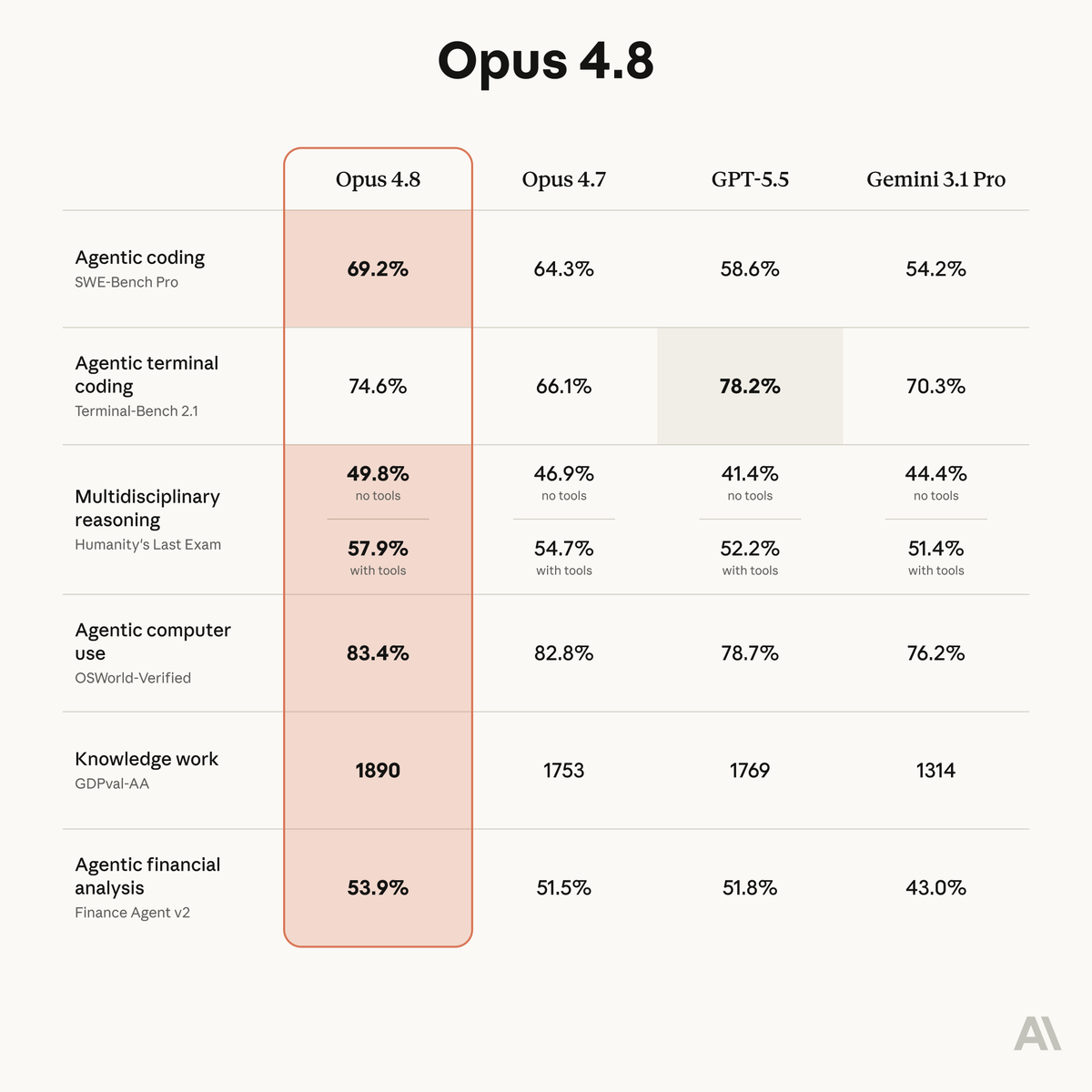
Introducing Claude Opus 4.8: it builds on Opus 4.7 with sharper judgment, more honesty about its own progress, and the ability to work independently for longer than its predecessors.
Available today at the same price.
A support team shipped AI-assisted ticket routing. Worked great for three weeks.
Then a billing policy changed. The AI kept routing tickets to the wrong queue. Support leads corrected the same misroute every day.
The reviewer caught it every time.
That was the problem.
Review was absorbing the failure. Nobody owned the fix.
AI workflows break differently than spreadsheets.
A spreadsheet throws an error. A formula goes blank. Someone notices within a day.
An AI workflow keeps running. The output still looks reasonable. But the source data changed two weeks ago and nobody updated the instructions.
The prompt still runs while the workflow stops being trustworthy.
AI review breaks two ways.
The reviewer redoes the whole task. The AI saved nothing.
Or the reviewer skims and approves. The AI just added a rubber stamp.
Four fields fix both: reviewer, check, decision, failure log.
New issue covers how to design the review step before the prompt.
A common AI review failure is defining a checkpoint without defining the review behavior.
The workflow says a human checks the output.
It does not say what the human checks.
Most teams build the wrong AI workflow first.
The flashy demo.
The loudest request.
The thing some manager keeps pushing.
Three weeks later, the output is shaky, the cleanup lands on someone else, and the team stops trusting it.
I wrote a five-question filter for spotting bad AI workflow bets before they ship.
The most useful AI workflow question is not "can AI do this?"
It is "if this goes wrong, who cleans it up?"
Bad AI output does not disappear.
It becomes work for Support, RevOps, Finance, Legal, or whoever inherits the mess.
68% of orgs have experienced AI data leakage incidents.
Only 6.4% have an advanced AI security strategy.
Breach case studies, who trains on your data by default, and a governance starter for ops teams in my latest newsletter post. Link below.
A lot of workflows teams want to give AI are not AI problems.
They are process problems.
Missing required fields. Broken routing. Approvals that loop three times before anything moves.
Fix those first. Then automate.
Over the past month, some of you reported Claude Code's quality had slipped. We investigated, and published a post-mortem on the three issues we found.
All are fixed in v2.1.116+ and we’ve reset usage limits for all subscribers.
Most teams do not have an AI workflow system.
They have chat fragments, copied prompts, and one person who knows which version still works.
This week's Less Clicks: how to turn repeated AI work into shared operating logic.