🚀 𝟭𝟲 𝗖𝗵𝗿𝗼𝗺𝗲 𝗘𝘅𝘁𝗲𝗻𝘀𝗶𝗼𝗻𝘀 𝗧𝗵𝗮𝘁 𝗔𝘂𝘁𝗼𝗺𝗮𝘁𝗲 𝗬𝗼𝘂𝗿 𝗪𝗼𝗿𝗸 𝗜𝗻 𝟮𝟬𝟮𝟲
If you're spending hours in Chrome every day, the right extensions can save you time, reduce repetitive work, and make your workflow much smoother.
1. 𝗧𝗼𝗱𝗼𝗶𝘀𝘁 ✅
Task management, project tracking, reminders, and team collaboration.
2. 𝗖𝗹𝗼𝗰𝗸𝗶𝗳𝘆 ⏱️
Time tracking, project timers, and productivity reporting.
3. 𝗠𝗲𝗿𝗹𝗶𝗻 𝗔𝗜 🤖
Use AI on any webpage, summarize content, and reply to emails with one click.
4. 𝗚𝗿𝗮𝗺𝗺𝗮𝗿𝗹𝘆 ✍️
Grammar checking, writing improvement, and vocabulary suggestions.
5. 𝗘𝘃𝗲𝗿𝗻𝗼𝘁𝗲 𝗪𝗲𝗯 𝗖𝗹𝗶𝗽𝗽𝗲𝗿 📌
Note-taking, webpage saving, and article annotation.
6. 𝗣𝗼𝗰𝗸𝗲𝘁 ❤️
Save articles for later, read offline, and get personalized content suggestions.
7. 𝗦𝗰𝗿𝗶𝗯𝗲 📝
Auto-generate step-by-step guides from any workflow you perform on screen.
8. 𝗙𝗼𝗿𝗲𝘀𝘁 🌱
Focus timer with gamification, website blocking, and virtual tree planting.
9. 𝗟𝗼𝗼𝗺 🎥
Record your screen, send video messages, and collaborate with teams.
10. 𝗣𝗲𝗿𝗽𝗹𝗲𝘅𝗶𝘁𝘆 𝗔𝗜 🔍
Search the web with AI, get cited answers, and research any topic quickly.
11. 𝗟𝗶𝗴𝗵𝘁𝘀𝗵𝗼𝘁 📷
Fast and easy screenshot capture tool.
12. 𝗦𝗶𝗱𝗲𝗿 𝗔𝗜 💬
Chat with AI on any webpage, summarize PDFs, and translate text instantly.
13. 𝗧𝗼𝗴𝗴𝗹 𝗧𝗿𝗮𝗰𝗸 📊
Track time, generate project reports, and manage team workloads.
14. 𝗭𝗮𝗽𝗶𝗲𝗿 ⚡
Automate workflows, connect apps, and eliminate repetitive tasks.
15. 𝗔𝘀𝗮𝗻𝗮 📋
Manage tasks, track projects, and keep teams aligned.
16. 𝗡𝗼𝘁𝗶𝗼𝗻 𝗪𝗲𝗯 𝗖𝗹𝗶𝗽𝗽𝗲𝗿 📚
Save any webpage directly into your Notion workspace with one click.
💡 𝗕𝗼𝗻𝘂𝘀:
The best productivity stack for most professionals:
📝 Todoist or Asana → Task management
⚡ Zapier → Automation
🤖 Perplexity AI + Merlin AI → Research & AI assistance
✍️ Grammarly → Better writing
🎥 Loom → Faster communication
📌 Notion Web Clipper → Save valuable resources
Which Chrome extension do you use the most? 👇
❤️ Like
🔁 Retweet
🔖 Bookmark
Follow @AamirAnsar94694 for more such posts
🚨BREAKING NEWS: Most people are sleeping on Claude for stock trading.
Here are 10 powerful Claude prompts for stock analysis, buying, selling, and smarter investing decisions.
Bookmark this 🔖- it may come in useful sooner than you think.
Content creators, this is for you 👇
10 AI tools that can completely transform your workflow:
🎬 https://t.co/uPc9Ybw8NZ – Video editing
🎙️ https://t.co/bg862stKeI – Transcription
🎨 @midjourney – AI image generation
✍️ @CohesiveAI – Content writing
🌐 Dora – Website builder
🎥 @riverside – Video creation
🗣️ Vozo – AI dubbing
📢 Aimensa – AI marketing
📸 @flair – Product photos
📝 @HyperWriteAI – AI writing
AI isn’t replacing creators.
It’s helping creators scale faster.
Which tool do you use most?
#AITools #ContentCreation #AI
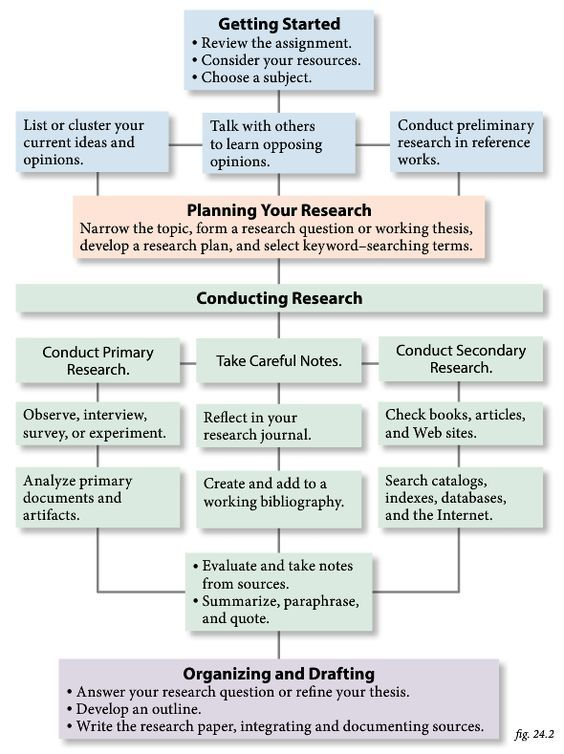
Starting a dissertation feels overwhelming until you see the roadmap.
A strong dissertation usually follows four core chapters:
1- Introduction
2- Literature Review
3- Methodology
4- Data Analysis & Results
Master the structure first, then focus on the research. A clear outline can save months of confusion.