I created this command line tool that you can use to create a starting point for your @github Actions workflows. If you have Node installed you can run it with "npx actions-workflow". Go check it out!
@tamara_mbz@jand4039@JannekeParrish But I think Teams is the worst offender here. Someone sends you a “Hello! I hope you’re doing good!“ message and then you wait 10 mins for them to formulate the actual question.
@tamara_mbz@jand4039@JannekeParrish The level of formality depends on how familiar I am with the recipient. Also, if it’s a long thread of emails then signing every email formally starts to feel awkward, so I fall back to using my name only or even leaving the signature out altogether.
@reddobowen@github@AzureFunctions@AzureApiMgmt@googleanalytics@GoHugoIO If you were even lazier developer than you claim to be, you could have skipped the API and run the Python code directly during build time but not commit the changes. 😃 I commit the JSON because I rely on the Netlify build trigger, and it felt like the simplest option.
@reddobowen@github@AzureFunctions@AzureApiMgmt@googleanalytics@GoHugoIO Your GitHub Actions workflow looks quite cool, really appreciate that you included it there in full to be studied! The JSON file that your API generates should be very cacheable, so one option could be to configure your CDN to cache the response and handle things dynamically.
@BreakingNewsAg1 It seems that this tweet is the one that’s mostly gaining comments, because obviously those people are interested to hear how it’s going. I suppose if the tweets were visible on the site itself then it could improve the metrics for other posts too.
@NickRob95 Hey! The contact form is an embedded Google Forms thing that seems to be working at least in my tests when I click the button. If you have a question that can be asked publicly here then I’d prefer that. My Twitter DMs are also open.
@Jozmoze There seems to be an issue with the zipapp because of missing dependencies in nodeenv. Use pre-commit v2.17.0 which has a temporary fix for this.
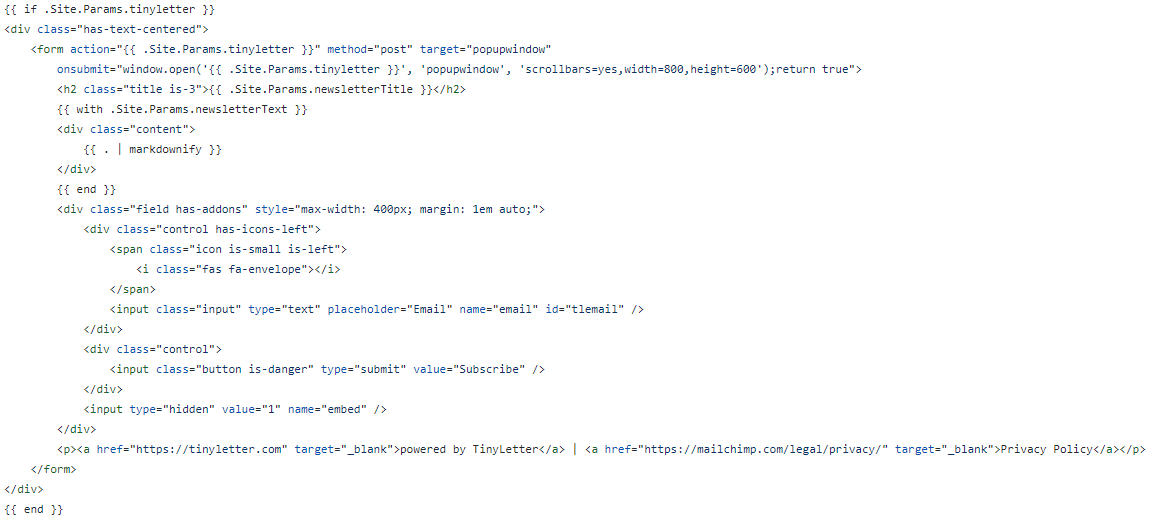
@raggy_k Hey! Nice looking site you have there! Here is my subscribe.html template which I have added in the blog post template. I basically just parameterized and styled the embed code that you get from the TinyLetter "Share" menu. The values come from the site config. I hope this helps!