How does Git Work?
The diagram below shows the Git workflow.
Git is a distributed version control system.
Every developer maintains a local copy of the main repository and edits and commits to the local copy.
The commit is very fast because the operation doesn’t interact with the remote repository.
If the remote repository crashes, the files can be recovered from the local repositories.
Over to you: Which Git command do you use to resolve conflicting changes?
Subscribe to our weekly newsletter to get a Free System Design PDF (158 pages): https://t.co/FIzCeaWsZV
Almost every software engineer has used Git before, but only a handful know how it works.
To begin with, it's essential to identify where our code is stored. The common assumption is that there are only two locations - one on a remote server like Github and the other on our local machine. However, this isn't entirely accurate. Git maintains three local storages on our machine, which means that our code can be found in four places:
- Working directory: where we edit files
- Staging area: a temporary location where files are kept for the next commit
- Local repository: contains the code that has been committed
- Remote repository: the remote server that stores the code
Most Git commands primarily move files between these four locations.
Over to you: Do you know which storage location the "git tag" command operates on? This command can add annotations to a commit.
—
Subscribe to our weekly newsletter to get a Free System Design PDF (158 pages): https://t.co/uc5M7CdXXC
Explaining 8 Popular Network Protocols in 1 Diagram
Network protocols are standard methods of transferring data between two computers in a network.
1. HTTP (HyperText Transfer Protocol)
HTTP is a protocol for fetching resources such as HTML documents. It is the foundation of any data exchange on the Web and it is a client-server protocol.
2. HTTP/3
HTTP/3 is the next major revision of the HTTP. It runs on QUIC, a new transport protocol designed for mobile-heavy internet usage. It relies on UDP instead of TCP, which enables faster web page responsiveness. VR applications demand more bandwidth to render intricate details of a virtual scene and will likely benefit from migrating to HTTP/3 powered by QUIC.
3. HTTPS (HyperText Transfer Protocol Secure)
HTTPS extends HTTP and uses encryption for secure communications.
4. WebSocket
WebSocket is a protocol that provides full-duplex communications over TCP. Clients establish WebSockets to receive real-time updates from the back-end services. Unlike REST, which always “pulls” data, WebSocket enables data to be “pushed”. Applications, like online gaming, stock trading, and messaging apps leverage WebSocket for real-time communication.
5. TCP (Transmission Control Protocol)
TCP is designed to send packets across the internet and ensure the successful delivery of data and messages over networks. Many application-layer protocols are built on top of TCP.
6. UDP (User Datagram Protocol)
UDP sends packets directly to a target computer, without establishing a connection first. UDP is commonly used in time-sensitive communications where occasionally dropping packets is better than waiting. Voice and video traffic are often sent using this protocol.
7. SMTP (Simple Mail Transfer Protocol)
SMTP is a standard protocol to transfer electronic mail from one user to another.
8. FTP (File Transfer Protocol)
FTP is used to transfer computer files between client and server. It has separate connections for the control channel and data channel.
—
Subscribe to our weekly newsletter to get a Free System Design PDF (158 pages): https://t.co/FIzCeaWsZV
💡 IntelliJ IDEA Tip: you can enable language specific syntax highlighting on any String by annotating it with @Language("<lang>") or commenting with //language=<lang>.
Especially useful when used with Java 15+ Text Blocks
What is SSO (Single Sign-On)?
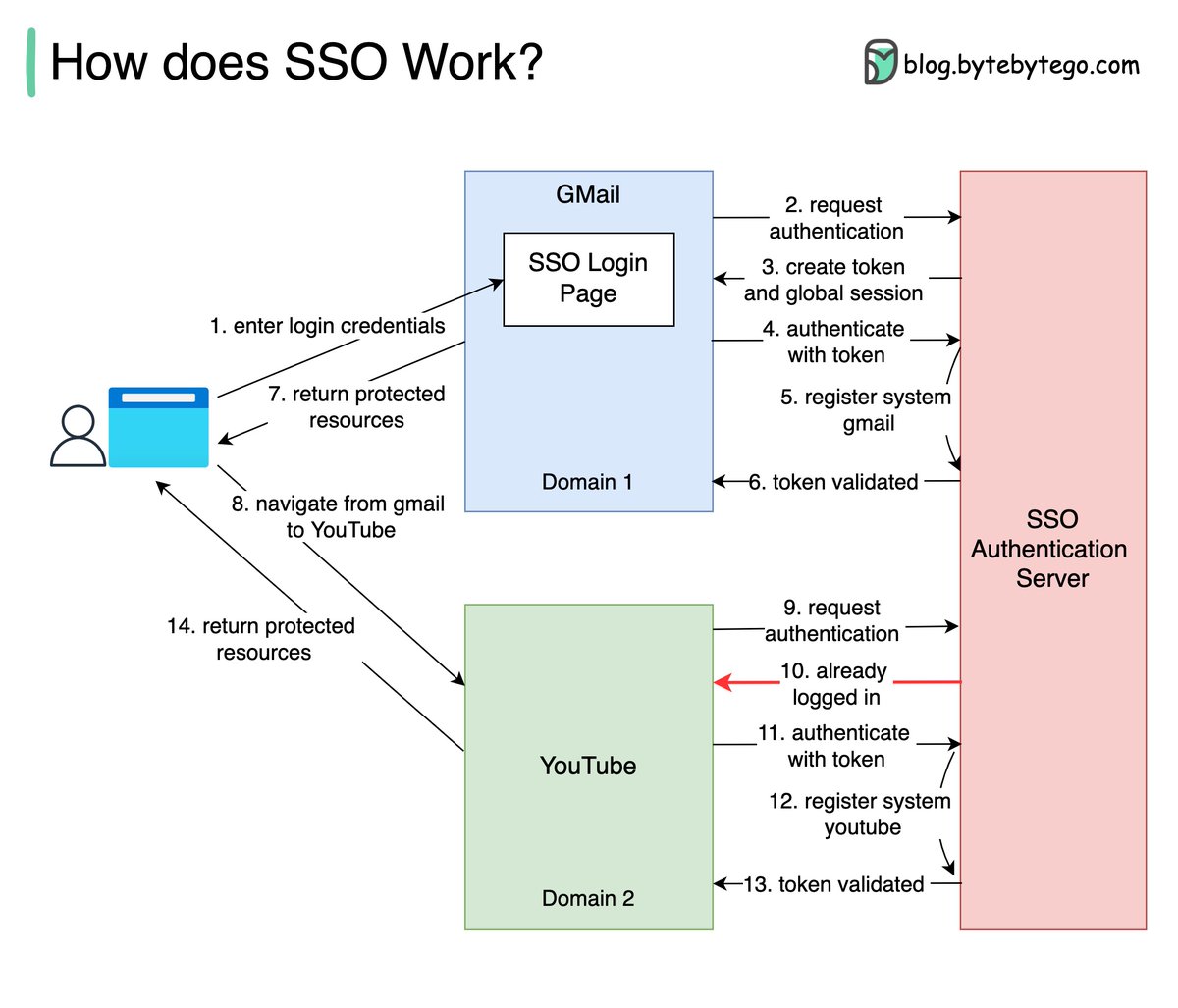
The diagram below illustrates how SSO works.
Step 1: A user visits Gmail, or any email service. Gmail finds the user is not logged in and so redirects them to the SSO authentication server, which also finds the user is not logged in. As a result, the user is redirected to the SSO login page, where they enter their login credentials.
Steps 2-3: The SSO authentication server validates the credentials, creates the global session for the user, and creates a token.
Steps 4-7: Gmail validates the token in the SSO authentication server. The authentication server registers the Gmail system, and returns “valid.” Gmail returns the protected resource to the user.
Step 8: From Gmail, the user navigates to another Google-owned website, for example, YouTube.
Steps 9-10: YouTube finds the user is not logged in, and then requests authentication. The SSO authentication server finds the user is already logged in and returns the token.
Step 11-14: YouTube validates the token in the SSO authentication server. The authentication server registers the YouTube system, and returns “valid.” YouTube returns the protected resource to the user.
The process is complete and the user gets back access to their account.
Over to you:
Question 1: have you implemented SSO in your projects? What is the most difficult part?
Question 2: what’s your favorite sign-in method and why?
–
Subscribe to our weekly newsletter to get a Free System Design PDF (158 pages): https://t.co/FIzCeaWsZV
Top 4 Most Popular Use Cases for UDP
UDP (User Datagram Protocol) is used in various software architectures for its simplicity, speed, and low overhead compared to other protocols like TCP.
🔹 Live Video Streaming
Many VoIP and video conferencing applications leverage UDP due to its lower overhead and ability to tolerate packet loss. Real-time communication benefits from UDP's reduced latency compared to TCP.
🔹 DNS
DNS (Domain Name Service) queries typically use UDP for their fast and lightweight nature. Although DNS can also use TCP for large responses or zone transfers, most queries are handled via UDP.
🔹 Market Data Multicast
In low-latency trading, UDP is utilized for efficient market data delivery to multiple recipients simultaneously.
🔹 IoT
UDP is often used in IoT devices for communications, sending small packets of data between devices.
—
Subscribe to our weekly newsletter to get a Free System Design PDF (158 pages): https://t.co/uc5M7CdXXC
Turn any paper into audio and listen on your phone!
Listen while walking, making dinner, or exercising. It's easy to fit your learning into your daily routine!
Session, Cookie, JWT, Token, SSO, and OAuth 2.0 Explained in One Diagram
When you login to a website, your identity needs to be managed. Here is how different solutions work:
- Session - The server stores your identity and gives the browser a session ID cookie. This allows the server to track login state. But cookies don't work well across devices.
- Token - Your identity is encoded into a token sent to the browser. The browser sends this token on future requests for authentication. No server session storage is required. But tokens need encryption/decryption.
- JWT - JSON Web Tokens standardize identity tokens using digital signatures for trust. The signature is contained in the token so no server session is needed.
- SSO - Single Sign On uses a central authentication service. This allows a single login to work across multiple sites.
- OAuth2 - Allows limited access to your data on one site by another site, without giving away passwords.
- QR Code - Encodes a random token into a QR code for mobile login. Scanning the code logs you in without typing a password.
Over to you: QR code logins are gaining popularity. Do you know how it works?
–
Subscribe to our weekly newsletter to get a Free System Design PDF (158 pages): https://t.co/FIzCeaWsZV
Caching 101: The Must-Know Caching Strategies
Fetching data is slow. Caching speeds things up by storing frequently accessed data for quick reads. But how do you populate and update the cache? That's where strategies come in.
🔍 Read Strategies:
Cache Aside (Lazy Loading)
- How it works: Tries cache first, then fetches from DB on cache miss
- Usage: When cache misses are rare or the latency of a cache miss + DB read is acceptable
Read Through
- How it works: Cache handles DB reads, transparently fetching missing data on cache miss
- Usage: Abstracts DB logic from app code. Keeps cache consistently populated by handling misses automatically
📝 Write Strategies:
Write Around
- How it works: Writes bypass the cache and go directly to the DB
- Usage: When written data won't immediately be read back from cache
Write Back (Delayed Write)
- How it works: Writes to cache first, async write to DB later
- Usage: In write-heavy environments where slight data loss is tolerable
Write Through
- How it works: Immediate write to both cache and DB
- Usage: When data consistency is critical
🚀 Real-Life Usage:
Cache Aside + Write Through
This ensures consistent cache/DB sync while allowing fine-grained cache population control during reads. Immediate database writes might strain the DB.
Read Through + Write Back
This abstracts the DB and handles bursting write traffic well by delaying sync. However, it risks larger data loss if the cache goes down before syncing the buffered writes to the database.
–
Subscribe to our weekly newsletter to get a Free System Design PDF (158 pages): https://t.co/kNfv0DVDdf
Top 5 Kafka use cases
Kafka was originally built for massive log processing. It retains messages until expiration and lets consumers pull messages at their own pace.
Let’s review the popular Kafka use cases.
- Log processing and analysis
- Data streaming in recommendations
- System monitoring and alerting
- CDC (Change data capture)
- System migration
Over to you: Do you have any other Kafka use cases to share?
--
Subscribe to our weekly newsletter to get a Free System Design PDF (158 pages): https://t.co/uc5M7CdXXC
How is data sent over the internet? What does that have to do with the OSI model? How does TCP/IP fit into this?
7 Layers in the OSI model are:
1. Physical Layer
2. Data Link Layer
3. Network Layer
4. Transport Layer
5. Session Layer
6. Presentation Layer
7. Application Layer
--
Subscribe to our weekly newsletter to get a Free System Design PDF (158 pages): https://t.co/uc5M7CdXXC
How does Docker Work?
Docker's architecture comprises three main components:
🔹 Docker Client
This is the interface through which users interact. It communicates with the Docker daemon.
🔹 Docker Host
Here, the Docker daemon listens for Docker API requests and manages various Docker objects, including images, containers, networks, and volumes.
🔹 Docker Registry
This is where Docker images are stored. Docker Hub, for instance, is a widely-used public registry.
--
Subscribe to our weekly newsletter to get a Free System Design PDF (158 pages): https://t.co/FIzCeaWsZV
Symmetric encryption vs asymmetric encryption
Symmetric encryption and asymmetric encryption are two types of cryptographic techniques used to secure data and communications, but they differ in their methods of encryption and decryption.
🔹 In symmetric encryption, a single key is used for both encryption and decryption of data. It is faster and can be applied to bulk data encryption/decryption. For example, we can use it to encrypt massive amounts of PII (Personally Identifiable Information) data. It poses challenges in key management because the sender and receiver share the same key.
🔹 Asymmetric encryption uses a pair of keys: a public key and a private key. The public key is freely distributed and used to encrypt data, while the private key is kept secret and used to decrypt the data. It is more secure than symmetric encryption because the private key is never shared. However, asymmetric encryption is slower because of the complexity of key generation and maths computations. For example, HTTPS uses asymmetric encryption to exchange session keys during TLS handshake, and after that, HTTPS uses symmetric encryption for subsequent communications.
--
Subscribe to our weekly newsletter to get a Free System Design PDF (158 pages): https://t.co/uc5M7CdXXC
CausalML is a Python package that provides a suite of uplift modeling and causal inference methods using machine learning algorithms based on recent research.
💡I'm teaching it on Wednesday (and you're invited). Let's dive in.
1. Causal machine learning is a branch of machine learning that focuses on understanding the cause-and-effect relationships in data. It goes beyond just predicting outcomes based on patterns in the data, and tries to understand how changing one variable can affect an outcome.
2. Causal ML vs ML: Traditional machine learning and causal machine learning are both powerful tools, but they serve different purposes and answer different types of questions.
3. Traditional Machine Learning is primarily concerned with prediction. It’s great at finding patterns and correlations in large datasets, but it doesn’t tell us about the cause-and-effect relationships between variables.
4. On the other hand, Causal Machine Learning is concerned with understanding the cause-and-effect relationships between variables. It goes beyond prediction and tries to answer questions about intervention: “What will happen if we change this variable?”
5. The CaualML Python package was developed by engineers at Uber. It provides a standard interface that allows user to estimate the Conditional Average Treatment Effect (CATE).
6. CATE: Conditional Average Treatment Effect, or CATE, is an estimate of the treatment effect conditioned on all available experiment covariates and confounders. We call these Heterogeneous Treatment Effects (HTEs).
7. Business Use Cases: In the workshop, I will share how to use CausalML to reduce Hotel Cancellations.
===
Ready to learn CausalML (in a free workshop)?
I have a free workshop, Causal Inference for Data Scientists in Python. I will share how companies like Uber, Google, and Bookings(dot)com use Causal Inference and Machine Learning to increase revenue.
👉Register here (seats are limited): https://t.co/l9SUNqgxNi
How does HTTPS work?
Hypertext Transfer Protocol Secure (HTTPS) is an extension of HTTP that utilizes Transport Layer Security (TLS) to encrypt communication between a client and server. Any intercepted data will be unreadable and secure from tampering and eavesdropping.
What's the process for encrypting and decrypting data?
Step 1 - The journey begins with the client (like your browser) establishing a TCP connection with the server.
Step 2 - Next comes the “client hello” where the browser sends a message containing supported cipher suites and the highest TLS version it can handle. Cipher suites are sets of algorithms that typically include: a key exchange method to share keys between devices, a bulk encryption algorithm to encrypt data, and a message authentication code algorithm to check data integrity.
The server responds with a “server hello”, confirming the chosen cipher suite and TLS version that they can both understand. The server then sends a TLS certificate to the client containing its domain name, certificate authority signature, and the server’s public key. The client checks this certificate to validate it is trusted and belongs to the server.
Step 3 - Once the TLS certificate is validated, the client creates a session key to be used for encrypting the bulk data transfer. Bulk data transfer refers to the transmission of the actual application data between client and server once the secure TLS connection is established. To securely send this session key to the server, it’s encrypted with the server’s public key. The server, with its private key, is the only one who can decrypt this encrypted session key.
Step 4 - Now that both parties have the secret session key, they shift gears to symmetric encryption. It’s like they’ve agreed on a private language that only they understand. This makes the data transfer very secure. Symmetric encryption is much faster for large amounts of data.
–
Subscribe to our weekly newsletter to get a Free System Design PDF (158 pages): https://t.co/kNfv0DVDdf
Session, cookie, JWT, token, SSO, and OAuth 2.0 - what are they?
These terms are all related to user identity management. When you log into a website, you declare who you are (identification). Your identity is verified (authentication), and you are granted the necessary permissions (authorization). Many solutions have been proposed in the past, and the list keeps growing.
From simple to complex, here is my understanding of user identity management:
WWW-Authenticate is the most basic method. You are asked for the username and password by the browser. As a result of the inability to control the login life cycle, it is seldom used today.
A finer control over the login life cycle is session-cookie. The server maintains session storage, and the browser keeps the ID of the session. A cookie usually only works with browsers and is not mobile app friendly.
To address the compatibility issue, the token can be used. The client sends the token to the server, and the server validates the token. The downside is that the token needs to be encrypted and decrypted, which may be time-consuming.
JWT is a standard way of representing tokens. This information can be verified and trusted because it is digitally signed. Since JWT contains the signature, there is no need to save session information on the server side.
By using SSO (single sign-on), you can sign on only once and log in to multiple websites. It uses CAS (central authentication service) to maintain cross-site information
By using OAuth 2.0, you can authorize one website to access your information on another website
--
Subscribe to our weekly newsletter to get a Free System Design PDF (158 pages): https://t.co/FIzCeaWsZV
Top 4 Forms of Authentication Mechanisms
1. SSH Keys:
Cryptographic keys are used to access remote systems and servers securely
2. OAuth Tokens:
Tokens that provide limited access to user data on third-party applications
3. SSL Certificates:
Digital certificates ensure secure and encrypted communication between servers and clients
4. Credentials:
User authentication information is used to verify and grant access to various systems and services
Over to you: How do you manage those security keys? Is it a good idea to put them in a GitHub repository?
--
Subscribe to our weekly newsletter to get a Free System Design PDF (158 pages): https://t.co/FIzCeaWsZV
8 data structures powering modern databases
Database efficiency depends on quickly storing, retrieving, and changing data. The backbone enabling this speed are data structures tailored to meet different database needs. Here are 8 data structures modern databases rely on:
1. Skip List
A skip list is a probabilistic data structure that enables fast search within an ordered sequence of elements. It is commonly used in in-memory databases like Redis because of its efficient average-case lookup and insert operations.
2. Hash Index
The hash index, commonly used in-memory databases, is an index data structure that uses a hash table to associate key values with specific data. It's a common solution for fast in-memory key-value lookups.
3. SSTable (Sorted String Table)
An SSTable is an immutable sorted data structure typically found in disk-based databases. SSTables are a crucial component in the LSM tree.
4. LSM Tree (Log-Structured Merge-Tree)
The LSM tree combines SSTables with an in-memory structure like MemTable. This hybrid disk and memory architecture provides excellent write performance for high-volume writes. However, periodic compaction of SSTables can impact read efficiency if not properly tuned.
5. B-Tree
Perhaps the most popular on-disk database index structure, the B-tree is optimized for systems that read and write large blocks of data. Its balanced structure allows for efficient insertion, deletion, and lookup of records. B+ tree is a common variant.
6. Inverted Index
Used in search engines like Lucene, an inverted index stores a mapping from content, such as words or numbers, to their locations within a database. It enables fast full-text search.
7. Suffix Tree
A specialized string indexing data structure, the suffix tree allows for rapid substring searches.
8. R-tree
Ideal for spatial indexing, the R-tree is a tree data structure used for indexing multi-dimensional data such as geographical coordinates, rectangles, and polygons. It's commonly used to optimize nearest neighbor and geospatial searches.
This list covers some of the essential data structures, but there are certainly others that serve critical roles across today's wide spectrum database architectures. What other interesting data structures are you aware of that power modern databases?
–
Subscribe to our weekly newsletter to get a Free System Design PDF (158 pages): https://t.co/kNfv0DVDdf