🎉 Phoenix Code just crossed 1,000,000 downloads - thank you for making this possible. If Phoenix Code helped your workflow, consider sharing it with a friend. 💛
Download Phoenix Code: https://t.co/mSlAzgM4lx #PhoenixCode#WebDevelopment
Phoenix Code 5.1 is now available at https://t.co/Y9GpJQXNpc 🚀
This is one of our biggest updates yet:
• AI with Claude Code
• Design Mode
• Rich Markdown editing
• Built-in terminal
• Responsive device previews
• Rebuilt Linux app
• Phoenix Neo themes
2/ We made Markdown feel more like a real document.
Edit Markdown like a document in Live Preview. Format text, edit tables, and it’s easy to add images - just paste or pick one from your device, like in Google Docs or Word.
1. Almost every agentic ide you use today is based on VSCode.
2. VScode is based on @AtomEditor , which is powered by @electronjs
2.5. There is also Visual Studio IDE, which was another beast.
Before all of these, There were Sublime Text by @sublimehq , @notepadplusplus, TextMate by @macromates , Geany, Komodo Edit (which I loved a lot), and even Adobe Brackets (which is now rewritten as Phoenix Code: @phcodedev ).
Not to mention we always had Vi / Vim, Emacs, nano etc that run ton TUIs.
I'm not even mentioning Jetbrains' tools.
Many of the editors / IDEs I've mentioned are still being actively developed.
@iangk Thanks for the report! I've created an issue to track this. If you can, please add repro steps here - It’ll help us fix it faster 🙂
https://t.co/gGQlBHxlu0
Also new in Phoenix Code 5.0: Phoenix Pro - an optional way to support our small indie team.
Phoenix Code stays 100% free & open source forever - including Live Preview.
Pro helps fund ongoing development, and adds Live Preview Edit.
Learn more: https://t.co/tmrxZj0juI
A fix is expected in the march release as it needed a full scale Tauri 2 migration- which is going on for past few months. This month's release will not have this fix. Sorry for the delay!
Tracking https://t.co/q79WiwK2lo
🎉 Phoenix Code just crossed 1,000,000 downloads - thank you for making this possible. If Phoenix Code helped your workflow, consider sharing it with a friend. 💛
Download Phoenix Code: https://t.co/mSlAzgM4lx #PhoenixCode#WebDevelopment
Update: Publish feature is back online! 🎉
✅ Added user-generated content warning screen for better phishing protection.
✅ Auto-delete sites after 3 days if not updated (perfect for dev-testing).
Thanks for your patience while we improved security. Happy coding!
We've temporarily disabled the publish feature after receiving phishing reports for user-published sites. In our next release, we'll implement required login for publishing to better protect against misuse. We appreciate your understanding during this brief interruption.
@StewartColes IOS is currently not supported, but we have heard reports that if you add https://t.co/OGVwuIKhp2 as a home screen shortcut from safari, it works in newer iPad's.
@tbdrosa@cortjezter Any hint on when this issue occurs? The size of the project, weather git is active in the project or more details to debug will help narrow down the issue. Please add all info you can to the issue.
June release(3.8) of Phoenix Code is now available for download at https://t.co/Y9GpJQXNpc.
Notable features:
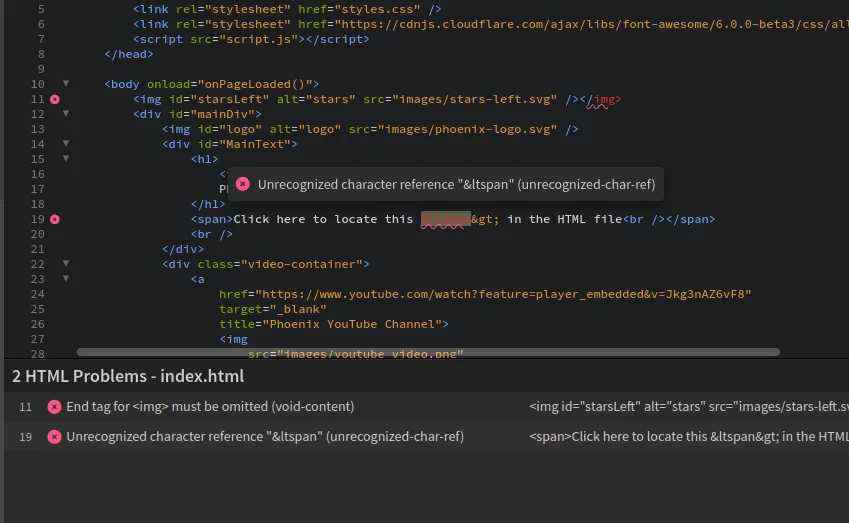
HTML Validation
Drag and drop files in the editor
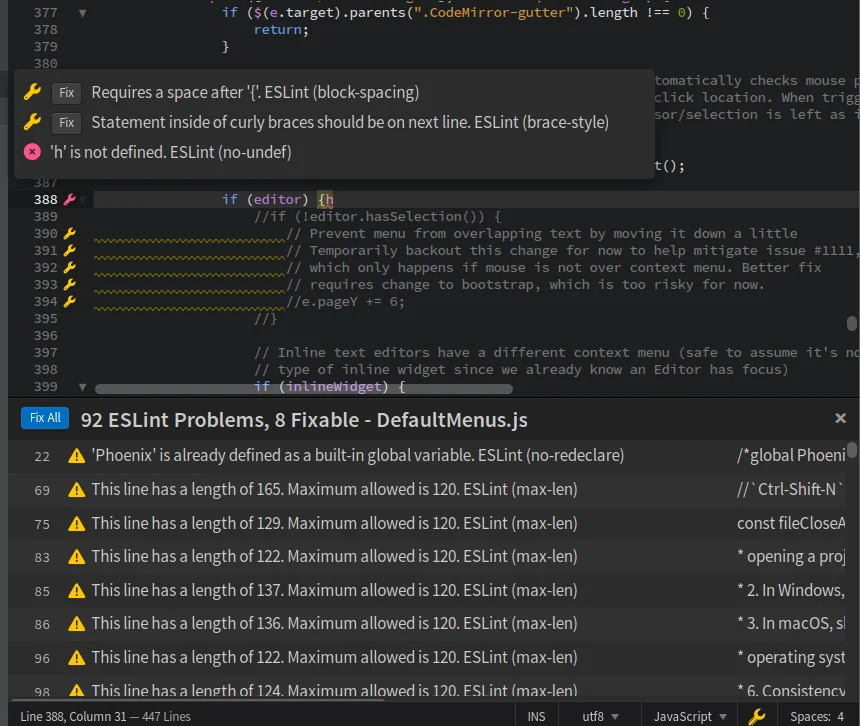
ESLint support with fixes
@limeatuk Can you explain more on where do you click on the images? Does it mean clicking on project file tree. Also where is the code highlighted for copying, did you mean svg image code?
@limeatuk We didn't make any changes to that feature, so its a bug if it doesn't work. Whats the exact steps to reproduce the issue, does it happen in the default project's index html as well?
🚀 Phoenix Code v3.10 is out now! ✨ New features:
📏 Indent Guide Lines
📝 Customize Line Height
⚡️ Editor Performance++
Read More https://t.co/u2ekacN244
Get it from https://t.co/5g9wcdhgtI
#WebDev#Coding#HTML#CSS#JavaScript#VSCode#CodeEditor