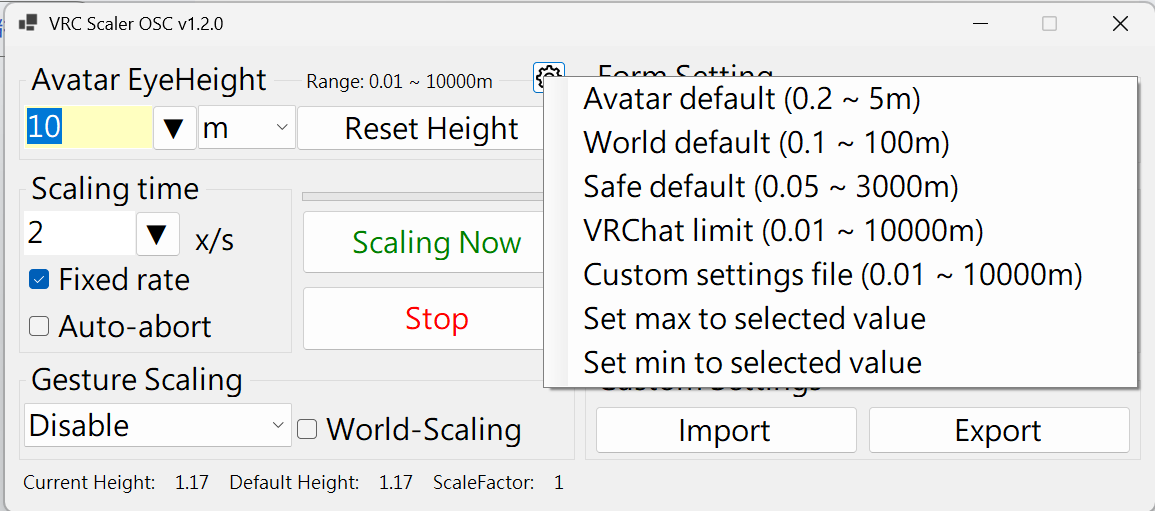
VRC Scaler OSC v1.2.0 Released!
●Added a Console app, including a Linux x64 version.
●Added height range limits to prevent excessive scaling.
●Avatar prefab has also been completed.
Also, please remember to enable the option shown in the fourth image.
#VRChat
Since there’s quite a lot of content, the documentation and store page are still being refined. The release is planned for Booth and Gumroad in the future.
If you want to develop your own avatar-based gimmick to control VRC Scaler, parameter list here:
https://t.co/ID8EKExLHF
VRC Scaler OSC v1.2.0 Released!
●Added a Console app, including a Linux x64 version.
●Added height range limits to prevent excessive scaling.
●Avatar prefab has also been completed.
Also, please remember to enable the option shown in the fourth image.
#VRChat
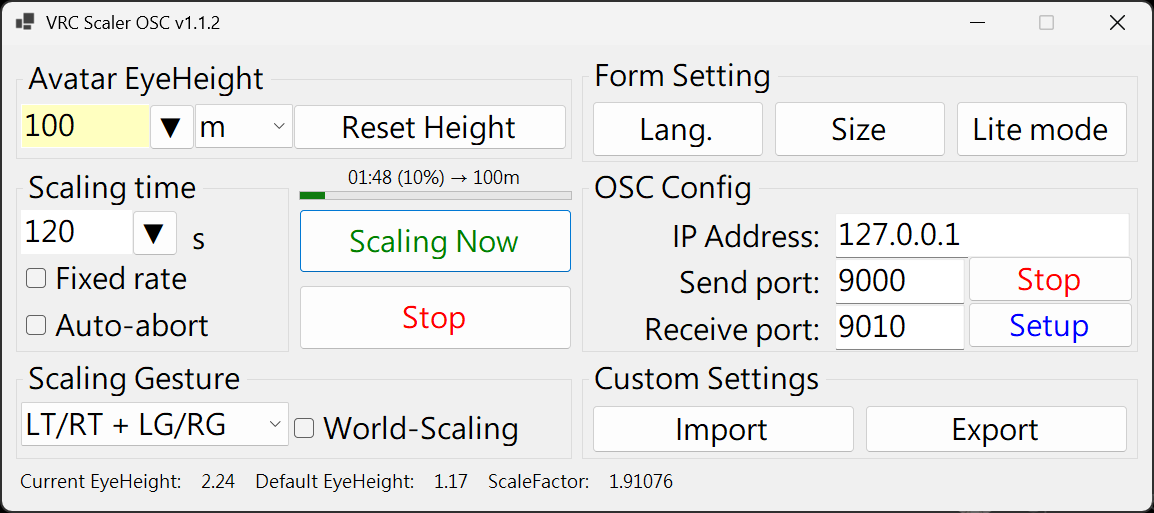
VRC Scale OSC v1.1.2 has been released. Main updates include:
1.Improved the stability of OSC parameter capture. If you are using /avatar/parameters control, restarting the application should no longer be necessary.
2.Added a remaining time display for smooth scaling transitions.
This is an application designed specifically for VRChat.
https://t.co/kEJgz0yZPF
VRChat now allows avatar size to be changed through OSC, with a range from 0.01 m to 10,000 m, and it no longer requires specially made gimmicks—any avatar can use it.
@Hibionthetv I’m currently developing a gimmick that can be installed on avatars, and it will also be able to control this application. I think this is probably the feature you’re looking for.
This is an application designed specifically for VRChat.
https://t.co/kEJgz0yZPF
VRChat now allows avatar size to be changed through OSC, with a range from 0.01 m to 10,000 m, and it no longer requires specially made gimmicks—any avatar can use it.
@BigMoomba Thank you for the feedback! I’ll try to fix this in the next version.
I also forgot to mention the stop parameter:
VRCScaleOSC/StopScaling (bool / float / int) — sending this parameter will immediately stop any height scaling
@BigMoomba VRCScaleOSC/ScalingEyeHeight (float) — instantly changes to the input height value
VRCScaleOSC/Gesture/Mode (int) — gesture-based scaling mode, where 0 means disabled
VRCScaleOSC/Gesture/WorldScaling (bool) — whether to use WorldScaling
@BigMoomba This application includes a set of control /avatar/parameters/, which are part of a gimmick prefab planned for future release. I can share a few that you may find useful:
VRCScaleOSC/SmoothScalingEyeHeight (float) — smoothly changes to the input height value
Placing VRCScalerOSC.setting.txt in the same folder as the executable will allow it to automatically load the new default settings the next time it is launched.
If this file does not exist or the settings are invalid, the program will fall back to its built-in default values.
If you want to modify the default size list, back to the main form and click the [Export] button. Then edit the values after ScalerMenuSelectItems in the exported configuration file, and import it back afterward.





![phone23451's tweet photo. If you want to modify the default size list, back to the main form and click the [Export] button. Then edit the values after ScalerMenuSelectItems in the exported configuration file, and import it back afterward. https://t.co/x5VtuFOKl5](https://pbs.twimg.com/media/HIzvHz6bMAAmOh6.png)