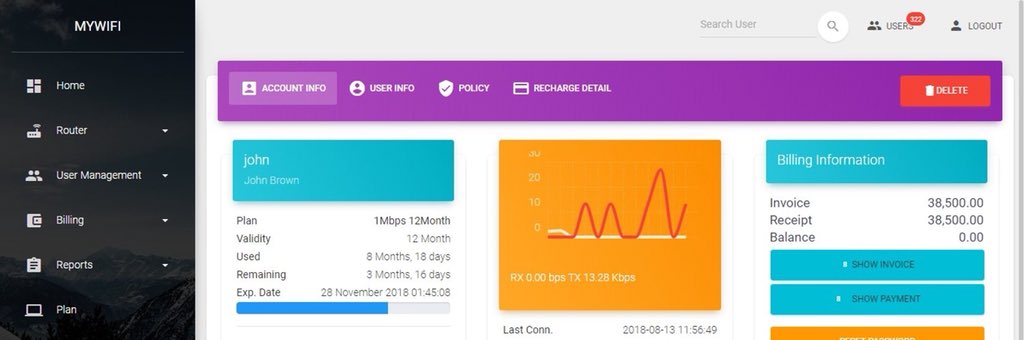
How To open a user dashboard?1.goto side menu click on usermanagement->listuser that will show all list of the user, now you can just click on username which you want to open a user dashboard.
https://t.co/930OSFcdV2 user on topbar by a username that will open a dashboard.
#ISP
PHP Radius is a Cloud-Based Bandwidth Management software including with ISP Billing System. https://t.co/xARiHtXmdA #cloud#internet#wisp#mikrotik#ubnt
How to show user accounting information?
->open a user dashboard, click on Account info Tab
->You Can Show PlanName, Plan validity, Used Time, Remaining Time, Expiry Date, Total Used data, Total Download/Upload Used data.
->You Can also show real-time user bandwidth chart.
#ISP
How To open a user dashboard?1.goto side menu click on usermanagement->listuser that will show all list of the user, now you can just click on username which you want to open a user dashboard.
https://t.co/930OSFcdV2 user on topbar by a username that will open a dashboard.
#ISP
How to import Multiple User Together?
KEY POINT:
-you can import Multiple User by uploading an only CSV file.
-import Multiple User by pre define formate information
-do you don't known about pre define format then you can click on sample CSV Link that will show your page.#ISP
How to fill the first tab Account Infomation for a new user?
->you can create a user two types, simple user or mac user
->type username and password(type mac address if user type is a mac)
->select user plan, enter Simultaneous-Use of user and IP address
#ISP#mikrotik#radius
How To create a New User in PHP Radius? KEY POINT: you can create simple user or mac based user.
step:1 click on sidebar menu on USER MANAGEMENT and click on New User.step:2 now you fill all the necessary information about the user
step:3 clicks on the apply button