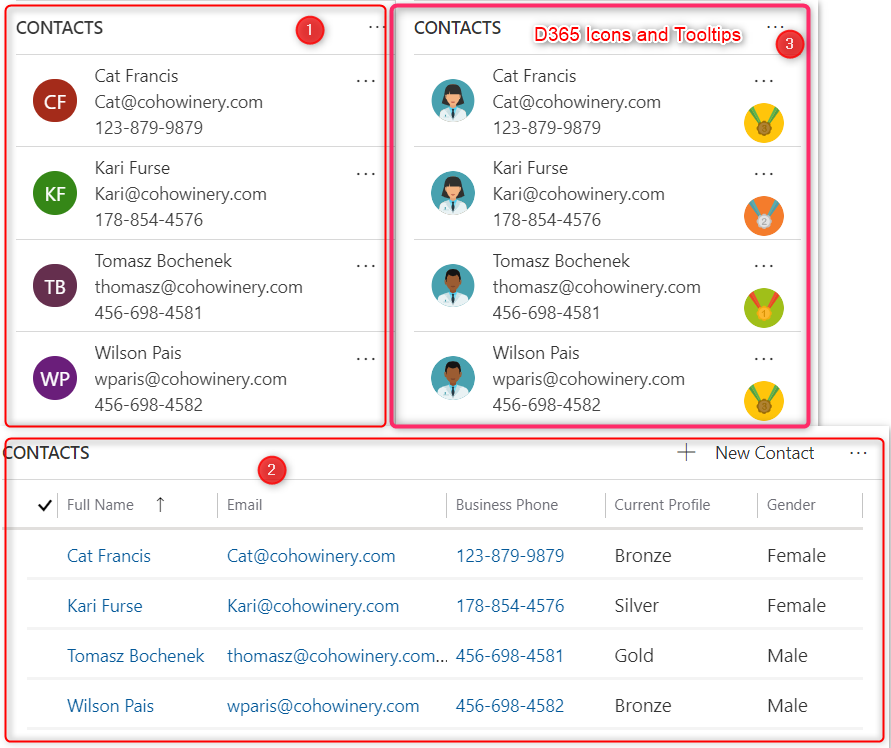
Did you know, by default with subgrid 1⃣ you can see 3 columns, and 5 columns with subgrid 2⃣. But with D365 Icons and Tooltips, you can configure another 2 picture columns (Gender, Current Profile) with subgrid 3⃣ https://t.co/5sE1C8qqiP
#MSDyn365#Dynamics365#PowerPlatform
Dataverse Dialog Builder, a managed solution helps you build Microsoft Dataverse OOB dialogs, such as the Assign dialog, Close Opportunity dialog, ...
#Dynamics365#powerapps
https://t.co/ohrPGxTHMH
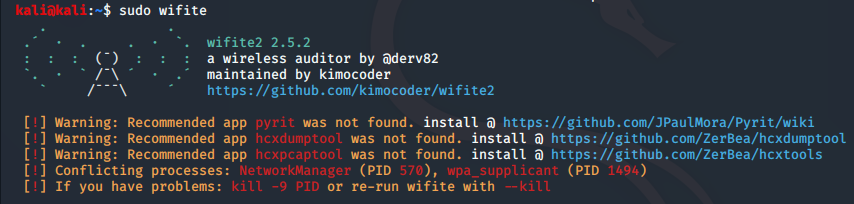
Hack Wi-Fi with one command!
Wi-Fi (802.11) Hacking: Automating Wi-Fi Hacking Across Multiple AP's and Security Protocols with wifite #wifihacking#wifite#cyberwarrior
https://t.co/KOTnC4gUU3
Just blogged 📢 : Dataverse: Create Console For Debugging Plugin Code
Create a console app for debugging plugin code. Stole this idea from @phuocle 🙇.
https://t.co/p3DPaDX6sl
#debugging#dataverse#plugindevelopment
Did you know, by default with subgrid 1⃣ you can see 3 columns, and 5 columns with subgrid 2⃣. But with D365 Icons and Tooltips, you can configure another 2 picture columns (Gender, Current Profile) with subgrid 3⃣ https://t.co/5sE1C8qqiP
#MSDyn365#Dynamics365#PowerPlatform
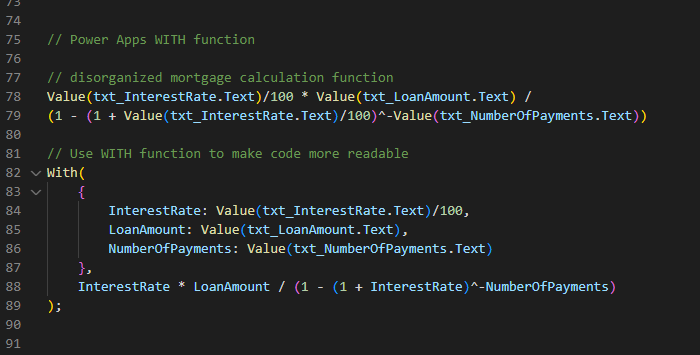
#PowerAppsTip 🔥
Use the #PowerApps WITH function to make your code more readable 📚
Did you like this tip? I've got 🔟 more of them!
🔗 https://t.co/ldekQuEx7O
I use these sites to mock-up #PowerApps ❤
Logo Generator 😼
https://t.co/f9skxcLt04
Loading Spinners 🎡
https://t.co/vzLyZG1MCE
Color Theme🎨
https://t.co/jUBHn2Vv9B
Icons 🗽
https://t.co/yXHhAYjAEC
Mock Data 💾
https://t.co/T8iCColvEt
Fake Text 📃
https://t.co/D64LaPIUPn
Happy Weekend...!!! Cleaned 14 GB space by deleting node_modules using npkill :)
A very nice tool to find all node_modules in a particular folder and also the option to delete...Thanks, @sanganikunj for the suggestion..!
https://t.co/SqQMhXXvNK
#spfx#pnp#teamsapp#tips
I present Dynamisc 365 with Azure DevOps for community Viet Nam event on Jul.2.2022. Check the repo: https://t.co/aKWbfXmML2. Goal: you can select solution(s) and deploy to instance(s) what you want. #Dynamics365#PowerApps#Dyn365#PowerAutomate
#TooLDR #86: View-FetchXML - This managed solution tool allows you to view FetchXML in pop-up dialog without downloading in Advanced Find as well as generate the JavaScript/C# code for FetchXml and WebAPI (developed by @phuocle).
https://t.co/CApGTLpP8o
New Blog Post 😃
In this #PowerApps article I show how to build a
custom theme with colors, fonts, sizes and styled controls 🎨
I'll also reveal a bunch of killer tools 😎 and techniques to help you build the theme of your dreams 🌛
🔗
https://t.co/vm1tlPUzl9