ARCHITECTING FOR THE 2026 THREATSCAPE
It's only a matter of time before bad stuff happens if all y'all are hosting client/customer workloads and there's no proper segmentation and separation.
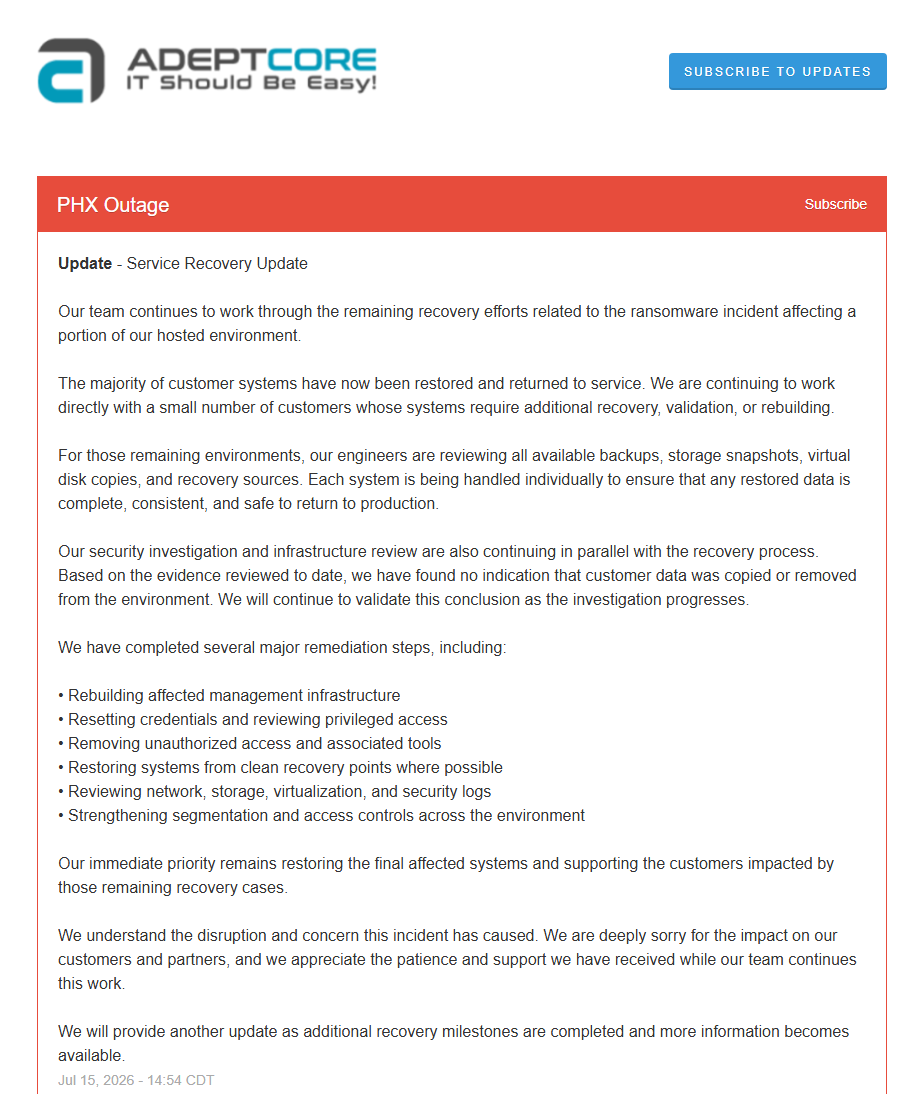
This was, and still is, a serious shit show:
https://t.co/nMobO7GDiS
We hold our client/customer environments, and thus their livelihoods, in our hands. That means that if we fail, and they fail, people could lose their business and their users would be out of work.
There is no Status Quo. We need to make sure we know where everything is and who has access to what!
And, we need to architect for hostiles!
Our KISS ADDS Paradigm Architectural Shift
ACTIVE DIRECTORY SECURITY SIMPLICITY
https://t.co/SVnIvs9K4Q
ACTIVE DIRECTORY SECURITY TIPS
https://t.co/dNNhJMAcQ0
ACTIVE DIRECTORY SECURITY: USE THE LOCAL ADMINISTRATOR PASSWORD SOLUTION!!!
https://t.co/7rJMReX7o3
Active Directory Hardening Awesomeness!
https://t.co/8R1fPZNyiR
The architecture is over and above Active Directory. Segmentation starts with users and works upwards.
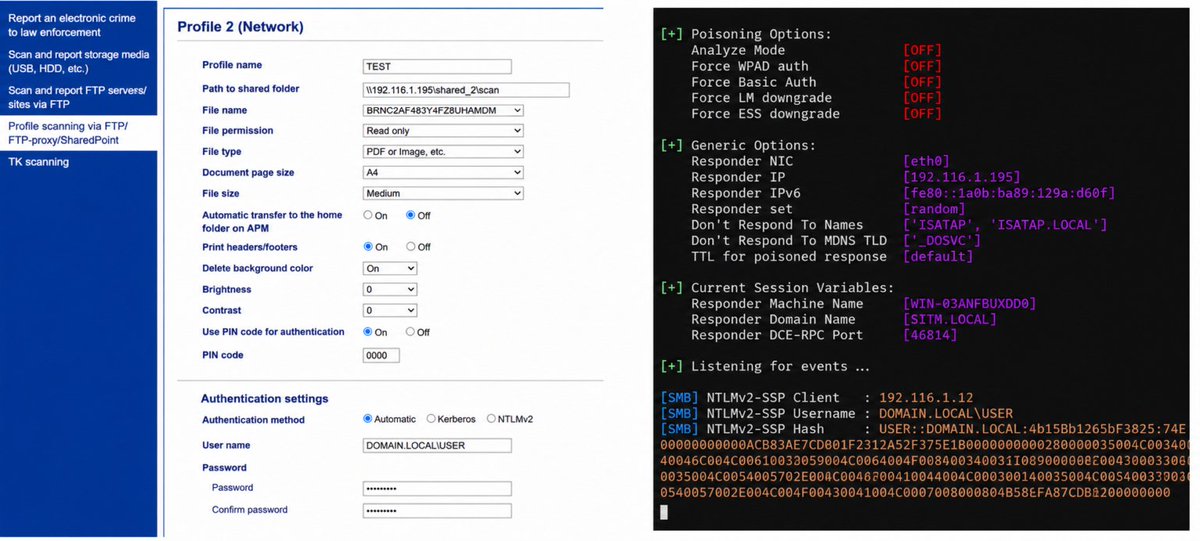
Abusing Printers to Compromise Active Directory
Modern office printers are often overlooked entry points into corporate networks. They can be abused to capture domain authentication data and ultimately facilitate a full domain compromise
We covered it in our article and gave recommendations on how to protect your environment
https://t.co/eHtWmFjeXz
@three_cube@_aircorridor
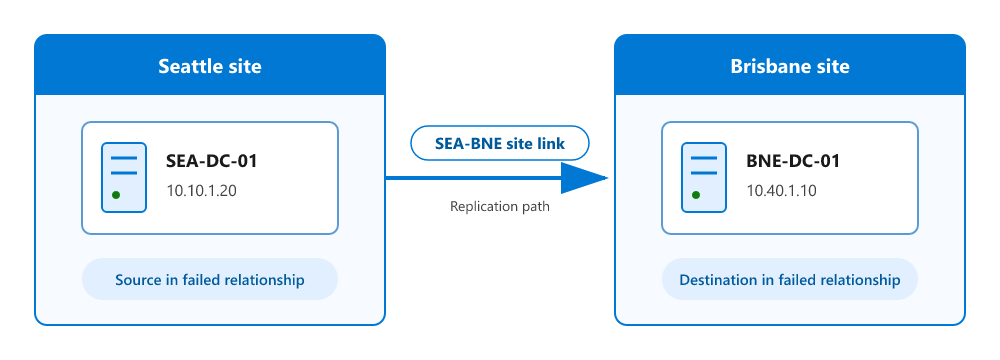
Learn how to design a resilient single-domain AD DS forest with an intentional namespace, DNS architecture, site topology, replication model, and domain controller placement. https://t.co/R3S5GSODvj
✨ Bringing this back around because it's worth a read. If you're an IT admin setting policy, a maker building agents, or an end user working in Microsoft 365 Copilot, this blog walks through how AI model choice works across Microsoft 365.
👉 https://t.co/6fAIxK4iE4
#Microsoft365 #Microsoft365Copilot #ITAdmins
ACTIVE DIRECTORY: QUICK AND EASY DEAD DC RECOVERY
If we catch it quick enough we can run a restore via Veeam.
The catch being image based backups that get restored can cause USN Rollback if the restore point is too far back, this could be hours, or trust related issues as machine passwords rotate on the domain.
Same issue with the restore point the further away it is from current the more likely we’re going to need to reset the machine password.
The steps are simple:
1.Turn the dead DC VM off
2.Mount the Windows Server installer .ISO
a.Ours uses AutoUnattend.XML to make things really quick
3.Clean Active Directory
a.Delete the AD Object in ADUC & Sites
b.Clean DNS Records in all folders
https://t.co/LonxLyYfdL a quick NTDSUtil Metadata clean-up check
4.FSMO Roles
a.Seize them if needed
b.We always have them on the _same_ DC along with Time
5.Verify Replication
a.Make sure everything is happy
6.Install the OS
a.Configure the Network
b.Add the Roles
c.DCPromo
d.Transfer FSMO Roles back
e.Set up Time
7.Done
I think that about covers it.
NOTE 1: We auto-update _all_ managed DCs across our client's environments, our environments, and our hosting environments.
NOTE 2: The DHCP Server setup should be exported regularly via PowerShell. That then allows for a fast restoring of the DHCP setup on the temporary PDCe and the subsequent transferring back to the newly minted PDCe.
🐧 Day 29/30 — #Linux
Installing Linux is only the first step.
Keeping it secure requires continuous hardening to reduce vulnerabilities and protect systems from unauthorized access and cyber threats.
Linux Hardening – Secure Configuration and Best Practices
Linux hardening is the process of strengthening a system by minimizing its attack surface and applying security best practices.
Keep the System Updated
Regular updates ensure your system receives the latest security patches and bug fixes.
Examples:
→ sudo apt update && sudo apt upgrade
→ sudo dnf update
→ sudo pacman -Syu
Remove Unnecessary Software
Every installed package increases the potential attack surface.
Best practice:
→ Uninstall services and applications you don't use.
Secure SSH Access
SSH is often the primary entry point to Linux servers.
Recommended practices:
→ Disable root login
→ Use SSH key authentication instead of passwords
→ Use strong passphrases
→ Change the default SSH configuration when appropriate
Configure a Firewall
Restrict network access to only the services you actually need.
Common firewall tools:
→ ufw
→ firewalld
→ iptables
Apply the Principle of Least Privilege
Grant users and applications only the permissions they require to perform their tasks.
Examples:
→ Avoid running applications as root.
→ Use groups to manage access.
→ Assign minimal file permissions.
Enable Security Frameworks
Strengthen your system using built-in Linux security mechanisms.
Examples:
→ SELinux
→ AppArmor
→ auditd
Monitor Logs Regularly
Review system logs to detect unusual activity before it becomes a serious issue.
Useful tools:
→ journalctl
→ rsyslog
→ logrotate
Protect Sensitive Data
Best practices include:
→ Encrypt important files when necessary
→ Perform regular backups
→ Verify backup recovery procedures
Security Checklist:
→ Keep software updated
→ Use strong passwords and SSH keys
→ Enable a firewall
→ Disable unused services
→ Monitor logs continuously
→ Limit user privileges
→ Perform regular backups
Why Linux Hardening Matters:
→ Reduce security risks
→ Protect sensitive information
→ Improve system reliability
→ Prevent unauthorized access
→ Build secure production environments
Linux security isn't achieved through a single tool—it's the result of consistently following proven best practices. Mastering Linux hardening prepares you to build secure, reliable systems for enterprise and cloud environments.
🐧Grab Linux Ebook: https://t.co/DeHjJ1Wubf
#Linux #LinuxTutorial #LinuxSecurity #CyberSecurity #DevOps #SystemAdministration #LinuxHardening #OpenSource #CloudComputing #100DaysOfCode
ACTIVE DIRECTORY PDCe DEAD - WHAT TO DO?
This is to augment the earlier post (link at the bottom).
Why? Because someone reached out after the original post and indicated Product Support killed an AD that should know better by restoring both DCs!
In an all dead scenario only restore the PDCe!
Then start with Step 5
- Check to make sure the FSMO Roles are there
- Check SYSVOL and NETLOGON are shared
- Check the AD Event Logs for any further issues
- Create a new TEST GPO
-- Check SYSVOL for the new GUID
If we still have DCs up with the PDCe dead then the following:
1.Evaluate SYSVOL Version Number
2.Check all DCs
3.DC with the _latest_ Version SEIZE the FSMO ROLES!
https://t.co/wSOuZTh2q6 _NOT_ under any conditions restore the original PDCe
5.Verify successful FSMO Role seating across all DCs
a.# Check FSMO
b.Get-ADForest | Format-Table SchemaMaster,DomainNamingMaster
c.Get-ADDomain | Format-Table PDCEmulator,RIDMaster,InfrastructureMaster
6.Verified?
a.Clean Active Directory of the Defunct PDCe
i.Delete the AD Object in Sites
ii.Clean DNS Records in all folders
https://t.co/4IlFsgqDc6 a quick NTDSUtil Metadata clean-up check
b.Mount the Windows Server installer .ISO
i.Ours uses AutoUnattend.XML to make things really quick
c.Install the OS
https://t.co/YooSjxXY1y
ii.Roles
iii.DCPromo
d.FSMO Roles
i.Transfer FSMO Roles to the newly stood up VM
1.NOTE: Replication NEEDS TO BE 100%!!!!
2.Check GPMC and run the Report!
ii.NOTE: We always have the Roles on the _same_ DC along with Time
e.Verify Replication
i.Make sure everything is happy
f.Set Up Time
i.W32tm steps to configure /Reliable:YES
g.Done
If it looks like the technician is flipping the mouse around looking for things, thus it LOOKS LIKE they don't know what they are doing STOP THEM and ESCALATE!!!
FIX TRUST ISSUES
1.Log on as local admin after a reboot
1.$Domain = "MyDomain.LAN"
2.$NETBIOS = "MyDomain"
3.$DomainAdmin = "MyDomainAdmin"
4.Test-ComputerSecureChannel -Credential "$($NETBIOS)\$($DomainAdmin)" -Repair
5.Test-ComputerSecureChannel
1.Should be TRUE = Fixed
2.Log off
3.Log on with a domain user
1.Should be fine
THE EARLIER POST:
https://t.co/wg8HSOTzTC
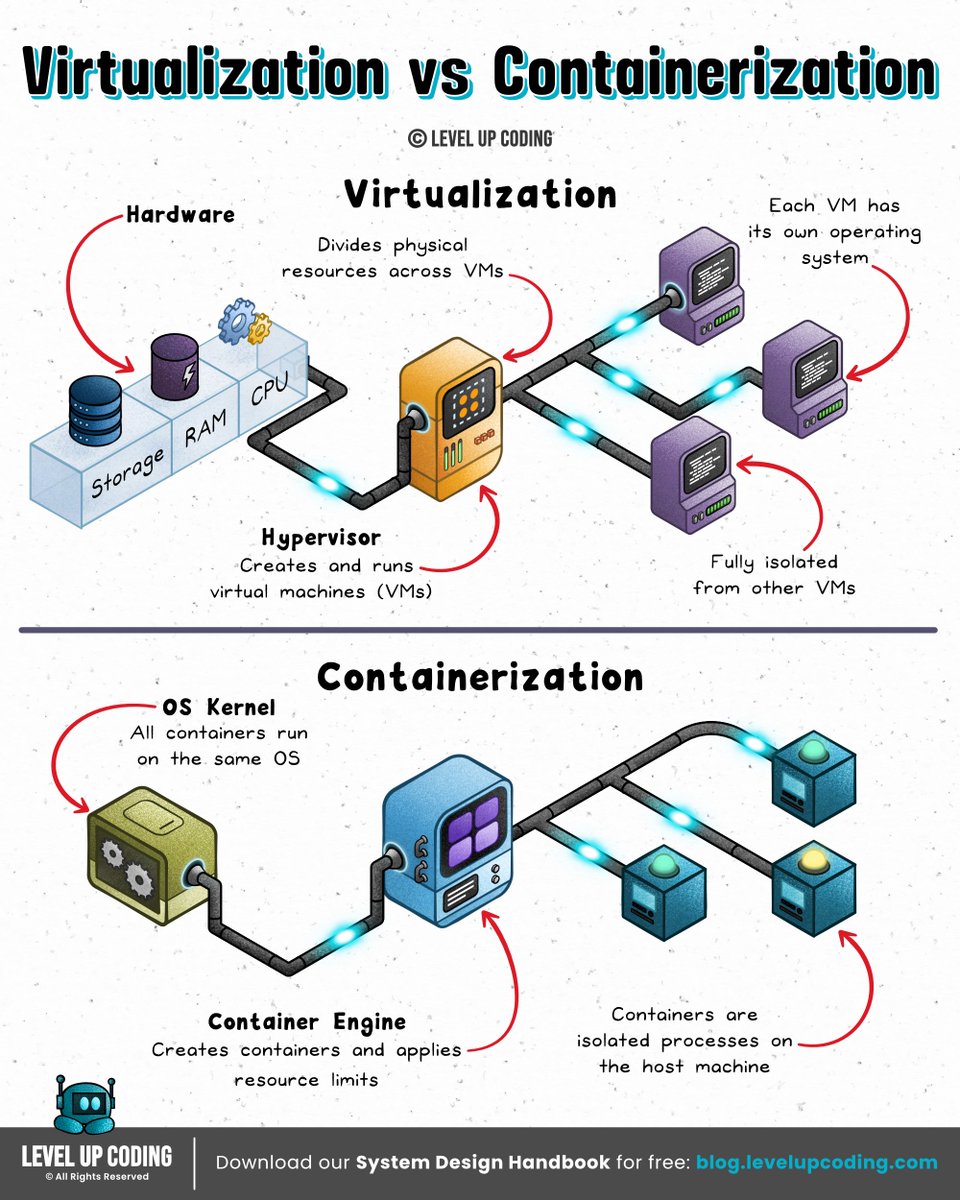
Virtualization vs Containerization
𝗩𝗶𝗿𝘁𝘂𝗮𝗹𝗶𝘇𝗮𝘁𝗶𝗼𝗻 (VMs) gives each workload its own full machine with its own guest OS and kernel. Great for isolation and OS flexibility, but you’re paying the cost of booting and managing entire operating systems for every workload.
𝗖𝗼𝗻𝘁𝗮𝗶𝗻𝗲𝗿𝗶𝘇𝗮𝘁𝗶𝗼𝗻 runs workloads as isolated processes on a shared OS. It’s fast and efficient; but with weaker isolation and more constraints around security and OS compatibility.
VMs give you strong boundaries and full environments. Containers give you speed and efficient delivery.
They're not mutually exclusive, they are complementary technologies. Modern systems often run containers inside VMs to combine the speed of containers with the isolation of virtual machines.
What else would you add?
——
𝗔𝗿𝗲 𝘆𝗼𝘂 𝘀𝘂𝗿𝗲 𝘆𝗼𝘂𝗿 𝗿𝗲𝘀𝘂𝗺𝗲 𝗽𝗮𝘀𝘀𝗲𝘀 𝗔𝗧𝗦 𝘀𝗰𝗮𝗻𝘀? Check by using Kickresume’s ATS Resume checker.
Check your ATS score here → https://t.co/zr1zg3oVhH
Thanks to our sponsor Kickresume who helps keep our content free.
——
♻️ Repost to help others learn and grow.
➕ Follow me ( @NikkiSiapno ) to improve at system design.
Day 4/60 - System Design Series 🚀
Database Replication
Database Replication can be used in many DBMS, usually with a master/slave relationship between the original (master) and the copies (slaves).
- Master DB generally only supports write operations.
- Slave DB gets copies of the data from Master DB and only supports read operations
All the data modifying commands like insert, delete or update must be sent to master DB. Most applications require much higher ratio of reads to writes; thus, the number of slave DBs is usually larger than the number of master databases.
Advantages of database replication:
- Better Performance: More queries processed parallely which improves the performance
- Reliability: Due to natural disaster database servers are destroyed then data is still preserved. No need to worry about data loss because its replicated across multiple locations.
- High Availability: Even if one of DB is offline you can access data stored in another database server.
Stateful vs Stateless Design — What's the Difference?
Stateless design is a powerful model that has led to the development of simple yet highly scalable and efficient applications.
“State” refers to stored information that systems use to process requests. This information can change over time as users interact with the application or as system events occur.
What are stateful applications?
Stateful applications store data like user IDs, session information, configurations, and preferences to help process requests for a given user. A stateful design allows applications to provide a personalized experience to their users while removing the need to share data across multiple requests.
The birth of stateless design
As applications grew in complexity and received increasing amounts of traffic, the limitations of stateful design became apparent. Managing and maintaining session data adds significant performance overhead and complexity to a system. This complexity made it difficult for systems to scale horizontally as sharing state across multiple instances becomes a challenge.
The rapid need for scalability and efficiency drove the popularity of stateless design. Instead of having mechanisms for state management, requests contained all the information needed to process it. This allowed systems to handle high levels of requests while adding flexibility to how the system scales, making it more resource efficient.
The key applications of stateless design have been pivotal in several areas:
🔶 Microservices & serverless computing: they exemplify statelessness, enabling services and functions to operate independently, thus enhancing scalability & resource efficiency.
🔶 RESTful APIs & CDNs: by each API call or request containing all necessary information, stateless design simplifies operations and improves content delivery speeds.
However, stateless design also presents certain challenges:
🔷 Larger request sizes: the need to include complete data in each request can result in increased data transfer, affecting performance.
🔷 Transmission inefficiencies: constantly sending full data sets can be less efficient than accessing centralized data in stateful designs.
🔷 Not always ideal: in scenarios inherently requiring state, such as complex user interactions, stateless design can add more complexity instead of simplifying the process.
Most applications pick a hybrid approach between stateful and stateless design depending on the needs and constraints of each component. The key to a well-designed system is balance. It should be scalable, simple, & fast without sacrificing functionality.
~~
Thank you to our partner Postman who keeps our content free to the community.
📣 Postman has a special online event. They’re demonstrating how AI and Flows enhance API development.
Secure your seat before they run out (it’s free): https://t.co/P4yjbq4lgR
Azure Solutions Architect Expert Certification FREE Course -AZ 305-
Are you ready to elevate your expertise in designing cloud and hybrid solutions on Microsoft Azure?
The Azure Solutions Architect Expert Certification exam measures your ability to accomplish the following technical tasks:
- Design identity,
- Could Solution Governance
- Monitoring Cloud solutions
- Design data storage solutions
- Design business continuity solutions
- Design infrastructure solutions
Course Link:
Link: 1
https://t.co/xdPiKYH41P
Youtube link:
https://t.co/kIOm2oMrO4
Follow @ZabihullahAtal for Free Tech Knowledge, Updates, and Career Growth!
#Azure #AzureCloud #MicrosoftAzure
gRPC & RPC Frameworks
Introduction
→ gRPC (Google Remote Procedure Call) is a modern, high-performance framework that enables communication between services in different systems.
→ It is based on the concept of Remote Procedure Calls (RPC), where a program can directly execute a function on another server as if it were local.
What is RPC?
→ RPC (Remote Procedure Call) allows one system to request a service or function on another system over a network.
→ The client calls a remote function, passes parameters, and receives the result — similar to calling a local function.
How gRPC Works
→ Uses HTTP/2 as its transport protocol for faster, multiplexed connections.
→ Relies on Protocol Buffers (protobuf) for defining services and message data structures.
→ Client stubs and server code are auto-generated from .proto files, reducing manual setup.
→ Supports multiple programming languages, making it ideal for microservices communication.
Key Features of gRPC
→ Bi-directional Streaming → Enables both client and server to send messages continuously.
→ Strong Typing → Uses Protocol Buffers for structured, type-safe communication.
→ Performance → Lightweight and faster than traditional REST APIs.
→ Cross-Language Support → Works across Java, Python, Go, Node.js, and more.
gRPC vs REST
→ REST uses JSON over HTTP/1.1, while gRPC uses Protocol Buffers over HTTP/2.
→ gRPC is binary and faster, while REST is text-based and easier to debug.
→ REST fits public APIs well; gRPC excels in internal microservices communication.
Common RPC Frameworks
→ Apache Thrift → Developed by Facebook, supports multiple languages and transports.
→ JSON-RPC → Lightweight text-based protocol using JSON for requests and responses.
→ XML-RPC → Early RPC format using XML over HTTP.
→ gRPC → Modern standard for high-performance RPC communication.
Best Practices
→ Use gRPC for internal service-to-service communication.
→ Implement authentication and encryption using TLS.
→ Monitor latency and handle retries for network resilience.
→ Combine with API gateways for hybrid REST and gRPC architectures.
👉 Grab the Backend Development with Projects Ebook here:
https://t.co/QdeNEmql5g
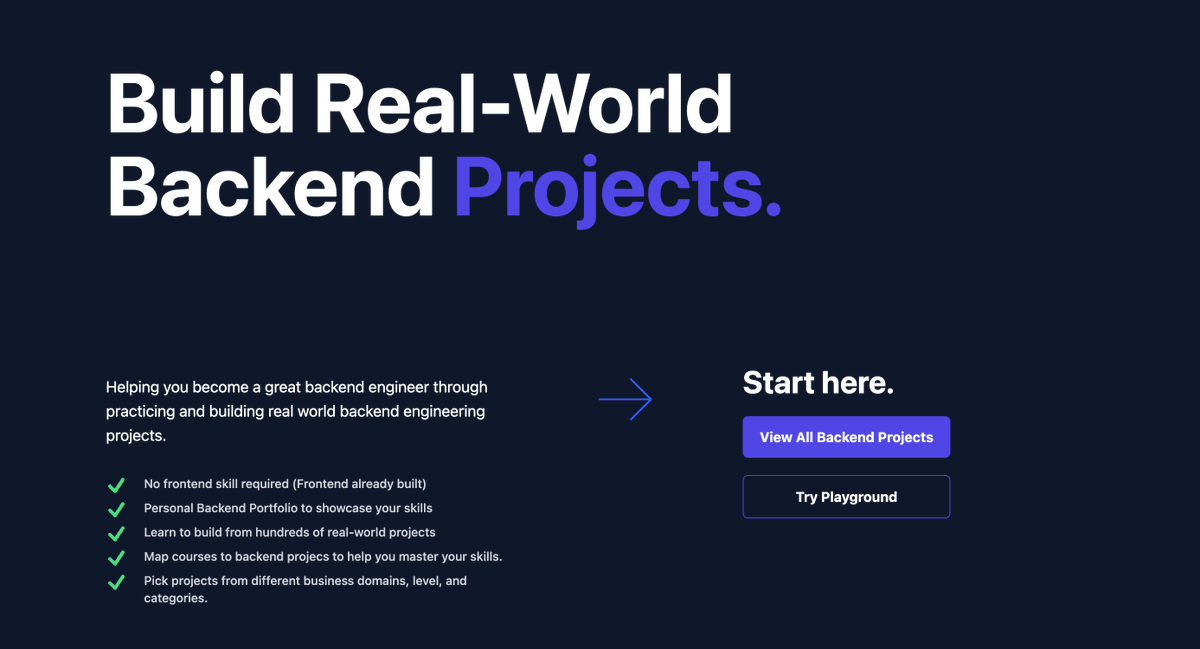
Backend Project Ideas for Developers
Beginner Backend Projects
-> REST API for To-Do List
-> Simple User Authentication System (JWT)
-> Notes API with CRUD operations
-> Blog API with posts and comments
-> URL Shortener API
-> Basic File Upload API
-> Contact Form Backend (email integration)
-> Simple Chat API (no real-time)
-> Weather API Proxy Server
-> Random Quote API
-> Product Catalog API
-> Inventory Management API
-> Basic Logging Service
-> Newsletter Subscription API
-> API Rate Limiter
-> Password Reset System
-> Session-based Authentication System
-> Role-Based Access Control (RBAC) API
-> Email Verification System
-> Pagination & Filtering API
-> Image Upload & Storage API
-> Basic Notification Service
-> Bookmark Manager API
-> Comment Moderation API
-> Simple Voting/Poll API
-> Markdown Blog Backend
-> Multi-user Notes Backend
-> File Metadata API
-> Download Manager API
-> Basic Search API
-> API Key Management System
-> Feature Flag Service
-> Simple Scheduler API (cron jobs)
-> Currency Converter API (external API integration)
-> URL Metadata Scraper API
-> API Usage Analytics Backend
-> Feedback Collection API
-> Survey Backend System
-> Affiliate Tracking Backend
-> Basic Payment Integration Backend (Stripe sandbox)
-> Referral System Backend
-> Image Resizer API
-> File Compression API
-> Simple Backup Service
-> Task Queue with Redis (basic)
-> Multi-language API support
-> CSV Import/Export API
-> Basic Report Generator API
-> API Documentation Generator
Intermediate Backend Projects
-> Real-time Chat Backend with WebSockets
-> Full Blog Backend with authentication & comments
-> E-commerce Backend (products, cart, orders)
-> Multi-tenant SaaS Backend
-> Social Media Backend (posts, likes, follows)
-> Notification System with queues (RabbitMQ/Kafka)
-> URL Shortener with analytics
-> OAuth2 Authentication Server
-> API Gateway with routing & rate limiting
-> Microservices-based User Service
-> Order Management System
-> Inventory Microservice
-> Recommendation Engine Backend
-> Search Engine Backend with Elasticsearch
-> Image Processing Service
-> Video Upload & Streaming Backend
-> Real-time Collaboration Backend (like Google Docs)
-> Payment Processing Backend (Stripe/PayPal)
-> Subscription Billing System
-> Multi-role Permission System
-> Audit Logging System
-> Distributed File Storage System
-> Email Service with templating
-> Push Notification Backend
-> Webhook Delivery System
-> Background Job Processing System (Celery/Bull)
-> Data Aggregation Service
-> Analytics Dashboard Backend
-> Metrics Collection Service
-> Log Aggregation System
-> Event-driven Architecture Backend
-> Message Queue System
-> API Caching Layer (Redis)
-> Distributed Cache System
-> Rate Limiting Middleware (advanced)
-> Feature Toggle Service (advanced)
-> API Versioning System
-> Schema Migration Tool
-> Database Sharding Implementation
-> Multi-database Support System
-> File CDN Backend
-> API Security Scanner Backend
-> GraphQL Backend Server
-> Hybrid REST + GraphQL API
-> Real-time Stock Price Backend
-> Multiplayer Game Backend
-> Location Tracking Backend
-> Geo-based Search Backend
-> Ride-sharing Backend (basic)
-> Food Delivery Backend (basic)
Advanced Backend Projects
-> Full Microservices Architecture System
-> Distributed System with Service Discovery
-> API Gateway with Load Balancing & Circuit Breaker
-> Kubernetes-based Backend Deployment System
-> Serverless Backend (AWS Lambda / Cloud Functions)
-> Scalable Chat System (millions of users)
-> Distributed Job Queue System
-> Real-time Data Streaming Platform (Kafka)
-> Event Sourcing + CQRS System
-> High-scale E-commerce Backend (Amazon-like)
-> Scalable Social Network Backend
-> YouTube-like Video Streaming Backend
-> Netflix-like Content Delivery Backend
-> Uber-like Ride-sharing Backend (full system)
-> Food Delivery Platform Backend (Swiggy-like)
-> Distributed Search Engine (Google-like basics)
-> Full Authentication System with SSO
-> Identity & Access Management (IAM) System
-> Blockchain-based Backend System
-> Payment Gateway System (Stripe-like)
-> Fraud Detection Backend System
-> AI-powered Recommendation Backend
-> Real-time Analytics Platform
-> Data Pipeline System (ETL processing)
-> Distributed Logging System (ELK stack)
-> Observability Platform (metrics, logs, traces)
-> Multi-region Database Replication System
-> Global CDN Backend
-> High-performance Cache System (Redis cluster)
-> Distributed Locking System
-> Feature Store for Machine Learning
-> Real-time Collaboration System (Google Docs-level)
-> Multiplayer Game Server Infrastructure
-> IoT Data Processing Backend
-> Smart Home Backend System
-> AI Chatbot Backend (LLM integration)
-> AI Code Execution Sandbox Backend
-> API Marketplace Platform
-> SaaS Platform Builder Backend
-> No-code/Low-code Backend Engine
-> DevOps Automation Backend
-> Continuous Integration Backend (CI system)
-> Continuous Deployment Backend (CD system)
-> Container Orchestration Backend
-> Cloud Cost Optimization Backend
-> Security Monitoring Backend (SIEM-like)
-> Threat Detection System Backend
-> Large-scale Notification System (millions/sec)
-> Distributed Rate Limiting System
-> High-scale File Storage System (S3-like)
-> Real-time Financial Trading Backend
Backend Projects Ebook
If you want complete backend projects with source code, architecture, and real-world implementations, check out this ebook:
Backend Projects with Source Code
https://t.co/QdeNEmpNfI
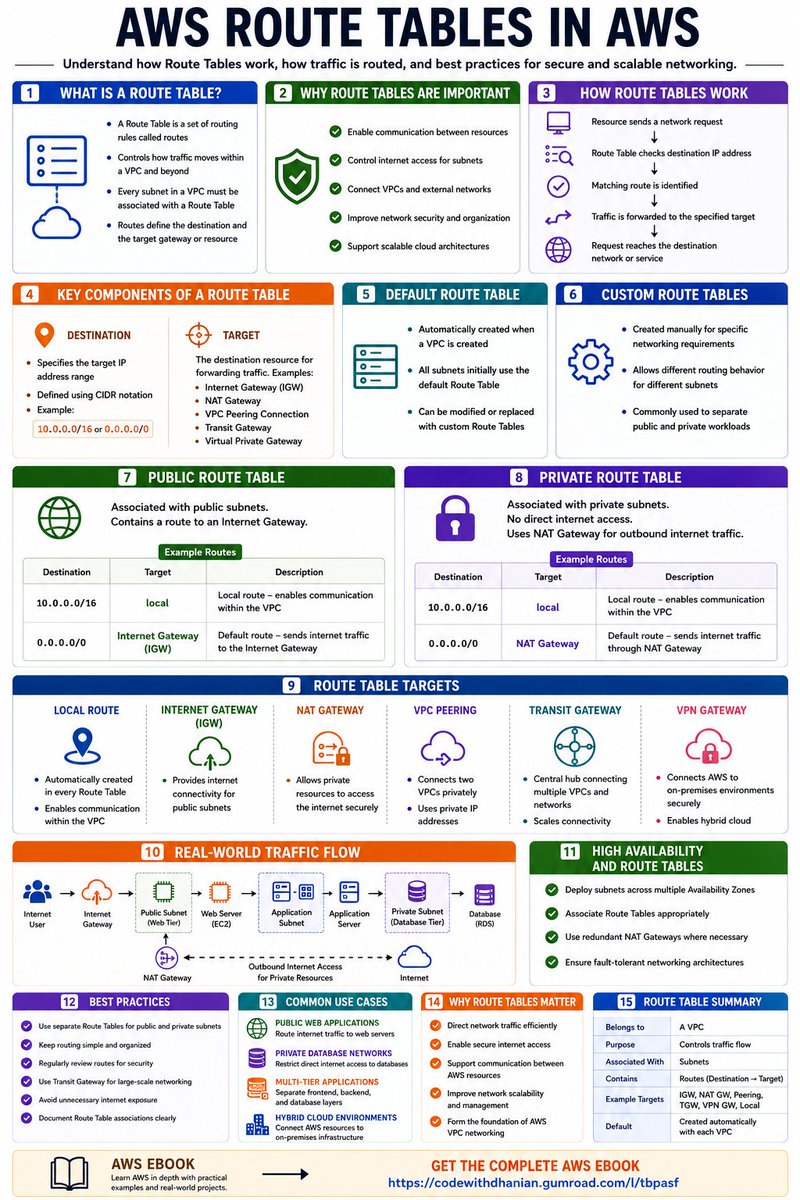
AWS ROUTE TABLES IN AWS
INTRODUCTION
AWS Route Tables are networking components within a Virtual Private Cloud (VPC) that determine how network traffic is directed. They act like road maps, telling AWS where data packets should go when they leave a subnet.
WHAT IS A ROUTE TABLE?
→ A Route Table is a set of routing rules called routes
→ Controls how traffic moves within a VPC and beyond
→ Every subnet in a VPC must be associated with a Route Table
→ Routes define the destination and the target gateway or resource
WHY ROUTE TABLES ARE IMPORTANT
→ Enable communication between resources
→ Control internet access for subnets
→ Connect VPCs and external networks
→ Improve network security and organization
→ Support scalable cloud architectures
HOW ROUTE TABLES WORK
→ Resource sends a network request
→ Route Table checks destination IP address
→ Matching route is identified
→ Traffic is forwarded to the specified target
→ Request reaches the destination network or service
KEY COMPONENTS OF A ROUTE TABLE
DESTINATION
→ Specifies the target IP address range
→ Defined using CIDR notation
→ Example: 10.0.0.0/16 or 0.0.0.0/0
TARGET
→ The destination resource for forwarding traffic
→ Examples include: → Internet Gateway (IGW)
→ NAT Gateway
→ VPC Peering Connection
→ Transit Gateway
→ Virtual Private Gateway
DEFAULT ROUTE TABLE
→ Automatically created when a VPC is created
→ All subnets initially use the default Route Table
→ Can be modified or replaced with custom Route Tables
CUSTOM ROUTE TABLES
→ Created manually for specific networking requirements
→ Allows different routing behavior for different subnets
→ Commonly used to separate public and private workloads
PUBLIC ROUTE TABLE
→ Associated with public subnets
→ Contains a route to an Internet Gateway
Example Routes
→ 10.0.0.0/16 → Local
→ 0.0.0.0/0 → Internet Gateway (IGW)
PRIVATE ROUTE TABLE
→ Associated with private subnets
→ No direct internet access
→ Uses NAT Gateway for outbound internet traffic
Example Routes
→ 10.0.0.0/16 → Local
→ 0.0.0.0/0 → NAT Gateway
ROUTE TABLE TARGETS
LOCAL ROUTE
→ Automatically created in every Route Table
→ Enables communication within the VPC
INTERNET GATEWAY (IGW)
→ Provides internet connectivity for public subnets
NAT GATEWAY
→ Allows private resources to access the internet securely
VPC PEERING
→ Connects two VPCs privately
TRANSIT GATEWAY
→ Central hub connecting multiple VPCs and networks
VPN GATEWAY
→ Connects AWS to on-premises environments securely
REAL-WORLD TRAFFIC FLOW
→ User Request → Internet Gateway
→ Internet Gateway → Public Subnet
→ Route Table forwards traffic to Web Server
→ Web Server communicates with Application Server
→ Application Server accesses Database in Private Subnet
→ Private resources use NAT Gateway for updates and patches
HIGH AVAILABILITY AND ROUTE TABLES
→ Deploy subnets across multiple Availability Zones
→ Associate Route Tables appropriately
→ Use redundant NAT Gateways where necessary
→ Ensure fault-tolerant networking architectures
BEST PRACTICES
→ Use separate Route Tables for public and private subnets
→ Keep routing simple and organized
→ Regularly review routes for security
→ Use Transit Gateway for large-scale networking
→ Avoid unnecessary internet exposure
→ Document Route Table associations clearly
COMMON USE CASES
PUBLIC WEB APPLICATIONS
→ Route internet traffic to web servers
PRIVATE DATABASE NETWORKS
→ Restrict direct internet access to databases
MULTI-TIER APPLICATIONS
→ Separate frontend, backend, and database layers
HYBRID CLOUD ENVIRONMENTS
→ Connect AWS resources to on-premises infrastructure
WHY ROUTE TABLES MATTER
→ Direct network traffic efficiently
→ Enable secure internet access
→ Support communication between AWS resources
→ Improve network scalability and management
→ Form the foundation of AWS VPC networking
Grab the AWS EBOOK:
https://t.co/G3pdEOq4DK
🚀 Customize SharePoint List Forms with AI using the Power Apps Canvas MCP Server
Watch 🎥: https://t.co/AtCDxGLBNQ
✅ A Modern #PowerApps form
✅ A fully tabbed form experience
✅ Power Fx formulas
Everything is built live—from the first prompt to finished app.
#SharePoint