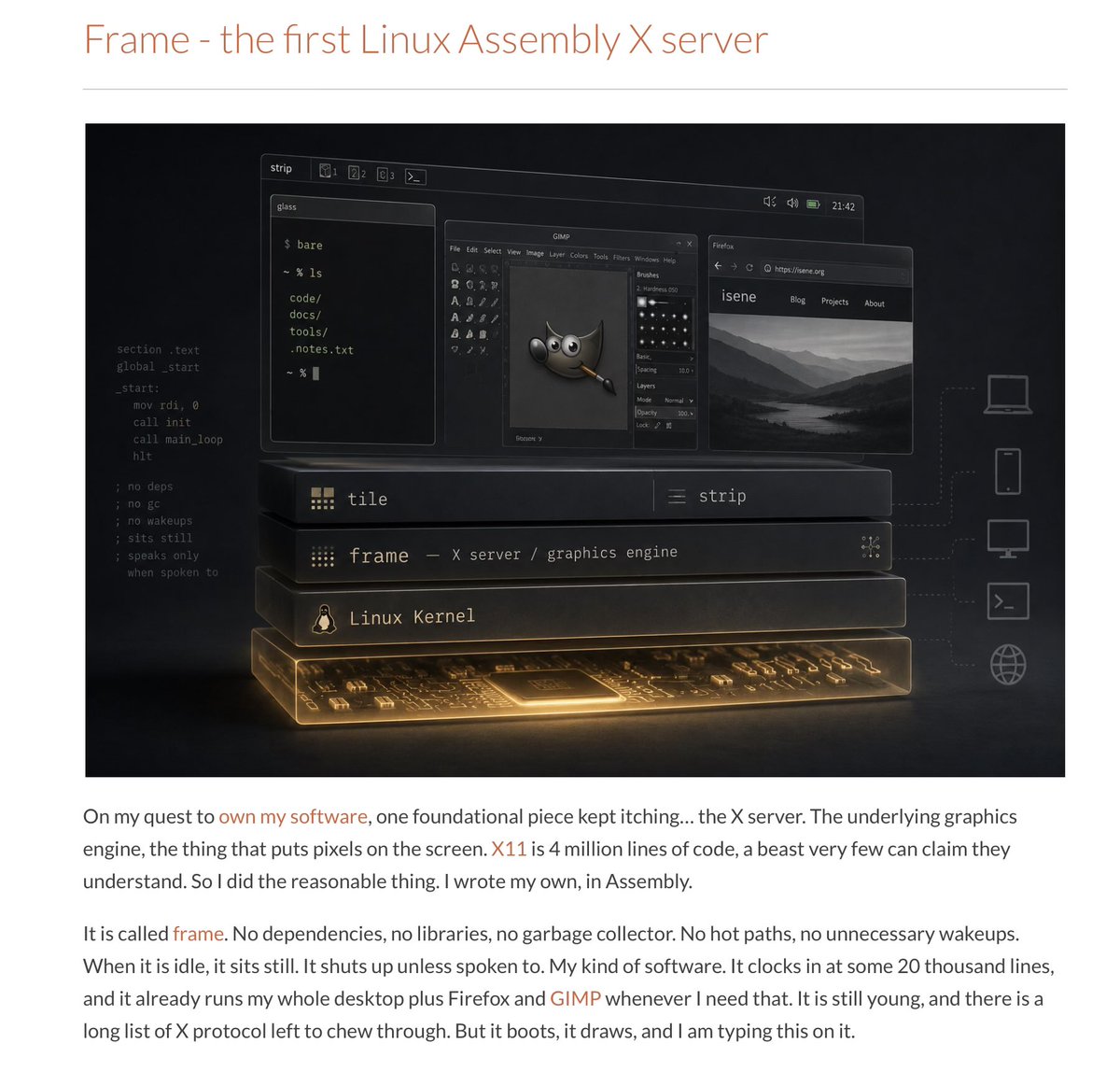
Under Linux, the graphics layer is typically handled by something called an X server. Indeed, many years ago, we thought that the defining characteristic of a user interface would be that it would be remote. Linux has generally followed this philosophy. You can often connect to a Linux box remotely and run desktop applications over the network. I think it proved much less useful than anticipated…
In any case…
A developer from Norway, Geir Isene, wrote his own X server… in assembly. That’s right. No compiler. No Rust. No C. Just assembly, with no dependencies. It is just one file containing assembly code. Assembly is one step removed from writing machine code directly.
Isene is using Claude Code to get it done.
It seems that he ended up with the same realization I had in the last year: this is the golden age for people who want to build their own software, for their own uses.
However, it is the first time I hear about such a non-trivial piece of software written… in assembly… with Claude Code. To be clear, there are large and complex software systems written in assembly… I just don’t think anyone thought of writing an X server in assembly before.
Some of my friends will object: “You can’t do that; you need the reliability of compilers and higher-level programming languages.” Maybe.
I think there are a great many unknowns today. Do programming languages matter the way they used to?
I co-founded pfSense. For the last year I've been building its successor.
If you run pfSense today, you already know the reasons to look around: development you can't influence, a CE edition that feels like an afterthought, FreeBSD driver roulette on modern hardware, and a config workflow where one bad apply on a remote box means a drive.
nfSensei is my answer. Built from scratch in Rust, on Linux, and designed around the things pfSense users actually complain about.
Your config.xml imports. There's an importer that reads your pfSense config, shows you exactly what maps over and what needs attention, then applies it. You don't start from zero.
You can't brick it from the couch. Changes stage as a candidate, diff before apply, validate through the real engines before anything is written, and auto-roll-back if you don't confirm in time. If a config ever fails at boot, the box falls back to the last good one on its own.
The hardware works. Linux base means modern NICs and drivers just work — and the fast path compiles your rules to XDP at 40Gbps.
Automation is native, not scraped. Everything the UI does is a documented API call — about 1,140 of them, with a built-in explorer. Your Ansible finally gets a real interface.
The VPNs are current. WireGuard, IPsec, Tailscale, and self-hosted mesh — your own control plane, your keys — plus post-quantum key exchange where it counts.
The experimental stuff has its own wing. Thirty-plus Labs features behind toggles: WAN bonding that fuses multiple cheap uplinks through a $5 VPS into one resilient pipe, per-flow SLA telemetry with tamper-evident audit chains, GeoDNS that steers traffic by live RTT and load, application-aware QoS, config push to a whole fleet of remote nodes, and an AI assistant on the box that reads your actual interfaces and logs using local models. Toggles are per-browser and can't touch your running config — flip things on, break them, tell me about it. Oh, and there is much more to mention here!
Self-hosted, on your hardware, no cloud account, no subscription.
It's NOW IN ACTIVE BETA (previously alpha) with about 40 testers, and bug reports typically get fixed in days. I want more people who know what pfSense does well and can tell me exactly where nfSensei falls short.
If you are interested in testing please email me: [email protected]. Tell me about your pfSense setup and I'll get you access.
Note: Affiliates and employees of Netgate are not invited.
Today, marks the official transition from Gemini CLI to the new Antigravity CLI for individual accounts.
Gemini CLI has stopped serving requests for Google AI Pro, Google AI Ultra, and free tier individual accounts.
Enterprise users with Gemini Code Assist licenses and API key authentication remain completely unaffected.
Read the full details: https://t.co/WY8FZry4wr
Three things had to line up for the stewards to overturn this.
1. The rule never says the timing system is the final word. The speeding rule (Article B1.6.3a) just says there's a speed limit, 60 km/h at Monaco. It doesn't say "speed as measured by the official timing system". Compare the false start rule (B5.11.1), which spells out exactly which system decides whether you jumped the start. Because the speeding rule names no source, the only question the stewards had to answer was: was the car actually going faster than 60? Not: did the screen say so.
2. The timekeeper proved its own number wrong. Pit lane speed is calculated as distance divided by time, and the official distance for that zone was 77 cm too long, because the barriers moved this year and opened a shorter line. The timekeeper found this itself with a laser scan after the race. Redo the maths with the correct distance and Gasly was doing 58.7 and 58.8 km/h. Under the limit, both times. The stewards actually rejected all of Alpine's own evidence; what convinced them was the official system contradicting itself.
3. The penalty could still be undone. Gasly never served his penalties during the race they were added to his finishing time afterwards, and that's the only kind the stewards have the power to erase. A penalty served at a pit stop is gone forever; nobody can give you back time you spent stationary. Alpine then filed for a review within the 96-hour deadline (Article 14 of the Sporting Code), with the new evidence the rules require. They were the only team that did.
That's why Gasly got his podium back and the other four drivers caught by the same faulty zone got nothing: all three conditions held for him, and only him.
#TodayILearned: Every Git repository has an empty tree hash: `4b825dc642cb6eb9a060e54bf8d69288fbee4904`.
It does not change from repo to repo and is created by default.
You can simply use it to generate all revisions from the start of your repo to a certain revision!
#Git#TIL
Whenever you finish working on some bugfix, verify whether similar bugs exist in other parts of the codebase you work on, including other applications. If such bugs exist, then fix them too.
You are in the context of the bug you just fixed, so it shouldn't be too hard to find and fix similar bugs.
A similar principle applies to just finished feature - think whether the usability of this feature can be improved. If yes, then improve it right now, without waiting until somebody else will create yet another feature request.
Following these principles is important for senior software engineers. Otherwise you are just junior who will be replaced with AI soon :)
Curious what is a system call and why it takes much more CPU time comparing to a regular function call (1000x more)? Then read this article. Then you'll understand why it is better to use read/write buffers in order to minimise the number of syscalls in hot paths when working with network and filesystem.
If your are interested in why VictoriaLogs is so efficient and fast, then take a look into these slides about VictoriaLogs architecture internals -
https://t.co/kR0KxEFwzo
Cloudflare's security team spent the last few weeks testing Anthropic's Mythos against fifty of our own repositories. What we learned about offensive AI, why faster patching is the wrong reaction, and what the architecture around vulnerabilities has to look like next. https://t.co/RSrRtIhgaV
This is how I optimize programs written in Go - by removing memory allocations from hot paths, while leaving the simplest readable and maintainable code without any optimisations for the rest of the program.
Hot paths consist of a very small share of all the code, so it isn't hard optimising them. The built-in memory profiler in Go significantly simplifies the optimization process.
DuckDB just released Quack: a client/server protocol over HTTP.
Any DuckDB can serve (quack_serve()), any DuckDB can attach to it.
DuckDB-Wasm included since it's plain HTTP on port 9494.
Some fun stuff :
- A browser tab talking directly to a DuckDB server somewhere on the internet
- Local-first apps with a remote target that speaks the exact same dialect
- Notebook-to-notebook query forwarding
Curious what people will build with this.
We've got a few ideas brewing at MotherDuck too :)
And while we're at it, can we finally retire the "DuckDB has no multi-writer support" take? There are plenty of options out there now, just depends how you want to slice and dice.
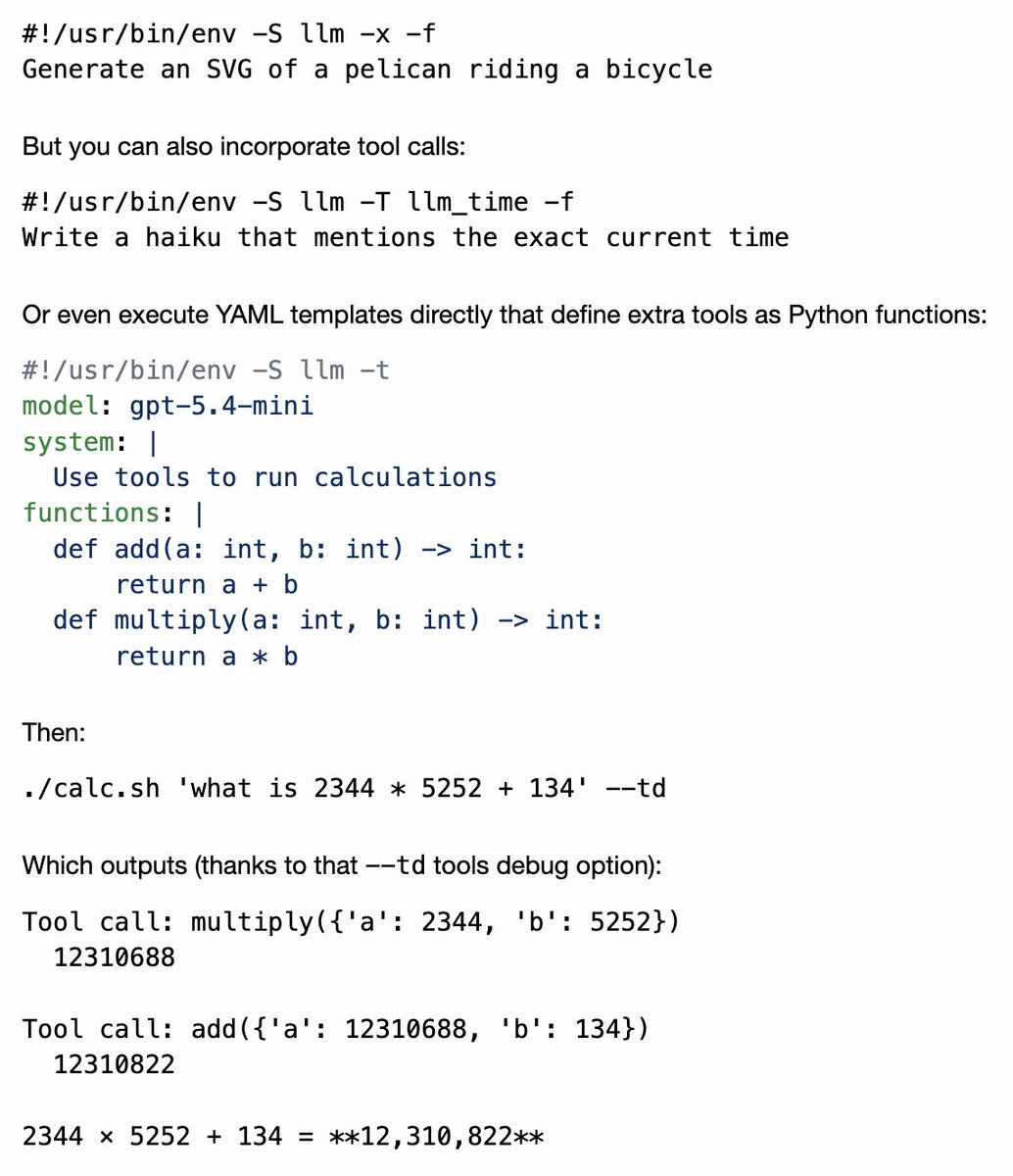
New TIL: I figured out how to use my LLM CLI tool in a shebang line, which means you can write executable scripts in English, or hook up more complex scripts with a snippet of YAML template
Grafana 13 ships Git Sync as GA!
Save dashboards directly to GitHub, GitLab, or Bitbucket, open a PR from the Save button, and sync changes back automatically.
https://t.co/nh2e3xzeu9
salesforce going headless is bigger than people realize.
software has been priced per seat for decades. the entire business model assumes a person logs in, clicks around, and gets value from a dashboard.
agents don’t log in. they make API calls.
so what happens to per-seat pricing when the primary user of your platform isn’t a person? when one company runs 50 agents that each make more API calls in a day than the entire sales team makes in a month?
every SaaS company is about to face this question. salesforce just forced it into the open by going fully headless.
the ones that figure out agent-native pricing first will own the next cycle. the ones still charging per seat while agents do the work will get left behind.