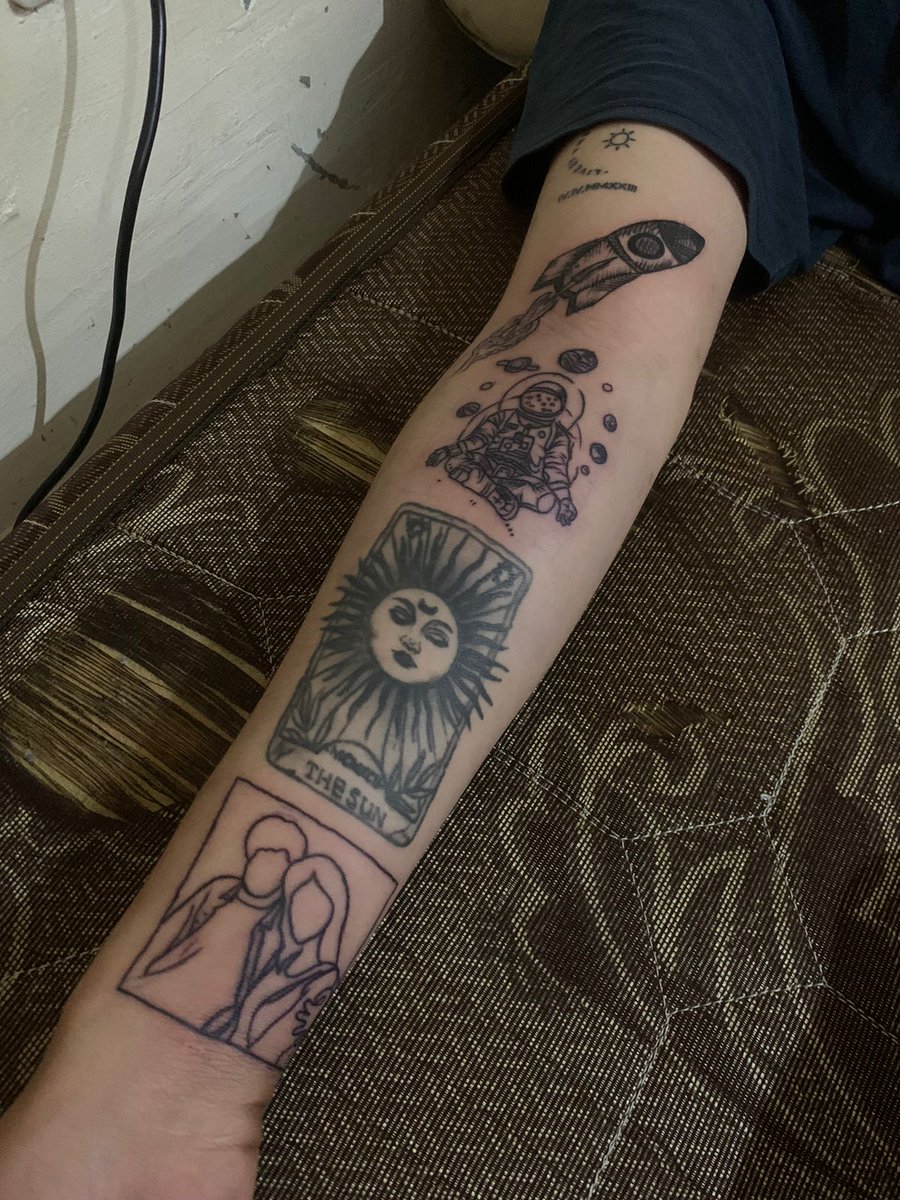
Unleash your imagination with @Sogni_Protocol — the place where your ideas come to life. And i got my tattoo design from @Sogni_Protocol — generated it in seconds.
If you can imagine it, Sogni can bring it to life.
#Sogni#AIDesign#MadeWithSogni
Coba pake 20 repo GitHub ini jika kamu ingin membuat Vidio menggunakan muse
Dengan resource ini, Muse bisa berubah jadi studio motion design. Ada skill animasi, 3D, efek sinematik, partikel, suara, sampe export final. Satu alur kerja: ide → skenario → animasi → suara → video jadi.
Udah diuji di Muss dan beberapa perlu penyesuaian environment dikit.
Btw ini gw dapet dari beberapa CT dan gw rangkumin aja
Skill & dasar animasi
1. motion-design-skill → timing, easing, 12 prinsip animasi Disney
https://t.co/t9jOyPbXMA
2. Motion → spring animation & transisi smooth
https://t.co/vECBPGQ94K
3. Remotion Skills → skill resmi bikin video profesional pake React
https://t.co/HK2WldCxJC
Visual & diagram
4. /hairline → ide atau SVG jadi animasi line art
https://t.co/LNXKdYDEWF
5. /anatomy → diagram 3D mesin & struktur interaktif
https://t.co/LJUvWJpLBe
6. /anatomy-reveal → exploded view + highlight produk
https://t.co/kF5AfOQ7AW
3D & fisika
7. Blender → rigging & animasi karakter 3D (built-in di Muse)
https://t.co/aQHyoRtFId
8. Three.js → scene 3D + kamera cinematic
https://t.co/IE7Csk2f2o
9. react-three-rapier → fisika realistis ke 3D
https://t.co/zu8aZqemxz
10. react-postprocessing → glow, depth of field, efek film
https://t.co/7EKV6oddRL
11. three.quarks → partikel & efek visual dramatis
https://t.co/sRs17alkQH
Kontrol & timeline
12. Tweakpane → sesuaikan parameter real-time
https://t.co/xprY2vp4Cb
13. GSAP → timeline animasi powerful, sekarang full gratis
https://t.co/DTlrFl1GFy
14. Remotion → engine utama bikin video pake React
https://t.co/I6FeZp2Rfs
Konten & audio
15. Manim → animasi penjelasan, formula, diagram
https://t.co/dF3VVYZotp
16. Lottie → animasi vektor ringan
https://t.co/J8w48vTvqz
17. Openverse API → SFX, ambient, musik gratis tanpa API key
https://t.co/8MiChrAIlw
18. librosa → deteksi beat biar animasi pas ketukan
https://t.co/rwvxe4S1Cz
19. WhisperX → auto-align subtitle, support Indonesia
https://t.co/PfnLoJSHFU
20. FFmpeg → export & transcode video final
https://t.co/hjTttNKT5a
Alurnya nanti seperti ini skill → skenario → animasi → suara → video jadi.
Saran saja
simpen post ini. Pas butuh bikin video, tinggal buka dan pake link-nya sesuai kebutuhan lo.
Coba aja dulu 2–3 tool di Muse lo nanti liat hasilnya. dan kembangkan biar makin bagus hasilnya
**After Effects dapat saingan kuat.**
Muse + 14 repositori GitHub gratis, studio motion lengkap langsung jadi.
Animasi, 3D, video AI, sampai suara — semuanya 0 rupiah ↓
01 **anime.js** → Mesin animasi untuk gerakan website yang halus
https://t.co/o2HWCXzXLL
02 **react-spring** → Fisika pegas biar gerakan UI terasa lebih nyata
https://t.co/AeZaqXgwWC
03 **PixiJS** → Rendering 2D cepat (partikel, efek, 60fps)
https://t.co/V8XCZYI6Lo
04 **p5.js** → Generative art hanya dengan beberapa baris kode
https://t.co/VZ3CheOBTc
05 **matter-js** → Fisika 2D nyata (jatuh, memantul, bertabrakan)
https://t.co/XNi2LAROHE
06 **D3** → Grafik dan visualisasi data yang bergerak
https://t.co/ctLxqMYdsI
07 **Motion Canvas** → Animasi 2D yang ditulis dengan kode (bukan keyframe)
https://t.co/FY1xDhudmL
08 **Blender** → Buat dan render 3D dengan Python
https://t.co/ZDUrrdXSyY
09 **Three.js** → Scene 3D yang berjalan di browser
https://t.co/tkZfhHsetb
10 **Remotion Skills** → Skill resmi untuk membuat video dengan AI
https://t.co/4DCXJN6xkT
11 **Lottie Web** → Putar animasi After Effects langsung di web
https://t.co/YaJ2LllN6t
12 **RIFE** → Interpolasi frame untuk slow-motion yang halus
https://t.co/ZjEUAhBRwO
13 **MusicGen** → Buat BGM dari deskripsi teks
https://t.co/2R5gUXJVYQ
14 **Tone.js** → Synthesizer, beat, dan efek suara di browser
https://t.co/8CFedKz7sm
Gerakkan → Simulasikan → Grafik → Gambar → 3D → Generate → Tambahkan suara
Semua 14 tools sudah diuji berjalan di Muse tanpa GPU (sebagian perlu penyesuaian lingkungan).
※ Model MusicGen hanya untuk non-komersial. Remotion gratis untuk tim maksimal 3 orang.
Tanpa langganan. Tanpa Adobe. Tanpa render farm.
Simpan dan coba buat sesuatu malam ini ↓
@Asentum Let's go! The ecosystem is really taking shape. Just launched my first token on AsePad and farming XP daily. Post-quantum + JS smart contracts is a combo worth watching. @Asentum#asentum
Nearly 45M $ASE staked on Ethereum ⚡️
Over 500 participants unlocking up to 10x XP.
Post-quantum architecture, JavaScript smart contracts and growing ecosystem are taking shape with more people getting involved each day.
Unleash your multiplier 👇
https://t.co/in6R6hVfk1
Nearly 45M $ASE already staked on Ethereum for up to 10x XP on @Asentum. The multiplier stacks with your streak and social boost. Free to start, the testnet faucet gives you gas to play with. #asentum
https://t.co/Hwe1AeeGNy
Just tried Auras v2 on @Asentum the upgraded AMM is noticeably faster, and Quantrix wallet makes the whole ecosystem easy to use. Post-quantum L1, JavaScript smart contracts, 2s blocks. The testnet actually pays you to use it. #asentum
Asentum's incentivized testnet is live! Earn XP for every on-chain action swaps, LP, token launches and it counts toward the $ASE airdrop. Post-quantum L1 with JavaScript smart contracts. Start here 👇
https://t.co/Hwe1AeeGNy
#asentum@Asentum
Akhirnya nemu cara gratis bikin video motion animasi kayak gini.
Modalnya 0 rupiah, Cuma pakai HP. Tanpa aplikasi editing, tanpa langganan Claude Pro.
Awalnya sempet ikut kelas berbayar biar cepet paham. Tapi pas masuk teknis, hampir semua alatnya berbayar dan nggak ramah buat pengguna HP, rata-rata wajib laptop kayak Claude Code.
Daripada berhenti di tengah jalan, gue ambil prinsip kerjanya aja, lalu racik ulang arsitekturnya dari nol supaya jalan di HP.
Bagian paling makan waktu bukan bikin satu video jadi, tapi trial & error nyambungin tiap alat sampai jadi workflow yang repeatable, tinggal pakai berulang.
Kalau mau bikin video dengan style baru, gue tinggal cari video referensi terus kirim linknya.
Sekarang tim produksi gue jalan semua dari HP, otomatis dan gratis:
• Muse → otak, naskah, dan ngatur scene
• HyperFrames → render kode jadi animasi
• Gemini → VO narasi
• Three.js, Whisper, FFmpeg → 3D, caption, dan audio di belakang layar
• ElevenLabs (opsional)
Gak ada satu alat ajaib. Yang ada sistem yang dirakit sesuai alat yang gue punya.
Ini semua alat yang gue pakai, lengkap di video 👇
Introducing ZK-NPoS: Zero-Knowledge Nominated Proof-of-Stake.
Orbinum brings ZK privacy to Substrate's NPoS, enabling private participation in validator nomination pools.
Private by default. Disclosed by choice.
🎥 How it works:
Keren nih. hasil muse bisa sebagus ini.
sayangnya generate nya mentok hanya 10 detik, andaikan bisa 30 detik orang pasti banyak yang pake.
prompt:
Webcam recording video, vertical 9:16, 720p, shot on a laptop webcam. The
girl sits in front of her laptop, recording herself.
SUBJECT: The young woman in the reference image — same face, same long dark
brown hair with stray hairs against her cheek, same delicate makeup (pink
coral lips, light eyeliner). She wears a BLUE short-sleeve ribbed top. Use the reference image
ONLY as a character-appearance reference: do NOT lock it as the first frame.
SCENE: Indoor room, she sits in front of her laptop, recording on its webcam.
Plain white wall behind her. The laptop screen glows softly on her face —
but the laptop itself is NEVER visible in the frame.
FRAMING: Face and shoulders only throughout the whole video. Every shot stays
at face-close or shoulders-up framing. No shots below the shoulders, no body
framing, and the laptop is never visible.
MUSIC AND SOUND: Original female-vocal R&B-pop with clear rhythm, BPM around
100-108, low-frequency bass + short, punchy electronic drum hits. Camera
moves and quick cuts are all timed to the drum beats. Layer in sounds of hair
flicking, close-range breathing, light laughter, soft laptop keyboard taps,
and indoor ambient noise. NO dialogue, NO lip-syncing — the girl herself
speaks no words at all.
CAMERA AND EDITING LOGIC: Not a single smooth one-take shot. She records
herself on her laptop webcam, leaning toward the screen for sudden face
close-ups, then leaning back to shoulders-up; quick jump cuts between
face-close shots and slightly farther shots, plus slight shifts in framing
as she leans. The laptop is never visible — the camera only ever shows her
face and shoulders. Every lean-in makes the viewer feel extremely close to her.
Webcam look: slight softness, auto-exposure pumping, compression artifacts.
VISUAL SEGMENTS (10 seconds):
1) 0-2.5s, opening webcam shot, shoulders-up: She settles in front of the
laptop, soft shy smile, eyes glancing at the lens then at the screen;
she brushes her hair back with one hand.
2) 2.5-5s, she leans toward the webcam: Face close-up — eyes lifting to lock
on the lens, light blink, faint smile at the corner of the mouth; jump cut
to shoulders-up as she leans back.
3) 5-8s, playful expression shifts: She glances down at the screen, then
back up at the lens; light laughter, hair flicking; intercut one extreme
close-up of her eyes as she leans in again.
4) 8-10s, ending pause in face-close shot, warm eye contact with the lens,
gentle rising and falling breath.
IMAGE QUALITY (HARD CONSTRAINTS): Real laptop webcam video, not a clean,
rigid high-def final edit. Soft beauty-filter look brightens and smooths skin
tone, but midtones and dark areas retain fine random grain and minimal color
noise; clear motion blur and brief out-of-focus occur during lean-ins and
hair brushing; retain focus breathing, auto-exposure/white balance pumping,
noise reduction smearing, platform compression artifacts. Facial features
discernible but not uniformly sharp. 720p. Prohibit text watermarks, zero
noise, all-sharp throughout, HDR, studio retouching, stabilizer smoothness.