Run a /retro command at the end of your chat for a 10x personalised claude experience
Have removed a bunch of sensitive info from this — but maybe this should be a native feature for everyone. @bcherny
Run a session retrospective. Auto-execute all updates, then show what changed for confirmation.
Phase 1: Gather
List ALL deliverables. Use a sub-agent to walk the session and enumerate everything built, configured, deployed, documented, or decided. Include code, config, docs, scripts, tasks, memory files, screenshots — if it took effort, it's a deliverable.
Review all corrections and feedback from the user during the session.
Extract learnings — in two co-equal buckets. Actively mine the second; sessions surface the first far more readily, which is exactly why retros drift technical.
(a) Technical / operational — reusable engineering principles, infra gotchas, non-obvious facts. NOT code-level implementation detail (detection heuristics, signal computation, edge-case workarounds — those belong in the code). Only what is genuinely reusable across projects.
(b) How Prajwal works / thinks — what he corrected about how you worked (not what you built); what he expressed a preference about (pacing, framing, level of detail, how much to ask vs proceed, ownership/delegation, before-vs-after review); what frustrated or pleased him; what he repeated, emphasized, or pushed back on. These hide in phrasing and reactions, not in errors — re-read his actual messages for the human signal, not just the technical trace.
Balance check: if your candidate learnings are all bucket (a), you have under-mined (b) — go back and re-read his messages before continuing. A healthy retro usually surfaces at least as many (b) as (a).
Summarize: planned vs achieved vs left to do.
Flag unresolved decisions for next session.
Phase 2: Update (auto-execute, then confirm)
Update task tracking.
Mark completed tasks as done
Add new tasks discovered during the session
Update last_touched
Update timestamps
Update the compact task index to mirror changes — new tasks, status transitions, updated notes, new blockers.
Update review pages — mandatory gate, not optional. For every task touched this session, open its review page and read the last section. If the latest session date is earlier than this session, add a new session section with: what was done, what changed from the plan, key decisions made.
Check documentation — replication test. For each major deliverable, ask: "could someone replicate this from what's written down, without access to this chat?" Focus on operational knowledge that matters — multi-step processes, non-obvious prerequisites, recovery procedures, key decisions and their rationale. Skip chat-level minutiae.
Specifically check:
New scripts/tools → is there a runbook or usage section?
Config/infra changes → are prerequisites and recovery documented?
Key decisions → is the decision + rationale captured where someone would look for it?
Docs that reference each other → are the cross-links in place?
If anything fails the replication test, update the docs before moving on.
8a. Central reference registry check. When this session changed central state (added/removed/relocated agents, bots, skills, scripts, infra services, customer surfaces, deploy slots, schemas), walk the registry of central docs and update each one whose angle on that state has shifted.
Capture pending work. Any "left to do" items that aren't already tracked:
Add as new tasks
Or attach them as sub-items of an existing task
Nothing actionable should exist only in chat after retro ends.
Show all changes made in steps 6–9 and ask Prajwal to confirm. If anything looks wrong, revert.
Phase 3: Learnings
Ask where learnings should be saved. Never auto-append to CLAUDE.md.
Options:
Global rules (universal across projects)
Repo-level rules
Topical rule packs
Working-style / thinking learnings
Domain-specific docs
Project memory files
Skip (learning isn't worth codifying)
Present each learning individually so Prajwal can decide per-learning. If the learning is already covered by an existing rule, skip it.
Retro learnings do NOT get written anywhere unless Prajwal explicitly approves.
When the context window is full - classifier in auto-mode blocks everything and it fails silently saying classifier rejected it cause it couldn't analyse it - claude code quirks @bcherny
@bcherny I already see the classifier blocking a lot of tasks based on the chat context, if it can also strictly enforce rules in claude.md, memory files and also auto run /simplify, it will be absolutely fantastic
The number of times I clicked 1 thinking I am picking the first recommended option is 1 too many
Might be a larger issue if this feedback is relied upon for product decisions
Ask it to turn it into deterministic scripts and use an api call wherever there's judgement involved and use the agents only to monitor and it will be 100x more reliable than just agents running workflows
- j'utilise Claude tous les jours
- je me crois assez bon là-dedans
- je regarde deux ingénieurs Anthropic pendant 2 HEURES
- l'ingénieur de Claude explique les Skills from scratch
- les 5 premières minutes
- attends. Les Skills c'est juste des dossiers ?
- des dossiers qui retiennent ton workflow ?
- ton domaine ? ton expertise ?
- pause. retour arrière. je regarde a nouveau
- je pense à chaque prompt que j'ai réécrit de zéro
- chaque contexte que j'ai expliqué 100 fois
- chaque session qui a tout oublié
- ça n'aurait pas dû se passer comme ça
- 16 minutes. tout change
- skill issue détecté
So AI can do a lot of things today - but how you access and run it makes a lot of difference in how efficient you can be. https://t.co/6huGY4OcIf - AI redesigns of websites e2e with AI agents - will speak more about it - was built e2e over the last month while travelling across Himachal and Leh and chilling. Unbelievable that all this was possible in a month of chilling and working and $300 of cc subscription and gemini credits.
I have an internal dashboard where each claude code instance picks up a task ID before starting each task and there are html pages that are written for me to review in detail, and all documentation is maintained for each agent to consume centrally and each claude updates the work done using stop hooks for forcing commits and updates relevant documentation at a retro session at the end of the session and usually use a sub-agent to go through the entire chat transcript to find retro findings - and also there is one doc which tracks how prajwal thinks and the doc is appended at retro using askuserquestion tool which surfaces the learnings that I want in it. @trq212 , one of the best features of cc.
I also maintain separate central claude.md and repo claude.md files. Also, anything that's a long running task automatically gets promoted to the vm - and all the agents running are tracked and maintained through the dashboard and these agents are reused across ideas.
Video gen Agent, lead-gen agent, email agents, linkedin agent, landing-page agent, a generic agent to create marketing posts, external-communication agent, etc and a lot more generic agents.
More specifically for https://t.co/6huGY4OcIf - there's a template factory, lead-gen factory, recreation factory(where redesigns are automatically created for websites that are tracked and marked as requiring redesign and hosted), Outreach factory(which automatically shares the recreated websites with the intended recipient), Monitoring agents(checking posthog and flagging incidents), operator agent(which actually does the work when there's an order e2e depending on the plan)
All of this is wired through telegram to talk and escalate to me.
All done while staring at mountains in a month and all enabled only because of the shared architecture.
Maybe will write in detail about it another time.
Meanwhile, check out https://t.co/6huGY4OcIf and submit a form for a free redesign.
Am the only one who misses @bcherny's threads on new features or how he uses cc?
Now claude_devs feels too impersonal and the updates don't have capture the entire depth of a release like he could capture it in a thread!
Bring it back!
Workflow for any modifications to the websites -
Find a reference image on Dribble/Pinterest for the changes >> use chatgpt to create a prompt based on the memory of what the business/app does >> nano-banana creates a mockup >> Claude code writes code/debugs and tests
AI context window might get solved, but the human context window will be the only limiting factor going forward - and the only fix is large cups of coffee and apparently there's an upper limit on that
It's wild that Claude cowork bled the Indian stock market -
If only markets adjusted for everything claude code is capable of instead - there would be a massacre
We don't need a different model architecture for AI to be dangerous.
Without guardrails, humans can take advantage, yes, but a bigger risk is misinterpreted tasks and the tools to execute them already exist
This decade is going to be wild
In a world where being performative is what brings attention to what you have to say, the what you have to say gets diluted behind the theatrics.
Raw, original thoughts not orchestrated around being viral are left to notes that maybe ai consumes to again share performative shit
UGLY AF UI, but it gets the job done.
No setup required. Just one click, get a link, use it anywhere.
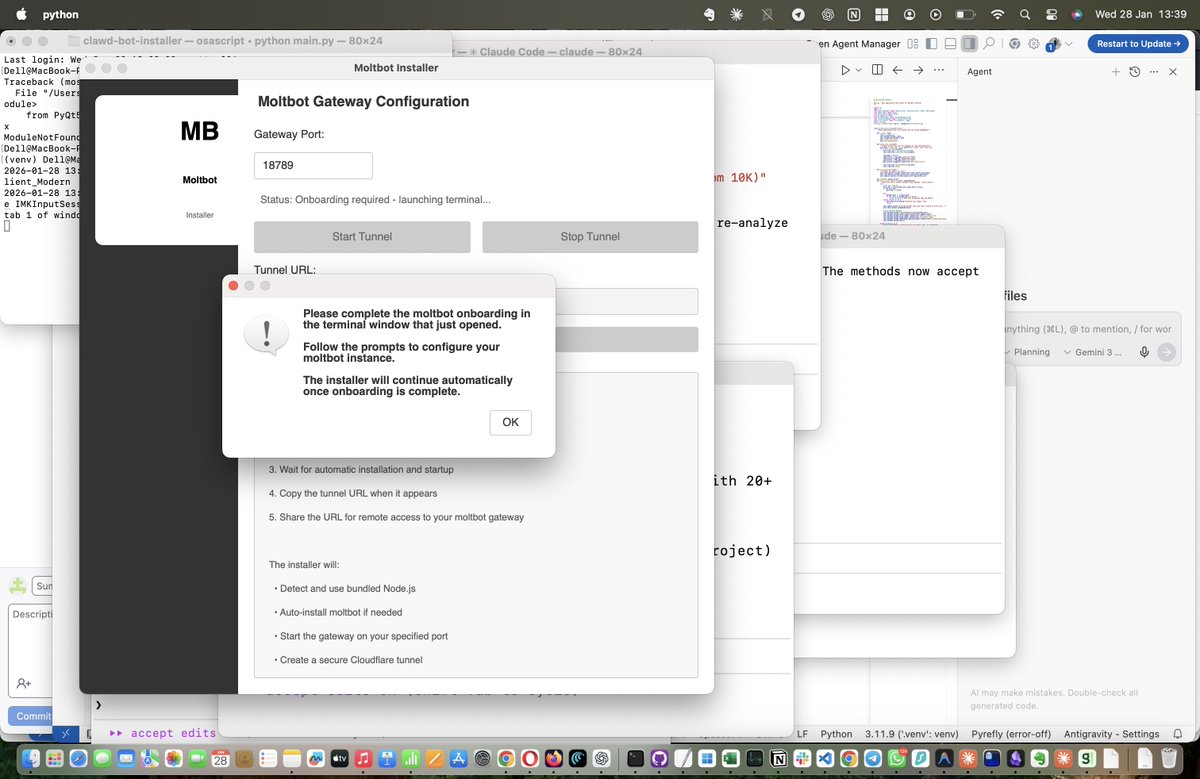
Clawdbot/@openclaw - the simplest way to use it - the application keeps the window open
Kinda wild that the non-technical world gets access to everything weeks/months later.
Testing it, will let y'll know
Working on making Clawd-bot(Molt-bot) easily accessible to anyone by just installing a macOS app!!
All dependencies, including bundled Node packages, Clawd bot libraries, and access via a Cloudflared tunnel, so someone can just install the application and run everything!! [IF this paragraph seemed irrelevant to you, ignore, idea is for it to be irrelevant]
Repurposing the https://t.co/M01HdyrUA9 repo for this and trying out multiple Claude agents on different tasks as well!!
Comment below and I will notify you!







![praajwall's tweet photo. Working on making Clawd-bot(Molt-bot) easily accessible to anyone by just installing a macOS app!!
All dependencies, including bundled Node packages, Clawd bot libraries, and access via a Cloudflared tunnel, so someone can just install the application and run everything!! [IF this paragraph seemed irrelevant to you, ignore, idea is for it to be irrelevant]
Repurposing the https://t.co/M01HdyrUA9 repo for this and trying out multiple Claude agents on different tasks as well!!
Comment below and I will notify you!](https://pbs.twimg.com/media/G_upzl-bAAIGUvx.jpg)



