It’s here. Introducing the @predotdev CLI.
Extend your full coding agent and architect agent experience to your terminal, and sync all your progress back to your predev workspace.
Take it for a spin!
Muse can't shop Amazon anymore. Claude Code can: 1.8x faster and 1.6x cheaper with the https://t.co/PE4KtU0O0w MCP than with Claude in Chrome.
Amazon blocked Muse, a cloud agent that shops from a virtual machine in Meta's cloud. A local agent drives your own Chrome, signed in as you.
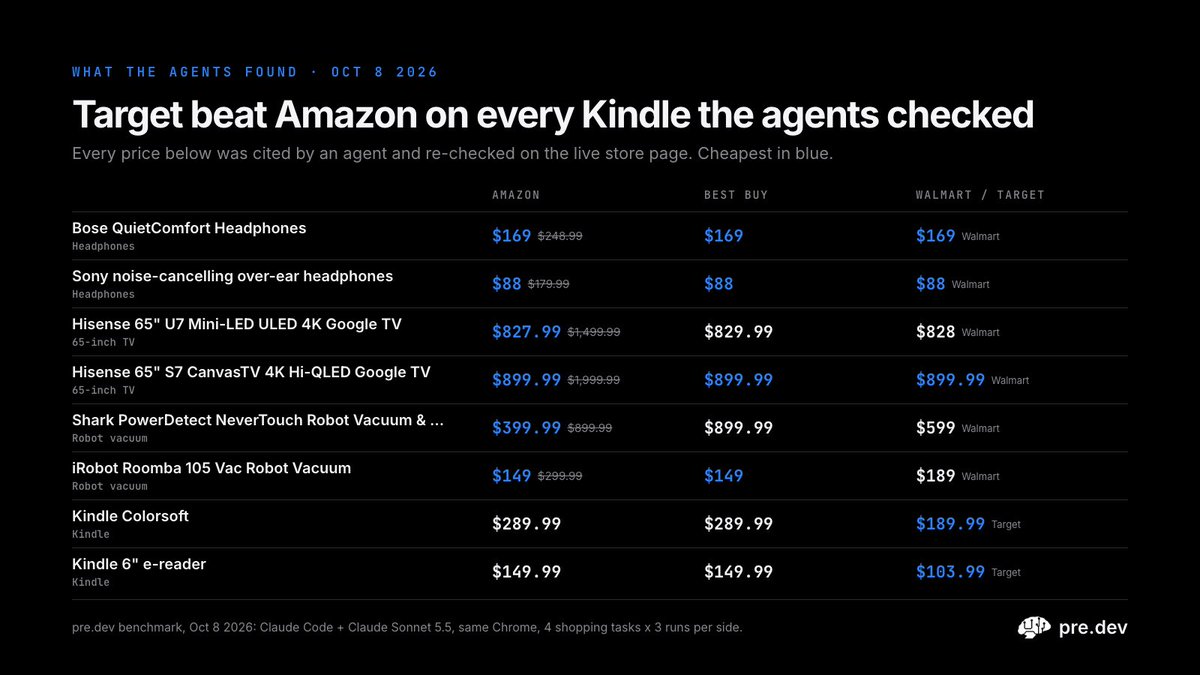
The day after Prime Day, we had Claude Code find the best deal still live on Amazon, then check Best Buy, Walmart and Target. 4 shopping tasks, 3 runs each, Claude Sonnet 5.5 on both sides:
- faster on all 4 tasks, first in 12 of 12 head-to-head runs
- 12 of 12 runs complete, all 34 cited prices checked out on the live page
- no store showed it a bot check
- it stopped before the cart: the buy button stays yours
What it found: Target had the Kindle Colorsoft $100 under Amazon. Amazon had a Shark robot vacuum $500 under Best Buy.
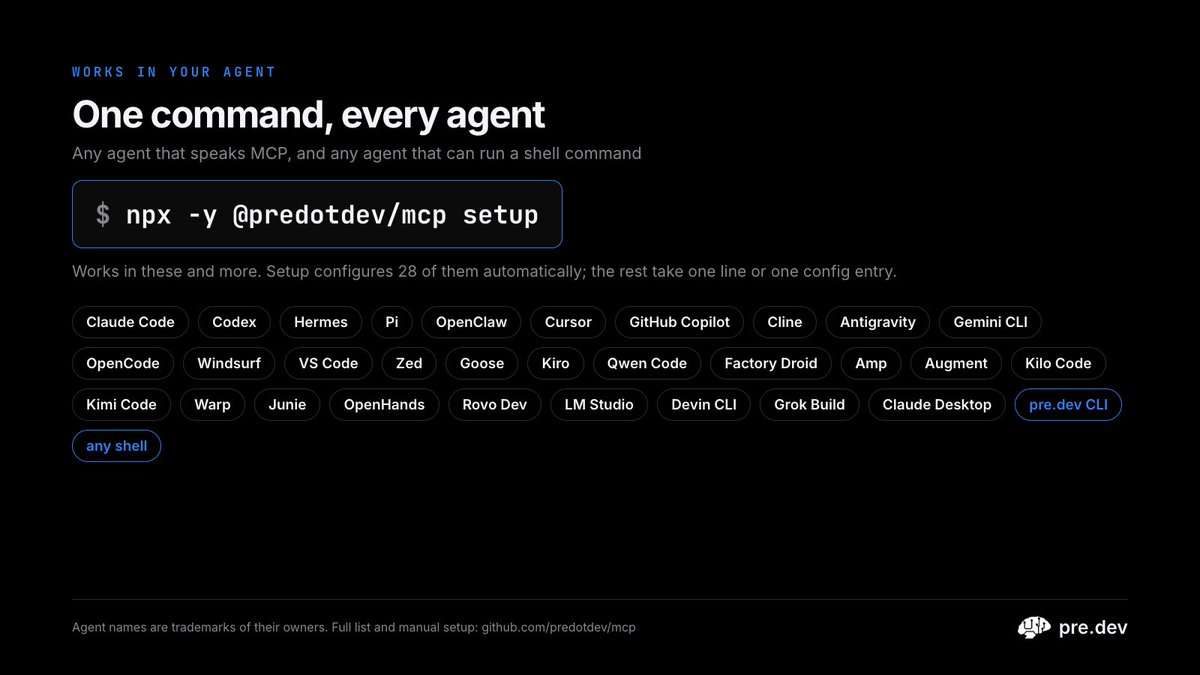
Works with any coding agent on your laptop:
npx -y @predotdev/mcp setup
No coding agent? The https://t.co/PE4KtU0O0w CLI does it too: type /chrome.
Same agent. Same model. Same Chrome. 2x faster and 1.8x cheaper.
We raced Claude Code with Claude in Chrome against Claude Code with the https://t.co/PE4KtU0O0w MCP: 8 everyday browser tasks, 3 runs each, Claude Sonnet 5.5 on both sides.
- Faster on all 8 tasks, from 1.3x to 2.8x
- First in 22 of 24 head-to-head runs
- 12 minutes of browser work became 6
- 1.8x lower API cost per task, as Claude Code reports it
- every answer right on both sides
Most of the gap is outside the model: across all 24 runs, 349 seconds of tool and startup time vs 95. The https://t.co/PE4KtU0O0w MCP hands the agent the page as short text with a ref on every button and field, so it takes fewer, smaller steps.
Open source and built with https://t.co/PE4KtU0O0w. One command sets it up in Claude Code, Codex, Cursor, Hermes, Pi and 20+ other agents:
npx -y @predotdev/mcp setup
The worst part of shipping a paid app isn't building it. It's the time you lose integrating vendor software, such as payments.
Make an account. Dig through the dashboard for keys. Create products by hand. Write the checkout route. Set up webhooks and wonder why they aren't firing. Hunt for a test card. By the time someone can pay you, the momentum is gone.
So we took that part away.
Every app you build on predev now comes with Stripe payments already wired in. No Stripe account to start, no keys to paste. You just say what you want to charge for:
"Add a $9/month Pro plan"
"Sell this template as a one-time $29 purchase"
"Put the export button behind a paywall"
The agent creates the products and prices in code (idempotently, so no duplicate plans), wires up Stripe Checkout, mounts the webhook handler so your app knows when someone has actually paid, and adds the button to your UI.
It checks its own work
Before handing anything back, the agent runs a real checkout with a Stripe test card and confirms the payment went through end to end.
It's normal Stripe code
No black box. It's ordinary Stripe code in your project, and you can read or change every line. The only difference is that the SDK points at predev's API host, which is why you don't need an account or keys. Those are already in your environment, server-side where they belong.
Checkout, subscriptions, one-time payments, the Billing Portal, webhooks, Elements: all Stripe as you know it.
Try it in two minutes
Projects build in test mode, so pay your own app as often as you like:
Card: 4242 4242 4242 4242
Expiry: any future date
CVC: any three digits
Stripe's decline cards work too, so you can see how your app handles a failed payment.
One heads-up: the first time your workspace uses payments, Stripe takes about a minute to activate the test account. When you're ready for real money, switch the project to live. Same code, real payments.
Payments is one of three services built into every predev app, alongside AI features and user sign-in. All three come connected, so the agent can use them the moment your idea needs them.
You can now build something that can earn.
Every predev project now ships with AI, payments and auth built in.
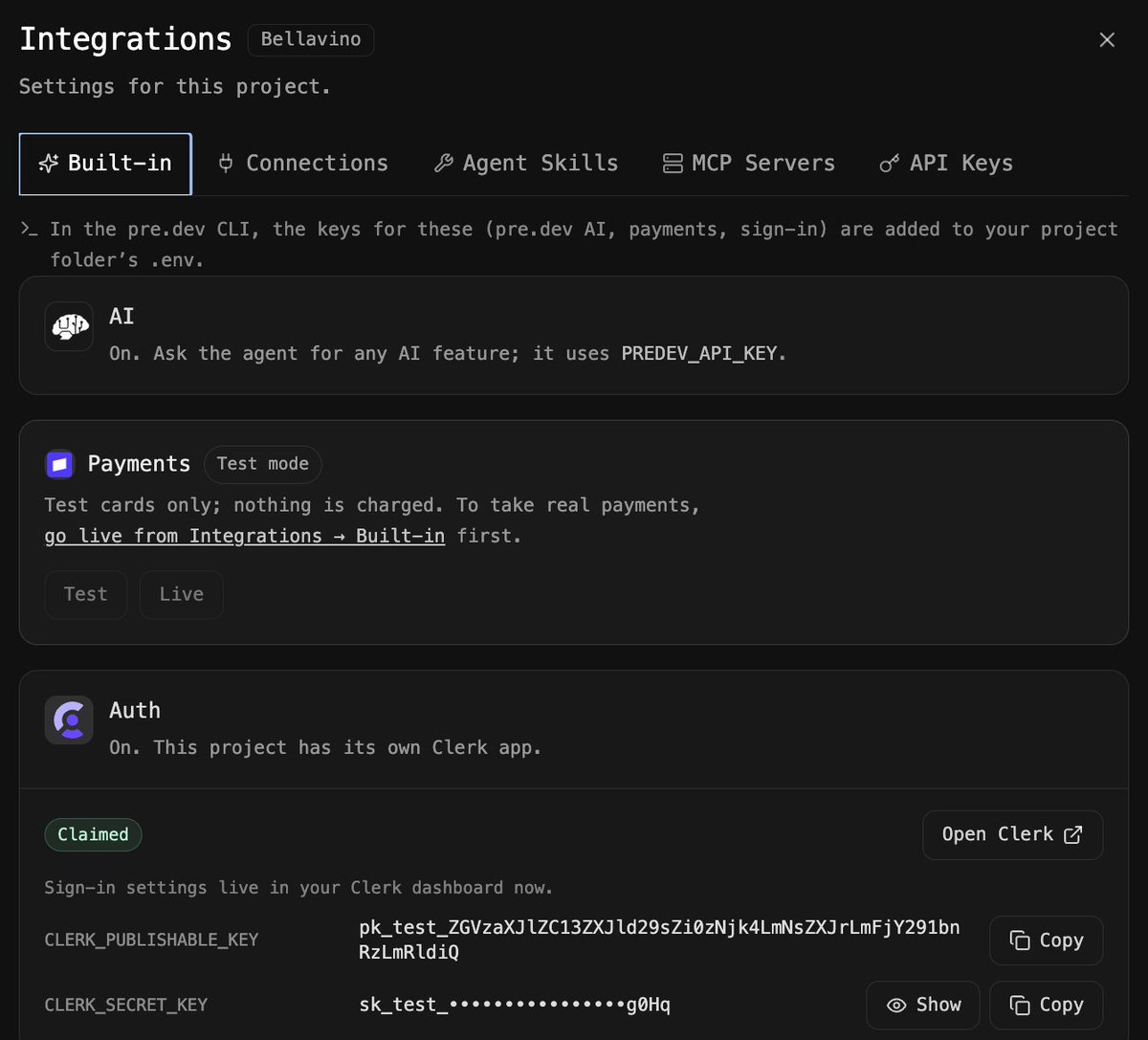
Open the Integrations panel on any project and you'll find them under Built-in. Already on, already wired, no setup.
Here's what each one gives you 👇
AI
Just ask the agent for an AI feature. A chatbot, smart search, recommendations, summaries, whatever your product needs.
It runs on your predev key (PREDEV_API_KEY), so there's no model provider account to set up and no keys to juggle.
In Bellavino, our demo restaurant menu, this is how we built an AI sommelier that pairs wines with whatever guests are ordering.
Payments
Every project starts in test mode: test cards only, nothing gets charged. Build your checkout, try every flow, break things safely.
When you're ready for real money, flip to Live in Integrations > Built-in. One switch, same code.
Auth
Each project gets its own dedicated Clerk app. Sign-up, sign-in and sessions work from the first build.
Once you claim it, it's yours. Open Clerk straight from the dashboard to manage sign-in methods, branding and users, with your keys right there to copy.
Working locally?
In the predev CLI, the keys for all three land in your project's .env automatically. Clone, run, done.
Why this matters
The first screen is never the hard part. The hard part is everything that makes an app real: users who can log in, a way to get paid, features that feel smart. That's usually where weekends get spent on API keys, webhooks and env vars.
predev plans the architecture first, so these aren't bolted on later. The agent builds around them from the start and verifies they work. You go from idea to a product people can sign into and pay for, not just a demo.
And the Built-in tab is just the start: Connections, Agent Skills, MCP Servers and your own API keys all live in the same panel.
Build something people can engage with: @predotdev
A trattoria will never build user accounts. Too much work: auth provider, keys, user table, verification, resets.
But our menu now remembers the wine each guest ordered last time. One prompt, and the agent set up the whole auth stack itself.
"What was that great red we had last time?"
Guests forget the wine they loved. We gave our digital menu user accounts so they don't have to remember. Here's the build, from sign-in to a saved order history, using @predotdev and @clerk https://t.co/CJCZbdDZC2
Imagine if Chat GPT or Claude could build full apps in any stack with 0 setup, downloads, or oauth, and you had any model you want and that’s @predotdev
"What was that great red we had last time?"
Guests forget the wine they loved. We gave our digital menu user accounts so they don't have to remember. Here's the build, from sign-in to a saved order history, using @predotdev and @clerk https://t.co/CJCZbdDZC2
Make your website agent-friendly, automatically.
Apps built with predev now expose their actions through WebMCP. Whenever the agent builds or changes a form or action in your web app, it registers it as a WebMCP tool that runs the exact same handler as the button. AI agents in the browser can use your app directly, and normal clicks keep working just like before.
The predev agent benefits too. Its own browser checks now call those tools, then still confirm the result on screen and again after a reload. They also finish sooner, because the first page visit already lists every control on the page.
Your app works for humans and for agents, without building anything twice.
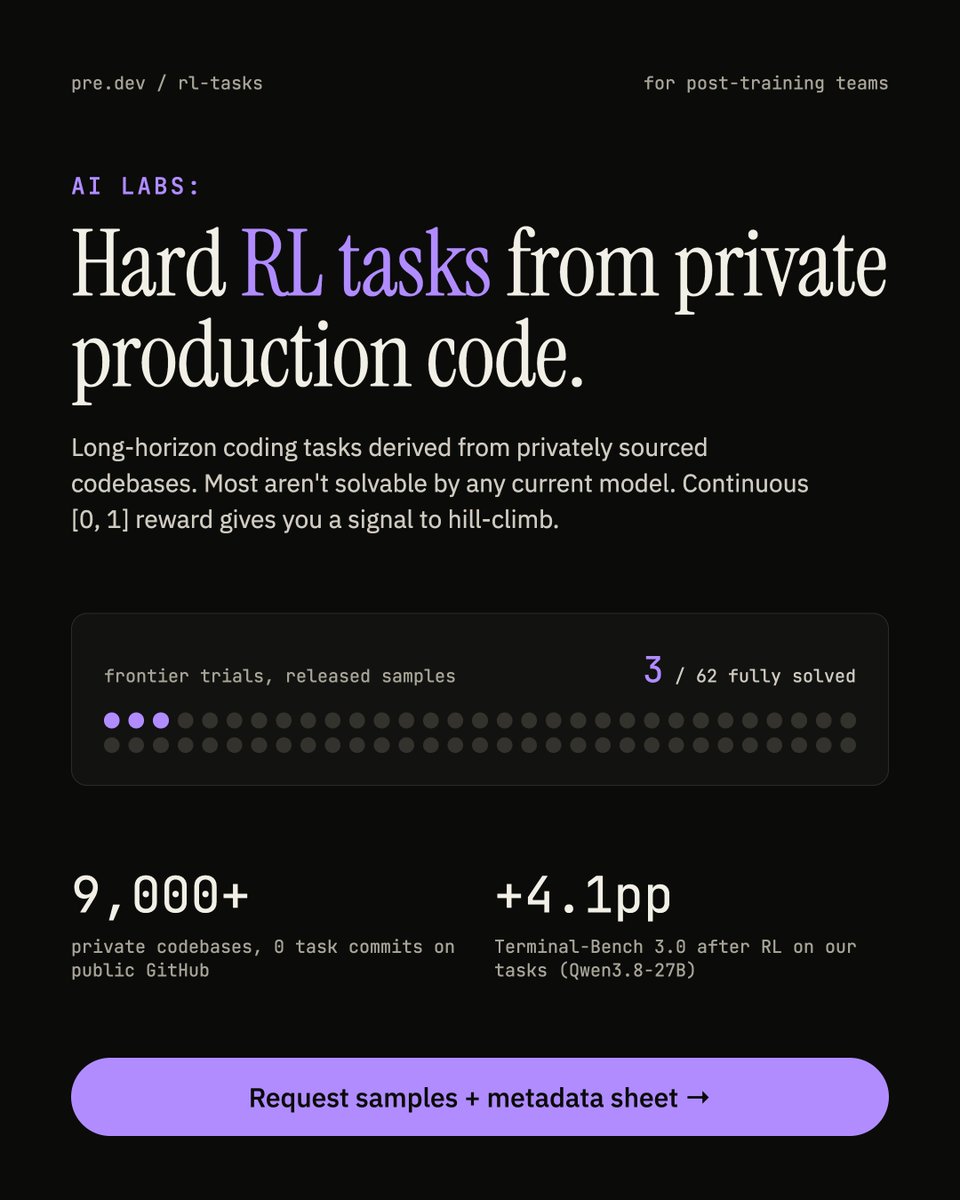
For AI labs doing post-training:
runnable RL environments built from 9,000+ private production codebases.
Hard, long-horizon tasks most models can't solve yet, with continuous rewards to hill-climb on.
→ Request samples + the metadata sheet
Built-in AI is live on @predotdev .
Every project now ships with access to hundreds of models: text, vision, images, video, speech, transcription, music, and embeddings.
Here's how it works:
Your app calls one endpoint
It authenticates with PREDEV_API_KEY, which is already in its environment
You pick any model in the catalog by its exact model ID
Streaming works out of the box
Usage is billed to your predev credits at per-model prices
There are no AI provider accounts to set up, no keys to paste, and nothing extra to subscribe to.
Trial accounts get a small allowance to try it. When credits run out, the call returns a clear error instead of failing silently, so you always know what happened.
Build the app, and the AI is already there.
Here is an example of what you can build with native AI and predev:
Our digital menu needed a wine recommendation. The old way means an account, an API key and a file full of secrets. With predev native AI, none of that exists. Here's the sommelier build, from a bigger wine list to a real recommendation. https://t.co/qruCnMpM0d
Most small ideas don't die because they're bad. They die in the setup.
Want to add one AI feature to your app? First you create an account with a model provider, generate an API key, wire up environment files, figure out where secrets live, and remember to rotate them. That's an afternoon of plumbing before you've written a single line of the feature.
So the idea gets weighed against the afternoon, and it usually loses.
That's why we built native AI into @predotdev. When the agent builds your app, AI access is provisioned along with it. No provider account, no API key, no .env to babysit, no secret to rotate. You describe the feature and the agent builds it. The feature your users see is the only thing you think about.
Take the plumbing away and the question changes from "is this worth an afternoon?" to "is this worth five minutes?"
Far more ideas pass that test.
Our digital menu needed a wine recommendation. The old way means an account, an API key and a file full of secrets. With predev native AI, none of that exists. Here's the sommelier build, from a bigger wine list to a real recommendation. https://t.co/qruCnMpM0d
Our digital menu needed a wine recommendation. The old way means an account, an API key and a file full of secrets. With predev native AI, none of that exists. Here's the sommelier build, from a bigger wine list to a real recommendation. https://t.co/qruCnMpM0d
Native auth and payments, now in predev
Earlier this week we gave you native AI tools to turn your ideas into products people actually want to use. Today you can capture that value.
Authentication and payments are now built in, powered by @clerkdev and @stripe. Sign-ups, sessions, checkout, subscriptions. All of it works out of the box.
As with our AI tools, predev orchestrates the vendor integration under the hood. No env files, no API keys, no permissions to reason about. You don't touch the plumbing, because there isn't any to touch.
That leaves you free to do the part that actually matters: crafting AI workflows worth paying for, and building a relationship with customers who keep coming back.
Tell us what you're building, and what integrations you want to see next.
New in @predotdev: native AI for your apps
Adding AI to an app used to be tedious. Provider accounts, API keys, wiring up each integration, and making sure none of those keys ever leak.
Starting today, you can skip all of that.
Every model in predev now works directly inside the apps you build. No keys, no extra accounts, no secrets in your frontend. Just multimodal AI, ready from day one.
A few ideas:
- An AI calorie tracker that reads a photo of your plate
- An interior redesign tool that reimagines a room from one picture
- A recipe generator that works with whatever's in your fridge
Or anything else you can dream up.
Take it for a spin and build AI experiences your users will love.
New in @predotdev: native AI for your apps
Adding AI to an app used to be tedious. Provider accounts, API keys, wiring up each integration, and making sure none of those keys ever leak.
Starting today, you can skip all of that.
Every model in predev now works directly inside the apps you build. No keys, no extra accounts, no secrets in your frontend. Just multimodal AI, ready from day one.
A few ideas:
- An AI calorie tracker that reads a photo of your plate
- An interior redesign tool that reimagines a room from one picture
- A recipe generator that works with whatever's in your fridge
Or anything else you can dream up.
Take it for a spin and build AI experiences your users will love.
The cheapest bug to fix is the one you catch in the plan.
Before predev writes any code, its architect agent researches your idea and hands you a spec: requirements, architecture, tech stack, milestones, complexity estimates.
You read it. You change it. Then it builds.
Required stack? Steer it there.
Integrating Stripe? Drop in the docs link and it plans from the real API.
Existing repo? /reverse picks up your patterns instead of starting fresh.
We handed the same brief to the three platforms people actually choose between: Replit, Lovable and https://t.co/b1oeOgHSc4 and took each to a live URL on a free tier. Here's where they diverged. https://t.co/4vcgY9aWpO
We handed the same brief to the three platforms people actually choose between: Replit, Lovable and https://t.co/b1oeOgHSc4 and took each to a live URL on a free tier. Here's where they diverged. https://t.co/4vcgY9aWpO
Worth underlining: this is also how you stretch your predev credits.
Every phase you drop to a cheaper model is credit you keep for the work that actually needs the heavyweight. Boilerplate research pass? Cheap. Hairy migration in the coding phase? Spend it there.
And if you'd rather not think about it, leave it on auto. The agent picks per phase and balances cost against the result.
Most coding agents give you one model for the whole run and hope it's the right call.
predev lets you pick per phase.
/model to set chat, research, coding, and acceptance independently. Cheap and fast where it doesn't matter, heavyweight where it does.
Settings stick with the project.