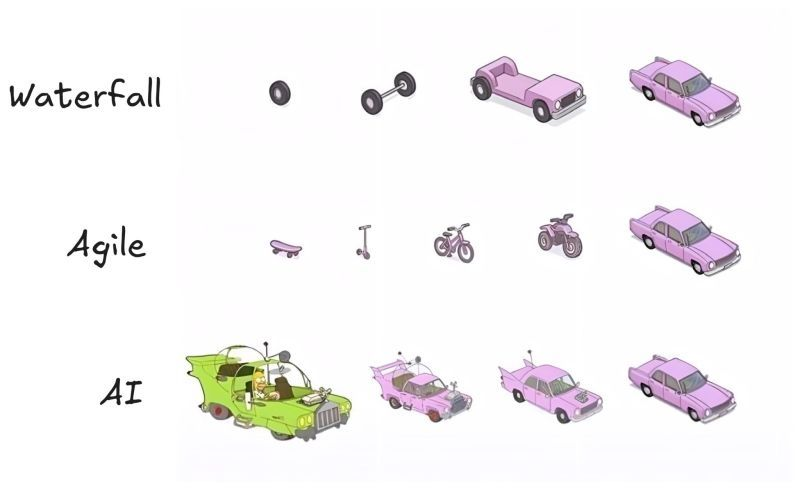
Honestly, this is the most accurate diagram I've seen.
Waterfall: You plan for 18 months and deliver exactly what nobody needs anymore.
Agile: You deliver something usable at every step, but the CEO keeps asking, "Where's the car?"
AI: You get the car on day one. It has six wheels, the doors are on backwards, and it has a rocket launcher. You spend more time making it yours than actually "building"; it's shaping. owning. verifying. That's what the best AI developers do now. They don't build. They shape and own.
VISUAL STUDIO CODE ALL SHORTCUT KEYS
Basic Editing Shortcut Keys
Ctrl + X = Cut line (empty selection)
Ctrl + C = Copy line (empty selection)
Alt + ↑ / Alt + ↓ = Move line up/down
Shift + Alt + ↓ / ↑ = Copy line up/down
Ctrl + Shift + K = Delete line
Ctrl + Enter = Insert line below
Ctrl + Shift + Enter = Insert line above
Ctrl + Shift + \ = Jump to matching bracket
Ctrl + ] = Indent line
Ctrl + [ = Outdent line
Home = Go to beginning of line
End = Go to end of line
Ctrl + Home = Go to beginning of file
Ctrl + End = Go to end of file
Ctrl + ↑ / Ctrl + ↓ = Scroll line up/down
Alt + PgUp / PgDn = Scroll page up/down
Ctrl + Shift + ] / [ = Fold/Unfold region
Ctrl + K Ctrl + [ = Fold all subregions
Ctrl + K Ctrl + ] = Unfold all subregions
Ctrl + / = Toggle line comment
Shift + Alt + A = Toggle block comment
Alt + Z = Toggle word wrap
Multi-Cursor and Selection Shortcuts
Alt + Click = Insert cursor
Ctrl + Alt + ↑ / ↓ = Insert cursor above/below
Ctrl + U = Undo last cursor operation
Ctrl + L = Select current line
Ctrl + Shift + L = Select all occurrences of current selection
Ctrl + F2 = Select all occurrences of current word
Ctrl + D = Add selection to next find match
Ctrl + Shift + Alt + → / ← = Column (box) selection
Find and Replace Shortcuts
Ctrl + F = Find
Ctrl + H = Replace
F3 / Shift + F3 = Find next / previous
Alt + Enter = Select all matches of Find
Ctrl + D = Add selection to next find match
Ctrl + K Ctrl + D = Move last selection to next find match
File Management Shortcuts
Ctrl + N = New file
Ctrl + O = Open file
Ctrl + S = Save
Ctrl + Shift + S = Save as
Ctrl + F4 = Close editor
Ctrl + K Ctrl + W = Close all editors
Ctrl + Shift + T = Reopen closed editor
Ctrl + Tab = Switch between open editors
Ctrl + P = Quick Open (Go to File)
Ctrl + Shift + N = New window
Ctrl + Shift + W = Close window
Search and Navigation Shortcuts
Ctrl + P = Quick Open
Ctrl + Shift + O = Go to Symbol
Ctrl + G = Go to Line
Ctrl + T = Show all symbols
Ctrl + Shift + M = Show problems
Ctrl + Shift + F = Search across files
Ctrl + Shift + H = Replace in files
Ctrl + Shift + E = Show Explorer / Focus
Ctrl + B = Toggle sidebar visibility
Ctrl + Shift + U = Show Output panel
Ctrl + Shift + C = Open new terminal
Ctrl + Shift + Y = Toggle Debug Console
Code Editing and Refactoring Shortcuts
Alt + Shift + F = Format document
Ctrl + K Ctrl + F = Format selection
F12 = Go to definition
Alt + F12 = Peek definition
Ctrl + . = Quick fix
Shift + F12 = Show references
F2 = Rename symbol
Ctrl + K Ctrl + X = Trim trailing whitespace
Ctrl + Space = Trigger suggestion
Ctrl + Shift + Space = Trigger parameter hints
Alt + Enter = Apply code action
Ctrl + / = Toggle line comment
Alt + Shift + A = Toggle block comment
Integrated Terminal Shortcuts
Ctrl + = Toggle integrated terminal Ctrl + Shift + = Create new terminal
Ctrl + Shift + C = Copy selection
Ctrl + Shift + V = Paste into terminal
Ctrl + ↑ / ↓ = Scroll terminal up/down
Ctrl + K = Clear terminal
View and Layout Shortcuts
Ctrl + Shift + P = Show Command Palette
Ctrl + Tab = Switch editor tabs
Ctrl + 1 / 2 / 3 = Focus into editor group
Ctrl + K Ctrl + ← / → = Move between editor groups
Ctrl + \ = Split editor
Ctrl + K Ctrl + → = Focus next group
Ctrl + K Ctrl + ← = Focus previous group
Ctrl + K Z = Zen mode
Ctrl + = Zoom in
Ctrl - = Zoom out
Ctrl + B = Toggle sidebar visibility
Debugging Shortcuts
F9 = Toggle breakpoint
F5 = Start/Continue debugging
Shift + F5 = Stop debugging
F11 = Step into
Shift + F11 = Step out
F10 = Step over
Ctrl + K Ctrl + I = Show hover
Ctrl + Shift + D = Open Run and Debug panel
Extensions and Source Control
Ctrl + Shift + X = Show Extensions view
Ctrl + Shift + G = Show Source Control view
Ctrl + Shift + E = Show Explorer
Ctrl + Shift + J = Toggle Search details
Ctrl + K Ctrl + G = View Git output
Get the complete Visual Studio Code Mastery ebook here: https://t.co/zWI90NaVLw
@airtelindia You have one of the worst broadband service with high internat cost. I expected a better service but your customer care and service agents all are useless.


![e_opore's tweet photo. VISUAL STUDIO CODE ALL SHORTCUT KEYS
Basic Editing Shortcut Keys
Ctrl + X = Cut line (empty selection)
Ctrl + C = Copy line (empty selection)
Alt + ↑ / Alt + ↓ = Move line up/down
Shift + Alt + ↓ / ↑ = Copy line up/down
Ctrl + Shift + K = Delete line
Ctrl + Enter = Insert line below
Ctrl + Shift + Enter = Insert line above
Ctrl + Shift + \ = Jump to matching bracket
Ctrl + ] = Indent line
Ctrl + [ = Outdent line
Home = Go to beginning of line
End = Go to end of line
Ctrl + Home = Go to beginning of file
Ctrl + End = Go to end of file
Ctrl + ↑ / Ctrl + ↓ = Scroll line up/down
Alt + PgUp / PgDn = Scroll page up/down
Ctrl + Shift + ] / [ = Fold/Unfold region
Ctrl + K Ctrl + [ = Fold all subregions
Ctrl + K Ctrl + ] = Unfold all subregions
Ctrl + / = Toggle line comment
Shift + Alt + A = Toggle block comment
Alt + Z = Toggle word wrap
Multi-Cursor and Selection Shortcuts
Alt + Click = Insert cursor
Ctrl + Alt + ↑ / ↓ = Insert cursor above/below
Ctrl + U = Undo last cursor operation
Ctrl + L = Select current line
Ctrl + Shift + L = Select all occurrences of current selection
Ctrl + F2 = Select all occurrences of current word
Ctrl + D = Add selection to next find match
Ctrl + Shift + Alt + → / ← = Column (box) selection
Find and Replace Shortcuts
Ctrl + F = Find
Ctrl + H = Replace
F3 / Shift + F3 = Find next / previous
Alt + Enter = Select all matches of Find
Ctrl + D = Add selection to next find match
Ctrl + K Ctrl + D = Move last selection to next find match
File Management Shortcuts
Ctrl + N = New file
Ctrl + O = Open file
Ctrl + S = Save
Ctrl + Shift + S = Save as
Ctrl + F4 = Close editor
Ctrl + K Ctrl + W = Close all editors
Ctrl + Shift + T = Reopen closed editor
Ctrl + Tab = Switch between open editors
Ctrl + P = Quick Open (Go to File)
Ctrl + Shift + N = New window
Ctrl + Shift + W = Close window
Search and Navigation Shortcuts
Ctrl + P = Quick Open
Ctrl + Shift + O = Go to Symbol
Ctrl + G = Go to Line
Ctrl + T = Show all symbols
Ctrl + Shift + M = Show problems
Ctrl + Shift + F = Search across files
Ctrl + Shift + H = Replace in files
Ctrl + Shift + E = Show Explorer / Focus
Ctrl + B = Toggle sidebar visibility
Ctrl + Shift + U = Show Output panel
Ctrl + Shift + C = Open new terminal
Ctrl + Shift + Y = Toggle Debug Console
Code Editing and Refactoring Shortcuts
Alt + Shift + F = Format document
Ctrl + K Ctrl + F = Format selection
F12 = Go to definition
Alt + F12 = Peek definition
Ctrl + . = Quick fix
Shift + F12 = Show references
F2 = Rename symbol
Ctrl + K Ctrl + X = Trim trailing whitespace
Ctrl + Space = Trigger suggestion
Ctrl + Shift + Space = Trigger parameter hints
Alt + Enter = Apply code action
Ctrl + / = Toggle line comment
Alt + Shift + A = Toggle block comment
Integrated Terminal Shortcuts
Ctrl + = Toggle integrated terminal Ctrl + Shift + = Create new terminal
Ctrl + Shift + C = Copy selection
Ctrl + Shift + V = Paste into terminal
Ctrl + ↑ / ↓ = Scroll terminal up/down
Ctrl + K = Clear terminal
View and Layout Shortcuts
Ctrl + Shift + P = Show Command Palette
Ctrl + Tab = Switch editor tabs
Ctrl + 1 / 2 / 3 = Focus into editor group
Ctrl + K Ctrl + ← / → = Move between editor groups
Ctrl + \ = Split editor
Ctrl + K Ctrl + → = Focus next group
Ctrl + K Ctrl + ← = Focus previous group
Ctrl + K Z = Zen mode
Ctrl + = Zoom in
Ctrl - = Zoom out
Ctrl + B = Toggle sidebar visibility
Debugging Shortcuts
F9 = Toggle breakpoint
F5 = Start/Continue debugging
Shift + F5 = Stop debugging
F11 = Step into
Shift + F11 = Step out
F10 = Step over
Ctrl + K Ctrl + I = Show hover
Ctrl + Shift + D = Open Run and Debug panel
Extensions and Source Control
Ctrl + Shift + X = Show Extensions view
Ctrl + Shift + G = Show Source Control view
Ctrl + Shift + E = Show Explorer
Ctrl + Shift + J = Toggle Search details
Ctrl + K Ctrl + G = View Git output
Get the complete Visual Studio Code Mastery ebook here: https://t.co/zWI90NaVLw](https://pbs.twimg.com/media/G2iarlLXQAILdG3.jpg)