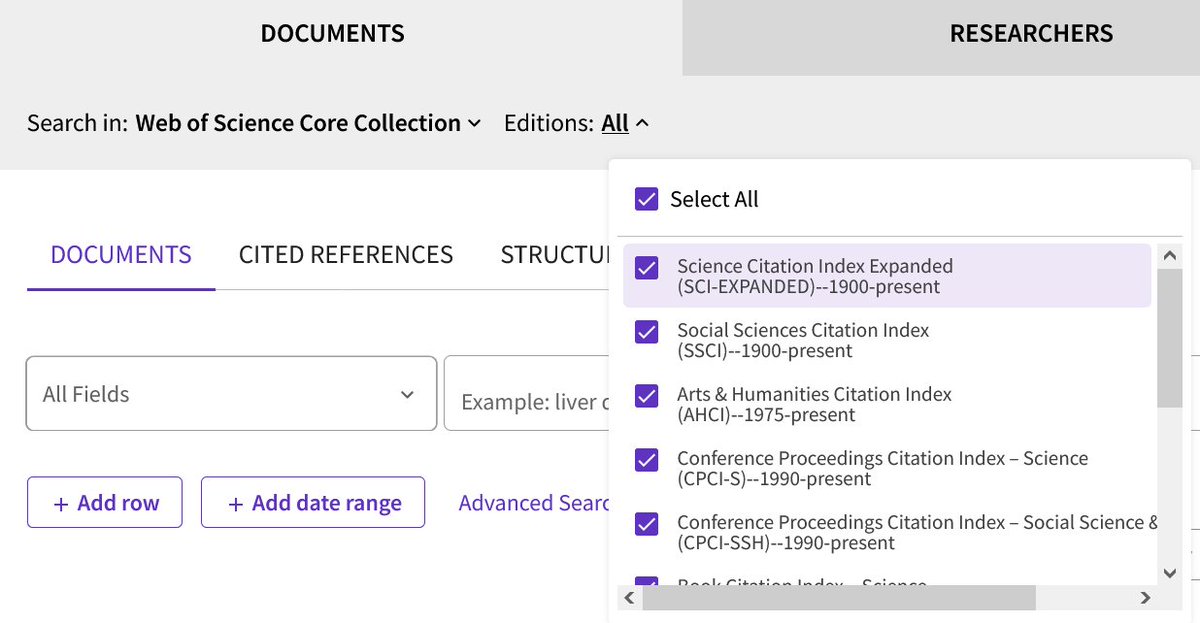
Did you know that Web of Science and Web of Science Core Collection are not databases? They are platforms! Access differs based on your institution's subscriptions. Be sure to check which databases you are searching, and report the names of the databases AND the platform.
If you are working on a systematic review, you may find the PRISMA-S checklist useful, it is an 'extension' to PRISMA-2020 aimed to ensure your output matches expectations from readers and editors, find it here!
https://t.co/NGX7EuIwDh
@carrieprice78 @pingue7 Carrie’s correct. Per Rethlefsen https://t.co/T1sSdGXy4J “Include the search strategies for each database and information source, copied and pasted exactly as run.” Makes sense too, as you want others to be able to replicate the entire review, including all searches.
@carrieprice78 @amylibrarian That would be the clearest way to do it, presuming you will be extracting data from and counting each study separately in your results.
PRISMA-S Item 13 is Date of Search. A good tip? Keep it simple! In your documentation, record the search date (best to use YYYY-MM-DD or spell out month) for each search. In your manuscript text, be explicit:
*The search was conducted Nov 17, 2022
*On Nov 17, 2022, we searched
What to avoid:
*We searched up to Nov. 17, 2022
*Published articles between 2000 and Nov 17, 2022
*We searched through Nov. 17, 2022
*We searched until Nov. 17, 2022
Answer: PRISMA-S Item 9 (Limits and Restrictions) solely applies to database-imposed limits (like limiting to English-language) and restrictions (like reviewing the 1st 100 Google results). If you use a database limit, report it! It is not the same as eligibility criteria
2/2
Question of the day: What is the difference between PRISMA-S Item 9 (Limits and Restrictions) and eligibility criteria or inclusion/exclusion criteria? If I say that we're only including English language articles in the inclusion/exclusion section, that's good enough, right?
1/2
If you want to see an example of a reproducible search, check out @TBrigham's search documentation on @OSFramework.
PRISMA-S Items 1, 2, 3, 4, 8, 13, and 15, all check! Item 9 (Limits and Restrictions) is also clear from the searches, but should also be in the manuscript
I second everything @mlrethlefsen said! I have been incorporating more aspects of PRISMA-S. I tend to list the title/topic given in the request form (or if I know abt the manuscript, that title), the name of requestor/author, & #search details. Example: https://t.co/ojgmqbAlGQ
Now you know to put your searches into repositories, what details should be included? All PRISMA-S items should go in the supplementary materials, plus additional reporting in the abstract and/or manuscript body for most items
https://t.co/eME8NALeeq
h/t @JaneYat
In PRISMA-S, we recommend putting all search strategies in repositories, whether an institutional repository, a generalist repository like Zenodo, or a specialist repository like searchRxiv. Journal supplementary materials are not only inaccessible, but they often go missing
Calling all patients, carers, healthcare professionals, and researchers working on or using #clinicaltrials: Help shape the next update of the CONSORT and SPIRIT reporting guidelines!
Sign up here to have your say on what should be included: https://t.co/uMDatbde6e
Thanks to @carrieprice78 for finding this nice example of reporting PRISMA-S Items 1 (databases), 8 (full search strategies), 9 (limits), 13 (date of search), and 15 (total records)--and thanks to the authors for their emphasis on clear reporting: https://t.co/azzzFrCUFj
Have you seen the great news? The team behind the PRISMA 2020 Shiny app has improved the databases and registers section to be able to list individual databases and registries! It is easier to comply with @PRISMASearch recommendations than ever. 1/2 https://t.co/WKmdOU9jKY