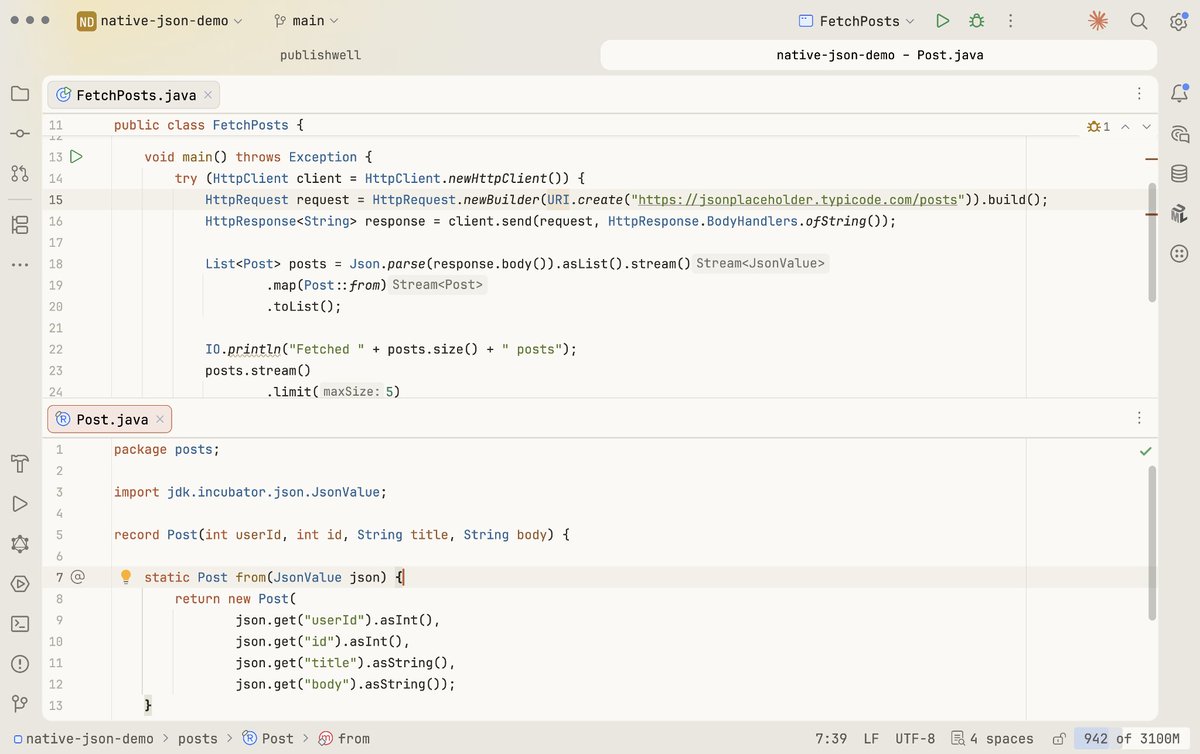
Fetching JSON from an API and mapping it to records in plain Java.
No Jackson. No Gson. No dependencies.
Just HttpClient and the new JSON API coming in JDK 28 (JEP 540). 👀
https://t.co/hjuMDmtnhh
The agile movement was started by developers for developers. The project managers invaded the Agile movement very early on. They were attracted by the shiny object of scrum master certification. Their influence was catastrophic.
But the worse catastrophe was the passivity of the developer community in allowing that deleterious influence to hold sway.
How is data sent over the network? Why do we need so many layers in the OSI model?
The diagram below shows how data is encapsulated and de-encapsulated when transmitting over the network.
🔹 Step 1: When Device A sends data to Device B over the network via the HTTP protocol, it is first added an HTTP header at the application layer.
🔹 Step 2: Then a TCP or a UDP header is added to the data. It is encapsulated into TCP segments at the transport layer. The header contains the source port, destination port, and sequence number.
🔹 Step 3: The segments are then encapsulated with an IP header at the network layer. The IP header contains the source/destination IP addresses.
🔹 Step 4: The IP datagram is added a MAC header at the data link layer, with source/destination MAC addresses.
🔹 Step 5: The encapsulated frames are sent to the physical layer and sent over the network in binary bits.
🔹 Steps 6-10: When Device B receives the bits from the network, it performs the de-encapsulation process, which is a reverse processing of the encapsulation process. The headers are removed layer by layer, and eventually, Device B can read the data.
We need layers in the network model because each layer focuses on its own responsibilities. Each layer can rely on the headers for processing instructions and does not need to know the meaning of the data from the last layer.
Over to you: Do you know which layer is responsible for resending lost data?
–
Subscribe to our weekly newsletter to get a Free System Design PDF (158 pages): https://t.co/uc5M7CdXXC
VisualVM 2.1.8 released: Support for Java 22 and a bunch of improvements and bugfixes. See the complete list at https://t.co/VaqEUQthZk. VisualVM 2.1.8 is available at https://t.co/Wcz5LSCk3y.
a @SpringBoot web application that starts in 80ms, takes up tens of megabytes of RAM, integrates AI, and can handle the kind of concurrent use you’d expect out of something like Go or Node.js, in ~20 lines of @java
Session, Cookie, JWT, Token, SSO, and OAuth 2.0 Explained in One Diagram
When you login to a website, your identity needs to be managed. Here is how different solutions work:
- Session - The server stores your identity and gives the browser a session ID cookie. This allows the server to track login state. But cookies don't work well across devices.
- Token - Your identity is encoded into a token sent to the browser. The browser sends this token on future requests for authentication. No server session storage is required. But tokens need encryption/decryption.
- JWT - JSON Web Tokens standardize identity tokens using digital signatures for trust. The signature is contained in the token so no server session is needed.
- SSO - Single Sign On uses a central authentication service. This allows a single login to work across multiple sites.
- OAuth2 - Allows limited access to your data on one site by another site, without giving away passwords.
- QR Code - Encodes a random token into a QR code for mobile login. Scanning the code logs you in without typing a password.
Over to you: QR code logins are gaining popularity. Do you know how it works?
–
Subscribe to our weekly newsletter to get a Free System Design PDF (158 pages): https://t.co/uc5M7CdXXC
Did you know that you can run Spring Guides in the Cloud over at https://t.co/peE2okAgJ7 🤩 This means that to learn about RabbitMQ + Spring you don't need to install anything and can run it right in your browser.
Single Sign-On (SSO) explained in simple terms.
The method to download the high-resolution PDF is available at the end.
The concepts of SSO revolve around the three key players: the User, the Identity Provider (IDP), and the Application.
1. The end-user or individual who seeks access to various applications.
2. Identity Provider (IDP): An entity responsible for user authentication and verification. Common IDPs include Google, Facebook, and company-specific systems.
3. Application: The software or service that the user wants to access. Applications rely on the IDP for user authentication. With SSO, users can seamlessly log in to various applications with a single set of credentials, enhancing convenience and security.
Single Sign-On (SSO) simplifies user access by enabling them to log in to multiple applications with a single set of credentials, enhancing the user experience and reducing password fatigue. It also centralizes security and access management, improving security, streamlining access control, and saving time and costs. Compliance and reporting become more accessible, and the integration is seamless, making it a practical solution for organizations seeking to enhance both security and operational efficiency.
When the user tries to log in, the application redirects them to the SSO service, which serves as the Identity Provider (IDP). The IDP then authenticates the user, often by checking their credentials, and if successful, it issues a token or assertion verifying the user's identity. This token is sent back to the user's browser, which in turn presents it to the application. The application, recognizing the token as valid, grants the user access without requiring them to re-enter their credentials. This streamlined process ensures that users can access multiple applications with a single login, reducing friction and enhancing both security and convenience.
Over to you: What's your perspective on the future of secure authentication in the digital realm?
Subscribe to our newsletter to download the 𝐡𝐢𝐠𝐡 𝐫𝐞𝐬𝐨𝐥𝐮𝐭𝐢𝐨𝐧 𝐏𝐃𝐅. After signing up, find the download link on the success page: https://t.co/F42vEaKssi
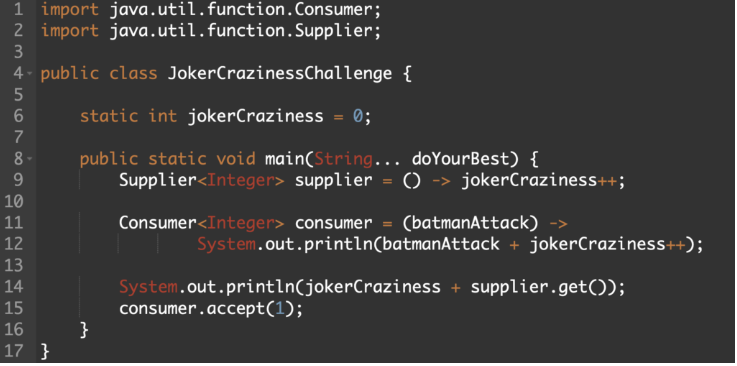
Get ready to master Java's functional interfaces, Supplier and Consumer, with the Joker Lambda Challenge! 🚀 Explore lambda behavior, test your skills, and gain valuable knowledge.
https://t.co/Swq0ymwG9Y
#Java#JavaChallenge#LambdaLearning#CodeSkills
Key Concepts to Understand Database Sharding.
In this concise and visually engaging resource, we break down the key concepts of database partitioning, explaining both vertical and horizontal strategies.
1️⃣ Range-Based Sharding: Splitting your data into distinct ranges. Think of it as organizing your books by genre on separate shelves.
2️⃣ Key-Based Sharding (with a dash of %3 hash): Imagine each piece of data having a unique key, and we distribute them based on a specific rule. It's like sorting your playing cards by suit and number.
3️⃣ Directory-Based Sharding: A directory, like a phone book, helps you quickly find the information you need. Similarly, this technique uses a directory to route data efficiently.
Over to you: What are some other ways to scale a database?
–
Subscribe to our weekly newsletter to get a Free System Design PDF (158 pages): https://t.co/uc5M7CdXXC
Popular interview question: What is the difference between Process and Thread?
To better understand this question, let’s first take a look at what is a Program. A Program is an executable file containing a set of instructions and passively stored on disk. One program can have multiple processes. For example, the Chrome browser creates a different process for every single tab.
A Process means a program is in execution. When a program is loaded into the memory and becomes active, the program becomes a process. The process requires some essential resources such as registers, program counter, and stack.
A Thread is the smallest unit of execution within a process.
The following process explains the relationship between program, process, and thread.
1. The program contains a set of instructions.
2. The program is loaded into memory. It becomes one or more running processes.
3. When a process starts, it is assigned memory and resources. A process can have one or more threads. For example, in the Microsoft Word app, a thread might be responsible for spelling checking and the other thread for inserting text into the doc.
Main differences between process and thread:
🔹 Processes are usually independent, while threads exist as subsets of a process.
🔹 Each process has its own memory space. Threads that belong to the same process share the same memory.
🔹 A process is a heavyweight operation. It takes more time to create and terminate.
🔹 Context switching is more expensive between processes.
🔹 Inter-thread communication is faster for threads.
Over to you:
1). Some programming languages support coroutine. What is the difference between coroutine and thread?
2). How to list running processes in Linux?
--
Subscribe to our weekly newsletter to get a Free System Design PDF (158 pages): https://t.co/FIzCeaWsZV