@BIMTrichy Love seeing our BIM Trichy community come together like this! Events like these make all the hard work worthwhile. Excited for what’s next and always proud to be part of this journey. 😊
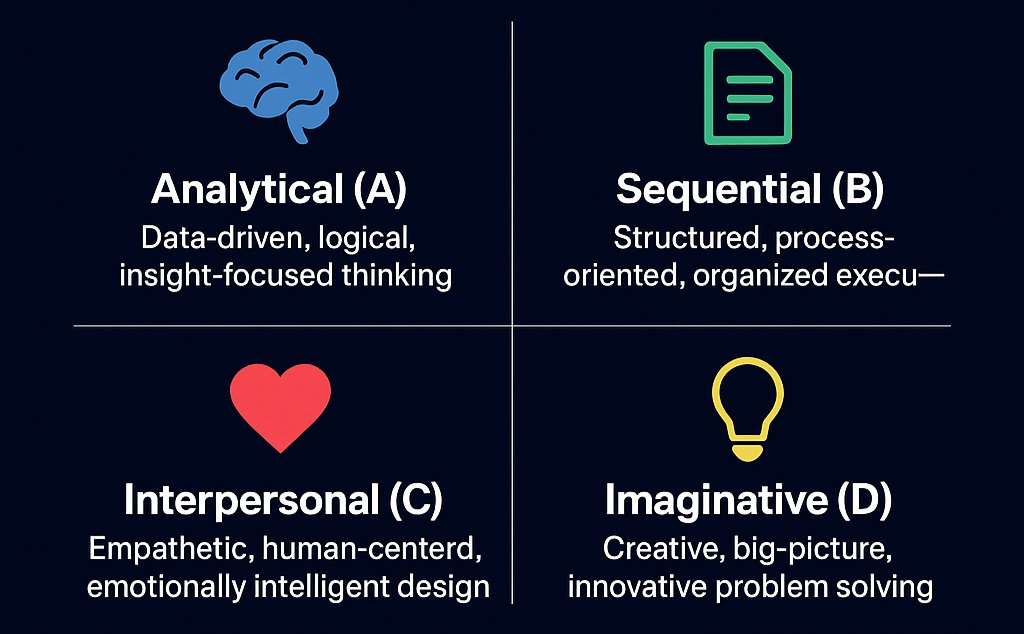
Ned Herrmann Model & UX
🧠 Analytical = Data & strategy
📋 Sequential = Structure & flow
❤️ Interpersonal = Empathy & human touch
💡 Imaginative = Creativity & delight
Miss one & UX breaks
No A → Random decisions
No B → Chaotic flow
No C → Cold experience
No D → Zero delight
AI agents can be used for troubleshooting in industrial operations to detect issues, predict failures, and automate resolution processes.
Here's a closer look👇
Learn more: https://t.co/5Dlg5T9Q5a
#IndustrialAI#DataOps#AI#AIAgents#DX sponsored by @CogniteData
Your factory’s energy use isn’t just a cost—it’s an opportunity. 💡 Splunk helps you find waste, optimize use & boost efficiency with real-time insights. 🚀 Smarter data = better decisions. 🔗 Check it out #IndustrialAI#EnergyEfficiency#DataDriven https://t.co/ZdsCvpeh2T
AI is reshaping the industrial sector by improving safety, reducing downtime, and enabling real-time decision-making. The fourth industrial revolution is here! #IndustrialAI#SmartManufacturing
From predictive maintenance to process optimization, Industrial AI is helping businesses stay ahead by transforming raw data into actionable insights. The power of AI in industries is undeniable.
Industrial AI is revolutionizing the manufacturing landscape, driving efficiency, precision, and cost savings. The future of factories is smarter, faster, and more automated.
Write a #sixwordstory or a #poem about this picture.
An alignment of swans
Walking every day
I often wonder
What they think and say
I wish I could translate
Tell them they’ll be okay
Even though nothing is being done
About climate change
#WritingCommunity#poetrycommunity
How to present
In 2006, I helped @ericschmidt create a deck outlining Google’s strategy, for a presentation Eric was delivering to the company. It taught me a profound lesson on how to present.
When I showed up to my first meeting with Eric, he asked me to visit with every product team at Google, chat with them to figure out what they were working on, and then summarize it on one slide (for each team).
Easy enough, I thought. I would use 3-5 bullet points per slide. Piece of cake. I started mentally mapping things out and got ready to leave.
“But”, Eric said, “I want no words on any slide”.
My well-laid plans disintegrated in an instant. How was I supposed to convey the key messages from each team, without WORDS?
Eric must have seen the panic on my face, and kindly gave me a hint. “Put the text in speaker notes”.
“But what goes on the slides, Eric?” I continued panicking.
That classic, gentle “Eric smile” fluttered on his face. “Why, images, of course!”
“You mean, you want each slide to just be comprised of images?”
“You got it. And use the title wisely. 7-8 words max. Let’s meet in a week to review progress.”
As I left the meeting, little was I to know that this conversation would fundamentally change my view on how to deliver effective presentations.
17 years later, I still cling tightly to the following principles:
1. The larger the audience, the fewer the words on the slide. In Eric’s case, the audience was thousands of employees, so we had 0 words per slide.
2. The title does most of the heavy lifting, which means it cannot be passive. It must be action oriented. Eg: not “Subscriber retention” but “Subscribers continue to be retained strongly” or even better “Net revenue retention continues to be > 100%”.
3. Use memorable images that substantiate and give credence to the words of the title. This image is what will occupy most of the slide area, so you need to spend much of your time thinking about what picture will best get the point (made by the title) across. In some cases, it might be a customer image or logo. in other cases, a graph. In yet other cases, it could be something else entirely. For the Google presentation, one of the images that gave me the most trouble was a slide on Google Search Appliance and other Enterprise products. The title stated that these products were increasingly being used by larger customers. The team didn’t want to share customer logos broadly since some were confidential, so logos were not an option. I decided to go with a trend line on the % of searches from enterprise customers, but the person who was supposed to pull this data for me, flaked at the last minute and I had to scramble. I ended up scrambling to create a mosaic of a bunch of consumer product logos with some kind of icon that denoted large enterprises. Not my finest moment but it got the point across.
4. Use speaker notes. Like Eric said, speaker notes should contain most of the details. It puts a lot of burden on the speaker since they cannot just read off the slides. But this doesn’t deter good speakers, since they prepare dozens of times, and then again.
So there you have it: my 4 principles for delivering compelling presentations to live audiences.
(CAVEAT: If the presentation has to be emailed to an audience who will consume it asynchronously, that’s completely different and has different rules).
How did the 2006 Google strategy presentation turn out, you ask? It went quite well, and later I got a nice thank you note from Eric. I didn’t realize at the time that I should have been the one thanking him for the once-in-a-lifetime learning opportunity.