🔥 PYROBOT AI is live!
CA:0x7a780a90016ee441bb44a7904c96c43b6acbca97
Explore Robinhood Chain from one dashboard:
🔎 Token scanning & scoring — See activity, liquidity, momentum, trading flow, and deployer history, with the reasons behind each score.
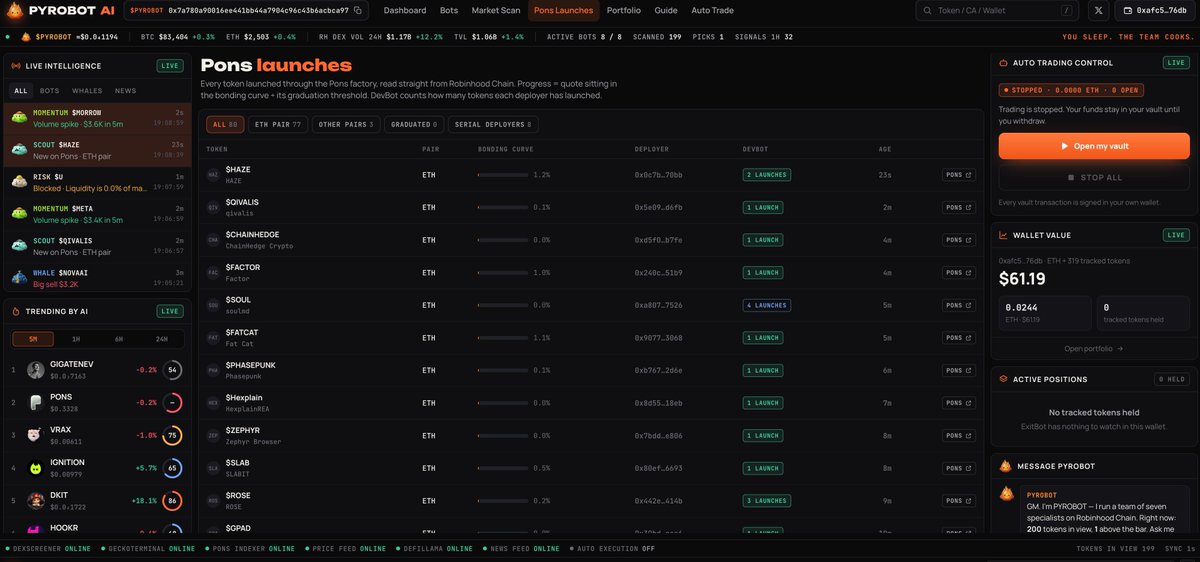
🆕 Pons launch tracking — Discover new tokens and check their trading pairs, bonding curve progress, and deployer records.
📊 Charts & risk insights — Review available price charts, trade data, and the team’s risk analysis before making your own decision.
⭐ Watchlist — Save tokens you want to follow.
👛 Wallet view — Connect your wallet to view holdings and ExitBot risk alerts. Viewing your data requires no signature.
🧪 Beta vault — Set trading limits and test deposits, stopping trading, and withdrawals. You confirm every onchain action in your own wallet. The contracts are not audited, so please test only with a small amount you can afford to lose.
Try it and share your feedback: https://t.co/RmTwoYjzbc
Send a Contract Address. Let PYROBOT Read the Market. 🔍
The Message PYROBOT panel on the homepage lets you investigate a token in seconds.
Paste a full contract address, enter a $TICKER, or ask a market question. PYROBOT routes the request through its specialist team and returns a structured read based on the latest available market and on-chain data.
RiskBot checks liquidity, liquidity-to-market-cap ratio, selling pressure, and hard risk conditions. MomentumBot reads short-term and hourly price movement together with trading volume. WhaleBot reviews buy and sell activity, including large swaps. DevBot checks the deployer’s history on Pons, while ScoutBot confirms whether the token has a DEX pair or is still moving through the Pons bonding curve.
PYROBOT then combines these signals into a 0–100 score:
✅ Pick — 85+ with no RiskBot block
👀 Monitoring — being watched, but below the Pick threshold
⛔ Blocked — a hard risk rule has been triggered
📉 Low — not enough strength across the current data
If a token has not graduated from its Pons curve or does not yet have a DEX pair, PYROBOT explains why a full market score is not available and shows the available launch, curve, and deployer information instead.
You can also ask for top picks, new launches, whales, market activity, blocked tokens, or news. For connected wallets, ExitBot can flag tracked holdings that need attention. The wallet view is read-only, and PYROBOT does not sign trades or automatically sell positions.
It is a fast research layer for Robinhood Chain: paste a CA, see the data, understand the risk, and open the full token page when you want to investigate further.
Try it at https://t.co/RmTwoYjzbc
PYROBOT provides data-based research signals, not financial advice.
🔍 Paste a CA into PYROBOT and get a live token read
On the homepage, use the “Message PYROBOT” panel in the lower-right corner. Paste a full contract address or enter a $TICKER, and PYROBOT sends it to the team for a live analysis.
The review includes:
• RiskBot: liquidity, liquidity-to-market-cap ratio, sell pressure, and hard risk blocks
• MomentumBot: 5-minute, 1-hour, and 24-hour price changes, plus recent volume
• WhaleBot: hourly buys and sells, including large swaps
• DevBot: the deployer’s previous Pons launches
• ScoutBot: whether the token has a DEX pair or is still on the Pons curve
• PYROBOT: the combined 0–100 score and current status
The result is classified as:
✅ Pick: 85+ and no RiskBot block
👀 Monitoring: being watched, but below the Pick threshold
⛔ Blocked: a hard risk rule was triggered
📉 Low: current data is not strong enough for a higher score
If a token is still on the Pons bonding curve and does not have a DEX pair, PYROBOT explains that full market scoring is not available yet, while showing the curve progress and deployer history.
You can also ask:
top picks · what’s pumping · whales · new launches · blocked · news · market
PYROBOT uses current public market and on-chain data. It provides research signals, not financial advice.
🔗 Try it here: https://t.co/kCBJfJLZwS
🔍 Paste a CA into PYROBOT and get a live token read
On the homepage, use the “Message PYROBOT” panel in the lower-right corner. Paste a full contract address or enter a $TICKER, and PYROBOT sends it to the team for a live analysis.
The review includes:
• RiskBot: liquidity, liquidity-to-market-cap ratio, sell pressure, and hard risk blocks
• MomentumBot: 5-minute, 1-hour, and 24-hour price changes, plus recent volume
• WhaleBot: hourly buys and sells, including large swaps
• DevBot: the deployer’s previous Pons launches
• ScoutBot: whether the token has a DEX pair or is still on the Pons curve
• PYROBOT: the combined 0–100 score and current status
The result is classified as:
✅ Pick: 85+ and no RiskBot block
👀 Monitoring: being watched, but below the Pick threshold
⛔ Blocked: a hard risk rule was triggered
📉 Low: current data is not strong enough for a higher score
If a token is still on the Pons bonding curve and does not have a DEX pair, PYROBOT explains that full market scoring is not available yet, while showing the curve progress and deployer history.
You can also ask:
top picks · what’s pumping · whales · new launches · blocked · news · market
PYROBOT uses current public market and on-chain data. It provides research signals, not financial advice.
🔗 Try it here: https://t.co/kCBJfJLZwS
📊 Market Scan: See what PYROBOT AI is finding
As of October 14, 9:37 PM (UTC+8), PYROBOT AI had 196 tokens in its live scanning view: 2 Picks, 34 Monitoring, and 78 Blocked. The rest were below the monitoring threshold. These are snapshot figures, not lifetime totals, and they change as the market updates.
Open Market Scan from the top navigation to filter tokens by status, launches on Pons, or launches within the past 24 hours. The page brings together pool, price, volume, liquidity, and on-chain launch data, then breaks each token’s 0–100 score into seven visible components.
A token becomes a Pick only when it scores 85+ and passes RiskBot’s hard checks. A risk block takes priority over the score.
The results table shows price changes, trading volume, liquidity, market cap, and pool age. Click a token to inspect its chart, each bot’s reasoning, and recent trades. At the time of this snapshot, the table displayed 160 detailed token records.
Explore the live results: https://t.co/U6Arf5KLdF
8 bots. One live Robinhood Chain scan. 🔥
Oct 14 snapshot: 197 tokens in view, 53 risk blocks, 4,673 deployers checked, 38 signals in the last hour, and 58 headlines in 24h.
Explore the live data: https://t.co/osOACv8sRG
Snapshot figures, not lifetime totals.
$PYROBOT
CA:0x7a780a90016ee441bb44a7904c96c43b6acbca97
token now has a dedicated candlestick chart on the PYROBOT AI homepage.
Follow its Pons bonding-curve activity at a glance, switch timeframes, or open the token page for more details. Chart prices are shown in ETH per token.
https://t.co/kCBJfJLZwS
Open My Vault is live on PYROBOT AI 🔥
Watch the video: open a vault, deposit, then withdraw back to your wallet.
Help us test with a small amount you can afford to lose. Try the full flow and reply with feedback.
Beta · contracts are unaudited.
https://t.co/osOACv8sRG
PYROBOT AI is live 🔥🤖
Eight bots. One chain view.
Explore Robinhood Chain markets, follow Pons launches, and inspect token signals in one place.
Read the chain. See the signals.
https://t.co/osOACv8sRG
Meet PYROBOT AI 🤖🔥
Eight specialized bots scan Robinhood Chain in real time—from new launches and whale activity to momentum, risk, news, and exits.
One terminal. More context. Better questions.
Read the chain. See the signals.
#PYROBOT#AI#Crypto
One tiny spark. A whole lot of bot chaos. 🔥🤖
The PYROBOT crew spotted a little spark… and immediately turned it into a game of tag.
Tiny feet. Big excitement. Absolutely no chance of staying in formation.
Who’s catching it first? 👀