The famous PowerShell script to reset the password of all KRBTGT accounts of DCs (!) found in an AD domain, either automatically or on demand has been updated with improvements, feature requests and minor bug fixes. Got feedback or requests? Let me know! https://t.co/HcCw3uWtgK
35 ways to harden your Active Directory environment
1. MFA everywhere, without exceptions
2. Create a patch cadence you can stick with, and stick to it
3. You don’t need more domain admins, limit it like anyone who has it is cursed
4. You can’t protect what you don’t know exists, inventory is essential
5. Segment your network like your career depends on it
6. If it absolutely doesn’t need to be on the internet, it shouldn’t be
7. EDR alone will not save you, diversify your threat detection strategy
8. Application control can be one of the hardest controls to defeat, use it
9. Deception technology is essential for today’s modern threats, learn it and use it well
10. Email security tools are great, but don’t forget out of band processes are key especially for money transfers
11. Teach users the basics of social engineering red flags, don’t phish them yourself
12. If you don’t test your backups, you don’t have backups
13. If you don’t test your DR plan you don’t have a plan
14. If you don’t follow the 3-2-1 rule for backups you don’t have backups
15. Backups in Steve’s basement don’t count
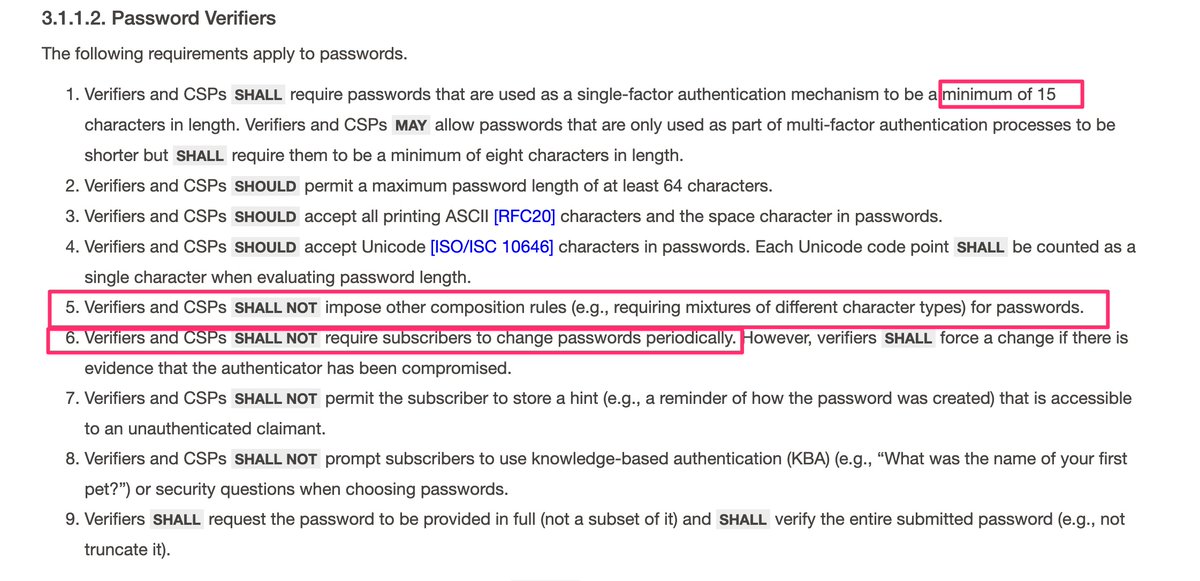
16. Rotating passwords regularly for no good reason is counter productive and then less secure option
17. 99% of vulnerabilities don’t matter, spend your time identifying the ones that could hurt you and address those first
18. Vulnerability scanning doesn’t show the whole picture, pentesting is a must
19. Hunting for misconfigurations yourself is a necessary part of good systems engineering
20. The cloud is not more or less secure than on-prem, it’s your strategy that matters most
21. Service accounts should be treated like radioactive material, tightly scoped and constantly monitored
22. Under no circumstances should the built in admin account be a service account
23. Domain admins should not be service accounts either
24. Active Directory permissions drift over time, assume yours already has
25. If you can’t explain why something needs admin rights, it shouldn’t
26. If you can’t explain why someone needs admin rights, they shouldn’t
27. Separate admin work from daily work, identity debt is real
28. Don’t reuse local admin passwords, LAPS is easy, use it
29. Security tools don’t replace good engineering, they amplify it
30. If fixing it later is the plan, it’s not a plan
31. Boring but consistent security beats clever hacks every time
32. If you don’t know if you have misconfigured ADCS, you probably do
33. After every change in ADCS, run invoke-locksmith
34. After every delegation change in AD run Invoke-ADeleginator
35. Use AppLocker Inspector to audit your applocker policies.
🏷️Bookmark this so you can come back to it later.
In his latest research, @MGrafnetter looks at Okta attack paths, and where they actually show up.
Not in Okta itself, but in everything connected to it. With OktaHound you can map that in BloodHound.
Check it out! https://t.co/jYHB9N894s
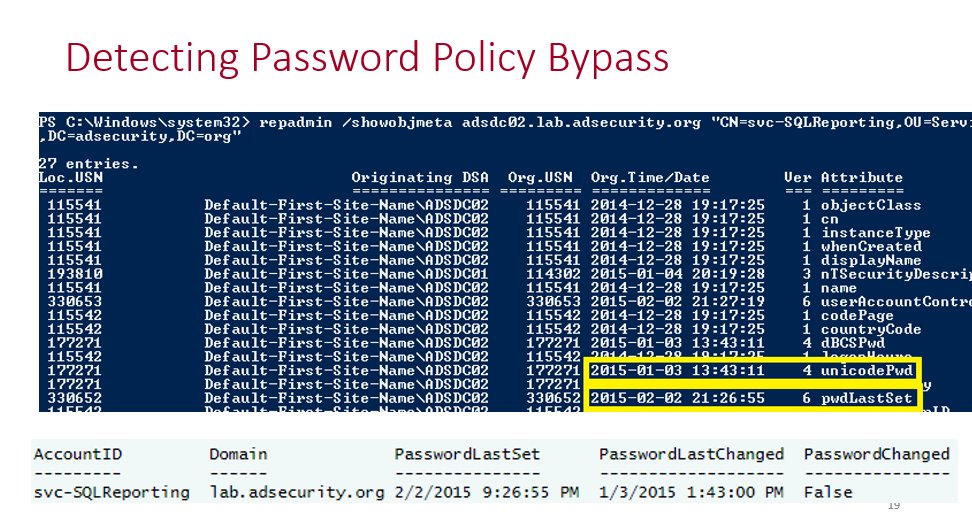
In Active Directory, there is a method that’s been around for many years which changes the password last set date but not the actual password. This is what I call a “fake password change” since the account appears to have a recent password when scanning for old passwords based on password last set, but the underlying password hasn’t actually changed.
I spoke about this in my 2015 @BSidesCharm talk which was my first conference talk.
More details including step-by-step screenshots are here: https://t.co/cxoAOvmVbt
Why does this happen?
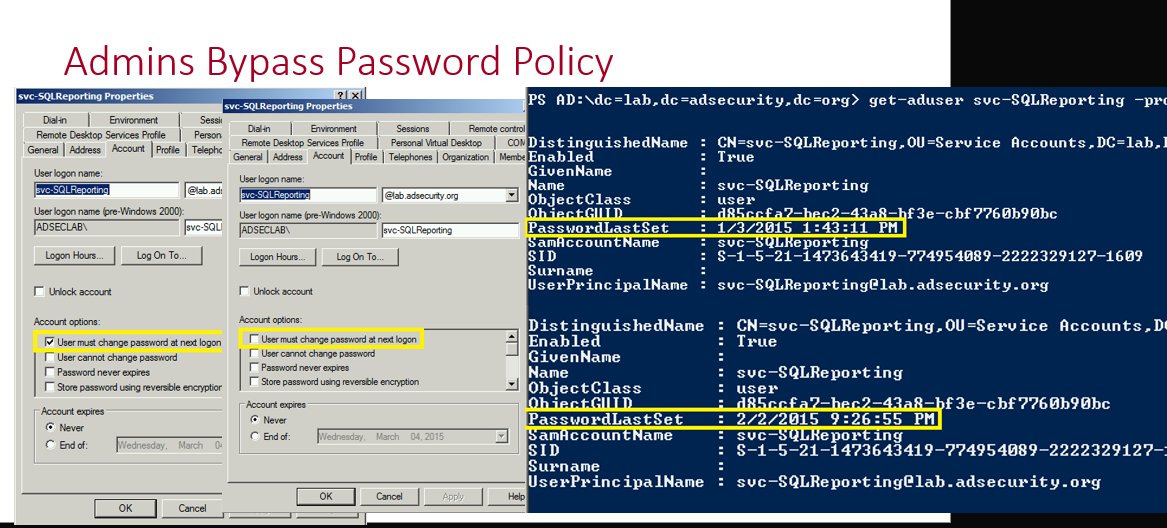
There are times where service account (or admin accounts) need to have password changes, but someone doesn’t want to do the work to change them. The ability to fake a password change requires modify rights on the pwdLastSet attribute which provides the ability to check/uncheck the setting “User must change password at next logon”. This setting is enabled when you want the user to change their own password when they logon.
How does this work?
This is simple to do when you have rights on the target account (in this example the password last changed in August 2025).
We open up Active Directory Users and Computers (ADUC), double-click on the target account to open up the account properties and then click on the Account tab. From here we check the box for “User must change password at next logon” and click Apply.
The PasswordLastSet date is now blank. Which makes it seem like the account has never had a password set.
We continue with our process where we uncheck the box for “User must change password at next logon” we checked and then click Apply.
After performing this action, the password change date has now been set to the current date and time even though the password itself hasn’t been changed since August 2025. We have successfully faked a password change!
Why does this happen?
This happens because the “User must change password at next logon” option is used to force a user to change their password at next logon. With it checked, Active Directory is waiting for the user to attempt to logon which is when the user is directed to change their password. During this time the PasswordLastSet value is blank since it is waiting for a new password. Once the user changes their password, the checkbox is effectively removed and the current date and time are set for the user’s passwordlastset property (technically this is the “pwdlastset” attribute, but the AD PowerShell cmdlets use that property).
An attacker could use this technique for an account with an old password they discover and have control of the account (with the ability to flip this bit). This would show that the password changed without it actually changing.
Detect fake Active Directory password changes at scale
I wrote a PowerShell script that will scan either the Active Directory Admins or All Users in the domain to see if there’s a fake password change that has been performed on them.
https://t.co/FZ2gjUFurd
Want stronger #LDAP security without accidentally taking down production? Scott Blake walks through how LDAP Signing and Channel Binding work, what Windows Server 2025 changes by default, and why “audit before enforce” should be your new favorite phrase.
https://t.co/WjknndZ4Yo
If you must run ADCS… at least run Locksmith regularly and fix all issues asap, especially for risk users and groups like domain users, everyone and authenticated users
I finally came around and documented all the Conditional Access bypasses in a single blog post. It contains not only the documented bypasses, but also the results of new research.
#Entra#ConditionalAccess#Security#Cheese
https://t.co/YWBfY0NhHl
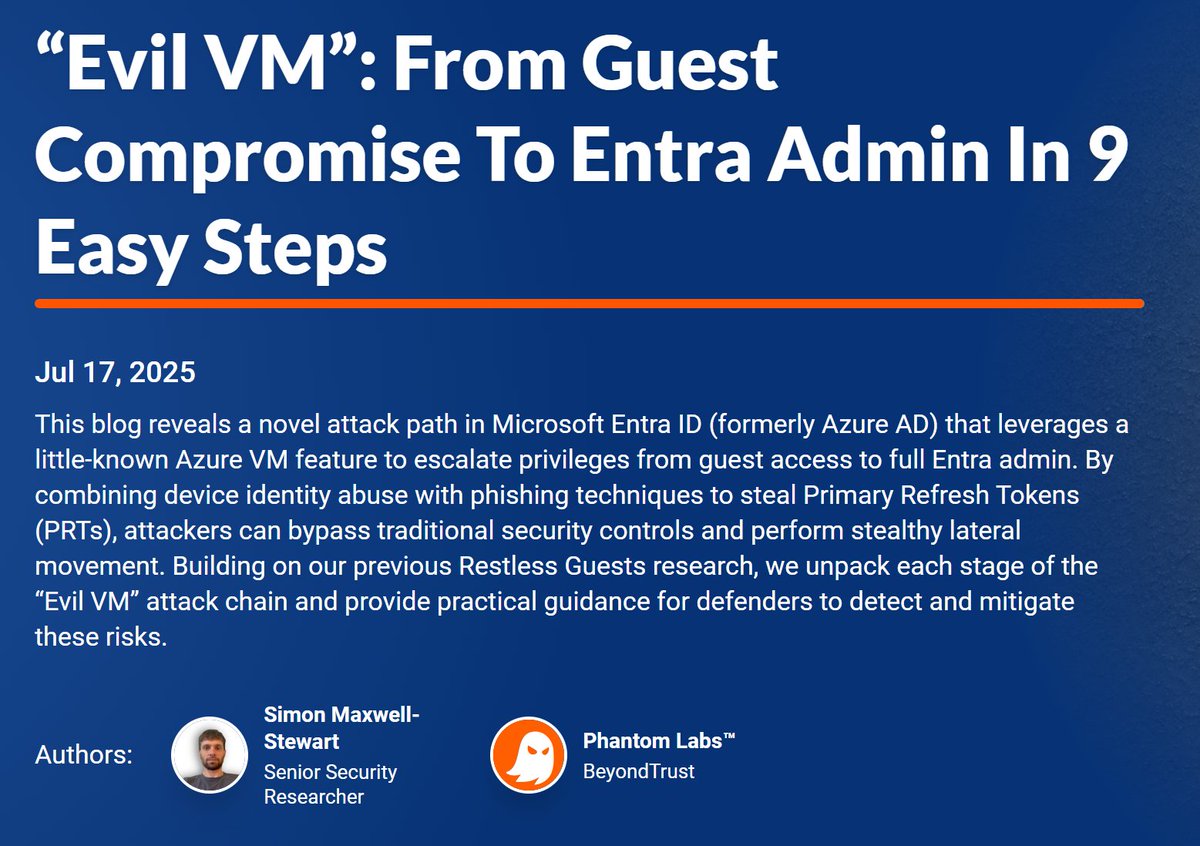
One compromised Microsoft Entra account - full tenant takeover.
And you’re left with what Microsoft gives you as logs. That’s your entire investigation surface.
It used to be different.
Attackers had to break into a DMZ service, move laterally into the internal network, or pull off a rare browser exploit. Domain admins often didn’t have internet access, and even if they did, they didn’t use their admin accounts for browsing. You had to escalate privileges.
Now all they need is an access token.
When a compromise happened, you had everything: files, logs, memory, disks, network captures - the full picture.
Now it’s just cloud logs.
Things have changed, but not for the better.
That said, the article shared by Mandiant here is excellent. It gives practical guidance on how to secure high-privilege accounts in Entra envs.
in case you've missed:
August 2025 NIST SP 800-63b requires minimum 15 symbols password length, and no periodic changes and no more composition rules (letter, digit, asterisks, etc)
https://t.co/m6jdsyT1ng
Please stop using Private browser sessions for cloud admin accounts
Look, we all know we shouldn't be using admin accounts while signed into our productivity account, but if you're gonna do it, at least use browser profiles so you can enforce compliance
https://t.co/e8I882Lh9w
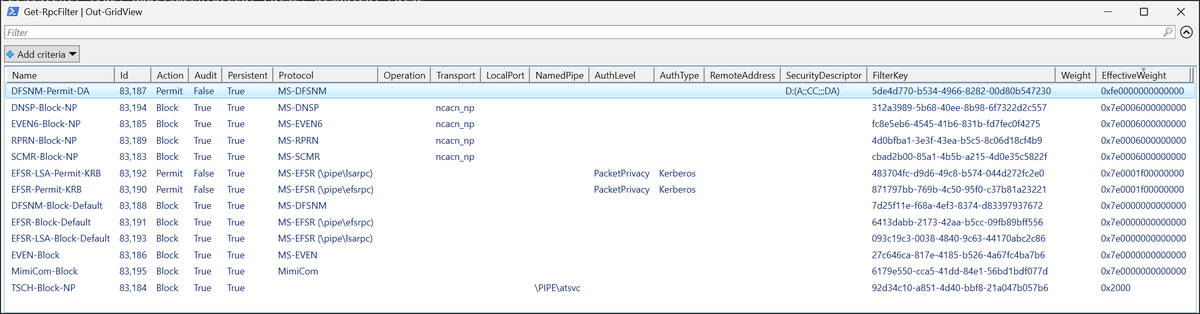
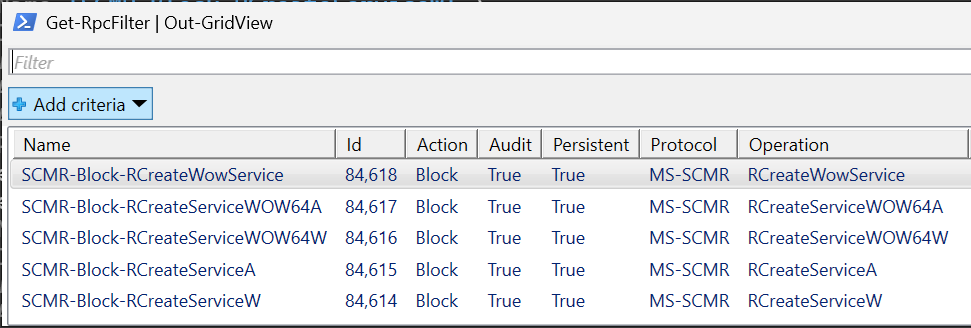
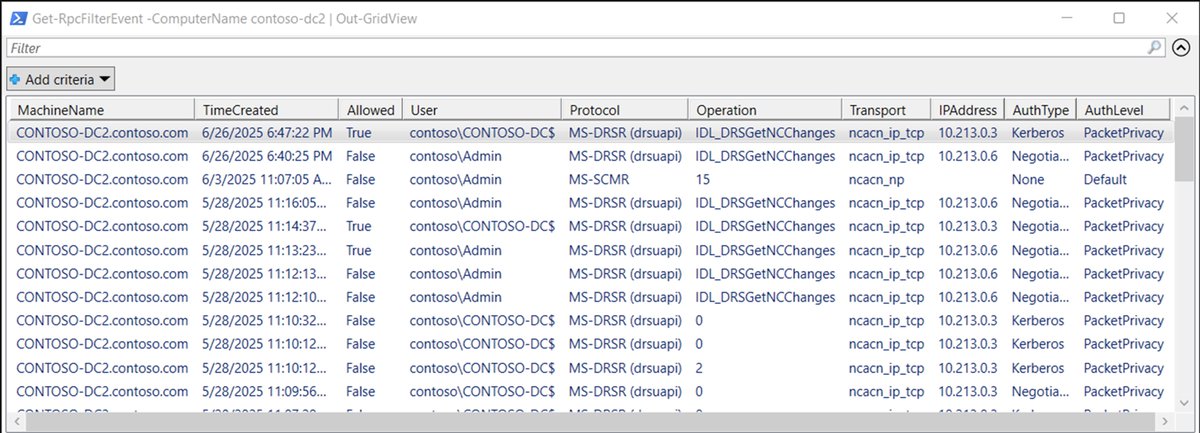
The DSInternals.RpcFilters PowerShell module for Windows RPC filter management is out! Includes support for the new OpNum matching capability of Windows Server 2025. Looking forward to community feedback.
https://t.co/AhhoyABwri
Not all Azure logs are created equal. Some stick around for 90 days, some for years, and others vanish unless you export them. I broke it down in Demystifying Log Retention in Azure.
https://t.co/j3JCmX08a7
#monitorallthethings#log#retention#azure#cheat#sheet
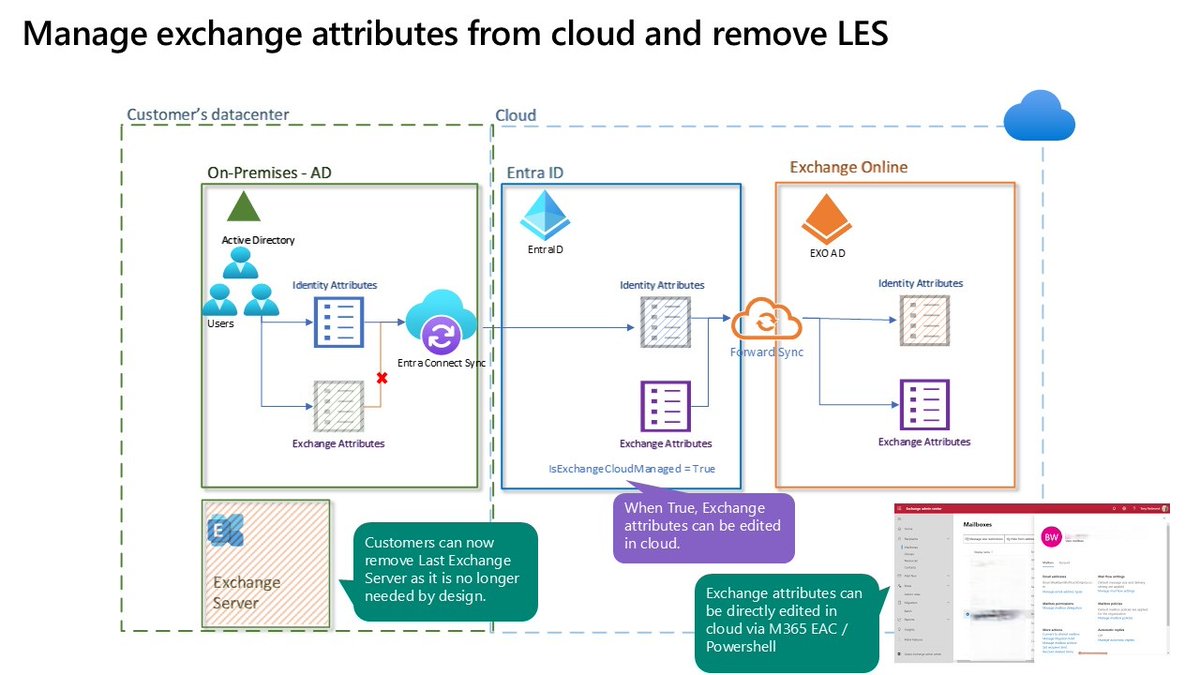
Removing the Last Exchange Server is now FINALLY possible!
A new capability in Exchange Online now allows administrators to manage Exchange attributes for directory-synchronized users with mailboxes hosted in the cloud.
With this update, the Source of Authority (SOA) for Exchange-specific attributes can be transferred to the cloud, while the SOA for identity-related attributes remains under the control of the on-premises Active Directory.
After moving the SOA for Exchange attributes to the cloud, these details can be managed using EXO PowerShell, the Microsoft 365 Admin Center, or the Exchange Admin Center, whereas identity attributes are still modified through on-premises Active Directory only.
Read more: https://t.co/XqnRs2gzoK
#Microsoft365 #ExchangeOnline #ExchangeServer #Hybrid #MicrosoftEntra #EntraID #ActiveDirectory #Microsoft
Attackers know how to find your weak and misconfigured Applocker rules. Now you can too....
🧵Just finished putting together a new tool to find weak and misconfigured AppLocker policies.
It’s called AppLocker Inspector.
Here’s how this tool came to be and what it does that’s so awesome…
This is a great read, and it has some good mitigations listed
There are additional recommendations I would offer that I did not see mentioned, so I'll do my best to expound on this without giving away too much (you need to go read the article) :P