open sourced my whoop cli + agent skill so you never have to open the phone app or tap through morning journal forms again.
wake up, voice-type to claude code how you slept / what you ate / workouts, and it syncs official whoop api v2 sleep, recovery, hrv, rhr, and workouts into local sqlite (plus optional live mac ble heart rate from your wrist).
pure python stdlib, zero deps, setup takes ~5 min, and you can hand the readme to your agent to install.
https://t.co/H5Nsuhss5W
I own both an iPhone and an Android, but I still end up using my Android way more.
> better network reception
> significantly better battery life
> better photos
> a much better keyboard
> and a bunch of other little things that add up
sure, the iPhone has its own strengths... and that’s exactly why I own both. but when it comes to actually using my phone every day, I keep reaching for my Android.
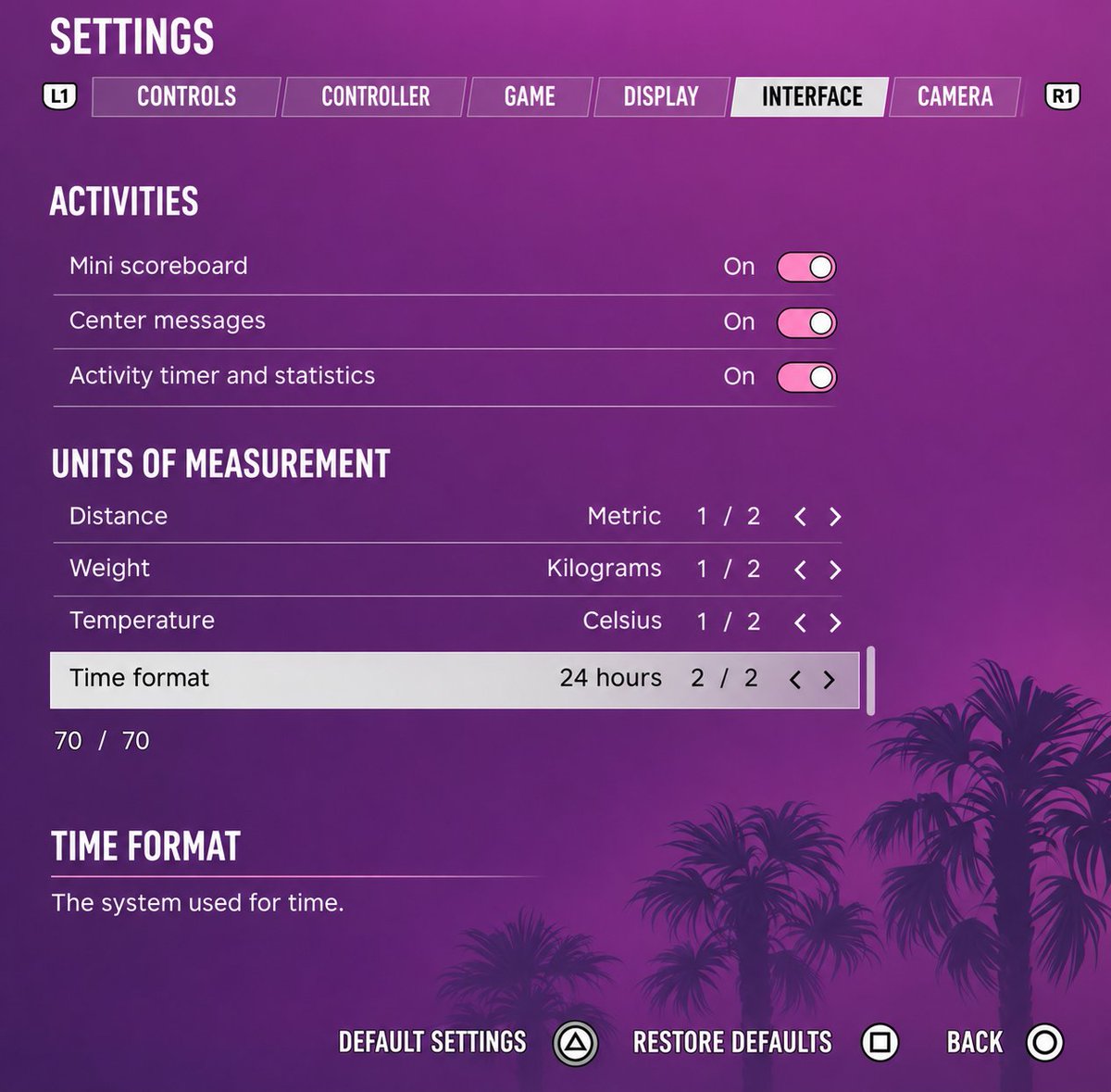
Change these GTA 6 settings for a better experience!
• Camera Shake: OFF
• Distance: Metric
• Aim Sensitivity: 9 or 10
• Street Names: ON
• Motion Blur: 3(zero for some)
• Control Scheme: Classic
• Temperature: Celsius
• Aim Acceleration: Highest
• TV Game Mode: ON
• Weight: Kilograms
• Grenade Trajectory: Always
• Time Format: 24-hour
Save these settings before starting your adventure!
You can now run a 9B AI model on your own laptop for FREE.
No API costs. No rate limits. 100% local on your machine.
I ran SenseNova-Loop-9B on my 16GB MacBook and it built a game, a file sorter and a full landing page. here's how, in 4 steps:
By the end, you'll know how to:
- run a 9B model 100% locally
- chat with it in your browser
- do it all for $0, no API key, no account
So, let's go step by step:
1. Build their llama.cpp
git clone https://t.co/zC9LOuMfRy
cd llama.cpp
cmake -B build
cmake --build build --config Release -j
the biggest mistake people make here is grabbing regular llama.cpp. the model card points to SenseNova's own fork, so start there
2. Start the model
llama serve -hf sensenova/SenseNova-Loop-9B-GGUF:Q4_K_M -ngl 99 -c 4096 --port 8000
the first run downloads the 5.8GB Q4_K_M file from Hugging Face, then it runs offline
why a 9B is worth it: it runs 24 of its 32 layers twice, so every token gets 56 layers of compute. SenseNova's benchmarks put it on par with Qwen3.8-27B on AIDABench, a model 3x its size
one thing: it's Apache 2.0, so unlike a lot of open models you can build a product on it
3. Open the chat
go to http://localhost:8000 and type your prompt
4. Give it a real build (the part every other guide skips)
ask for one whole thing: a game, a script, a landing page
when it crashes, paste the error back. my file sorter crashed on the first real run, then sorted 20 files into 7 folders one fix later
two gotchas:
- bump the context. 4096 is too small for a full build, my landing page alone was 6.5K tokens. raise -c, and expect it to use more memory (the model card says as low as ~9GB at 64K context on a GPU)
- expect fix rounds. my snake game took 5 (crash, speed, growth, food, board size), the landing page took 0
What you need:
- a 16GB Mac, or a GPU with ~10GB VRAM
- ~6GB of disk for Q4_K_M
- more of both if you want a big context
save it so you don't lose it
25 more free websites most people have never heard of:
1.) https://t.co/KYELkT9wv5 — Direct links to delete your account on hundreds of sites
2.) https://t.co/Hn7Ygo58zq — Scan any file or link for malware before you open it
3.) https://t.co/7LklncCXYl — Check which of your accounts support two-factor login
4.) https://t.co/9fsnrZiF9I — A free, open-source password manager
5.) https://t.co/Rrw5ph8XYT — Send notes that self-destruct after being read
6.) https://t.co/sYPXbGNUyL — Ask math, science or unit questions and get computed answers
7.) https://t.co/5uUCE7fsNw — The best free graphing calculator
8.) https://t.co/pGRU52FtVw — A calculator for everything: loans, BMI, dates, percentages
9.) https://t.co/RfxAD96DA4 — Compare the cost of living between any two cities
10.) https://t.co/oQfo9OHT6y — See every direct flight from any airport on a map
11.) https://t.co/qyNNlSiWVY — The flight search engine travel hackers use
12.) https://t.co/LV6ArVFuYX — Free ebooks and audiobooks with a library card
13.) https://t.co/imGUtHiEmJ — Borrow millions of ebooks for free
14.) https://t.co/hmFj1HxMUT — Find free, legal versions of paywalled research papers
15.) https://t.co/adIfkhxcUM — Free courses from basic math to economics
16.) https://t.co/ylmcrSS9SD — Harvard's famous intro to computer science, free
17.) https://t.co/QfSBldviBF — Learn to code for free, with certificates
18.) https://t.co/hgnQK97s1P — Step-by-step learning paths for tech careers
19.) https://t.co/aFlsdMtLhi — Learn to touch type properly
20.) https://t.co/rrTqrdislb — Click a muscle, get exercises for it
21.) https://t.co/cgizrsu1pO — Find the best time to wake up based on sleep cycles
22.) https://t.co/xcrsWOlUQa — Free high-quality photos for any use
23.) https://t.co/wsNCeRV3fv — Generate color palettes in seconds
24.) https://t.co/ysZRnNwnYr ��� Pull text out of any image or scanned PDF
25.) https://t.co/FXhj5c5Lyl — See every time zone at a glance
If you’d love to see more content like this, don’t forget to follow @julia_coder_ for more AI magic.
The invoice was off by $40. That's it.
I was 24, six months into my first job in accounts payable, when I noticed that our cleaning supply vendor had billed us $40 more than the purchase order said.
I asked my supervisor, Gary, about it.
He barely looked up. "It's rounding. Just approve it."
It didn't look like rounding to me. A rounding error goes up or down, and this was always exactly $40 over.
That night I couldn't let it go, so I pulled the vendor's invoices for the past three years. There were 2,300 of them, and every single one was exactly $40 over the purchase order.
I did the math three times. $92,000.
The next morning I asked Gary if he wanted to look at what I'd found. He said, "Put it away, Megan. Please. That's not your job."
I noticed he said "please," and that he was sweating.
Missing an agent tool? Nodecode can write it and keep it.
Nodecode is a self-modifying AI agent built in Common Lisp for builders experimenting with extensible assistants.
It helps you add capabilities without manually wiring every tool by letting the model evaluate Lisp inside the running agent. New definitions are saved as files, committed with git, and loaded on future starts.
Key features:
• Persistent tools – definitions created during a session stay available after a restart
• Live updates – most releases apply to the running program; saved generations support rollback
• Modular cells – add tools, skills, MCP servers, or scheduled prompts through installable folders
• Context recall – retrieve old conversation turns word for word rather than relying on summaries
• Shared gateway – terminal, browser, Discord, Telegram, and Slack clients use the same running agent
It’s open-source (MIT license).
Important: it ships without a sandbox and runs with your user account’s permissions. The README recommends a container or VM before leaving it working alone.
Link in the reply 👇
🚀 Build Your First AI Agent with Claude in Just 10 Minutes!
No coding. No complicated setup. Just Claude and a few simple steps.
Here's how to get started:
1️⃣ Open https://t.co/eA3ZE0w4PM
2️⃣ Ask Claude to guide you through building an AI agent.
3️⃣ Add useful skills like Web Search and File Reading.
4️⃣ Connect tools like Gmail, Google Drive, Slack, or Notion.
5️⃣ Define your agent's name, purpose, and goals.
6️⃣ Customize its behavior and permissions.
7️⃣ Test it with real-world tasks.
8️⃣ Save and launch your agent.
9️⃣ Improve it with more skills and tools.
🔟 Start building something amazing!
The best part? You don't need to be a developer to get started.
AI agents are becoming more accessible every day. Start learning now and stay ahead! 🔥
Follow @RIslam775 for more AI resources. 🤖
#Claude #AIAgents #AITools #ArtificialIntelligence
I spend a ridiculous amount of time working with CLIs these days. Claude Code, Codex, Grok Build, and a growing collection of AI engineering tools.
And I got to thinking: if this is where some of the most sophisticated engineering in the world is happening, why are we still interacting with it like it's 1985?
So I built a voice shell.
I wanted something I could use from my phone while sitting on the couch, with full, direct access to my actual development environment. Not another chat interface for a coding agent, but the real thing. My code, my projects, my shell, and whatever agents I happen to have working.
And I wanted to be able to talk to it.
Remember all those wonderfully obscure Linux commands, with their sophisticated combinations of flags, pipes, and arguments? Now imagine typing them on a phone keyboard.
No thanks.
I integrated Gemini Live, so now I can just ask what's happening, inspect files, check Git status, direct my coding agents, and approve commands using my voice. I can switch between speaking, typing, and touch controls whenever I want.
And because I apparently can't leave well enough alone, I built a custom WebGPU rendering engine for the whole thing.
Characters materialize from thousands of particles. Deleted text dissolves into glowing embers. Terminal output glides and rearranges itself as the screen changes. There's GPU compute, particle simulation, HDR, bloom, and a 3D particle orb that reacts to our voices.
All of this is running on top of a real terminal, with proper ANSI support, interactive applications, persistent sessions, and reconnect synchronization.
But here's where it gets interesting: I own the entire interface.
If I want to integrate another agent, add a tool, or completely change how I interact with my engineering environment, I can just build it. At this point, adding a new capability is often literally a prompt away.
That opens up some pretty fascinating possibilities.
We're already using AI to build extraordinarily sophisticated software. Why shouldn't we do this with the tools we use to build it?
And if the result happens to be powerful, gorgeous, and lets me get some engineering done while sitting on the couch?
Even better.
📢 𝗝𝗨𝗦𝗧 𝗜𝗡: $META Muse Introduces AI-Powered Spaces to Build Personalized Apps and Automate Daily Tasks
👉 𝗞𝗲𝘆 𝗛𝗶𝗴𝗵𝗹𝗶𝗴𝗵𝘁𝘀:
➤ 𝗠𝘂𝘀𝗲 introduces 𝗦𝗽𝗮𝗰𝗲𝘀, customizable interactive experiences within its app.
➤ Users can create 𝗽𝗲𝗿𝘀𝗼𝗻𝗮𝗹𝗶𝘇𝗲𝗱 𝘁𝗼𝗼𝗹𝘀 simply by describing their ideas.
➤ Spaces support 𝗱𝗮𝗶𝗹𝘆 𝗽𝗹𝗮𝗻𝗻𝗶𝗻𝗴, productivity, entertainment, and creative projects.
➤ Users can 𝗺𝗼𝗱𝗶𝗳𝘆 𝗱𝗲𝘀𝗶𝗴𝗻𝘀, features, and functionality through Muse.
➤ Spaces can be added to 𝘀𝗶𝗱𝗲𝗯𝗮𝗿𝘀 or 𝗺𝗮𝗶𝗻 𝘁𝗮𝗯𝘀.
➤ Users can 𝘀𝗰𝗵𝗲𝗱𝘂𝗹𝗲 𝘀𝗽𝗮𝗰𝗲𝘀 to appear based on routines.
➤ Supported examples include 𝘀𝗵𝗼𝗽𝗽𝗶𝗻𝗴 𝗵𝘂𝗯𝘀, 𝘀𝗰𝗵𝗼𝗼𝗹 𝗱𝗮𝘀𝗵𝗯𝗼𝗮𝗿𝗱𝘀, and 𝘁𝗿𝗶𝗽 𝗽���𝗮𝗻𝗻𝗲𝗿𝘀.
➤ Spaces also support 𝗯𝘂𝘀𝗶𝗻𝗲𝘀𝘀 𝗼𝗿𝗱𝗲𝗿 𝘁𝗿𝗮𝗰𝗸𝗶𝗻𝗴 and 𝗰𝗹𝗶𝗲𝗻𝘁 𝗺𝗮𝗻𝗮𝗴𝗲𝗺𝗲𝗻𝘁.
➤ Connected apps enable 𝗮𝘂𝘁𝗼𝗺𝗮𝘁𝗶𝗰 𝗯𝗮𝗰𝗸𝗴𝗿𝗼𝘂𝗻𝗱 𝘂𝗽𝗱𝗮𝘁𝗲𝘀 across personalized spaces.
➤ Users can 𝗲𝗱𝗶𝘁, 𝗮𝗱𝗱 𝗻𝗼𝘁𝗲𝘀, and track progress directly.
👉 𝗪𝗵𝘆 𝗧𝗵𝗶𝘀 𝗠𝗮𝘁𝘁𝗲𝗿𝘀:
➤ Makes 𝗰𝘂𝘀𝘁𝗼𝗺 𝗮𝗽𝗽 𝗰𝗿𝗲𝗮𝘁𝗶𝗼𝗻 accessible without traditional programming skills.
➤ Shifts AI from answering questions toward building 𝗶𝗻𝘁𝗲𝗿𝗮𝗰𝘁𝗶𝘃𝗲, 𝗽𝗲𝗿𝘀𝗶𝘀𝘁𝗲𝗻𝘁 𝘁𝗼𝗼𝗹𝘀.
➤ Connected apps could reduce 𝗺𝗮𝗻𝘂𝗮𝗹 𝘄𝗼𝗿𝗸 and simplify everyday workflows.
➤ Highlights growing competition in 𝗔𝗜-𝗽𝗼𝘄𝗲𝗿𝗲𝗱 𝗽𝗲𝗿𝘀𝗼𝗻𝗮𝗹 𝗽𝗿𝗼𝗱𝘂𝗰𝘁𝗶𝘃𝗶𝘁𝘆 platforms.