You and your agent can now access Android Device Streaming directly through Android CLI → https://t.co/qyjrS0tu1Y
It gives you remote access to real physical devices for testing. Deploy builds, collect logs, and capture screenshots all through the terminal. ⚡️
I've loved using Claude Code, Codex, and OpenCode since the very beginning.
But a few weeks ago, I tried out pi to see what all the hype is about. And now, it's my daily driver. I'm in full control. No unexpected changes to the harness.
Check out pi in about 6 minutes.
After 15 years of masterclassing Native Android, I realized something uncomfortable.
The gap between Junior and Senior isn't just about how much code you write.
It's about how much code you *don't* have to write anymore.
In 2026, AI tools like Cursor aren't a threat to your job. They are a threat to your ego.
When I moved to Flutter + Rails, my ego took a hit. I was a beginner again. But my productivity? It doubled.
Don't let your "Native Pride" blind you to the "Vibe Coding" revolution.
Solve problems. Ship apps. Let the AI handle the boilerplate. 🐙🔥
10x productivity tip: use Claude hooks with sounds so Claude alerts you when it finishes a task or needs permission.
But that's not the tip, the tip is to add your favourite childhood game sounds like the Starcraft, Warcraft, or even Mario.
We've added a new command to Claude Code called /insights
When you run it, Claude Code will read your message history from the past month. It'll summarize your projects, how you use Claude Code, and give suggestions on how to improve your workflow.
On the one hand, AI influencers are breathlessly raving about Claude Code, Clawdbot, and Cowork. And on the other hand, most people I know—even software engineers—are despondent, overwhelmed about how everything is changing so quickly. I hear this from people early in their careers especially, a fear that everything they've learned and the skills they've gained are rapidly being devalued.
This is a mental trap. Don't fall for it. You should not just be watching from the sidelines or reading articles about "how software engineering is changing."
Imagine it was 1993 and the personal computer revolution was kicking off. If you could go back in time to then, what should you have done?
The answer: try everything. Buy a PC. Learn how to touch type. Figure out what the Internet is. Imbibe it all. Don't wait until it becomes a job requirement.
That's exactly what you should do with AI. Try everything. Try Claude Code, try Clawdbot, try the Excel integrations, Veo, everything you can get your hands on. Learn what it's doing. Build your intuitions. Be one step ahead of it. Evolve alongside it. Don't lose your curiosity or get swallowed by anxiety or let yourself be convinced that you'll learn it when you have to. Think deeply about how AI will change the things around you—not society, that's too hard to project—but how it will change your job, your personal life, your immediate environment.
No matter how old you are or young you are, no matter what stage of your career you are in, we are all going through the biggest technological change of the last 100 years, and we're going through it together. Nobody has the answers. It's obvious that so much is going to change, but nobody is going to figure it out before you do if you choose to stay at the frontier.
So don't hide from it. Sit at the front of the class. Pay close attention. And be grateful that it's never been easier to stay at the frontier of the most important technology change of our lifetimes.
A small quality of life detail: you can now press tab to add more instructions when accepting/rejecting a permission prompt.
We tried probably a dozen iterations of this UX over the last few weeks before deciding to ship this one.
Let us know what you think!
Your IDE, your workflow 🛠️ @AndroidStudio Narwhal 4 lets you set the Project view as the default for all new projects, saving you a step every time you get started → https://t.co/qAGNJJWE7J
Before moving from my role at Google to Snowflake I sat down and did a braindump of all the guidelines that I follow (or followed at one point and wanted to reintroduce).
For those interested, here are the ~34 guidelines that made the cut
𝗧𝗼𝗽 𝟮𝟬 𝗦𝗤𝗟 𝗾𝘂𝗲𝗿𝘆 𝗼𝗽𝘁𝗶𝗺𝗶𝘇𝗮𝘁𝗶𝗼𝗻 𝘁𝗲𝗰𝗵𝗻𝗶𝗾𝘂𝗲𝘀
Here is the list of the top 20 SQL query optimization techniques I found noteworthy:
1. Create an index on huge tables (>1.000.000) rows
2. Use EXIST() instead of COUNT() to find an element in the table
3. SELECT fields instead of using SELECT *
4. Avoid Subqueries in WHERE Clause
5. Avoid SELECT DISTINCT where possible
6. Use WHERE Clause instead of HAVING
7. Create joins with INNER JOIN (not WHERE)
8. Use LIMIT to sample query results
9. Use UNION ALL instead of UNION wherever possible
10. Use UNION where instead of WHERE ... or ... query.
11. Run your query during off-peak hours
12. Avoid using OR in join queries
14. Choose GROUP BY over window functions
15. Use derived and temporary tables
16. Drop the index before loading bulk data
16. Use materialized views instead of views
17. Avoid != or <> (not equal) operator
18. Minimize the number of subqueries
19. Use INNER join as little as possible when you can get the same output using LEFT/RIGHT join.
20. For retrieving the same dataset, frequently try to use temporary sources.
Do you know what is 𝗤𝘂𝗲𝗿𝘆 𝗢𝗽𝘁𝗶𝗺𝗶𝘇𝗲𝗿? Its primary function is to determine 𝘁𝗵𝗲 𝗺𝗼𝘀𝘁 𝗲𝗳𝗳𝗶𝗰𝗶𝗲𝗻𝘁 𝘄𝗮𝘆 to execute a given SQL query by finding the best execution plan. The query optimizer works by taking the SQL query as input and analyzing it to determine how best to execute it. The first step is to parse the SQL query and create a syntax tree. The optimizer then analyzes the syntax tree to determine how to run the query.
Next, the optimizer generates 𝗮𝗹𝘁𝗲𝗿𝗻𝗮𝘁𝗶𝘃𝗲 𝗲𝘅𝗲𝗰𝘂𝘁𝗶𝗼𝗻 𝗽𝗹𝗮𝗻𝘀, which are different ways of executing the same query. Each execution plan specifies the order in which the tables should be accessed, the join methods, and any filtering or sorting operations. The optimizer then assigns a 𝗰𝗼𝘀𝘁 to each execution plan based on the number of disk reads and the CPU time required to execute the query.
Finally, the optimizer 𝗰𝗵𝗼𝗼𝘀𝗲𝘀 𝘁𝗵𝗲 𝗲𝘅𝗲𝗰𝘂𝘁𝗶𝗼𝗻 𝗽𝗹𝗮𝗻 with the lowest cost as the optimal execution plan for the query. This plan is then used to execute the query.
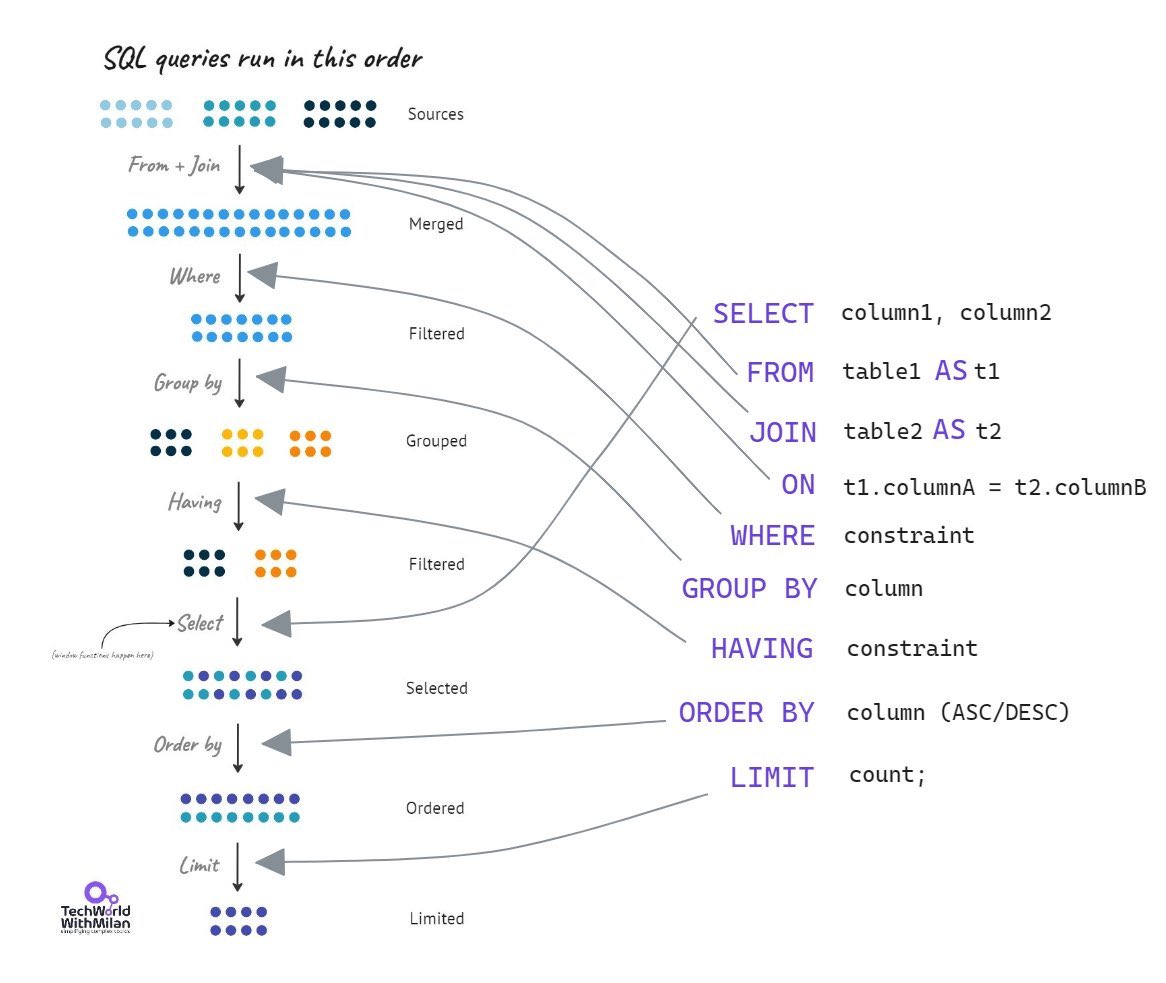
Check in the image the 𝗼𝗿𝗱𝗲𝗿 𝗶𝗻 𝘄𝗵𝗶𝗰𝗵 𝗦𝗤𝗟 𝗾𝘂𝗲𝗿𝗶𝗲𝘀 𝗿𝘂𝗻.
#technology #softwareengineering #programming #techworldwithmilan #sql
Chandrayaan-3 Mission:
'India🇮🇳,
I reached my destination
and you too!'
: Chandrayaan-3
Chandrayaan-3 has successfully
soft-landed on the moon 🌖!.
Congratulations, India🇮🇳!
#Chandrayaan_3#Ch3
Stuff few people tell you:
Being good at debugging at large tech companies is a good part this:
Knowing where to find the right dashboards (and know how to use them + filter/search in them) which make debugging prod issues *so* much easier.
We released the first Developer Preview of #Android14!
It includes changes to streamline background work, along with enhancements to privacy, personalization, security, and more.
Try out the new features and APIs, test your apps, and give us feedback → https://t.co/wC144Pwl26