@AskPayPal your website says to call. Can you give an answer here so many can benefit from this as it’s not a personal question it’s general for the public.
@AskPayPal how long until you have the service to buy crypto again. You said early 2024 several months ago. Do I need to transfer funds to another platform?
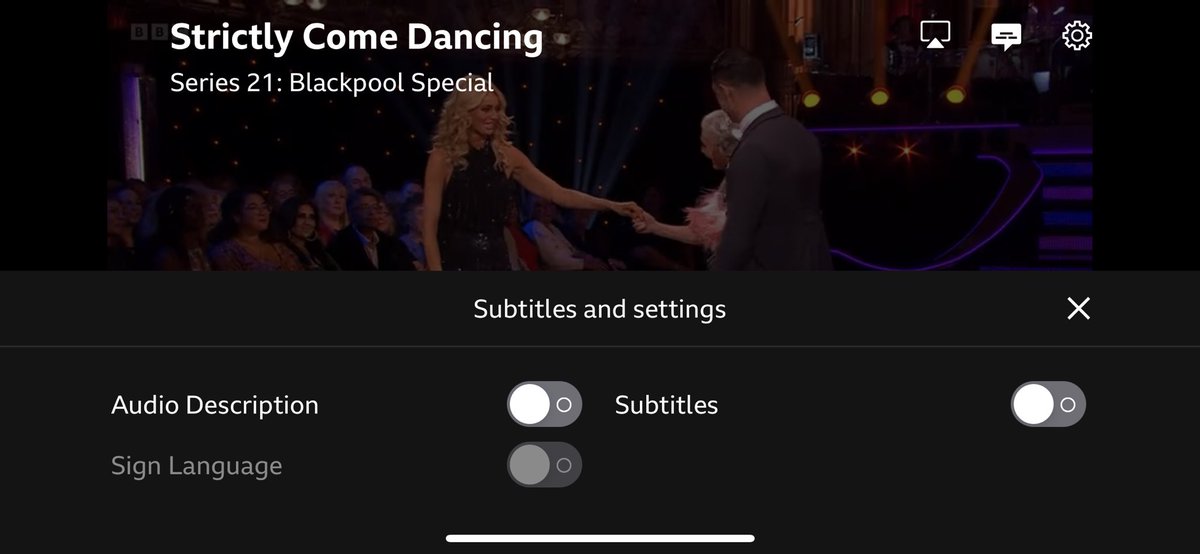
#strictly There’s a solution I have found which works. Go into iPlayer on your device, not your TV (I used an iPhone) and bring up last night’s episode. Top right, click on the middle icon and turn off audio description. Then go back to your TV and it will be fixed :)
#StrictlyComeDancing - There’s a solution which works. Go into iPlayer on your device, not your TV (I used an iPhone) and bring up last night’s episode. Top right, click on the middle icon and turn off audio description. Then go back to your TV and it will be fixed :)
@acsstanton There’s a solution I have found which works. Go into iPlayer on your device, not your TV (I used an iPhone) and bring up last night’s episode. Top right, click on the middle icon and turn off audio description. Then go back to your TV and it will be fixed :)
@Jessica_mae_G97 There’s a solution I have found which works. Go into iPlayer on your device, not your TV (I used an iPhone) and bring up last night’s episode. Top right, click on the middle icon and turn off audio description. Then go back to your TV and it will be fixed :)
@Nic45398235 There’s a solution I have found which works. Go into iPlayer on your device, not your TV (I used an iPhone) and bring up last night’s episode. Top right, click on the middle icon and turn off audio description. Then go back to your TV and it will be fixed :)
@shoesthatgirl_@BBCiPlayer There’s a solution I have found which works. Go into iPlayer on your device, not your TV (I used an iPhone) and bring up last night’s episode. Top right, click on the middle icon and turn off audio description. Then go back to your TV and it will be fixed :)
@ndwilliams1975 @BBC There’s a solution I have found which works. Go into iPlayer on your device, not your TV (I used an iPhone) and bring up last night’s episode. Top right, click on the middle icon and turn off audio description. Then go back to your TV and it will be fixed :)
@shoesthatgirl_@BBCiPlayer@bbcstrictly@BBCOne There’s a solution I have found which works. Go into iPlayer on your device, not your TV (I used an iPhone) and bring up last night’s episode. Top right, click on the middle icon and turn off audio description. Then go back to your TV and it will be fixed :)
@Smeagalsmith@BBCiPlayer There’s a solution I have found which works. Go into iPlayer on your device, not your TV (I used an iPhone) and bring up last night’s episode. Top right, click on the middle icon and turn off audio description. Then go back to your TV and it will be fixed :)
@andyscott78@BBCiPlayer There’s a solution I have found which works. Go into iPlayer on your device, not your TV (I used an iPhone) and bring up last night’s episode. Top right, click on the middle icon and turn off audio description. Then go back to your TV and it will be fixed :)
@M18Snooker@BBCiPlayer There’s a solution I have found which works. Go into iPlayer on your device, not your TV (I used an iPhone) and bring up last night’s episode. Top right, click on the middle icon and turn off audio description. Then go back to your TV and it will be fixed :)