@IntuneSuppTeam Just to be clear, the filter is correct. In the preview, the affected Surface device shows up as expected.
Right now, running larger rollouts with Autopilot is a huge pain. 😡
@IntuneSuppTeam I initially thought the issue was related to Incident IT1180739 and had already been fixed. But the problem is back. A Win32 app with Required intent and an exclude filter (device.manufacturer -startsWith "Microsoft") is still installing during ESP on a Surface device. 🤷♂️
@IntuneSuppTeam Is it possible that the "Turn off the Store application" setting also blocks Intune deployment of Store apps, contrary to what's described here? ➔ https://t.co/xfRgNeFlVI
While we're at it: the assignment section of the Firewall policies is buggy too. In the filter selection, only the first three filters (alphabetically) are selectable. Not exactly the quality I expect from an enterprise-grade workplace management tool. @IntuneSuppTeam 😡
@IntuneSuppTeam@MSIntune Intune Endpoint Security – Windows Firewall policies seem totally broken! Once created, settings can't be changed. The 'Next' button on the config page is greyed out after any edit. Can you please fix this ASAP? 🤯
@IntuneSuppTeam A bit disappointing that, once again, the community (MVP and Mr. DLL @Mister_MDM) had to provide proof of a Microsoft issue through DLL reviews. -> https://t.co/0vjem402cH
Microsoft support case has seen no progress for several weeks... @IntuneSuppTeam@DeviceDeploy
@MSEndpointMgr@modaly_it@JankeSkanke@sandy_tsang Hi everyone! Quick question: Should your Windows Update Compliance Dashboard V8.0 also work with Windows Update for Business Reports data? I can’t find the WaasDeploymentStatus table in the Log Analytics workspace. Any ideas?
@DeviceDeploy@IntuneSuppTeam@brookspeppin@AasawariNavathe I'm so sorry, I completely missed your response! I agree, 200 is definitely more than enough—as long as the client doesn't hit the limit on their own. ;)
The device only has one active key.
@IntuneSuppTeam@brookspeppin@AasawariNavathe@DeviceDeploy Are there any insights or answers to this great question? Unfortunately, the problem still persists! Cleaning up on the client side using "Remove-BitLockerKeyProtector" definitely does not solve the issue. Recovery keys in Entra are never cleaned up...
@IntuneSuppTeam@MSIntune ...would be nice if the WindowsLAPS Policy type is completed with an option to enable the Built-in local Administrator Account
@IntuneSuppTeam Is there any way the device install stauts from a Win32 app deployment provides useful output?
Each device is listed at least twice in the device status overview. (user & system). with the current filters you will not get any useful results.
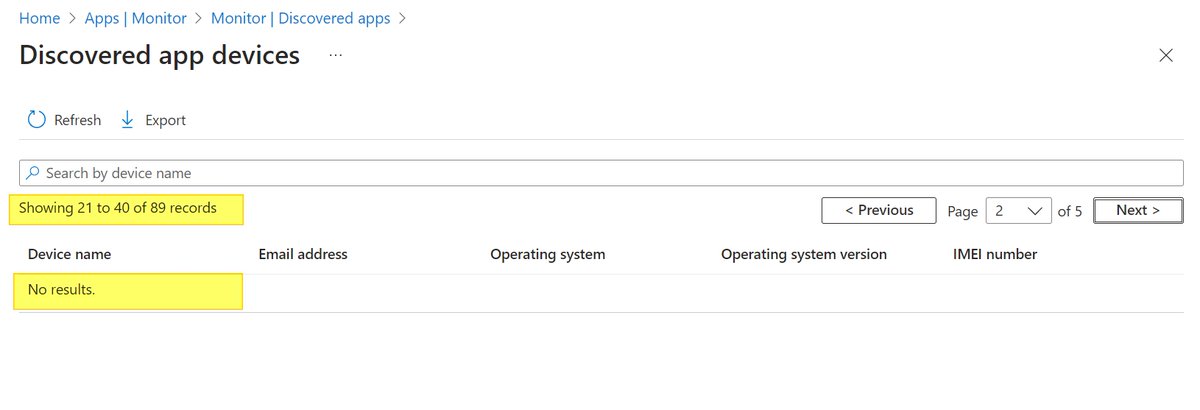
@SCCM_Avenger@RealMarkPowell unfortunately, the "discovered apps" is not really useful in its current state. from the second page on, no results are displayed. I can reproduce the problem in any tenant.... so please test it yourself