Breaking: Windows 10 support has been extended until October 2027
In a quiet update to its official Windows 10 Extended Security Updates page, Microsoft pushed the consumer ESU coverage period to October 12, 2027.
That is one full year beyond the earlier October 2026 cutoff home users were planning around.
This is a big deal for the hundreds of millions of PCs still on Windows 10.
If you’re already enrolled, Microsoft says your coverage continues automatically. No action needed. If you haven’t enrolled yet, you still can.
The options remain the same: free if you sync PC settings with a Microsoft account, 1,000 Microsoft Rewards points, or a one-time $30 payment. One licence covers up to 10 devices.
This does not mean Windows 10 is getting new features. ESU is still security-only.
But it does mean Microsoft is no longer forcing the migration clock as aggressively.
Windows 11 is finally improving in 2026, but Windows 10 users just got more time to move on their own terms.
Windows 11 June 2026 update, which was supposed to make PCs faster, is crashing some PCs with BSODs, breaking OneDrive integration in File Explorer and custom folder icons, and causing other problems.
We're seeing reports that Windows 11 KB5094126 is causing boot failures on some PCs, mostly HP enterprise hardware.
The worst reports involve BitLocker recovery loops, Black Screen of Death/BSOD failures, Secure Boot signature errors, and error 0xc0430001.
Affected models appear to include HP EliteBook 840 G10, HP ProBook 460 G11, HP Engage One Pro G2 AiO POS, HP ZBook, and some Dell Precision systems.
The likely trigger is Secure Boot certificate handling + EFI partition space. On older images with a 100MB EFI partition, Windows may fail to update Boot Manager because there isn’t enough space, especially on HP systems where firmware recovery files can bloat EFI.
There are also File Explorer cloud integration issues. OneDrive, and in some cases Dropbox or iCloud Drive, may stop opening from the sidebar/tray shortcut after KB5094126.
Microsoft also confirms desktop.ini hardening can break custom folder icons or localized folder names from untrusted sources.
KB5094126 is important, as it fixes 200+ security bugs, but be careful, as it could cause havoc on some PCs.
🚀 New Feature Alert! Introducing a new enrollment method for staging corporate Android devices in @MSIntune🥳🎉
📲 Simplify the enrollment process
⚡ Enhance productivity with faster device setup
🌐 Learn more: https://t.co/DGZ8pCFqGg
#MSIntune#AlwaysIntune#IntuneInspired
Want to master Microsoft Entra Conditional Access Policies this year?
Here's a short clip from a new YouTube series I'm starting on conditional access policies.
Subscribe and watch the full video at https://t.co/VVoyxIlShk
The newest Entra Offering just dropped into Public Preview today.
Learn how you can create Conditional Access Policies to manage all types of internet access by your users (yes even apps that are not integrated with Entra ID).
Read here https://t.co/capIvXxGq4
If you want to watch a quick demo see https://t.co/Dh6ejZLJFh
Note: License info for this product is not available yet.
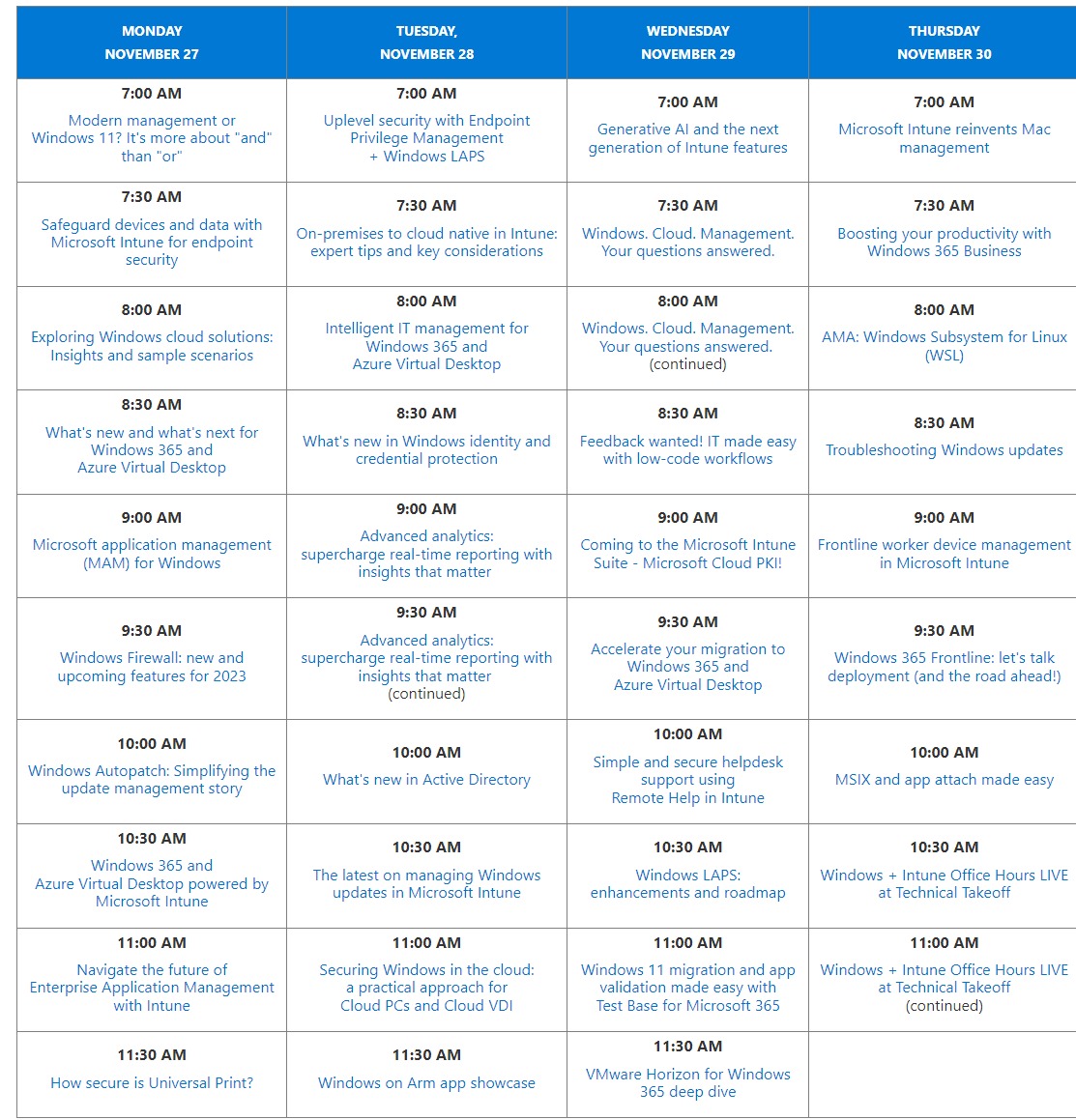
Have you been enjoying #MicrosoftIntune#TechTakeOff? We have 39 deep dive sessions in 4 days! Check out the schedule here, and view the session on-demand! Day 2 starts soon! Come view the sessions live at https://t.co/pLMX2MlRL5
#MSIntune#Windows11#CloudNative
Dive into the #AI Shared Responsibility Model!
AI is more than just a buzzword. It's a tool that is reshaping industries and changing the way we work. But how can it be harnessed effectively and safely? The AI Shared Responsibility Model provides a roadmap. Let's break it down!
🤝 In the AI Shared Responsibility Model, tasks are divided between the AI platform or application provider and you. This varies depending on whether you're using Software as a Service (SaaS), Platform as a Service (PaaS), or Infrastructure as a Service (IaaS). #AI #SaaS #PaaS #IaaS
https://t.co/hm8DP1f7Q0
📚 An AI-enabled solution has three layers: AI platform, AI application, and AI usage. Each layer groups tasks performed by either you or the AI provider. The security responsibilities generally reside with whoever performs the tasks.
- 🔐 The AI platform layer provides the AI capabilities to the applications. It's critical to build and safeguard the infrastructure that runs the AI model, training data, and specific configurations. This layer provides access to functionality via APIs. #AISecurity
Azure OpenAI Service: https://t.co/CnyYhjbe5H
- 🖥️ The AI application layer provides the service or interface that the user consumes. Its complexity can vary from simple to highly complex, depending on the application. Its safety system protects the AI application from malicious activities. #AIApplication
- 🚀 The AI usage layer describes how the AI capabilities are used and consumed. It requires security assurances for identity and access controls, device protections and monitoring, data protection, and governance. #AIUsage
https://t.co/FH8RVDgE7i
💡 Microsoft recommends starting with SaaS-based approaches like the Copilot model for initial AI adoption. It reduces the level of responsibility and expertise your organization needs to design, operate, and secure these complex capabilities. #Microsoft #AI
- Microsoft Security Copilot: https://t.co/42vR8fWmGB
🛡️ Protecting AI usage is similar to any computer system. It's critical to update acceptable use policies and educate users on the difference of standard IT applications to AI enabled applications. #AIUsage #AIEducation
https://t.co/N3fPFQEZxh
Some of you have already seen this in Intune! Here's the official blog.
This will make it easier to upgrade devices to Windows 11 and also update ineligible devices to the latest Win 10 w/o managing 2 policies and groups.
Let us handle it!
https://t.co/CSV1mG6BV3
Thanks, Jörgen! I've been assigned the configuration of the Start Menu, and this answered so many of my questions. Real nice write-up.
[Ping @ccmexec]
Customizing Windows 11 default Start Menu during OSD using LayoutModification.json https://t.co/8DZVDRs5Ub
It seems that #windowsAutopilot version 2 is in the test phase.
Do you want to know why I think so? Please read this blog explaining how I stumbled upon APv2 which lured me into the rabbit hole.
#intune#msintune#MVPBuzz
https://t.co/I8ORe4SyUJ
Through the early 1980s, Microsoft co-founders @PaulGAllen and @BillGates brainstormed ideas for a new product: a graphical “operating environment” that would ran on top of their command-based MS-DOS operating system. After many delays, it would release as Windows 1 in 1985. ✨