Pai da Alice. Queria ser pilogo de Moto GP, mas não é. Tem duas certezas na vida: é o último filho de Crom e em sua lápide estará escrito “Rick? Que Rick?”
RAG vs. CAG, clearly explained!
RAG is great, but it has a major problem:
every query hits the vector DB. even for static information that hasn't changed in months.
this is expensive, slow, and unnecessary.
Cache-Augmented Generation (CAG) fixes this by letting the model keep static information in its key-value (KV) memory, which is what the model builds internally for every token it reads.
in fact, you can combine RAG and CAG for the best of both worlds.
here's how it works:
RAG + CAG splits your knowledge into two layers.
↳ static data (policies, documentation) gets cached once in the model's KV memory
↳ dynamic data (recent updates, live documents) gets fetched via retrieval
you get faster inference, lower costs, and less repeated work.
the trick is being selective about what you cache.
only cache static, high-value knowledge that rarely changes. cache everything and you'll hit context limits. separating "cold" (cacheable) and "hot" (retrievable) data keeps this system reliable.
you can start today. OpenAI and Anthropic already support prompt caching in their APIs.
one thing to know before you scale it.
prompt caching matches on an exact prefix, byte for byte. your cached layer only gets reused when it sits at the very front of the context in the same order every time.
↳ reorder two cached policy documents and both turn into a miss
↳ cache document A alone and document B alone, then query both, and the second one misses because the model computed its cached state without ever seeing the first
in production this looks like a small fraction of your cached blocks serving almost all the hits. the rest just sits there.
the way out comes from how attention behaves. tokens attend mostly to their own local neighborhood, and only a few reach across document boundaries. CacheBlend recomputes those few and reuses everything else from the separately cached documents.
multi-document queries run two to four times faster, quality holds, and order stops mattering.
it ships in LMCache, which is fully open source.
repo: https://t.co/TXlaLLu04a
(don't forget to star 🌟)
below, i have quoted my article on KV cache management. it covers where prefix caching stops working and how a proper caching layer fixes it.
give it a read.
cheers! :)
📦 We're excited to release NotMyFault, RDCMan, ZoomIt, CoreInfo, Process Explorer, Process Monitor, and PsPing with new features and bug fixes!
Get the tools at https://t.co/zlch58GEpK.
See what's new on the Sysinternals Blog: https://t.co/eojIonaLGD
Everyone's suddenly talking about 𝗵𝗮𝗿𝗻𝗲𝘀𝘀 𝗲𝗻𝗴𝗶𝗻𝗲𝗲𝗿𝗶𝗻𝗴.
Weren't we just getting the hang of context engineering? 😵💫
Here's the 3-step evolution of how we work with AI in 2026, and why each stage matters:
𝟭. 𝗣𝗿𝗼𝗺𝗽𝘁 𝗲𝗻𝗴𝗶𝗻𝗲𝗲𝗿𝗶𝗻𝗴
It's about what you 𝘴𝘢𝘺 to the model.
The practice of figuring out what instructions/framing/examples a model needs to nail a task or answer a question in your domain.
Do this right and the model does in one shot what used to take five.
But it can only work with what you put in that one ask.
𝟮. 𝗖𝗼𝗻𝘁𝗲𝘅𝘁 𝗲𝗻𝗴𝗶𝗻𝗲𝗲𝗿𝗶𝗻𝗴
It's about what you 𝘣𝘳𝘪𝘯𝘨 to the model.
Your context window is finite (200K tokens, maybe 1M on the smartest models). Every token you load upfront (memory, AGENTS.md, skills, docs) is budget spent.
Context engineering is the practice of deciding what earns a spot in that window, and what stays out.
Do it well and the model feels 10x smarter. Overpack, and it drowns.
𝟯. 𝗛𝗮𝗿𝗻𝗲𝘀𝘀 𝗲𝗻𝗴𝗶𝗻𝗲𝗲𝗿𝗶𝗻𝗴
It's about what you build 𝘢𝘳𝘰𝘶𝘯𝘥 the model.
A model on its own does one thing: take an input → return an output → stop.
Harness engineering is the practice of building the system that runs it in a loop, and gives it tools to act, memory to remember, and guardrails to stay on track.
→ Prompt and context are what you hand the model for 𝘰𝘯𝘦 turn.
→ The harness is what strings 𝘩𝘶𝘯𝘥𝘳𝘦𝘥𝘴 of them together into an agent that actually goes and does the work.
That's why everyone's so hyped about harness engineering.
In only a few years, we've gone from 𝘵𝘢𝘭𝘬𝘪𝘯𝘨 to a model → 𝘧𝘦𝘦𝘥𝘪𝘯𝘨 a model → 𝘣𝘶𝘪𝘭𝘥𝘪𝘯𝘨 𝘢 𝘴𝘺𝘴𝘵𝘦𝘮 around it.
Which stage is your team at? 👇
SSH Tunnels: Local and Remote Port Forwarding 🔽
SSH is an old-school technology that is still incredibly useful today. With a single ssh command, you can:
- Access private VPC services through a bastion
- Open a remote localhost port in your browser
- Expose a homelab service through a public server
- Turn an SSH connection into a SOCKS proxy for an entire private network
My reworked tutorial explains SSH port forwarding with diagrams, hands-on labs, and a visual cheat sheet to help you both understand different types of tunnels and remember the right flags: https://t.co/oVRkf6OpKr
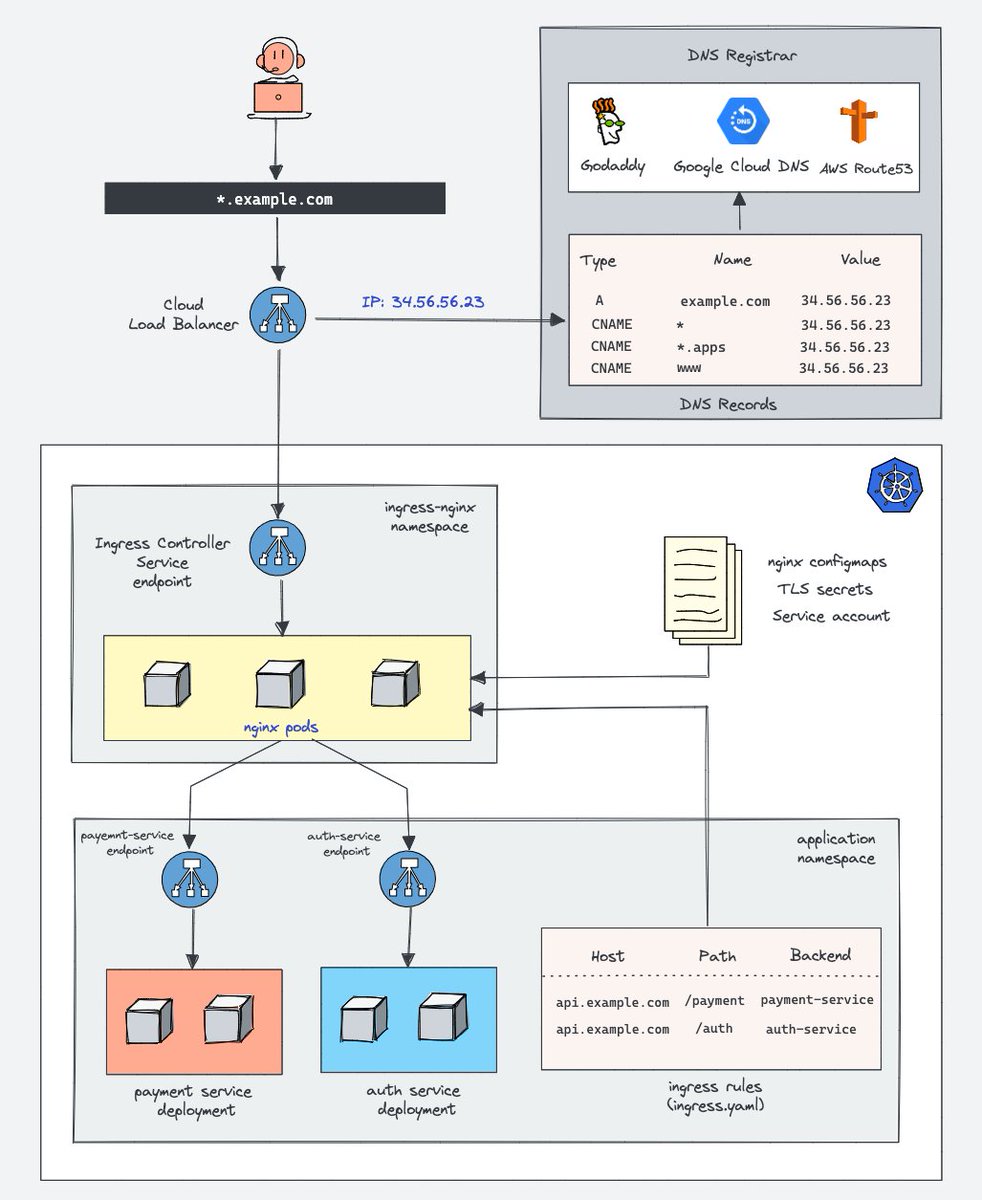
Learn Kubernetes Ingress concepts in 7 mins 🚀
This detailed blog will teach you,
- What is Kubernetes Ingress?
- How Does Kubernetes Ingress work?
- what is a Ingress Controller?
- How Does an Ingress Controller Work?
- Ingress & Ingress Controller Architecture
𝗗𝗲𝘁𝗮𝗶𝗹𝗲𝗱 𝗕𝗹𝗼𝗴: https://t.co/l20C5DhEEX
If you liked the blog, do drop a comment :)
Note: While Ingress is still the most widely used option, Kubernetes is moving toward the Gateway API for more advanced and flexible traffic management.
Understanding Ingress first makes learning Gateway API much easier.
#devops #kubernetes #practicaldevops
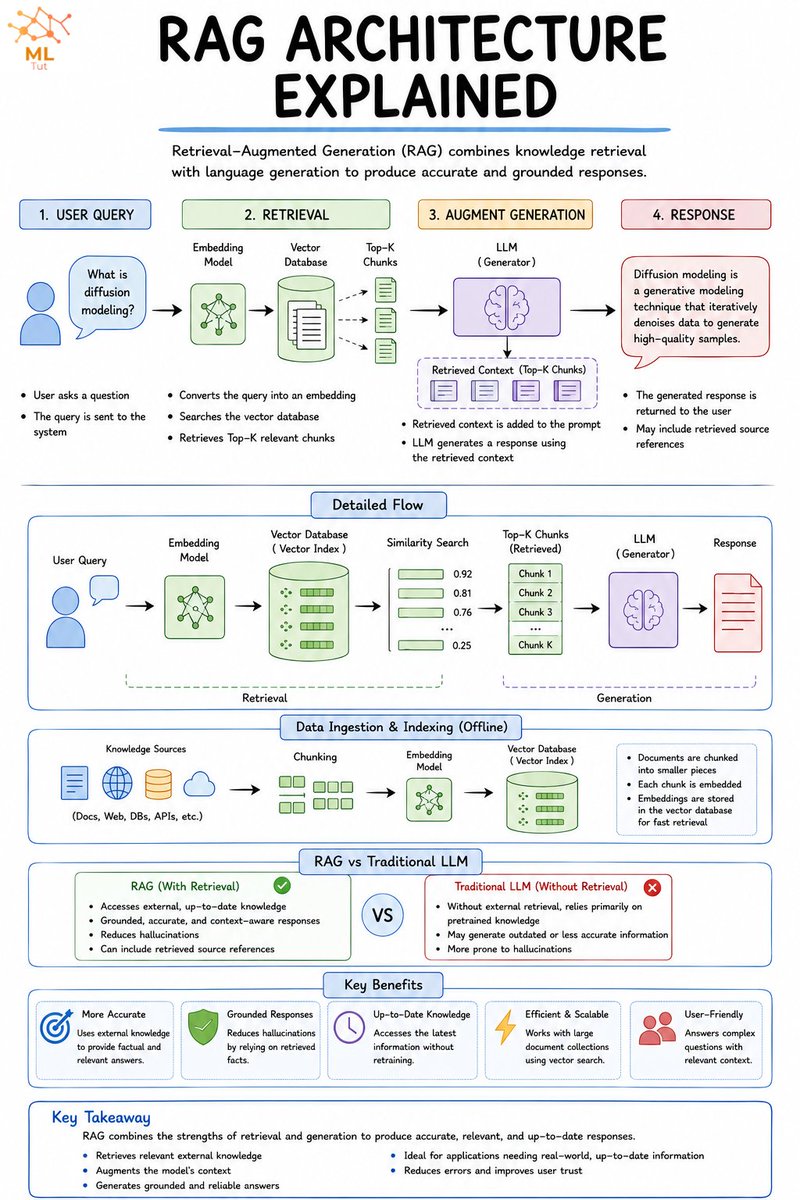
8 RAG Architectures Developers Should Know.
RAG isn't one fixed architecture. It's a spectrum of retrieval approaches that determine what gets searched, how results are ranked, and how much control the LLM has over retrieval.
Knowing these architectures is important. But understanding how to evaluate and choose the right one for your application is just as important.
Learn more about that here: https://t.co/eyIBu7mNEc
1. 𝗡𝗮𝗶𝘃𝗲 𝗥𝗔𝗚
↳ Retrieves the top matching chunks from a vector store and passes them directly to the LLM.
2. 𝗛𝘆𝗯𝗿𝗶𝗱 𝗥𝗔𝗚
↳ Combines keyword search with vector search, which helps when both exact terms and semantic meaning matter.
3. 𝗥𝗲𝗿𝗮𝗻𝗸𝗲𝗱 𝗥𝗔𝗚
↳ Retrieves a larger candidate set first, then scores and reorders chunks so the most relevant context gets used.
4. 𝗠𝘂𝗹𝘁𝗶-𝗤𝘂𝗲𝗿𝘆 𝗥𝗔𝗚
↳ Rewrites one question into multiple related queries to improve recall across different phrasings and document matches.
5. 𝗛𝗶𝗲𝗿𝗮𝗿𝗰𝗵𝗶𝗰𝗮𝗹 𝗥𝗔𝗚
↳ Searches broad document sections first, then narrows into smaller chunks for more precise retrieval.
6. 𝗚𝗿𝗮𝗽𝗵 𝗥𝗔𝗚
↳ Represents knowledge as entities and relationships, which helps when the answer depends on connected facts.
7. 𝗖𝗼𝗿𝗿𝗲𝗰𝘁𝗶𝘃𝗲 𝗥𝗔𝗚
↳ Checks whether retrieved context is useful and adjusts the retrieval process when the first results are weak.
8. 𝗔𝗴𝗲𝗻𝘁𝗶𝗰 𝗥𝗔𝗚
↳ Lets the LLM plan retrieval steps, choose tools or sources, and reason through multiple searches before answering.
Here's a simple mental model: Naive = fast and simple. Hybrid + Reranked = better precision. Multi-Query + Hierarchical = broader coverage. Graph = connected facts. Corrective = self-checking. Agentic = autonomous reasoning.
RAG helps models retrieve knowledge. Memory systems help them retain it. If you want to learn how production AI evolves beyond RAG into stateful memory systems, here's a great deep dive → https://t.co/MMG8YivtUW
What else would you add?
——
♻️ Repost to help others learn RAG.
🙏 Thanks to @Oracle for sponsoring this post.
➕ Follow me ( @NikkiSiapno ) to improve at AI engineering.
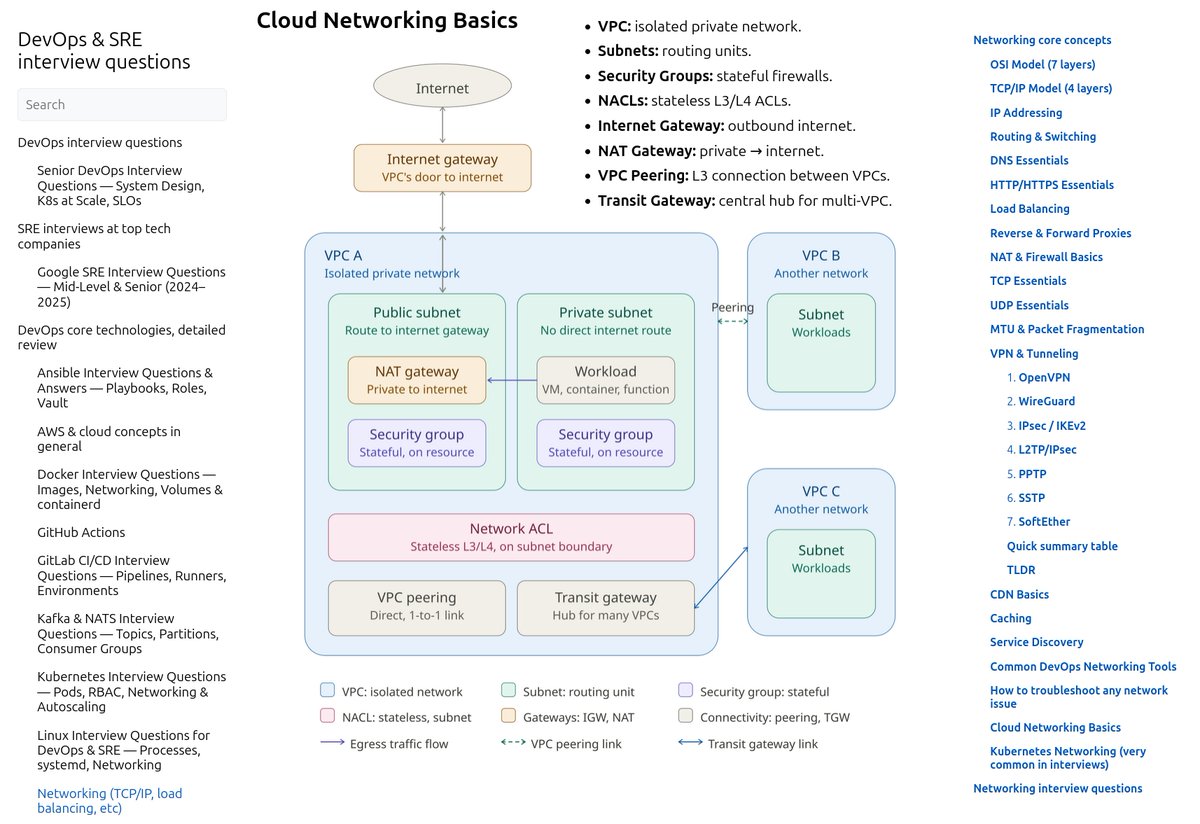
cloud networking basics, explained simply:
a VPC is your own private network in the cloud. Nobody else can see inside it
subnets split that network into smaller pieces. Public subnets can reach the internet. Private subnets can't, by default
security groups are firewalls attached to your servers. They're stateful, meaning if you allow traffic in, the response traffic out is automatically allowed too
NACLs are firewalls too, but on the subnet level. They're stateless. You have to allow both directions yourself. This trips up a lot of people
internet gateway is literally the door to the internet. No IGW, no outbound or inbound traffic
NAT gateway lets private servers reach the internet (like for updates) without being reachable from the internet themselves
VPC peering connects two VPCs directly, one to one
transit gateway is the better option once you have many VPCs. Instead of peering everything to everything, they all connect to one hub
btw, sometimes people set security groups correctly but forget the NACL is blocking traffic. Always check both
simple mental model: VPC is your house, subnets are rooms, security groups are locks on each door, NACLs are the building's front gate rules
also, you can check this out:
https://t.co/V2Z6hHXZLh
#cloudcomputing #azure #gcp #networking #devops #aws
agents → tools → loops → graphs → autonomous systems
Google just put all five in one free course. most people stop after the first one.
2 hours 17 minutes, taught by a Developer Relations Engineer at Google Cloud. no signup, no paywall.
39:45 - build your first agent
56:10 - connect MCP tools
1:14:34 - four loop patterns for running it
1:23:01 - turn those loops into a graph
2:05:00 - wire the whole thing into one autonomous system
the progression is the point. one agent is a demo, an agent with tools does work.
loops let it keep going. graphs let several of them coordinate.
only the last step runs without you in the room.
most people are still tuning the prompt inside step one.
worth more than most paid agent bootcamps.
bookmark and watch it today, then read the full graph engineering breakdown below
Google just released free 2-hour course on full agent engineering: 1 prompt → agent teams → loops → graphs from 0% to 100%:
10% → 38:46 - build your first agent
30% → 54:46 - connect MCP tools
55% → 1:12:43 - Loop engineering: 4 ways to run agents
70% → 1:20:57 - Graph engineering
100% → 2:22:31 - the full system that works while you sleep
most people build one agent and stop there - this is the full path to a system that runs without you from scratch
watch it today - then read the full graph engineering playbook below ↓
Containers are not Virtual Machines. 🛑
Many developers assume that running code inside Docker automatically makes it safe. But a single flag like --privileged or a mounted /var/run/docker.sock can turn a simple container compromise into a full Host System Takeover.