@SteveOfMaine@GeminiApp I use gems. Not ideal, but the closest I can think of. Also, until Google give us a way to opt-out of using our files to train futures models, I'll significantly limit my use of the tool.
This question has been thrown at me several times this morning from the Apple keynote event. Remember that the LIDAR which is helpful to so many blind or low vision folks for detecting objects etc is present in the iPhone 17 pro and 17 pro Max, it is not present in the iPhone 17 or iPhone 17 air.
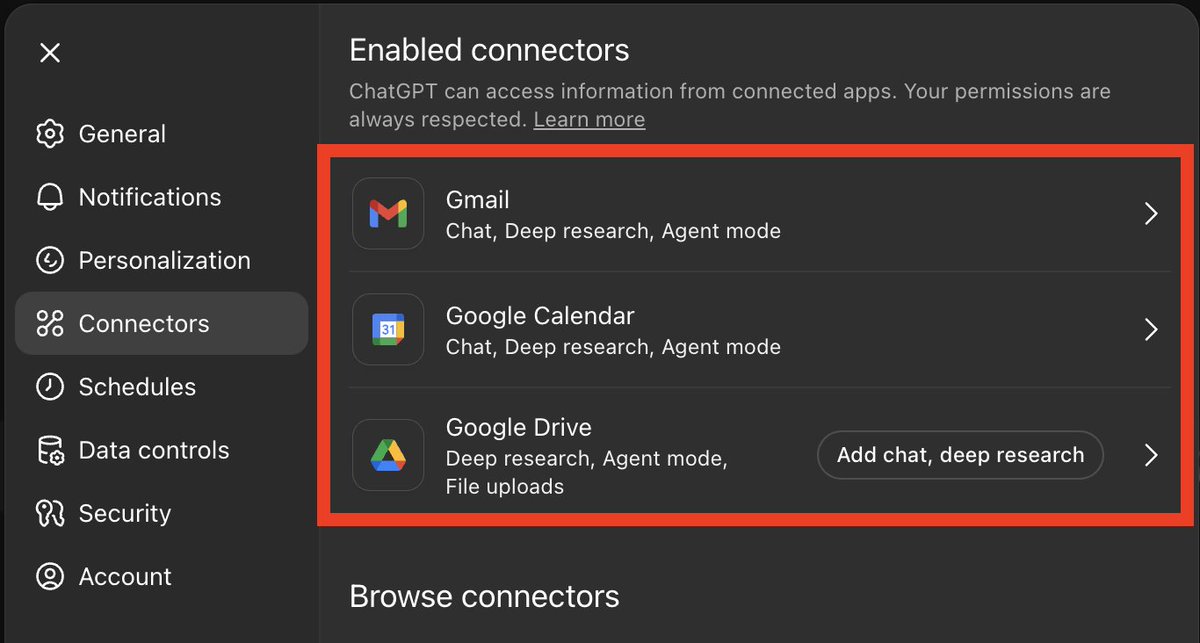
The new ChatGPT connectors are really useful!
Chat can now access Gmail, Google Cal, and Drive, so it can:
-Skim unread emails & give a summary
-Summarize threads + draft replies
-Pull key info from old convos
-Do meeting prep + agendas
Prompts below:
Speakaboo blind AI assistance iOS app. Fantastic AI app, especially the find dog poo Siri shortcut for locating ones Guide Dog poo in the backyard, works extremely well. https://t.co/agP5b5TdKM
Just a gentle reminder for folks who use CC for webinars, meetings etc, this is only one part of making your online sessions fully accessible and inclusive.
Every time I see session has CC, and nothing else, makes me think we have a long way to go.
Another example, just because a movie has CC, doesn't make it fully accessible either.
We need to think a bit more, rather than just trying to sign off on one accessible and inclusive feature.
We need to think of people with all needs, not just one.
And no, I'm not just thinking of people who are blind here which is often said to me as a person who is blind: i.e.its not all about you.
Lets start thinking more out of the box which it feels like I've been banging on about for a good quarter of a century.
Just a friendly reminder for folks who are not quite used to using VoiceOver on iOS or iPad iOS who may get a bit stuck in trying to turn it off in particular, remember that you can assign the accessibility triple click shortcut to VoiceOver. Consequently, you can press the power button Three times to then toggle VoiceOver on or off.
A tip for Brailliant BI20X and BI40X uses, if you want to silence speech quickly, for example in the middle of the night or in a meeting, far left thumb key plus space will toggle speech off, and of course on again when you need to.
The more I read .BRF files on my Brailliant BI40X via Braille Access on my iPhone, iPad and Mac, the more I'm impressed by Apple's commitment to Braille.
Files are shared between all devices via the BRF Files on iCloud.
Reading position is retained between devices, bookmarks can be set/moved between, and of course there is the good old Find command.
I would urge folks that are testing out Mac OS 2026 beta, to give it a go with your Braille display.
Simply press Space+dots 7 and 8, and choose what you want to do.
All output is on your Braille display.
Looking forward to when Apple finalizes access to the Monarch multiline Braille display.
Power tip for Brailliant BI20X and BI40X Braille display users: press BackSpace plus Enter with following hot keys to directly jump to main menu options: T Terminal, E Editor, V Victor reader, F File Manager, and C Calculator.
Note - if already in Terminal mode and connected, these commands will not be available.
If you are in AI and are following me, and I'm not following you back, let me know.
It doesn't matter, the algorithm here won't show you to me a lot anyway. But I will put you on my lists too, which might help someone see you.
Canvas now supports downloads!
If you're writing a doc, you can export it as a PDF, docx, or markdown.
If you're using Canvas to write code, it will export directly to the appropriate file type (e.g. .py, .js, .sql, etc.).
We’re starting to roll out a lightweight version of memory improvements to Free users. In addition to existing saved memories, ChatGPT now references your recent conversations to provide more personalized responses.
https://t.co/RZFYUC9JAT
Discover how Project Astra's Visual Interpreter is designed to help blind and low-vision individuals navigate their surroundings. A fantastic example of AI for accessibility.
https://t.co/A4NI0YnPlB #ProjectAstra#AI#Accessibility#Google
Reaprovechando el viejo MacMini de Delia del 2012 he creado un AppleScript para optimizar VoiceOver ✌🏻
Reusing Delia’s old 2012 Mac Mini, I’ve created an AppleScript to optimize VoiceOver. 😎
https://t.co/b414DSTEvM
Viewpoint is a new AI-powered screen reader assistant for Windows screen readers. It is free. It is designed to make it easier to use inaccessible software, read PDF files and navigate inaccessible websites while using any Windows screen reader.
Because Viewpoint is powered by Google Gemini you will need a Gemini API key. This is free.
You can download Viewpoint at the link below:
https://t.co/jSzYJclP3j
and read the Viewpoint documentation at
https://t.co/UvOLxlqL2h
I haven't tried Viewpoint yet.