FRESHERS, LISTEN UP:
1. GitHub is your resume
2. Projects > Certificates
3. DSA is gym for your brain, not a job offer
4. Your first job won’t be your dream job and that’s OK
5. Imposter syndrome is a sign you’re growing
Start messy. Stay consistent. WIN BIG.
➍ Semantic Elements in HTML
➀ Structural
❯ h1 to h6
❯ header
❯ nav
❯ main
❯ article
❯ section
❯ aside
❯ details
❯ summary
❯ footer
➁ Textual
❯ p
❯ ul
❯ ol
❯ li
❯ blockquote
➂ Inline Elements
❯ a
❯ strong
❯ em
❯ q
❯ abbr
❯ small
* This list is not complete
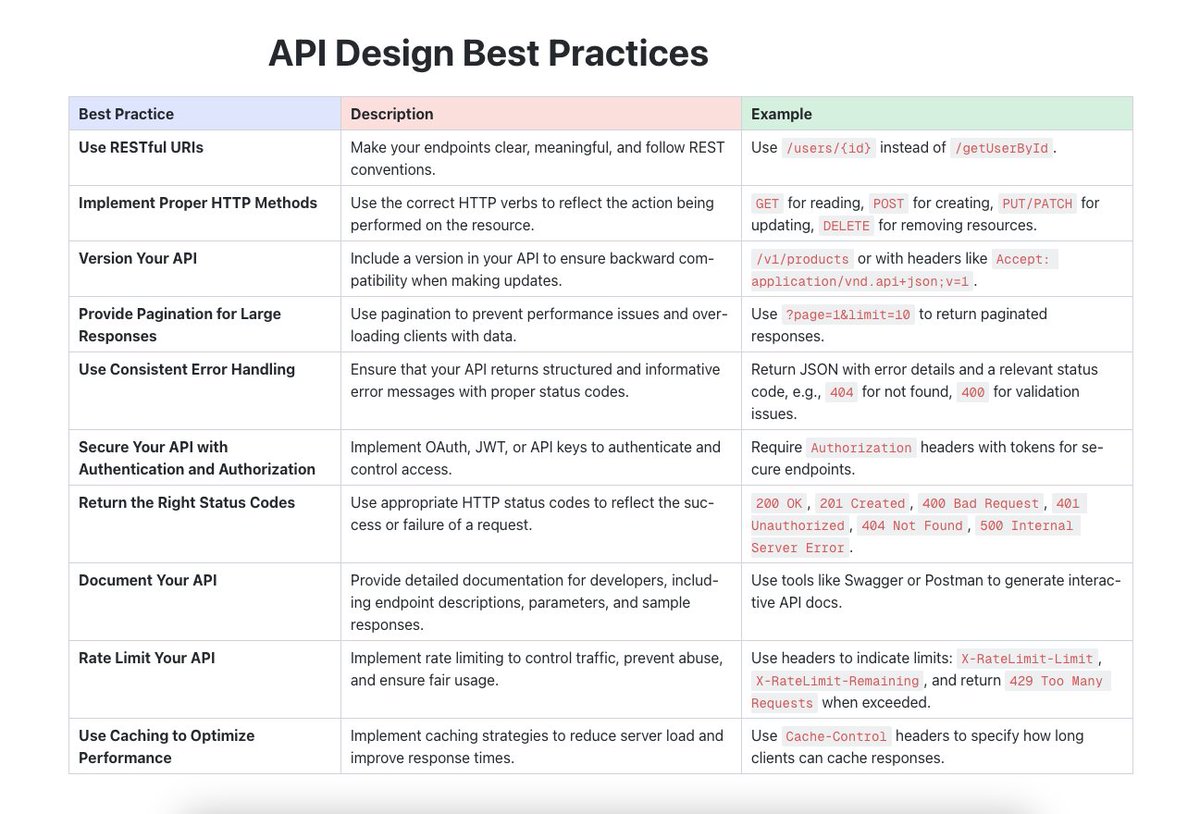
This can be the approach you follow:
1. Understand the Requirements
- Purpose and Scope:
Determine what the API is meant to achieve.
Identify the main use cases and target users (e.g., internal developers, third-party partners, public use).
- Resources and Operations:
Define the primary resources (e.g., users, products, orders).
Identify the actions (CRUD operations - Create, Read, Update, Delete) that can be performed on these resources.
2. Design Principles
- RESTful Architecture:
Follow REST (Representational State Transfer) principles if the API is to be RESTful.
Ensure stateless operations, meaning each request from a client must contain all the information needed to understand and process the request.
- URL Structure and Endpoints:
Design intuitive and consistent URLs.
Use nouns to represent resources (e.g., /users, /products).
Use HTTP methods to indicate actions (GET for reading, POST for creating, PUT for updating, DELETE for deleting).
3. Request and Response Format
- Use JSON:
JSON (JavaScript Object Notation) is commonly used due to its simplicity and compatibility with most programming languages.
- Consistent Responses:
Ensure responses have a consistent structure.
Include standard HTTP status codes (200 OK, 201 Created, 400 Bad Request, 404 Not Found, 500 Internal Server Error).
Provide meaningful error messages and codes.
4. Authentication and Authorization
- Authentication:
Decide on the authentication method (e.g., API keys, OAuth, JWT - JSON Web Tokens).
Implement secure authentication mechanisms to protect the API.
- Authorization:
Ensure that users can only perform actions they are authorized to.
Implement role-based access control (RBAC) if needed.
5. Rate Limiting and Throttling
- Protect the API:
Implement rate limiting to prevent abuse (e.g., 100 requests per minute).
Use throttling to ensure fair usage among users.
These are the points you can keep in mind before framing your answer.
Want to learn Spring Boot?
Cover these 10 points 👇
1. Start with Java basics (OOP, collections, exception handling). Then learn Spring Core fundamentals- dependency injection & MVC.
2. Understand @SpringBootApplication, autoconfiguration, & starters. Use Spring Initializr & CLI to jumpstart projects.
3. Create REST controllers, handle HTTP methods (@GetMapping, @PostMapping), and master validation & exception handling.
4. Learn Spring Data JPA for database CRUD, set up relationships, & manage transactions with @Transactional.
5. Security: Learn Spring Security for authentication/authorization. Also JWT
6. Write unit tests with JUnit/Mockito, test controllers with MockMVC, & explore integration testing.
7. Use Spring Boot Actuator for app health, caching with @Cacheable, logging, and profiles for environments.
8. Learn Spring Cloud (Eureka, Gateway, Resilience4j), inter-service comms, & centralized config with Spring Cloud Config.
9. Monitoring with Actuator, Prometheus, & visualize with Grafana.
10. Dockerize, deploy on Kubernetes, and build CI/CD pipelines.
25 Springboot annotations that are good to know 👇
1. @SpringBootApplication: Combines @Configuration, @EnableAutoConfiguration, and @ComponentScan annotations for configuring, enabling auto-configuration, and component scanning in Spring Boot applications
2. @Component: Marks a class as a Spring-managed bean, making it available for dependency injection
3. @Service: Specialized form of @Component used to annotate service-layer classes in the applicatio
4. @Repository: Marks a data access object (DAO) class, signaling to Spring that it will handle database interactions. It also enables exception translation, so database-related exceptions are caught and translated into Spring’s DataAccessExceptio
5. @Controller: Used to define a controller in the MVC (Model-View-Controller) framework. This annotation handles HTTP requests by mapping them to specific methods in a controller class.
6. @RestController: Combines @Controller and @ResponseBody, simplifying the development of RESTful APIs by automatically converting response data to JSON or XML.
7. @RequestMapping: Maps HTTP requests to handler methods. It can be applied at the class or method level and allows for specifying HTTP method types (GET, POST, etc.) and paths
8. @GetMapping, @PostMapping, @PutMapping, @DeleteMapping: Variants of @RequestMapping for handling specific HTTP request methods (GET, POST, PUT, DELETE) in REST APIs, making the code more readable and concise.
9. @Autowired: Used for dependency injection by automatically injecting an instance of a bean into a class. It can be applied to constructors, fields, or setters.
10. @Qualifier: Works with @Autowired to resolve ambiguity when multiple beans of the same type are present, allowing you to specify the exact bean to inject.
11. @Value: Injects values into fields from application properties or environment variables, making it easy to use external configuration values.
12. @Configuration: Marks a class as a source of bean definitions for the application context, used for Java-based configuration.
13. @Bean: Indicates that a method produces a bean that should be managed by the Spring container, typically used in combination with @Configuration.
14. @ConfigurationProperties: Maps properties from https://t.co/dCVM9qLO8Z or application.yml files to a Java class, allowing easy access to configuration properties with complex structures.
15. @Profile: Specifies which beans should be created based on the active profile, allowing you to set up different configurations for different environments (e.g., dev, test, production).
16. @EnableAutoConfiguration: Enables automatic configuration in Spring Boot by scanning the classpath and enabling configurations for various Spring modules, like JPA or RabbitMQ.
17. @EnableAsync: Enables asynchronous method execution, allowing you to run methods in a separate thread without blocking the main thread.
18. @Scheduled: Used to schedule tasks in Spring, enabling the execution of methods at specific intervals.
19. @Transactional: Ensures that methods execute within a transaction, rolling back on exceptions and committing changes upon successful execution. It’s often used for database operations.
20. @CrossOrigin: Configures cross-origin resource sharing (CORS) to control how resources are shared with frontend clients from different domains, helping manage security in REST APIs.
21.@Primary: Used alongside @Autowired to resolve dependency conflicts by setting a default bean when multiple implementations exist.
22. @Lazy: Delays bean initialization until needed, optimizing memory and startup time, especially for costly or rarely used beans.
23.@Conditional: Allows custom conditions for bean creation, enabling complex conditional logic.
24.@ConditionalOnBean: Creates a bean only if another specific bean is already present in the context, useful for configuring dependencies dynamically.
25.@Cacheable, @CachePut, @CacheEvict
Today I earned my "Describe cloud computing" badge! I’m so proud to be celebrating this achievement and hope this inspires you to start your own @MicrosoftLearn journey!
https://t.co/sSpLFHGIws #MSLearnBadge
#100DaysOfCode
Day 1 up to Day 27
Nothing to rush, I am enjoying this pace.
Follow me:
LinkedIn: https://t.co/f7HWNwxCfB
GitHub: https://t.co/OFIvOldg5K