New article! A user is reporting full system freezes while using Superluminal on Linux. What do you do? Cry? Well, we did a little bit.
But we also dove into the kernel...again, fixing several issues in eBPF's spinlock implementation. Read all about it:
https://t.co/HHAyGdnZYZ
Nice article!
Had strong deja vu while reading this to the UIPainter created at Guerrilla in 2014 or so that I did some work on back then, though at the time that didn’t have the caching layer described here.
So was funny to see this at the end. Time is a flat circle :-)
Went ahead, downloaded a 200MB installer, launched the thing. Didn't feel like 50ms at all.
Pulled out Superluminal of course, because Superluminal never lies. Turns out it's ~500ms, not 50ms.
From RtlUserThreadStart to the first ZwUserShowWindow: 476ms.
@ocornut@CryZe107 > I'm not sure what's before
That’s startup of the ETW capture itself, you can discount it. When running the target program from Superluminal, the place where the main thread starts (visible in the colored overview) is exactly where your app starts running.
fwiw, I totally agree that streaming any kind of non-trivial profiling & optimization live would be like watching paint dry, but I would absolutely be interested in watching an after-the-fact “here’s what I optimized, and here’s how I went about it” stream (or video. or blog post.)
One related thing is that some of the wayland issues that people *have* reported sometimes are already being tracked in wayland, and a number of those issues have literal years of (what seems to me) ideological back and forth between maintainers and users, with no resolution in sight…
Practically speaking, we’ve gotten zero x11-related bug reports in the Superluminal Linux beta (“it just works”), and multiple Wayland-related bugs. And that’s while using Qt which supposedly supports both. I still don’t know how to fix the Wayland bugs.
Depending on your target audience, I don’t think you can get away with only supporting one of them though. Wayland apps won’t run on x11. x11 can run on wayland via xwayland, but like any “emulation” layer, that has its own issues, particularly around things like DPI.
So like many things in Linux user space, from an app developer’s perspective: it’s a mess.
can someone give me a human opinion, with an attempt at impartiality, about Wayland versus X11 for end users? I'm moving a Win32 app to Linux and there are choices to be made
Yeah, to be clear, I’m not saying one is better than the other. Just from our current experience, we get more “this doesn’t work right on wayland” reports than we do x11 reports. Partly that’s because wayland is more common (I think), but the users who are running x11 just don’t seem to have any issues (or maybe they’re just not reporting them ofcourse…).
@the_geeko1 No, we don’t have those numbers, we don’t track stuff like that (or anything else really), but when people report other issues we often ask them for their system info, so I know there’s at least some number of people on x11. But it’s hard to say for sure indeed.
Yeah, to be clear, I’m not saying one is better than the other. Just from our current experience, we get more “this doesn’t work right on wayland” reports than we do x11 reports. Partly that’s because wayland is more common (I think), but the users who are running x11 just don’t seem to have any issues (or maybe they’re just not reporting them ofcourse…).
Tired of elevation prompts whenever you start a capture? So were we! Our latest Insider update adds a system-installed capture service.
With it, you no longer need elevation to start captures. This also enables AI agents to autonomously create captures without user intervention!
@dcolascione Did you just “literally unusable” a product that’s being used by thousands of people in one of the few industries where perf still matters? 😄
I have extensive experience with WPA. Pivot tables are very powerful, but you absolutely don’t need them for most day to day perf work.
There’s a profiler in town that *doesn’t* need $3400 of RAM to open a perf capture for those who are wondering.
It even works on the same source (.etl) files as WPA, so you could literally do an A/B comparison!
https://t.co/TT3TrcdzLg
@ZoidCTF and yes I could actually justify it -- if I want to run my app loading large files, *and* while taking an ETL trace for performance analysis with WPA, while having one other WPA instance open with an earlier trace for comparison purposes ... that's easily 100 GB
Spent a few hours this evening looking into this. The symbol resolving part we can solve, we have full support for DWARF symbols thanks to the Linux version.
The main problem is that the Go runtime Does Things with its stack to support goroutines, and those things are not well liked by Windows. In particular, RSP for goroutines lies outside of the TEB’s StackBase/StackLimit, which causes ETW’s unwinder to fail for any stack where a goroutine is present.
That’s not something we can really do anything about, so I don’t think go support will be coming anytime soon. At least on Windows. T he Linux situation may be different; haven’t looked at that.
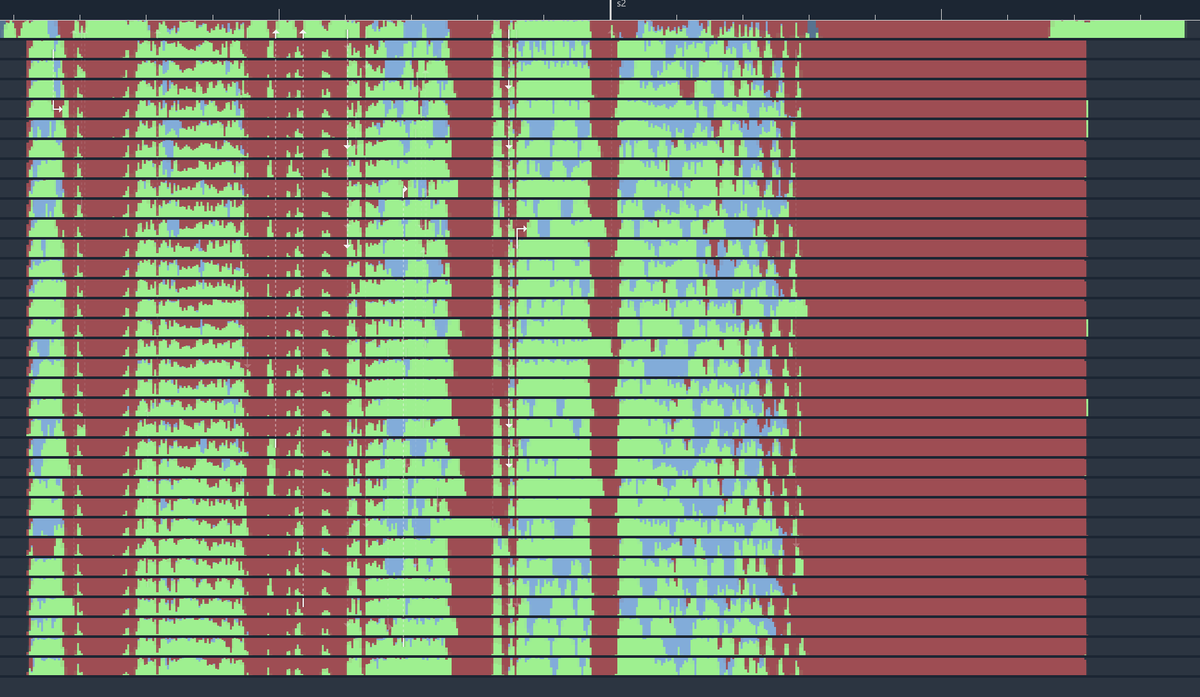
For the past week, my life has been staring at profilers (Spall output and @SuperluminalSft) all to improve the performance of the Odin compiler.
It's looking a heck of a lot healthier than before, but damn is it still not done yet.
n.b. red at the end is the external linker
@__malkia__ Hm, I’m not familiar with Go (I know what it is, just never used it :-). It’s a compiled language right? Does it not output debug information? What about on Linux?
Ah, your post made it seem like it was WPA taking most of the RAM, and I’ve certainly been in many OOM situations with WPA & large captures in the past myself, so it fit my expectations :-)
Totally fine to use whatever you’re comfortable with of course! But the memory usage of WPA is one of the main things that originally made us start Superluminal.