@MSFTSecSuppTeam@msftsecurity is there anybody that can explain how AppControl can be made simpler if all the bootstrap exes that come from the Microsoft AppStore (Web) are signed by a Microsoft Certificate???
@MSFTSecSuppTeam And before you reply telling me to write a block rule, this is also under because it doesn’t take into consideration ANY other Microsoft signed bootstrapper.
This is NOT a secure by design setup.
@MSFTSecSuppTeam I understand why it’s allowed. I’m saying this is undesirable. Organisations get audited under based on “installed” software.
So under this scenario I have users with multiple instances of Firefox that never updates and appears in defender cve reports ruining my Score
@MSFTSecSuppTeam Yes the first reply i received seems wrong. Try the Firefox bootstrapper. It’s signed by Microsoft. So staff can install it (but then not run the app). And I end up with devices that have the browser installed.
This response seems wrong. An example is the Firefox bootstrap signed by Microsoft.
I trust Microsoft but not Mozilla. I don’t want staff installing that browser.
Staff can install it because of this Microsoft trust
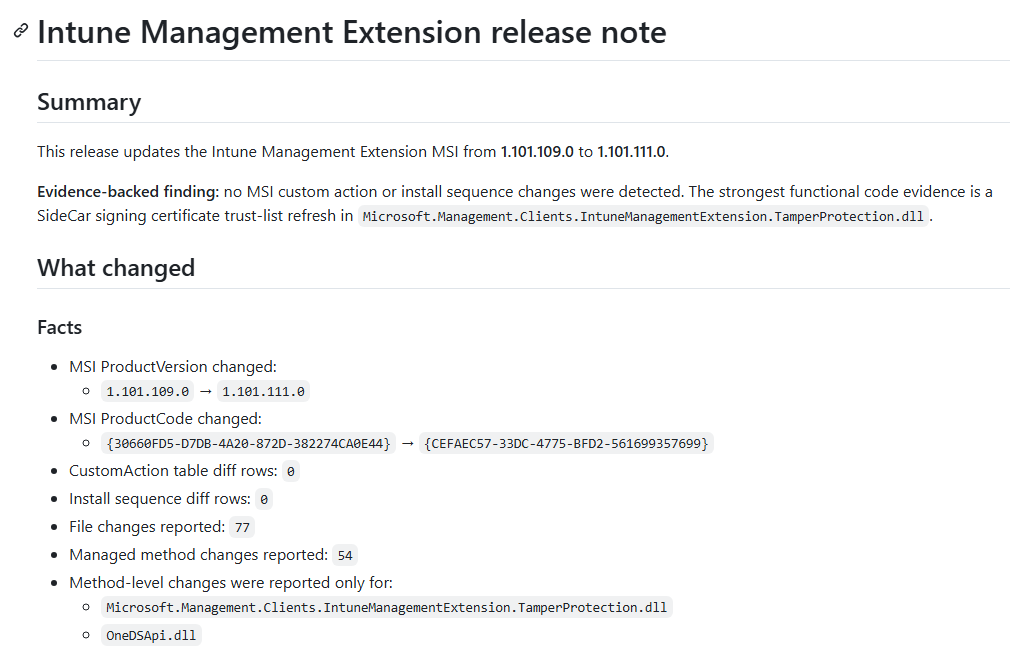
Intune Management Extension: Release Notes.
When something changes in Intune, we usually get a “What’s new” update or a roadmap update. But what happens when the local IME changes?
That part is a big black box... And with the IME being responsible for much more than most people think. Win32 apps, scripts, remediations, reporting, APv2-related pieces, that list will only keep growing.
So I wanted my own Intune Management Extension Release Notes :) @IntuneSuppTeam :P
Every time a new IME version appears, an automation flow compares the MSI, custom actions, payload files, DLLs, and changed methods to determine what actually changed in the SideCar/IME agent.
#Intune #MSIntune #Windows11
https://t.co/x5rsv8GS7V
@NathanMcNulty Technology and infrastructure is just getting to the point of being so over engineered. The old
meme of “majority of end users use only 10% of the features in Microsoft Office” couldn’t be a better explanation of the entire industry.
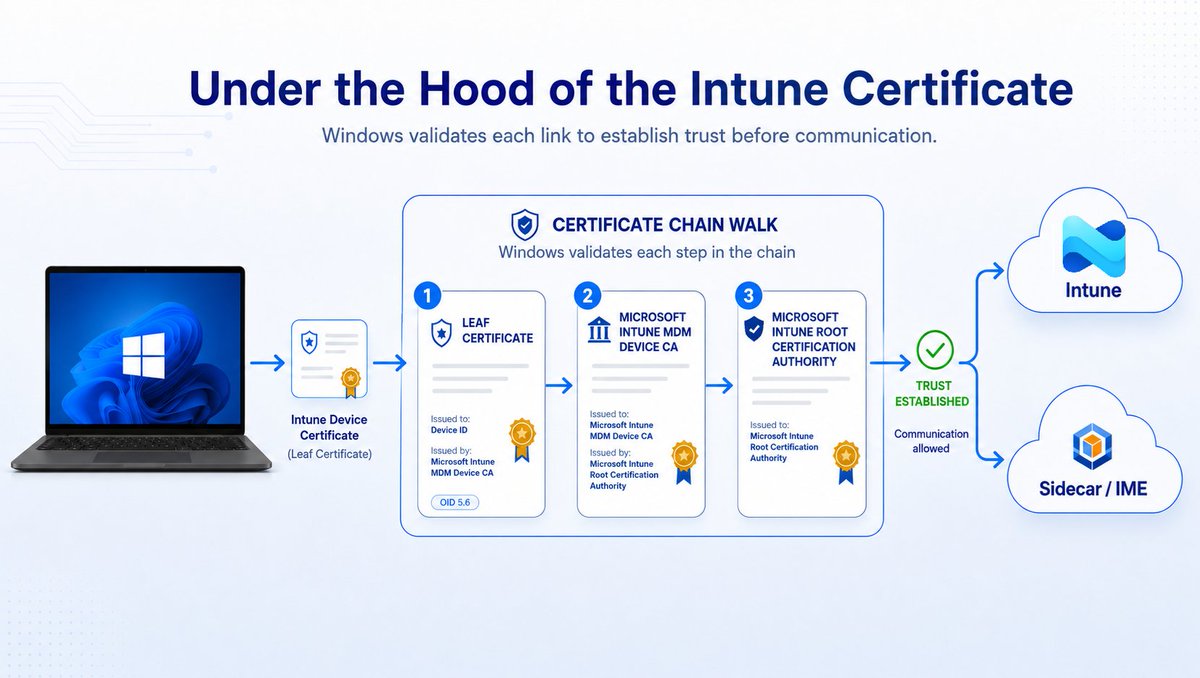
Under the Hood of the Intune Certificate
The Intune certificate matters more than most people think. That Certificate keeps the policy sync alive and is also needed for IME communication, which means apps and scripts depend on it as well.
But when the certificate or its chain breaks, things can get funny. The device can still show a recent last check-in, while it is no longer able to receive the latest policies, apps, or scripts.
In this webinar, we will explain what the Intune MDM device certificate does, what changed with the Intune Intermediate certificate renewal, why some devices may have missed it, and how to find devices that still appear healthy but may not be.
But hey, it is all fine because the last check-in still moved… right?
Register here: https://t.co/gZtj8m09Fp
#Intune #MSIntune
@ariaupdated I would like to see a policy that allows admins to manage the current user manageable setting “Notify me when a restart is required to finish updating”.
This would help in situations like RDP sessions where users can easily miss the toast notification due to a timeout.
We have released a new report in #Autopatch to help you evaluate the patching vulnerability risk in your estate, along with some new guidance for how quickly to take patches. #WindowsUpdate https://t.co/55QvaxRHNN
@Mister_MDM After monitoring devices yesterday (Australian time) I could see them updating to .109. and it seemed to be resolved. Then in the afternoon around 2:00pm I started seeing category fail warnings again along with errors listing apps.
PSA: Known issue with April's LCU for basically everything.
In a _very_ specific scenario (see below), users are going to get a BitLocker recovery prompt after updating.
Link below is for one KB, but the story is the same everywhere.
https://t.co/THZAKQc8eb