i gave 5.6 sol access to my camera roll and had it extract pictures of every piece of clothing i own from my photos
then, told it to find new outfits for me and render them on me with gpt-image!
its kinda cool to see your entire wardrobe in a collection like this
THERE'S A SECOND SKILL EVERY GREAT AI VIDEO CREATOR HAS — AND ALMOST NOBODY TALKS ABOUT IT
Character consistency gets all the attention. Nobody mentions the other half of the problem — the one that makes a perfectly consistent character still look like a slideshow instead of a scene.
The secret is camera vocabulary. The creators whose sequences actually feel directed aren't writing better character prompts than you. They're issuing real camera instructions instead of vague ones — and most people never learn the difference.
There's a free reference that makes this fast to fix: aicameramovements,com
It's not a generation tool, it's a vocabulary bank — every camera move broken down into name, description, speed, framing, and exactly how the shot should end. Whip pan left, tilt up, crash zoom out, dolly in, truck right — each one with a ready-to-copy prompt attached.
What actually changes once you use real terms instead of vague ones:
- "Camera moves closer" becomes "dolly in — smooth controlled push, subject position consistent while distance closes, finish in a tighter composition"
- "Fast cut to wide" becomes "crash zoom out — snap the lens rapidly away, land on a bold wider composition"
- Seedance stops guessing your intent because you're no longer describing a feeling, you're issuing a direction
Why this matters for anything built with a character sheet or grid:
- A locked character still reads as static if every shot uses the same vague "camera moves" instruction
- Real shot vocabulary is what turns a consistent character into a directed sequence, not just a slideshow of correct faces
- Once you know the terms, you can assign a specific move to each panel in your storyboard instead of leaving pacing to chance
If your sequences hold together but still feel flat, this is probably why.
It was never just the character sheet. It's the camera language you pair it with.
(h/t @NexlowX for the original find)
CODEX SKILL THAT FINDS YOUR STARTUP’S FIRST CUSTOMERS!
I made a Codex skill that analyzes your startup and finds potential customers from real public signals.
Paste your startup URL while Codex defines your ideal customer, searches public discussions, qualifies each prospect, and generates a polished report with personalized outreach openers.
-> ideal customer profile analysis
-> public pain + buying signal research
-> evidence-backed prospect shortlist
-> fit, timing + reachability scores
-> original source links for every prospect
-> personalized outreach openers
-> polished HTML report
-> one-command install
Install: npx --yes codex-first-customer-finder-skill
100% open source.
Repo in Bio.
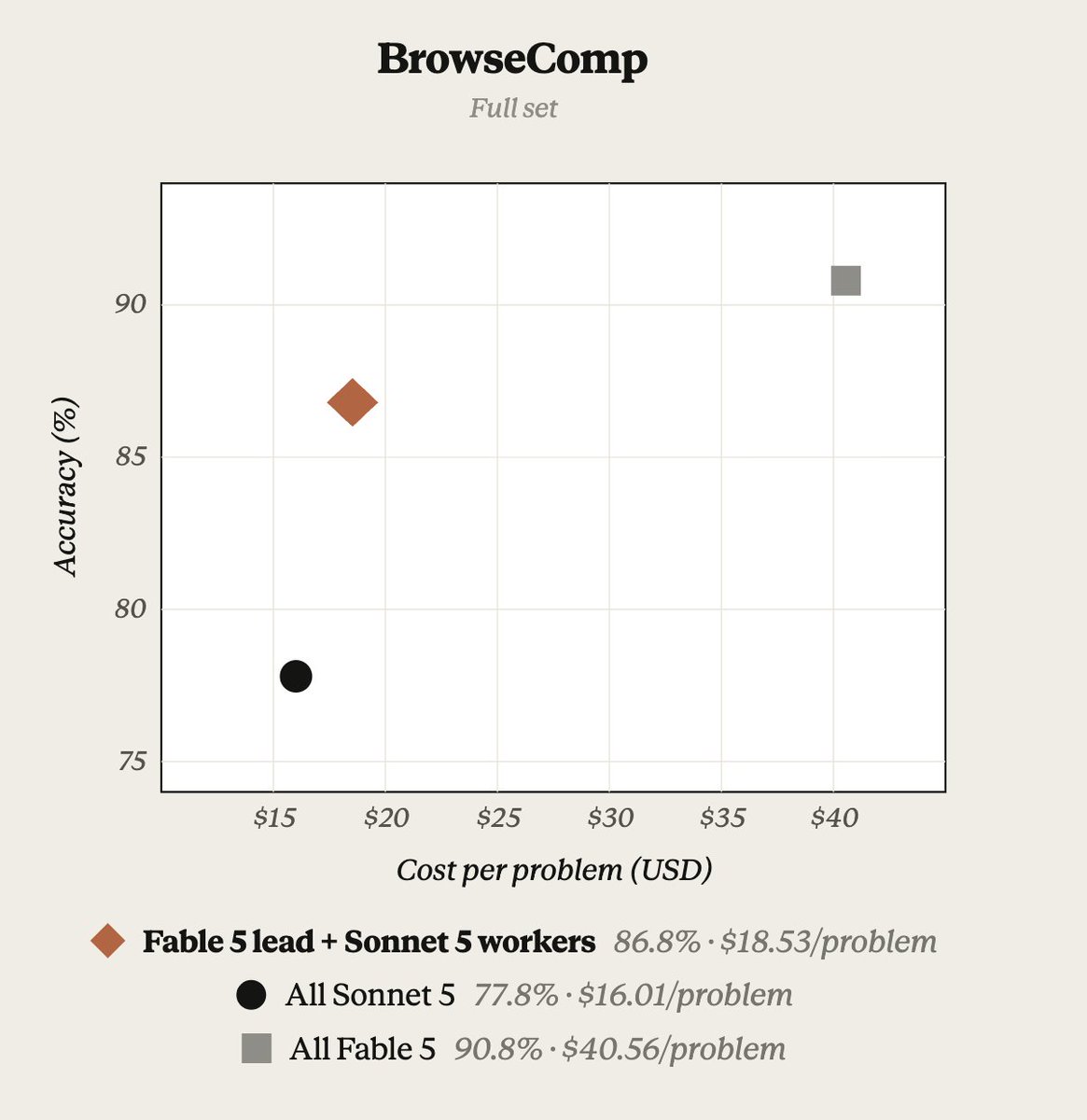
On BrowseComp, we tested Claude Managed Agents w/ Fable 5 orchestrator + Sonnet 5 worker sub-agents.
The Fable 5 orchestrator achieves 96% of Fable 5 performance at 46% of the price.
Token-heavy research is delegated to Sonnet 5.
See our cookbook:
https://t.co/zDGXCK79N3
PRO TIP: Copy this article into Fable 5 and tell it...
"Read this article, review my current workflow, and tell me 5 things I can do to be more productive"
This video will make you a Claude Fable 5 expert in 20 minutes.
0:00 Intro
2:43 wtf is a loop?
5:30 Loop Engineering 101 *demo included*
8:12 Fable 5 x Claude Skills
10:10 3 ways to build effective Fable 5 Skills
12:12 Visual capabilities
14:04 Building a local memory system
18:17 How I'm personally using Fable now
Cinematographers learn 12 camera moves in film school.
Most AI creators don't know a single one. Because nobody told the camera what to do.
Here they are:
→ Push-in — moves toward the subject
Builds tension. Creates intimacy. Use it slowly.
→ Pull-back — retreats to reveal
Isolation. Scale. Endings. The reveal shot.
→ Pan — horizontal rotation, camera stays fixed
Suspense lives in what you haven't shown yet.
→ Tilt — vertical version of the pan
Tilt up on a hero. They look powerful immediately.
→ Tracking shot — camera travels with the subject
Energy. Forward motion. You feel like you're there.
→ Arc / orbit — circles the subject
Hero moments. Product showcases. Keep it under 30 degrees.
→ Crane / jib — sweeps vertically on a boom
Grandeur. Scale. The "god-view" of cinematography.
→ Zoom — focal length changes, camera doesn't move
Flatter look than a dolly. Fast zoom = music video energy.
→ Dolly zoom — camera goes one way, lens goes the other
Background warps. Subject stays still. Pure psychological dread.
→ Whip pan / crash zoom — extreme speed for transitions
Shock. Comedy. Stops the scroll every time.
→ Handheld — natural shake, no stabilisation
Add "subtle" or the model goes full earthquake.
→ Static + angles — low, high, Dutch, bird's-eye, worm's-eye
Low angle = power.
Dutch angle = unease.
Bird's-eye = scale.
The mistake everyone makes: stacking multiple moves into one prompt. One move. One clip. Always.
And add "slow" to almost everything. Slow moves hide what AI can't render cleanly. Fast moves expose every flaw.
📖THE BEST SEEDANCE 2.0 WORKFLOW STARTS INSIDE CHATGPT IMAGE 2
One creator can now go from storyboard to cinematic short film without a camera, actors, or a production crew
Most creators use Seedance 2.0 as a video generator.
The real power comes from combining ChatGPT Image 2 + Seedance 2.0 into a production pipeline.
Here’s the workflow:
1.Create a story idea in ChatGPT.
2.Generate a shot-by-shot storyboard.
3. Build character sheets to lock consistency.
4.Generate every scene in ChatGPT Image 2.
5.Define camera movements and actions.
6.Animate each shot in Seedance 2.0.
7.Stitch the clips together into a finished short film.
Why this works:
• Consistent characters across scenes
• Better storytelling
• Precise camera control
• Faster iteration
• Professional-looking results
• One person can do the work of an entire production team
Use cases:
⁃Viral AI shorts
⁃YouTube animations
⁃Brand commercials
⁃Educational content
⁃Story-driven ads
⁃Social media content
The future of AI video isn’t prompting.
It’s building production pipelines.
📥Tomorrow I am sharing a workflow that almost nobody is using but absolutely should be.
🔖 The full breakdown from setup to final export is waiting in the pinned article.
A senior Anthropic engineer just dropped 11-page PDF on "Loop Engineering" for agentic systems.
The shift: you stop prompting the agent. You build the system that prompts it instead.
Schedule → Discover → Build → Verify → Repeat
Every loop runs one turn, five moves:
• Discovery: it finds its own work - failing CI, open issues, recent commits - instead of being handed a list.
• Handoff: each task gets an isolated git worktree so parallel agents don't collide.
• Verification: a second agent, told to assume the code is broken, reviews the first. The "thing that can say no."
• Persistence: results get written to disk, never left in a context window that gets flushed.
• Scheduling: an automation wakes it on a timer. That's what makes it a loop.
The key insight: an agent grading its own work always praises it.
This 11-page PDF changed how I'm building agentic systems today.
Read it now, then explore the article below.
🫡🫡 Seedance 2.0 continues to perform stably.
prompt:https://t.co/FC7tYzeIIN
A stylized painted action sequence on a steep alpine face in bright hard-edged daylight: a female skier matching the reference exactly—white-and-orange racing suit, red goggles, white helmet with a spiked red plume, red poles, red boots, black-and-red skis with bold red lettering—bursts downhill through jagged dark rocks and a sharp cliff-edge jump lip. Open with a wide whip-follow tracking shot as she rockets toward the lip and launches, snow blasting behind her; cut to a medium orbit at the apex as she grabs one ski and twists into a fast controlled spin against the crisp blue sky, poles flaring outward; cut to a low downhill impact shot with a slight crane-down feel as she slams the landing and detonates a huge wall of snow spray, motion blur only in the spray and flying chunks; finish with a longer wide tracking shot as she carries that momentum into a fierce high-speed slalom, carving left-right through a narrow rock corridor on the steep snow face. Keep the palette icy white, glacier blue, charcoal rock, signal orange, and crimson red, with bold painterly large color blocks, hard-edged light and shadow, minimal texture noise, Arcane-meets-Valorant splash-art energy, thrilling kinetic motion, and strict visual continuity across all four cuts.
𝟯. 𝗚𝗶𝘃𝗲 𝗶𝘁 𝗮 DESIGN.md 𝗳𝗶𝗿𝘀𝘁
DESIGN.md is a concept from Google Stitch: a plain-text design system that spells out color, type scale, spacing, radius, shadow, and component rules, so the agent reads it before every UI build and the style stops drifting. AGENTS.md is how to build it, DESIGN.md is how it should look.
Don't want to write one? Steal it. Someone scraped 73 real ones (Stripe / Linear / Airbnb / Vercel) into https://t.co/joLMjQBFei. Drop one in your root and tell the agent to make all UI follow DESIGN.md.
Claude Fable 5 ile animasyonlu, ödül kalitesinde web sitesi nasıl yapılıyor. Sadece "site yap" değil, doğru prompt mimarisi ile nasıl tasarlanıyor, hangi adımlarla ilerliyor, Claude Code nasıl yönlendiriliyor, hepsini adım adım göstermiş.
Arkadaş özellikle Fable 5'i kullanmış. Fable 5'in tasarım ve animasyon tarafındaki farkı net görünüyor.
Ama şunu da söyleyeyim. Fable 5 token tüketimi ciddi. Limit bitmesi şikayeti çok geliyor. Uzun session açmadan önce bağlamı temiz tutun, CLAUDE.md'nizi hazırlayın.
İzleyin, kaydedin. 🚀
Most people upload a file and hope AI “figures it out.”
It won’t … unless you build a system around it.
NotebookLM uses Gemini’s large context window.
It turns scattered files into a connected, cited research brain.
Here’s the workflow power users follow:
[ 🔖 bookmark this post for later ]
✨ Gemini Flash
• Core engine powering NotebookLM.
• Fast, accurate synthesis across large sets of sources.
Sample prompt:
“Highlight the main key insights across these docs.”
✨ Gemini Pro (Plus Tier)
• Used for deeper reasoning and context handling.
• Best for complex briefs and enterprise workflows.
Sample prompt:
“Draft a polished briefing using these internal docs, with cited evidence.”
1️⃣ Add Sources
• Import PDFs, Docs, transcripts, and webpages.
• Structure, tables, and images stay intact.
2️⃣ Source-Based Chat
• Respond only using your uploaded content.
• Ideal for reviews, validation, and checks.
3️⃣ Structured Study Guides
• Generates summaries, timelines, and briefs.
• Helpful for organizing large material sets.
4️⃣ Visual Topic Mapping
• Creates visuals to show relationships between topics.
• Useful for comparing topics or themes.
5️⃣ Audio Overview
• Converts notebooks into spoken recaps.
• Great for reviewing long content on the go.
6️⃣ Video Summaries
• Creates short narrated videos with slides.
• Perfect for updates or training.
7️⃣ Deep Research
• Find credible references for your topic.
• Expands research with relevant material.
8️⃣ Structured Data Tables
• Extracts key data points into organized, sortable rows.
• Turns messy, unstructured info into clean, exportable data.
9️⃣ Collaborative Notebooks
• Share notebooks with teams or clients.
• Structure and citations stay intact.
Copy-Paste These Power Prompts:
► Summarize Content
“Create a 500-word thematic summary with citations.”
► Compare Sources
“Show key points across these documents and note conflicts.”
► Identify Decisions
“List main decisions and attach each one to its source.”
► Generate a Brief
“Assemble a brief that organizes the material into: Background → Core Points → Recommendations.”
► Create Script for Audio/Video
“Write a two-host script and test weak claims.”
Workflows You Can Build:
Research Review:
➟ Add papers into a notebook
➟ Produce a briefing from all sources
➟ Use chat for targeted questions
➟ Create audio for on-the-go review
Shared Knowledge Base:
➟ Add all project documents
➟ Build an onboarding study guide
➟ Share the notebook with your team
➟ Auto-update when new files are added
Content Analysis & Creation:
➟ Add competitor material
➟ Generate a comparison summary
➟ Build a mind map of themes
➟ Export slides for presentations
Build the system once and turn raw files into insights fast.
Save this guide and test it on your next deep-work task.
📌 Learn 30 free AI tools in 30 days: https://t.co/7MJCwAPtaQ
👉 Follow me @AndrewBolis for more and 🔄 Repost this to help others use AI
quick impressions after a few hours with fable 5:
→ it wants big tasks. small stuff feels beneath it, the more complex the job the harder it goes
→ wouldn't turn on ultracode yet, it spins up a whole lot of parallel agents
→ it's on the slow side. even with effort turned down it still sits there thinking for a while. (could be me though)
timeline is full of posts about how hard it burns tokens. so i tested it on my $200 max plan: effort set to xhigh, ran a full-site design audit /goal, 30 minutes, it took 2% of my weekly quota. not as crazy as i expected
the prompt i ran, you can try it:
---
/goal boot this project's real site, screenshot every page, run a full-site ui/ux audit, and produce an actionable design report.
audit like a senior design lead on their first day: judge whether a normal user can understand the product, trust it, and finish the core action without reading docs, not whether the ui looks nice.
acceptance criteria
- local dev environment boots and the real site opens
- key pages screenshotted with built-in browser debugging
- covers main pages, core user flows, and mobile layout
- dimensions: first impressions, navigation, visual hierarchy, component consistency, loading / empty / error states, trust signals, conversion paths
- every issue tagged P0-P3, which of understanding / trust / conversion it hurts, and the specific fix
- report written to docs/design-audit/README.md, screenshots in docs/design-audit/assets/
- fix safe small stuff like copy, spacing, button hierarchy on the spot. big changes are recommendations only. never touch payment / delete / publish actions
- ends with the 5 issues hurting conversion most and 5 quick wins fixable today
when done, save the whole flow as a reusable skill: boot, screenshot, audit, prioritize, fix. rerun it after every release.




![AndrewBolis's tweet photo. Most people upload a file and hope AI “figures it out.”
It won’t … unless you build a system around it.
NotebookLM uses Gemini’s large context window.
It turns scattered files into a connected, cited research brain.
Here’s the workflow power users follow:
[ 🔖 bookmark this post for later ]
✨ Gemini Flash
• Core engine powering NotebookLM.
• Fast, accurate synthesis across large sets of sources.
Sample prompt:
“Highlight the main key insights across these docs.”
✨ Gemini Pro (Plus Tier)
• Used for deeper reasoning and context handling.
• Best for complex briefs and enterprise workflows.
Sample prompt:
“Draft a polished briefing using these internal docs, with cited evidence.”
1️⃣ Add Sources
• Import PDFs, Docs, transcripts, and webpages.
• Structure, tables, and images stay intact.
2️⃣ Source-Based Chat
• Respond only using your uploaded content.
• Ideal for reviews, validation, and checks.
3️⃣ Structured Study Guides
• Generates summaries, timelines, and briefs.
• Helpful for organizing large material sets.
4️⃣ Visual Topic Mapping
• Creates visuals to show relationships between topics.
• Useful for comparing topics or themes.
5️⃣ Audio Overview
• Converts notebooks into spoken recaps.
• Great for reviewing long content on the go.
6️⃣ Video Summaries
• Creates short narrated videos with slides.
• Perfect for updates or training.
7️⃣ Deep Research
• Find credible references for your topic.
• Expands research with relevant material.
8️⃣ Structured Data Tables
• Extracts key data points into organized, sortable rows.
• Turns messy, unstructured info into clean, exportable data.
9️⃣ Collaborative Notebooks
• Share notebooks with teams or clients.
• Structure and citations stay intact.
Copy-Paste These Power Prompts:
► Summarize Content
“Create a 500-word thematic summary with citations.”
► Compare Sources
“Show key points across these documents and note conflicts.”
► Identify Decisions
“List main decisions and attach each one to its source.”
► Generate a Brief
“Assemble a brief that organizes the material into: Background → Core Points → Recommendations.”
► Create Script for Audio/Video
“Write a two-host script and test weak claims.”
Workflows You Can Build:
Research Review:
➟ Add papers into a notebook
➟ Produce a briefing from all sources
➟ Use chat for targeted questions
➟ Create audio for on-the-go review
Shared Knowledge Base:
➟ Add all project documents
➟ Build an onboarding study guide
➟ Share the notebook with your team
➟ Auto-update when new files are added
Content Analysis & Creation:
➟ Add competitor material
➟ Generate a comparison summary
➟ Build a mind map of themes
➟ Export slides for presentations
Build the system once and turn raw files into insights fast.
Save this guide and test it on your next deep-work task.
📌 Learn 30 free AI tools in 30 days: https://t.co/7MJCwAPtaQ
👉 Follow me @AndrewBolis for more and 🔄 Repost this to help others use AI](https://pbs.twimg.com/media/HKSZGyhboAA0yhr.jpg)


