#Gempa (UPDATE) Mag:4.0, 10-Okt-24 05:07:33 WIB, Lok:9.16 LS, 115.34 BT (Pusat gempa berada di laut 42 km tenggara Kuta Selatan), Kedlmn:66 Km Dirasakan (MMI) II Lombok Barat, II Lombok Tengah, II Karangasem #BMKG
Zoho CEO Sridhar Vembu believes enabling employees to work from home may prevent workplace burnout - The Ec... https://t.co/Q1NcHhCKO6 via @economictimes
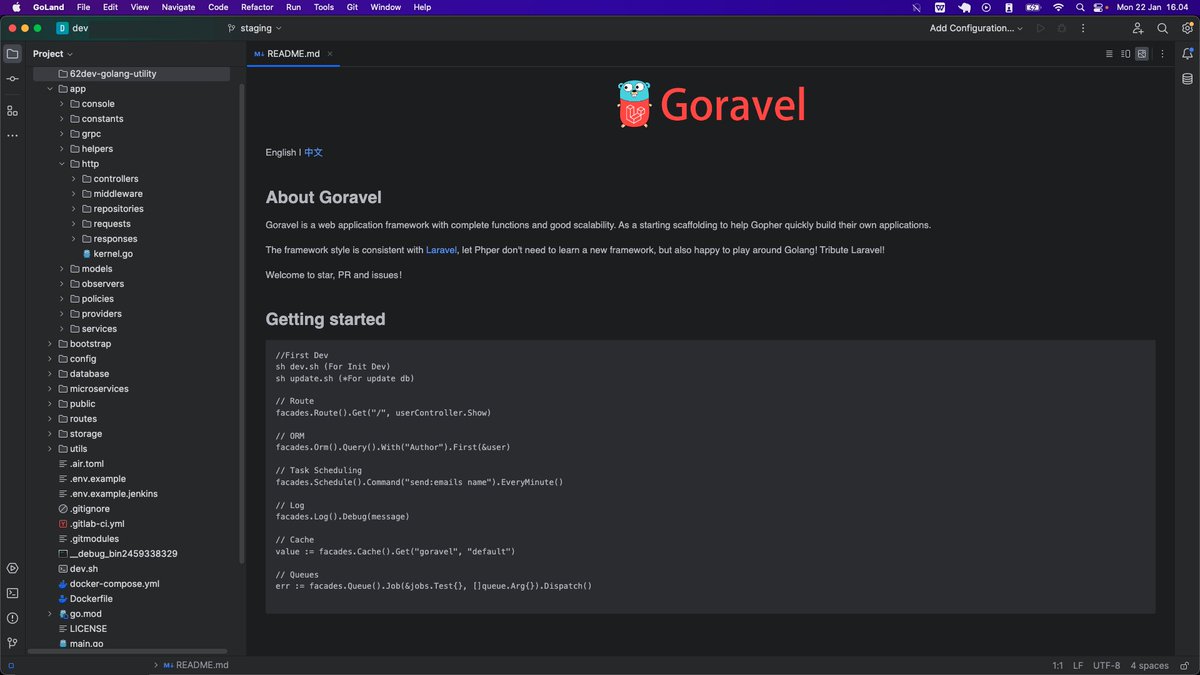
Jadi keinget tahun lalu ada project uji coba yg pake Goravel di kantor.. Ini framework Go yg arsitektur & struktur folder nya persis Laravel, bahkan sampe artisan console nya, jadi bukan php artisan tapi go run . artisan wkwkw. Ibarat rumahnya Laravel, isinya bukan PHP tapi Go 👀
Don't just study JavaScript to know how loops work, or what a Promise is.
Learn how to solve real life scenarios:
1. Fetching data with the auth token in the request header
2. Handling request/response errors
3. Displaying the data on the website with a UI component library
4. Being able to read and navigate through said UI component library documentation
5. Adding CSS effects like hover, active, focus
6. Validating inputs before creating or updating data
7. Handling form errors (like incorrect email format)
8. Handling the onClick, onMouseOver, onMouseDown, onMouseUp events
9. Blocking the default event execution to implement your own logic
10. Logging the user out after a certain inactivity period
Every programmer working on the frontend deals with these scenarios every day.
Increase your chances of getting hired by practicing them.
Want to be a successful frontend developer?
Do you how to:
1. Fetch data?
2. Handle request/response errors?
3. Show a loading indicator?
4. Display the data on the website?
5. Make the UI mobile friendly?
6. Make the UI accessible?
7. Add a hover effect?
8. Build a popover menu?
9. Hide/show content on a button click?
10. Validate inputs (e.g. age input should only accept numbers)?
11. Disable buttons if the form is not filled?
12. Add onClick, onMouseOver, onKeyPress events?
13. Block the default event execution?
14. Attach headers and body to requests?
15. Display success/error messages?
Don't just study JavaScript to know how the `if` statement works.
Orient your studies around 👆 these concepts so that you are effective and useful.
DAY 16 of #20DaysOfReact
HOW TO STRUCTURE YOUR FRONTEND CODE IN REACT.
[with explanation]
📁src
|
|_ 📁components
| |_ 📁Cards
| | |_ 📄MainCards.jsx
| |_ 📁Buttons
|_ 📁api
| |_ 📄Auth.js
| |_ 📄Event.js
|_ 📁Pages
| |_ 📁HomePage
| | |_ 📄HomePage.jsx
| |_ 📁LoginPage
| |_ 📄LoginPage.jsx
|_ 📁contexts
| |_ 📄AuthContext.js
| |_ 📄EventContext.js
|_ 📁hooks
| |_ 📄useAuth.js
| |_ 📄useEvent.js
|_ 📁utils
| |_ 📄HelperFunctions.js
| |_ 📄Date.js
|_ 📁assets
| |_ 📁images
| | |_ 📄logo.svg
| | |_ 📄background.jpg
| |_ 📁styles
| |_ 📄global.css
| |_ 📄theme.js
|_ 📄App.jsx
|_ 📄index.js
Here is a brief explanation:
- src: This is the main folder where your React app lives.
- components: Think of this like a box of LEGO pieces. It holds small, reusable parts of your app, like building blocks. Inside, you have separate folders for different types of blocks:
Cards: These are special blocks that you can use to create things like information cards.
Buttons: Here, you keep different types of buttons you can use in your app.
- api: This is like a special toolbox where you keep tools for talking to the internet.
Auth.js: It probably has stuff for logging in and keeping your app secure.
Event.js: This could handle things like scheduling events or activities in your app.
- Pages: Imagine this as a storybook with different pages of your app.
HomePage: This page contains all the stuff for your app's main screen.
LoginPage: This is where users can log in to your app.
- contexts: Think of these like invisible helpers that carry messages between different parts of your app.
AuthContext.js: It helps parts of your app know if someone is logged in or not.
EventContext.js: This one helps your app share information about events.
- hooks: These are like shortcuts or tricks to make parts of your app work better.
useAuth.js: It helps with all the stuff related to logging in and out.
useEvent.js: This one makes working with events easier.
- utils: This is your toolbox of handy tools for your app.
HelperFunctions.js: Contains tools for doing all sorts of jobs in your app.
Date.js: It might help you handle dates and times in your app.
- assets: This is where you keep pictures, designs, and styles for your app.
images: Stores the pictures your app uses, like a logo or background.
styles: Holds the rules for how your app should look.
- App.jsx: Imagine this as the main stage where your app comes to life. It decides what to show and how everything should work.
- index.js: This is like the stage manager. It tells your app to get ready and appear on the screen for everyone to see.
This organized structure helps you build and manage your website in a neat and organised way, making it easier to understand and work on, especially when your project gets bigger and more complex and you have to make changes very often.
I am not saying that this is the only or the best way, this is what I usually follow and thought about sharing it.