@MeteorWallet Key rotation is one of those features you hope you never need.
But if you ever become unsure about the safety of an old access key, having the option to replace it without abandoning your wallet is pretty useful.
@MeteorWallet If the new key works as expected and you've securely backed it up:
→ Confirm the new key is your primary
→ Test your access again
→ Revoke the old key
Be very careful here.
Make absolutely sure the new key works and is safely backed up before revoking the old one.
@MeteorWallet Important: generating the new key doesn't automatically remove the old one.
The old key can still remain your primary/default key, so don't rush to revoke anything.
First, make the new key your primary key and carefully test that you can access your wallet with it.
@MeteorWallet You'll then choose the signature algorithm for your new full-access key.
→ Choose your preferred algorithm
→ Generate the new key
→ Save it somewhere safe
At this point, you have a new way to access your wallet.
@MeteorWallet In Meteor, you can create a new full-access key and make it your primary key.
The process:
→ Open Settings
→ Click Security & Recovery
→ Click Manage Full Access Keys
→ Click Add New Access Key
→ Click on Generate New Key
@MeteorWallet Your access key is basically what gives you control over your wallet.
That's why keeping it safe matters.
But sometimes you may have a reason to believe an old key was exposed, stored somewhere unsafe, or simply shouldn't be trusted anymore.
That's where key rotation comes in.
Think your wallet access key might not be safe anymore?
You don't necessarily have to abandon the wallet.
@MeteorWallet lets you rotate your full-access key and replace the one you no longer trust.
Here's how I'd approach it. 🧵
@DewFinance@MeteorWallet@near_intents I like seeing things like this available directly in Meteor.
It's not just about adding another DeFi product.
It's about making it easier for NEAR users to actually discover and access what's being built in the ecosystem.
Dew + Meteor + NEAR Intents.
Pretty clean experience.
@DewFinance@MeteorWallet@near_intents And for the NEAR community, this is where Meteor comes in.
The Dew USDC Vault is available directly inside Meteor Wallet.
So you can access the opportunity without having to go looking for it elsewhere.
@DewFinance@MeteorWallet Moving USDC over is also made easier with one-click deposits from any network, powered by @near_intents.
So you don't have to make the cross-chain part the whole problem.
@DewFinance@MeteorWallet The interesting part is how simple Dew keeps it.
No complicated strategies to follow.
You deposit your USDC, receive $mUSDC, and can deposit or withdraw whenever you want.
Simple and flexible.
A new DeFi option for your $USDC just caught my attention.
@DewFinance is offering 6% APY on USDC, with a pretty straightforward setup.
And yes, you can access it directly through
@MeteorWallet . 👇
@MeteorWallet If you've been curious about NEAR AI but haven't tried it yet, this makes getting started much simpler.
Stake your NEAR directly from Meteor, receive AI credits, and start exploring, all without leaving your meteor wallet.
That's a solid quality-of-life update.
@MeteorWallet I like updates like this because they remove unnecessary steps.
The less time spent switching between apps, the easier it is to actually explore what the ecosystem has to offer.
That's something Meteor has been doing consistently.
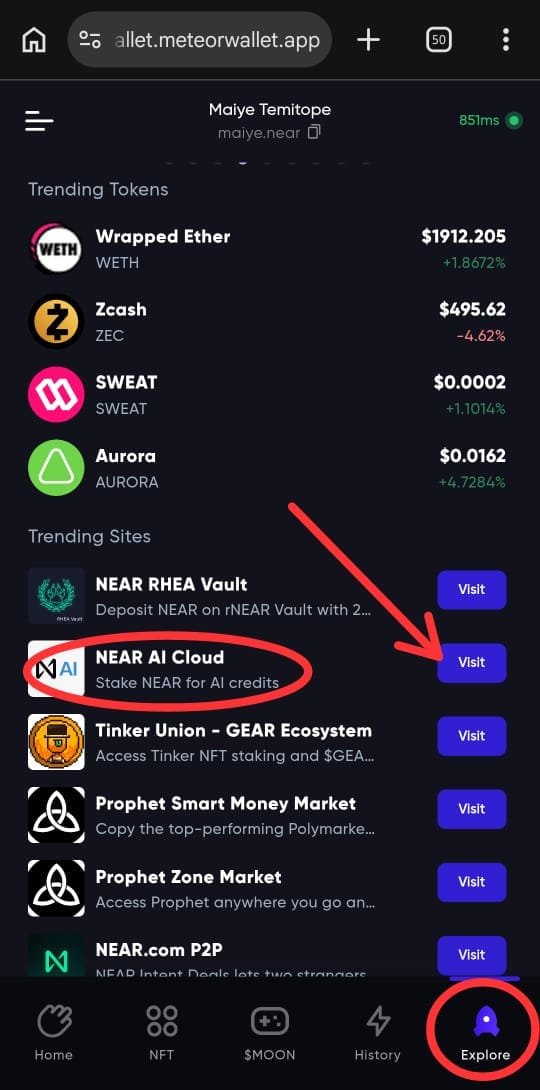
@MeteorWallet The process is easy and simple
Simply:
→ Open your meteor wallet app or browser
→ Go to the Explore tab at the bottom right corner
→ You will see "NEAR AI Cloud", click on visit to go to the website
→ Stake your NEAR
Simple.
@MeteorWallet Those credits work across all 43 AI models available on NEAR AI, including models from providers like Anthropic, OpenAI and Google.
As your AI usage changes, you can simply adjust the amount of NEAR you've staked.
@MeteorWallet The interesting part?
Your NEAR isn't being spent.
It's locked (staked) while you use NEAR AI, and you can get it back when you decide to unstake.
So rather than paying a subscription every month, your stake unlocks access to AI.
@MeteorWallet We're used to paying for AI with a bank card and a monthly subscription.
NEAR AI takes a different approach.
Instead of spending your NEAR, you stake it.
That stake is then converted into AI compute credits you can use across the platform.
🚨 Meteor just rolled out another useful update.
You can now stake your $NEAR for NEAR AI directly from the meteor wallet.
No new app. No cloud account. No leaving
Meteor.
But what does staking for AI actually mean?
👇