Jane Street pays $650,000 a year for quants. MIT wrote the exact bible to get there & released it for free.
51 pages. Zero to quant. Probability, stats, market making, real interview questions from Jane Street, Citadel, Two Sigma & more. Bookmark, before someone takes it down.
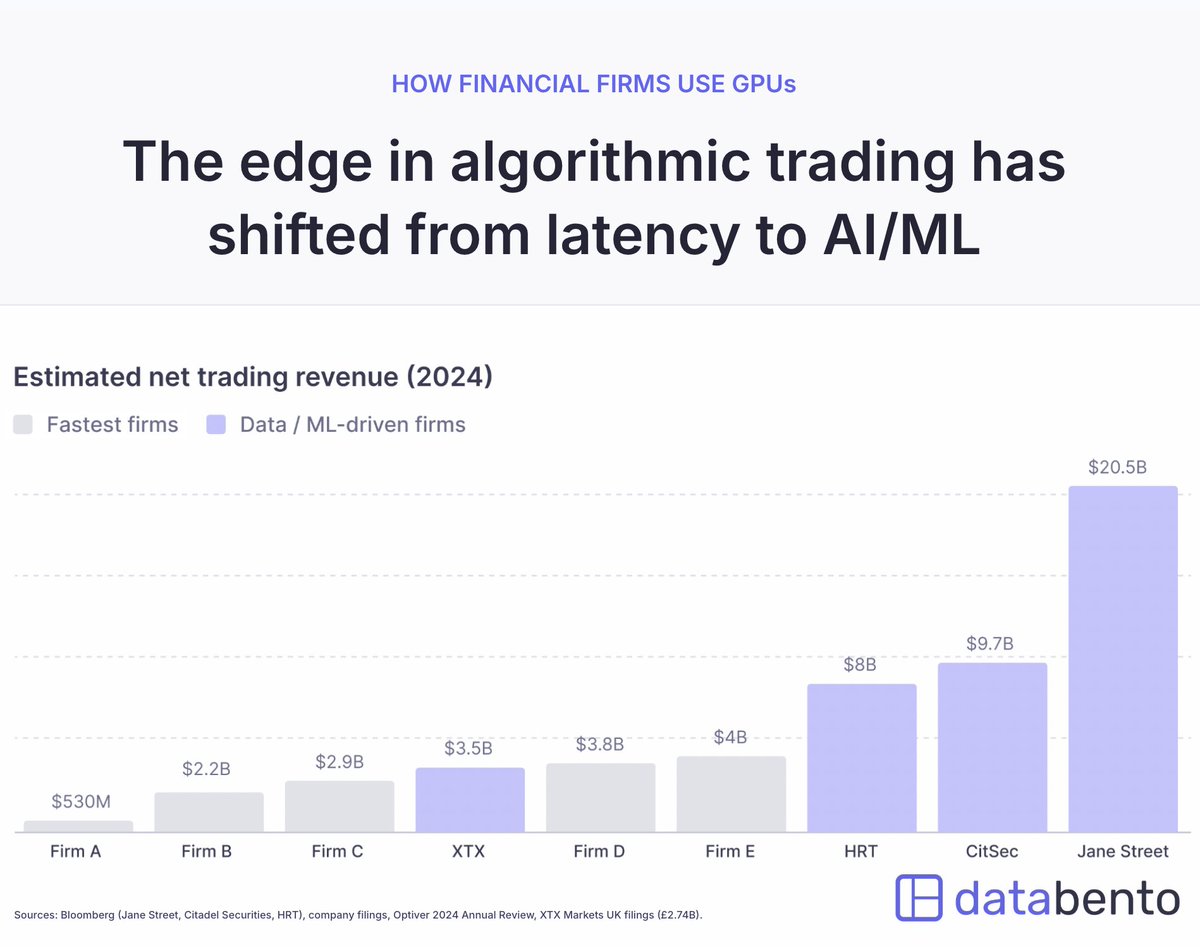
HFT vs. AI: Here's the estimated trading revenues for 5 firms generally considered the fastest in major US & European markets... alongside 4 firms considered the best in ML-driven trading.
* To be clear, the ML firms aren't slow. They have FPGA engineers, lease microwave networks, etc.
* But the data clearly shows that the edge in algo trading has shifted from latency to ML.
So like... why? I gave a talk at NVIDIA GTC about this, time to unravel it here.
Someone finally documented how to actually use Claude Code.
22K+ stars. claude-code-best-practice.
Direct from Boris Cherny and team:
→ Always use plan mode, give Claude a way to verify
→ Ask Claude to interview you using AskUserQuestion tool
→ Use Git Worktrees for parallel development
→ /loop - schedule recurring tasks for up to 3 days
→ Code Review - fresh context windows catch bugs the original agent missed
→ /btw - side chain conversations while Claude works
→ Make phase-wise gated plans with tests for each phase
→ Use cross-model (Claude Code + Codex) to review your plan
→ CLAUDE[.]md should target under 200 lines per file
→ Use commands for workflows instead of sub-agents
→ Have feature-specific sub-agents with skills instead of general QA or backend engineer
→ Vanilla Claude Code is better than complex workflows for smaller tasks
→ Take screenshots and share with Claude when stuck
→ Use MCP to let Claude see Chrome console logs
→ Ask Claude to run terminal as background task for better debugging
→ Use cross-model for QA - e.g. Codex for plan and implementation review
The community workflows included:
→ Cross-Model (Claude Code + Codex) Workflow
→ RPI (Research Plan Implement)
→ Ralph Wiggum Loop for autonomous tasks
→ Github Speckit (74K stars)
→ obra/superpowers (72K stars)
→ OpenSpec OPSX (28K stars)
The billion-dollar questions it addresses:
→ What should you put inside CLAUDE[.]md?
→ When should you use command vs agent vs skill?
→ Why does Claude ignore CLAUDE[.]md instructions?
→ Can we convert a codebase into specs and regenerate code from those specs alone?
The daily habits:
→ Update Claude Code daily
→ Start your day by reading the changelog
→ Follow r/ClaudeAI, r/ClaudeCode on Reddit
Repost it. Bookmark it.
🚨Breaking: The guy who created Claude Code (@bcherny) just revealed how his team actually trains their AI.
One file: CLAUDE.md
You place it at the root of your project.
Inside it:
past mistakes
conventions
rules
Claude reads it every session.
The result?
The agent improves over time without you touching the code.
Every bug that gets fixed becomes a permanent rule.
Boris Cherny uses this internally at Anthropic every day.
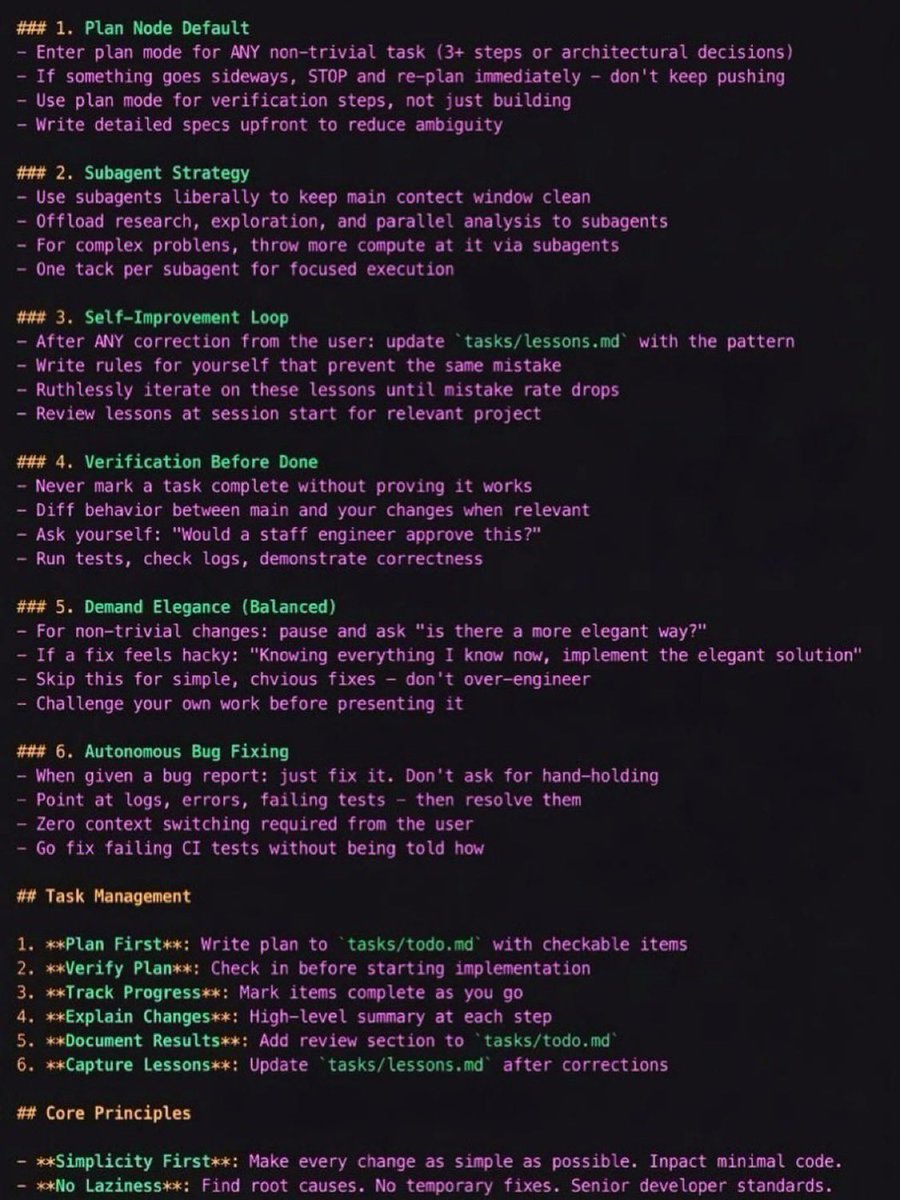
Here’s the template he shared — ready to copy, paste, and adapt.
CLAUDE.md Template
1. Plan Mode Default
Enter plan mode for any non-trivial task (3+ steps or architectural decisions)
If something goes wrong, STOP and re-plan immediately — don’t keep pushing
Use plan mode for verification steps, not just building
Write detailed specs upfront to reduce ambiguity
2. Subagent Strategy
Use subagents frequently to keep the main context window clean
Offload research, exploration, and parallel analysis to subagents
For complex problems, throw more compute via subagents
Assign one task per subagent for focused execution
3. Self-Improvement Loop
After any correction from the user, update tasks/lessons.md with the pattern
Write rules for yourself to prevent repeating the same mistake
Ruthlessly iterate on these lessons until the mistake rate drops
Review lessons at the start of each session
4. Verification Before Done
Never mark a task complete without proving it works
Diff behavior between main and your changes when relevant
Ask yourself: “Would a staff engineer approve this?”
Run tests, check logs, and demonstrate correctness
5. Demand Elegance (Balanced)
For non-trivial changes, ask: “Is there a more elegant solution?”
If a fix feels hacky, ask:
“Knowing everything I know now, implement the elegant solution.”
Skip this for simple fixes — don’t over-engineer
Challenge your own work before presenting it
6. Autonomous Bug Fixing
When given a bug report: just fix it
Use logs, errors, and failing tests to diagnose
Require zero context switching from the user
Fix failing CI tests automatically
Task Management
1. Plan First – Write the plan in tasks/todo.md with checkable items
2. Verify Plan – Confirm the plan before implementation
3. Track Progress – Mark items complete as you go
4. Explain Changes – Provide a high-level summary at each step
5. Document Results – Add a review section to tasks/todo.md
6. Capture Lessons – Update tasks/lessons.md after corrections
Core Principles
Simplicity First
Make every change as simple as possible and minimize code impact.
No Laziness
Find root causes. Avoid temporary fixes. Maintain senior-level engineering standards.
Learn how to read OrderFlow. You can thank me later 👀
I put together a detailed introduction that covers everything you need to understand my posts.
There will be a Part 2, where we will go even deeper with real setups, and execution. Stay tuned! $BTC
https://t.co/hfNaTMWUJI
𝐕𝐢𝐬𝐮𝐚𝐥 𝐛𝐥𝐨𝐠 on Vision Transformers is live.
https://t.co/N09njkKTXW
Learn how ViT works from the ground up, and fine-tune one on a real classification dataset.
CNNs process images through small sliding filters. Each filter only sees a tiny local region, and the model has to stack many layers before distant parts of an image can even talk to each other.
Vision Transformers threw that whole approach out.
ViT chops an image into patches, treats each patch like a token, and runs self-attention across the full sequence.
Every patch can attend to every other patch from the very first layer. No stacking required.
That global view from layer one is what made ViT surpass CNNs on large-scale benchmarks.
𝐖𝐡𝐚𝐭 𝐭𝐡𝐞 𝐛𝐥𝐨𝐠 𝐜𝐨𝐯𝐞𝐫𝐬:
- Introduction to Vision Transformers and comparison with CNNs
- Adapting transformers to images: patch embeddings and flattening
- Positional encodings in Vision Transformers
- Encoder-only structure for classification
- Benefits and drawbacks of ViT
- Real-world applications of Vision Transformers
- Hands-on: fine-tuning ViT for image classification
The Image below shows
Self-attention connects every pixel to every other pixel at once. Convolution only sees a small local window. That's why ViT captures things CNNs miss, like the optical illusion painting where distant patches form a hidden face.
The architecture is simple. Split image into patches, flatten them into embeddings (like words in a sentence), run them through a Transformer encoder, and the class token collects info from all patches for the final prediction. Patch in, class out.
Inside attention: each patch (query) compares itself to all other patches (keys), softmax gives attention weights, and the weighted sum of values produces a new representation aware of the full image, visualizes what the CLS token actually attends to through attention heatmaps.
The second half of the blog is hands-on code. I fine-tuned ViT-Base from google (86M params) on the Oxford-IIIT Pet dataset, 37 breeds, ~7,400 images.
𝐁𝐥𝐨𝐠 𝐋𝐢𝐧𝐤
https://t.co/N09njkKTXW
𝐒𝐨𝐦𝐞 𝐑𝐞𝐬𝐨𝐮𝐫𝐜𝐞𝐬
Dr @sreedathpanat Videos on ViT
ViT paper dissection
https://t.co/sg3JRvcgNG
Build ViT from Scratch
https://t.co/cnHzEeefDA
Original Paper
https://t.co/QiwrlDRQOc
Next up: demystifying Low-Rank Adaptation (LoRA) in PEFT!
Follow me @Mayank_022 along for more deep learning insights, cool fine-tuning projects, and updates from the upcoming blog posts.
If you can’t explain it simply, you don’t understand it.
This repo fixes that.
Turn any concept into clear, structured explanations that actually make sense.
• Simplifies complex ideas
• Builds real understanding
• Works for code + concep
This isn’t a chatbot.
MiroFish Offline spins up a simulated world of agents that interact and evolve to explore outcomes.
Run it locally. Watch the system unfold.
• Swarm intelligence
• Parallel reasoning
• Offline execution





![techNmak's tweet photo. Someone finally documented how to actually use Claude Code.
22K+ stars. claude-code-best-practice.
Direct from Boris Cherny and team:
→ Always use plan mode, give Claude a way to verify
→ Ask Claude to interview you using AskUserQuestion tool
→ Use Git Worktrees for parallel development
→ /loop - schedule recurring tasks for up to 3 days
→ Code Review - fresh context windows catch bugs the original agent missed
→ /btw - side chain conversations while Claude works
→ Make phase-wise gated plans with tests for each phase
→ Use cross-model (Claude Code + Codex) to review your plan
→ CLAUDE[.]md should target under 200 lines per file
→ Use commands for workflows instead of sub-agents
→ Have feature-specific sub-agents with skills instead of general QA or backend engineer
→ Vanilla Claude Code is better than complex workflows for smaller tasks
→ Take screenshots and share with Claude when stuck
→ Use MCP to let Claude see Chrome console logs
→ Ask Claude to run terminal as background task for better debugging
→ Use cross-model for QA - e.g. Codex for plan and implementation review
The community workflows included:
→ Cross-Model (Claude Code + Codex) Workflow
→ RPI (Research Plan Implement)
→ Ralph Wiggum Loop for autonomous tasks
→ Github Speckit (74K stars)
→ obra/superpowers (72K stars)
→ OpenSpec OPSX (28K stars)
The billion-dollar questions it addresses:
→ What should you put inside CLAUDE[.]md?
→ When should you use command vs agent vs skill?
→ Why does Claude ignore CLAUDE[.]md instructions?
→ Can we convert a codebase into specs and regenerate code from those specs alone?
The daily habits:
→ Update Claude Code daily
→ Start your day by reading the changelog
→ Follow r/ClaudeAI, r/ClaudeCode on Reddit
Repost it. Bookmark it.](https://pbs.twimg.com/media/HEetkU-bEAA0hd_.jpg)