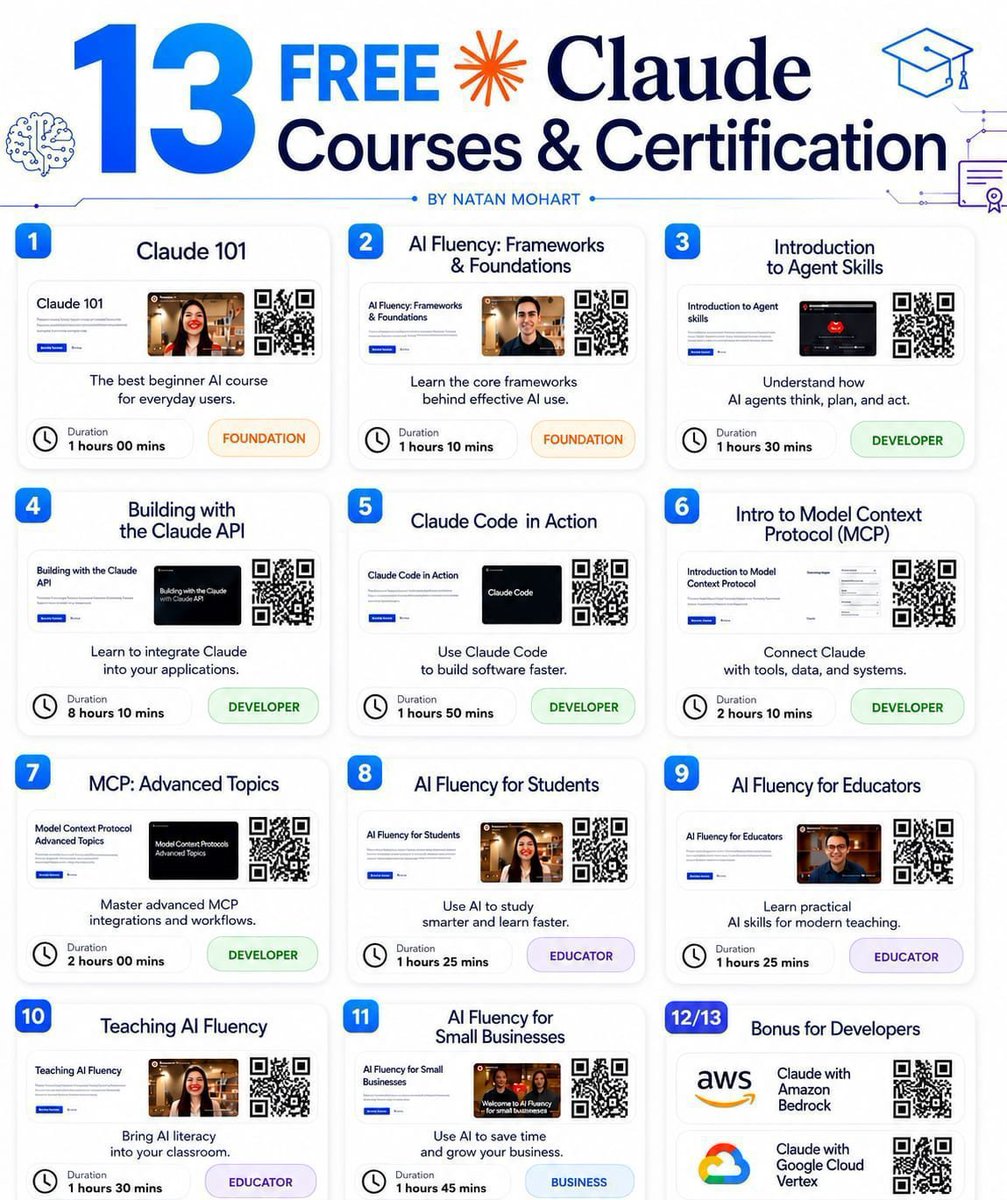
13 FREE Claude AI Courses with Certificates 🎓
1. Claude 101
https://t.co/A1jekmlLZC
2. AI Fluency: Framework & Foundations
https://t.co/i7FvpS2IfF…
3. Introduction to Agent Skills
https://t.co/bquXj1iV3s…
4. Building with the Claude API
https://t.co/M96MrD4Vy6…
5. Claude Code in Action
https://t.co/5RrS9eeWd0…
6. Introduction to Model Context Protocol (MCP)
https://t.co/bquXj1iV3s…
7. MCP: Advanced Topics
https://t.co/JbVvoVdrwB…
8. AI Fluency for Students
https://t.co/2ne3UA91FT…
9. AI Fluency for Educators
https://t.co/2ne3UA91FT…
10. Teaching AI Fluency
https://t.co/XylFT5uWEK…
11. AI Fluency for Small Businesses
https://t.co/2ne3UA91FT…
12. Claude with Amazon Bedrock
https://t.co/a63KfbRzt8…
13. Claude with Google Cloud Vertex AI
https://t.co/5cfrLapbGa…
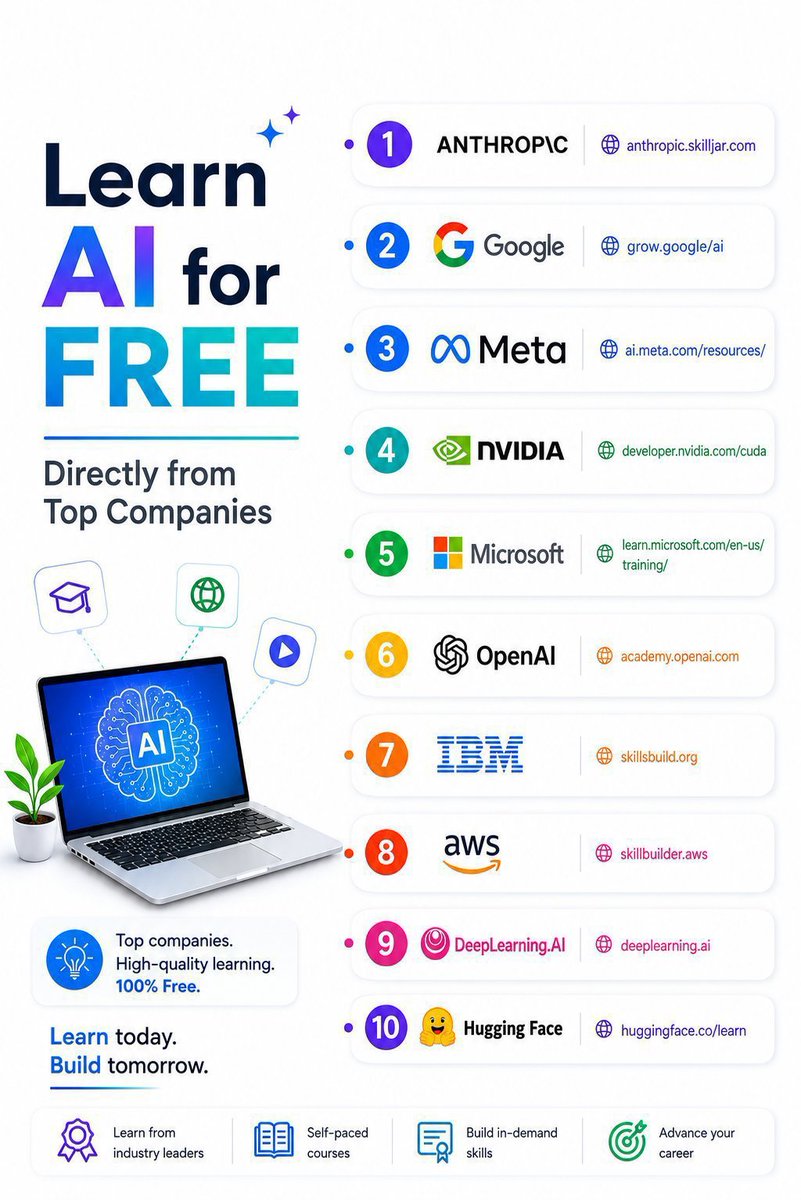
Save this post and share it with someone who wants to learn AI for FREE!
🚨 GOOGLE JUST DROPPED A 1-HOUR COURSE THAT TEACHES YOU AGENTIC AI FROM SCRATCH.
No fluff. No expensive bootcamp.
In just 60 minutes, you’ll learn how to:
→ Build your first AI agent
→ Give agents persistent memory
→ Create long-running agentic loops
→ Build MCP and understand MCP vs APIs
→ Connect multiple AI agents into one system
This could save you hours of jumping between paid courses.
🔖 Bookmark this. Watch it this weekend.
🚨 BREAKING: Claude has a mode called infinite personal tutor.
It can teach you any skill from zero in 4 hours.
Here are the 09 prompts to learn anything:
(Pick a skill. Save the prompts. Start with #1.) 📌
🚨 STOP TELLING CHATGPT “MAKE ME A GRAPHIC.”
Stop saying:
“Design a flyer.”
“Create a poster.”
“Make a social media graphic.”
Those prompts are too vague.
You’re giving AI the task without giving it the creative direction.
Use these 8 prompts instead:
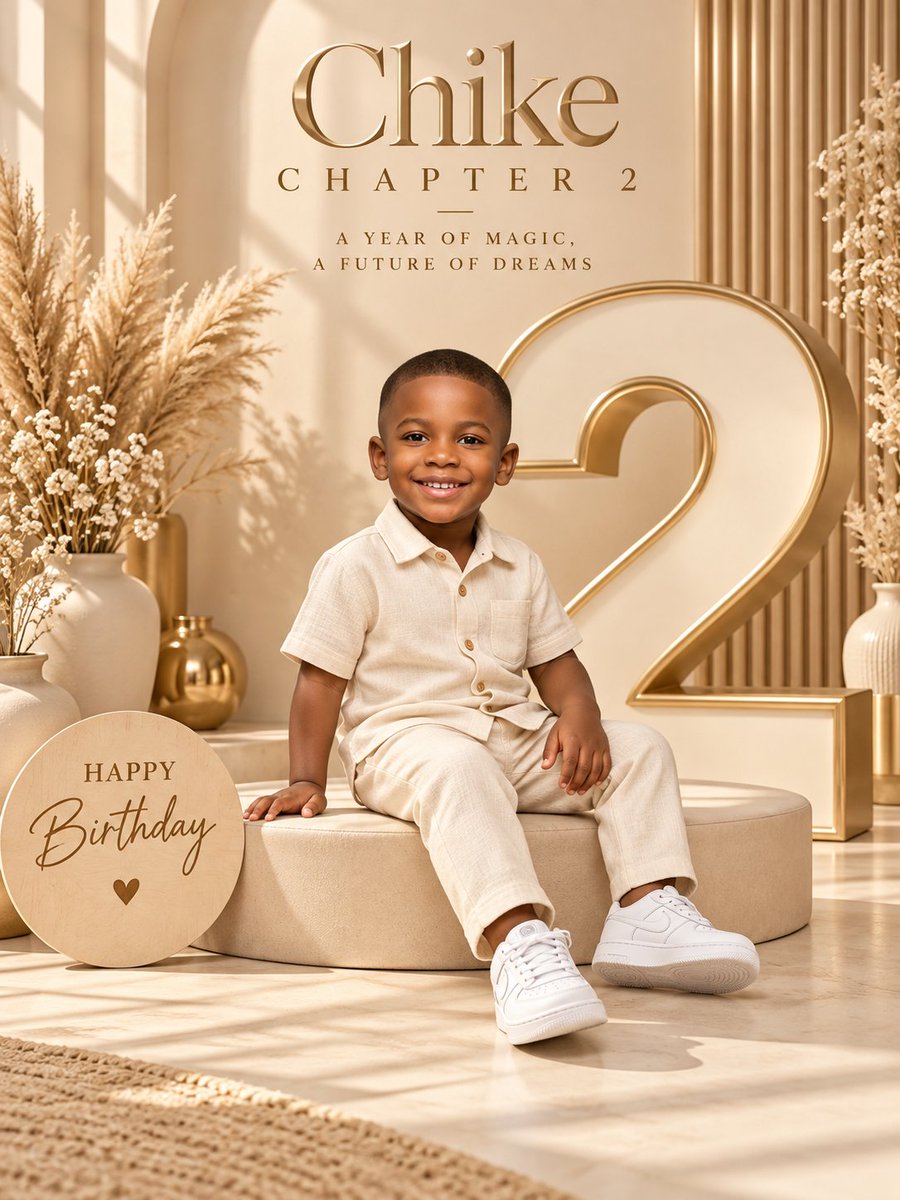
No need to go to studio again to celebrate your Children Birthday just use the prompt with GPT 2 image below 👇
Prompt:
Using the uploaded photo as facial identity reference
Create a premium 2nd birthday studio portrait inspired by the reference image, with a warm luxury beige-and-cream aesthetic.
Feature a cheerful young boy around 2 years old seated naturally on a low rounded beige platform, smiling toward the camera. Dress him in a soft cream/beige short-sleeve textured shirt, matching light trousers, and clean white sneakers. Keep the pose relaxed and playful, with one hand resting beside him and one leg slightly forward.
Behind him, place a huge sculptural number “2” as the main birthday prop. Make it elegant and three-dimensional with an ivory center, soft champagne-gold edging, smooth rounded surfaces, and realistic studio shadows.
Create a sophisticated birthday set using:
warm ivory and beige tones
vertical decorative wall panels on the right
soft cream architectural curves
dried pampas grass
delicate dried flowers
neutral ceramic vases
subtle golden accents
soft sunlight creating gentle window shadows across the floor
At the top, add refined luxury typography:
Chike
CHAPTER 2
A YEAR OF MAGIC,
A FUTURE OF DREAMS
Use an elegant high-fashion serif font for the name, widely spaced uppercase lettering for “CHAPTER 2,” and smaller minimalist typography for the subtitle.
Near the bottom-left, place a round light-wood birthday sign reading:
HAPPY
Birthday
♥
Make the overall image feel like a high-end editorial children’s birthday photoshoot, elegant, timeless, bright, warm, dreamy, and professionally styled. Use soft natural skin tones, realistic fabric textures, shallow depth of field, subtle warm highlights, cinematic soft lighting, premium photography quality, ultra-detailed, photorealistic.
Composition: vertical portrait, full-body child visible, giant number 2 behind him, clean centered layout, balanced negative space for typography, 3:4 aspect ratio, no clutter, no extra text, no distorted hands or feet.
BREAKING: Most people are using ChatGPT to design flyers the wrong way.
The difference between a generic flyer and a professional-looking one often comes down to the prompt.
I put together 7 prompts that instantly give ChatGPT better creative direction for:
• Business flyers
• Product ads
• Event posters
• Food promos
• Service flyers
• Luxury designs
• Sales campaigns
Save this before your next design project.
Here are 7 strong ChatGPT prompts you can copy and customize to generate professional flyer designs:
1. Premium Business Flyer
“Create a professional social media flyer for [Business Name], a [type of business]. Use a clean, premium layout with strong visual hierarchy, modern typography, high-quality product/service imagery, and plenty of whitespace. Use [brand colors] as the main color palette. Include the headline ‘[Headline]’, supporting text ‘[Offer/Message]’, CTA ‘[Call to Action]’, contact information, and social handles. Make it look like it was designed by a senior graphic designer. Aspect ratio: 4:5.”
2. Product Advertisement Flyer
“Design a high-converting advertising flyer for [Product Name]. Make the product the main visual focus using realistic studio lighting, premium shadows, and a clean commercial background. Add a bold scroll-stopping headline, 3 short product benefits, price [Price], promotional offer [Offer], and a strong CTA. Use [colors] and keep the design modern, minimal, polished, and suitable for Instagram and Facebook advertising.”
3. Event Flyer
“Create a modern professional event flyer for [Event Name] happening on [Date] at [Venue]. Feature a powerful headline, event theme, date, time, venue, guest/speaker information, ticket details, and CTA. Use cinematic lighting, bold typography, dynamic composition, and [preferred colors]. Keep all information easy to read while giving the flyer a premium event-promotion aesthetic. Format: vertical 4:5.”
4. Food & Restaurant Flyer
“Design an appetizing promotional flyer for [Restaurant/Food Brand] featuring [Food/Product]. Use a highly realistic hero image of the food with rich lighting, natural textures, subtle steam or ingredient details where appropriate, and a clean restaurant-style layout. Include [Headline], price [Price], offer [Promotion], location, phone number, and ‘Order Now’ CTA. Use [brand colors] and make the design premium, modern, and mouth-watering.”
5. Service Business Flyer
“Create a professional flyer advertising [Service] for [Business Name]. Use a simple, trustworthy, modern design with a strong headline such as ‘[Headline]’. Feature one relevant high-quality image, followed by 3 key benefits: [Benefit 1], [Benefit 2], [Benefit 3]. Add [special offer/warranty], phone number, location, and CTA. Use clean icons sparingly and maintain a polished [brand color] + white + black color palette.”
6. Luxury Promotional Flyer
“Create a sophisticated luxury flyer for [Brand/Product/Service] using an elegant [black/gold/cream/etc.] color palette. Use refined typography, subtle textures, realistic premium photography, soft shadows, elegant spacing, and minimal decorative elements. Highlight [main offer/product], include a short premium tagline, price or promotion, contact details, and CTA. Avoid clutter and make the composition feel exclusive, expensive, and editorial.”
7. Sales / Discount Flyer
“Design a bold professional promotional flyer for [Brand Name] announcing [Discount]% OFF / [Sale Name]. Make the discount the strongest visual element. Feature selected [products/services] with clean commercial photography, bold modern typography, contrasting colors, subtle graphic shapes, and clear spacing. Include the sale period [Dates], conditions [Details], CTA ‘Shop Now’ / ‘Book Now’, website, phone number, and social handle. Make it highly attention-grabbing without looking overcrowded.”