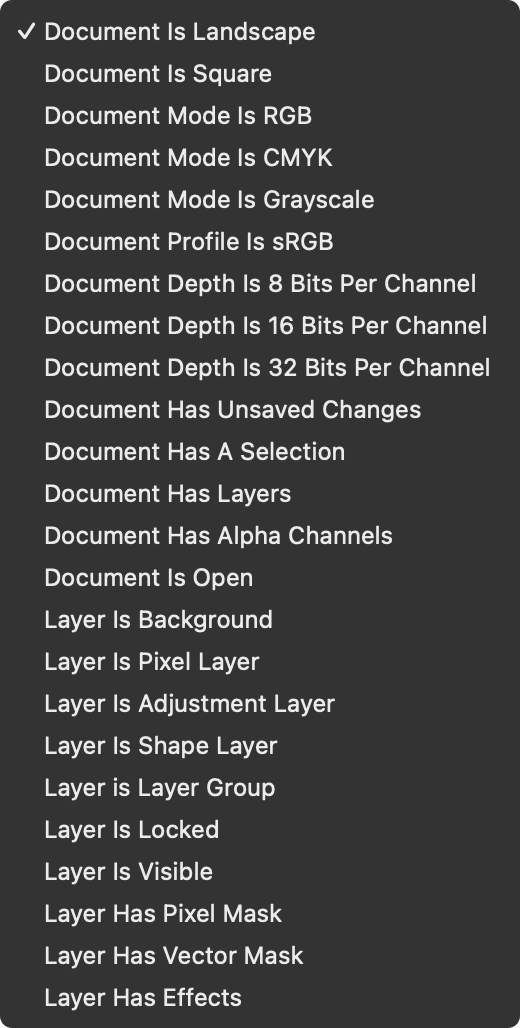
Did you know that @Photoshop has a Conditional Action feature?
(Use the Actions panel burger menu to find/insert it in your Action)
So, you can detect some properties of your document (1st screenshot) and run if/else alternative Actions 😊
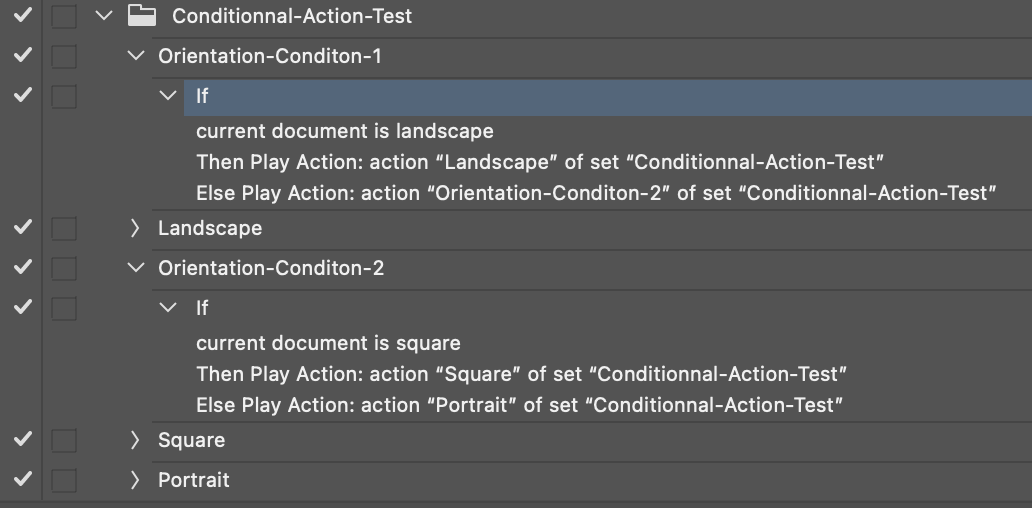
In this example (2nd screenshot), I'm nesting 2 Conditional Actions to find and apply different actions to the 3 possible orientations: Landscape, Square or Portrait.
Super useful combined with Photoshop Actions API:
https://t.co/xfC3cyljVr 😉
Every designer has a favorite placeholder text. There are fun ones like Klingon Ipsum, Hodor Ipsum, and Vader Ipsum.
But I want mine to look unreal. That's how I spot what still needs replacing. Placeholder made of real phrases is easy to miss when you finalize a publication.
Photoshop now lets you choose your own:
1. Edit > Preferences > Type (Windows) or Photoshop > Settings > Type (macOS).
2. Type your words in the Point Text and Paragraph Text fields.
3. Click OK. Click with the Type tool for point text, or drag a box for paragraph text.
Already have a text layer? Type > Paste Placeholder Text.
Don't want placeholder text at all? Uncheck "Fill new type layers with placeholder text" in the same panel. To get Lorem ipsum back, clear the fields and click OK.
What do you type when you need dummy text?
Before vs after Turntable - Adobe Animate's new feature!
Same jump. Same scene. One click changes everything about the angle.
Adobe Animate's Turntable feature, in action.
#AdobeAnimate#Animation
The Remove Tool just got another boost! ⚡️
It can now erase related elements, like shadows, reflections, etc.
Also, I need to stop removing puppies from photos...
Adobe is retiring CEP in favor of UXP across Creative Cloud desktop apps. Developers can now see the full per-app migration timeline, running through 2029. https://t.co/U6LEhjmpEw
@Adobe and @adobedevs, join as at #AdobeDevelopersLive on September 29+30 and bring your questions.
Perfect geometry is quietly ruining your lettering.
The eye doesn't read measurements, it reads impressions. Letters that are mathematically correct can still look wrong.
The fix is optical, not mathematical.
When Dynamic Text dropped in Photoshop, there were a lot of users asking why wasn't this in Illustrator.
The team listened and it's now available to test out in the latest Adobe Illustrator Beta.
Dynamic Text automatically resizes and reflows as you scale or reshape its container, so you don’t have to keep manually adjusting your type to make it fit. Something I have done manually, countless times over my career.
It also works with Type on a Path , so any curve you draw gets the same fit-to-space behavior.
The GREPedia for #InDesign, the reference encyclopedia and custom cheat sheet builder script, now includes a Polish version. 🇵🇱
Special thanks to Tomasz Kuc and Marek Włodarz for editing this Polish version.
https://t.co/ECOBTEPoBT
GREPedia is FREE!
I'll make a real process post at some point, but for now sharing a little BTS of our optical glass matte shot. Teenage Sex and Death at Camp Miasma's theatrical release is this week, next week for some. See you at the movies! @sapphicspielbrg@mubi@CampMiasmaFilm
IAMAG is becoming a real social network for artists : https://t.co/ts4I3GKXPH
A place built by artists, for artists, where your work is protected, never scraped, never used to train AI, and where you are seen because your art is good, not because you paid to be.
It opens in private beta in 48 hours, right as our community campaign comes to a close. The artists who backed it are already inside, shaping it piece by piece.
I would love for you to come and see it, and if it speaks to you, to help us finish it and put your name among the people who made it real.
This is the last big pillar of everything we've built for artists: tools that protect your art, public and private portfolios, career and mentorship, free live sessions with working pros. And it means so much more with you in it.
Thank you for being part of this. Come take a look
Another recent article from Animation Obsessive that I really like: this one about Hayao Miyazaki's gorgeous image boards. Miyazaki's image boards aren't storyboards, but they're not fleshed out concept art either; they kind of sit somewhere in between.
https://t.co/arpUNi8Ihm
AverageColors v0.3 adds Square Root & Area-Weighted color methods, combines fills & strokes into unified colors, and saves results directly to Swatches. Download: https://t.co/KCqQU3k2Bh #illustrator#adobeillustrator#script#extendscript
New feature of my animation tool « drAEw » for AE: From now on, you can vectorize your footage on the fly (no pixels, real vectors) and have fun.
Check @aescripts for more.
After Effects changed rotoscoping again.
The new Object Matte workflow combines one-click AI selection, real-time manual refinement, and fast propagation, all without requiring a live internet connection.
Take a deep look at the full toolset:
https://t.co/n3br4rTpOa
New AE features alert! In this video, I'll quickly show you how to use the improved mask tracker, native SVG paste, depth of field in the Advanced 3D render engine, copy frame to clipboard, and variable font filtering.
https://t.co/23KjjO5h4L
Bolt UXP continues to evolve. Justin Taylor showcases how WebView UI support can help developers build richer Adobe plugin experiences with familiar web technologies and streamlined workflows.
https://t.co/cYNbuqQWZG