10 horas de viaje. Auditorio lleno y yo en uno de esos momentos que llevan al límite.
Adrenalina en el estómago.
Ese instante que dominas el tema, trabajaste para estar ahí y no siempre es suficiente: hay que atreverse a dar el siguiente paso.
Una vez más se de qué estoy hecha
Most people use Claude to ask questions.
But its real value comes from building workflows that handle repetitive work for you.
Here are 6 practical Claude setups worth building this weekend:
Track expenses and subscriptions.
Organize your inbox and draft replies.
Create a searchable business knowledge hub.
Monitor competitors and find content opportunities.
Research ad creatives and generate new concepts.
Automate your client onboarding process.
The goal isn't to use more AI tools.
It's to build smarter systems that save time, reduce manual work, and help you focus on what actually matters.
Build it once. Make it work every week.
Which of these six would save you the most time?
#ClaudeAI #ArtificialIntelligence #AITools #Automation #Productivity
Today marks a major new chapter for notes and writing @Gemini_Notebook. Highlights:
Notes now live in the left panel w/ sources
Notes are grouped together; one click deselects them to keep them from influencing chat
Notes do NOT count towards source quota
What this enables:
Historically notes were contained in the Studio panel and were effectively invisible to the Notebook AI. You couldn’t ask questions about your notes, or ask the model to pull out common themes or contradictions in your thinking, or generate an audio overview based on your writing. There was also no easy way to see all your notes in one place, which was always a little odd for a product called Notebook!
If you wanted to use any of the AI features with your notes, you had only one option, which was to convert the note into a source, at which point you had two distinct copies of the note: one in the Sources panel and one in Studio. If you edited the Studio version of the note, the Sources version would not update.
In the new framework, all notes are stored in a new collapsible folder at the top of the Sources panel and can be used for grounding just like sources. (You generate notes from the Sources panel as well, by clicking the “Create note” button.) You can use chat to ask complex questions about all your entire note collection, with citations back to relevant passages. (“Summarize all the thoughts I captured about the Q1 marketing plan in my notes” “Propose a plot structure for chapter two based on my notes.”) Or you can easily support your notes with grounded information from your sources. (“Fill in the details from the assigned reading based on my lecture notes.”) Or you can generate artifacts that combine note and source material. (“Create a quiz that reviews my knowledge of all the topics I jotted down in my class notes.”)
You can also get source-grounded advice or research support as you are writing a note. (“Fact check these paragraphs against my sources.”) Over time, this transition will enable a number of additional AI-powered writing features that we are really excited to introduce. Notes continue to open in the right-hand panel so that you can explore your sources, chat, and write notes in the same workspace, without opening and closing any of the panels.
We know that there are many important scholarly or research workflows where grounding solely on external sources is a priority and where personal commentary should not be visible to the AI. That’s why we’ve made it easy to deselect some or all of your notes, which effectively keeps your notes from “contaminating” your knowledge base. (The reverse is also possible as well — it’s now easy to select only your notes, if you want to organize or explore your own ideas and ignore your sources.) We’re also making the note/source selection state persistent — if you close a notebook, you’ll find the same selection pattern active when you return.
Another key point about note organization: In all the list views available in the source panel (by type, recency, or title), notes are presented as their own category at the top of the panel, so you can quickly scan through your latest writing. But in Auto-label view—which automatically organizes your knowledge base into customizable categories—notes are intermingled with sources, based on their content. (FYI, if you have notebooks with many sources in them, auto-label is a killer feature.) But selection persistence applies to Auto-label view as well, so if you’re worried about notes infiltrating your knowledge base, you can just deselect them with one click in List view and they’ll be invisible to the model even when you are in Label view.
I’ve been using the new notes for the past month or two, and as someone who actively uses Notebook as a true writing/note-taking tool, I can tell you it’s a vast improvement over the previous approach. And more importantly, it establishes the foundation for some magical writing-related features that we’ll be shipping in the next few months. More to come on that front soon…
Un avance de Canva.
La integración de IA avanzada para la generación de imágenes, especialmente un modelo de vanguardia diseñado para el diseño, sin duda potenciará a los usuarios y ampliará los límites de la creatividad.
Felicitaciones por la posición en ranking Design Arena.
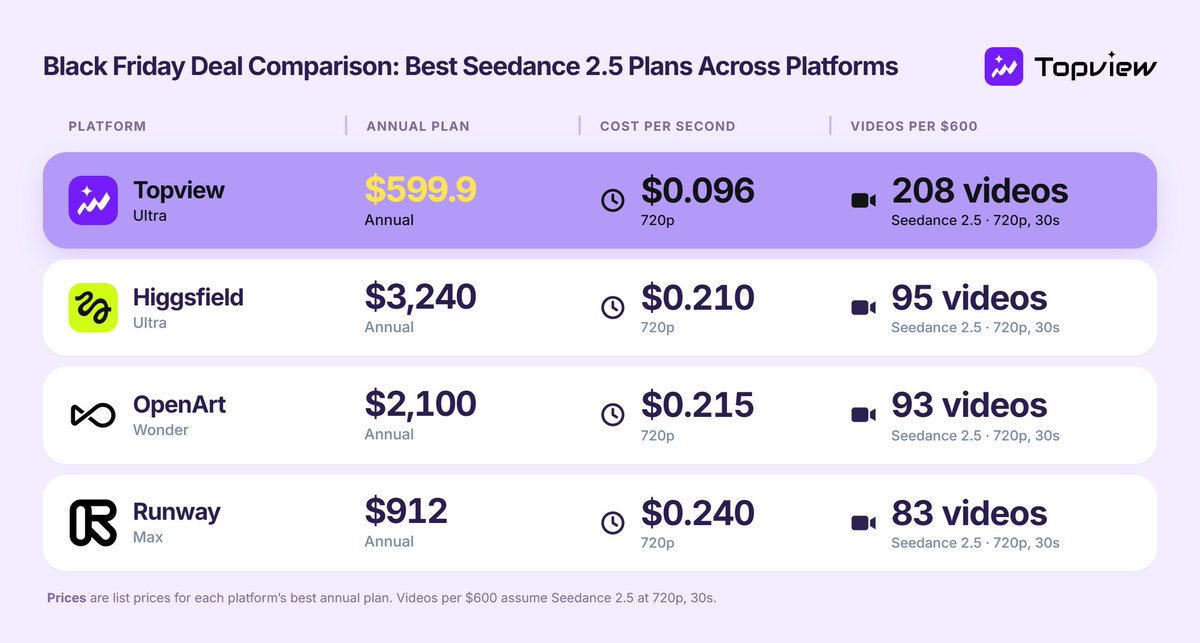
Black Friday llegó a Topview con hasta 6 meses EXTRA de Ultra.
1 año: 14 meses US$600.
2 años: 30 meses US$1200.
Incluye 500 créditos mensuales y 30 días de Seedance 2.5 ilimitado a 720p.
Es la Oportunidad para crear más con IA, hoy es la mejor oferta del mercado @TopviewAIhq
Black Friday con descuentos irresistibles.
Pero 1 mala compra, sale muy caro.
8 Prompts para Investigar precios, Descubrir problemas que las tiendas no mencionan, Comparar alternativas y Revisar tu carrito.
El último puede Convencerte de NO Gastar ni UN PESO 🧵👇
¡CUIDADO! Si encuentras un cable USB-C tirado en el aeropuerto, mall o lugar público, NO LO CONECTES.
Existen Cables Modificados con Microchips ocultos capaces de ejecutar Ataques y Comprometer tus Datos.
ADVERTENCIA: Un cable gratis podría salirte carísimo.
Los 5 niveles para crear tu agente IA impulsado por Opus 5.5 sin tocar 1 sola línea de código.
Créalo directo desde la app de escritorio de Claude.
Mira este Tutorial Simple de cómo crear un sistema que automatiza tu contenido en minutos, sin que nunca hayas visto un Código 👇
¿Buscas cambiar de Celular?
Pagar por un gama alta ya no tiene sentido.
Google Pixel 11 sigue Cayendo de Precio Sin Frenos. Es el Android más inteligente, con IA avanzada, Cámaras top y años de Soporte garantizados al coste más bajo.
Si esperabas el momento perfecto, ES AHORA
US$48 frente a US$7,55 por las mismas 1.000 llamadas a una IA.
Instrucciones duplicadas, contexto mal organizado y caché desaprovechada aumentan tú factura sin mejorar resultados.
Aquí están los cálculos y las condiciones para lograrlo. https://t.co/EIkH677FfL
Gemini Notebook puede transformar Artículos, PDFs y Videos de YouTube en Ideas Estructuradas como si tuvieras un investigador del MIT trabajando contigo.
Aquí tienes mis 10 Prompts Profesionales que cambiarán la forma en que analizas información.
“It’s so bizarre that people are constantly asking if my breasts are real or fake. They’re so obviously real that anyone who’s ever seen or touched a breast would know”
Christina Hendricks addressed the speculation about her breasts being real or implants
We have a gif for you—ChatGPT Images 2.6 is here.
ChatGPT Images 2.6 can turn your prompts and pictures into animated GIFs.
You can also keep reference images of yourself, pets, and characters ready to reuse in new creations...no need to upload them again.
Go on. Make it weird. Send more GIFs of your dog dancing.
Images 2.6 is available today in ChatGPT, and Codex across all tiers on web, desktop, and mobile.
https://t.co/WQg0cVJRca
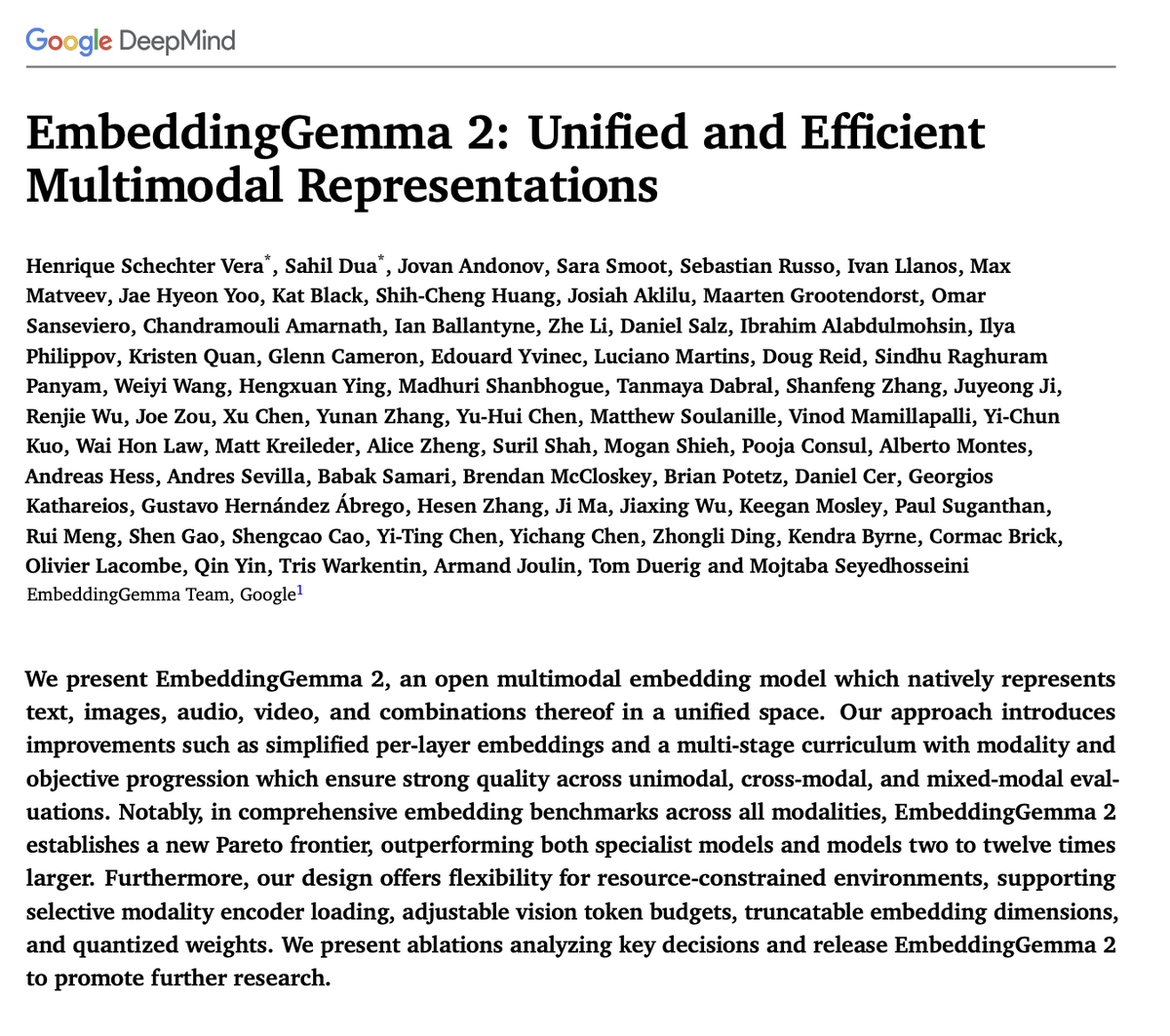
The EmbeddingGemma 2 tech report is officially live!
We are sharing the full architecture, training recipe, and ablations behind our 740M open multimodal embedding model.
Inside the paper:
🌐 Unified representations for text, code, images, audio, and video
📈 How it outperforms specialist and general models up to 12x larger
⚡ On-device efficiency: modular encoders, Matryoshka dims, and int4 quantization (down to 567MB)
Read the full report: https://t.co/gnc2NzpmIl
introducing gemini omni 1.2 flash, now available in ai studio and the gemini api
what's new:
- fast & 30% lower cost
- longer clips
- edit in conversation
- more natural speech
- more controllable shots