context-mode v1.0.130 just shipped.
14.6K GitHub stars, 1,029 forks, 73 contributors, 15 AI coding tools, 3 OS, one plugin.
The most-upvoted complaint about Claude Code on HN this month: "limits exhaust in minutes nowadays."
Right behind it: "easy to spend 30 EUR a day when providing it with a lot of context."
And: "Despite my best efforts at /compact instructions, by the time we are ready to implement, the nuance is lost."
Three different complaints. Same root cause.
Your context window is full of garbage. Repeated file reads. Stale tool outputs. Logs nobody asked for. Every npm test that fired 50K bytes you'll never look at.
context-mode keeps the important parts in a local SQLite database. Your AI talks less, remembers more, costs less.
The proof on this single conversation:
→ 14 MB stayed OUT of my context window
→ 18,632 captures across 159 projects, locally indexed
→ 70 days of usage, no cloud, no telemetry
Two weeks of work behind v1.0.130: 18 patches, 60 community issues closed, multi-window UX restored after a rollback we wrote down in an ADR so it can't happen again.
https://t.co/6qDtMec1UO
80 hours of AI pair programming. Here's what context-mode saved me.
→ $487.20 in API costs. Opus pricing. Real money, not estimates.
→ 22.3 hours of re-explaining context after compaction. Time I got back to ship.
→ 268 sessions resumed from memory. The agent never asked "what were we doing?"
→ 47 preferences auto-learned. "use TS strict" once, remembered forever.
→ 14,847 events indexed. Searchable across every session, every project.
Without context-mode |████████████████████████████████████████| 6.2 MB
With context-mode |█░░░░░░░░░░░░░░░░░░░░░░░░░░░░░░░░░░░░░░░| 124 KB
98% of raw data never entered my conversation.
That's a 50× longer session. Same context window.
Multiply across a 13-engineer team:
$487 × 13 = $6,331/month saved
22 hours × 13 = 286 hours/month recovered
Open source. Local-first. No telemetry. No account. No SaaS lock-in.
https://t.co/6qDtMec1UO
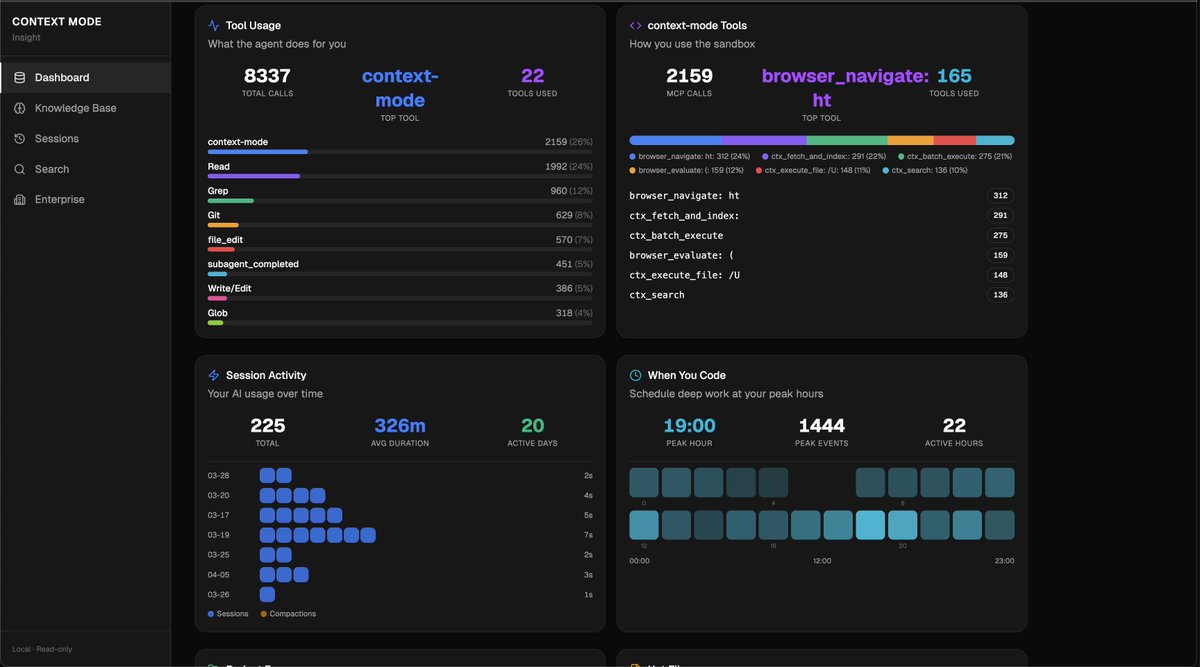
225 sessions, 8,337 tool calls. I ran /ctx-insight on my own data and the numbers surprised me.
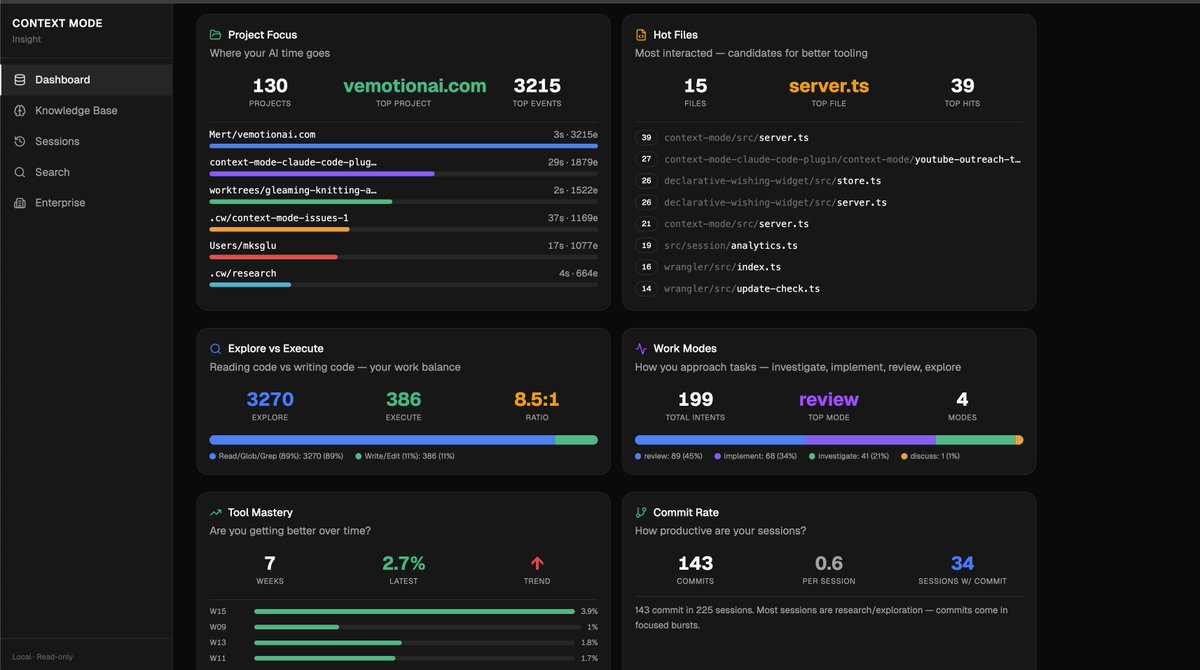
I read 5.2x more than I write. 1,992 files read, 386 written. I thought I was mostly writing code. Turns out I spend most of my AI time understanding code. Review mode 45% of the time, implementation only 34%. My context window overflows in just 4% of sessions, which apparently puts me well below the 60%+ most developers hit.
The part I didn't expect: 19 tasks running in parallel across 6 bursts saved me roughly 26 minutes. And my error rate is 2.7%, meaning almost everything lands on the first try. 143 commits in 225 sessions, but most sessions are pure research.
The commits come in focused bursts.
All of this was already sitting in a local SQLite database on my machine. Every session writes tool calls, errors, file edits, context overflows. I just never had a way to see it until now.
/ctx-insight to see yours. Nothing leaves your machine.
https://t.co/6qDtMec1UO
90-hour session. One. Didn't crash, didn't compact, didn't run out of context.
14 releases shipped. 11.7 MB processed, 85% never entered the conversation. Opus 4.7 just dropped and it's even faster. With context-mode I haven't hit a context limit in weeks.
90k developers. /ctx-stats to see yours.
https://t.co/6qDtMec1UO
Context Mode — approaching 200 stars.
Every MCP tool call floods your Claude Code context window.
Context Mode keeps raw output in sandbox, returns only what matters. 315KB → 5.4KB. 98% reduction.
https://t.co/a6HchFDMO3
Built an AI agent @seclawai that runs on your own machine. Talk to it on Telegram — it can check system info, manage files, run commands, all through natural conversation.
Built https://t.co/ugmTMix4bl: self-hosted AI agents with Docker isolation, scoped permissions, and multi-agent routing.
If useful, a repost or technical feedback would really help. 🙏
What if your AI assistant actually had access to your real tools — Gmail, Calendar, GitHub — but ran entirely on your own server?
I built @seclawai: a self-hosted AI agent platform that connects to 20+ services via a single CLI command.
In the demo, I'm chatting with my agent on @telegram:
• Checking calendar availability
• Summarizing unread emails (count only — privacy first)
• Drafting replies
• Finding free slots for deep work
• Saving notes to my personal workspace
No SaaS dependency. No monthly subscription. Your data stays on your machine.
Set up in 60 seconds: npx seclaw
https://t.co/D7HlZ90MCA
https://t.co/UOqAckWMcn
@CloudflareDev@inngest@composio@Docker
Built an AI agent @seclawai that runs on your own machine. Talk to it on Telegram — it can check system info, manage files, run commands, all through natural conversation.
No cloud lock-in. No monthly subscription. You own everything.
Open source: https://t.co/D7HlZ90MCA
@CloudflareDev@inngest@composio
https://t.co/UOqAckWMcn
I built seclaw — a secure alternative to OpenClaw.
Same autonomous agent capabilities.
But with Docker-level isolation instead of "please don't read my SSH keys" in a prompt.
One command. 60 seconds. Your agents, your machine.
npx seclaw — 60 seconds to deploy.
https://t.co/22Qhpxhbi6
https://t.co/NAZQABazlG
🧵↓
I built seclaw — a secure alternative to OpenClaw.
Same autonomous agent capabilities.
But with Docker-level isolation instead of "please don't read my SSH keys" in a prompt.
One command. 60 seconds. Your agents, your machine.
npx seclaw — 60 seconds to deploy.
https://t.co/22Qhpxhbi6
https://t.co/NAZQABazlG
🧵↓
I built seclaw — a secure alternative to OpenClaw.
Same autonomous agent capabilities.
But with Docker-level isolation instead of "please don't read my SSH keys" in a prompt.
One command. 60 seconds. Your agents, your machine.
npx seclaw — 60 seconds to deploy.
https://t.co/22Qhpxhbi6
https://t.co/NAZQABazlG
🧵↓
I built seclaw — a secure alternative to OpenClaw.
Same autonomous agent capabilities.
But with Docker-level isolation instead of "please don't read my SSH keys" in a prompt.
One command. 60 seconds. Your agents, your machine.
npx seclaw — 60 seconds to deploy.
https://t.co/22Qhpxhbi6
https://t.co/NAZQABazlG
🧵↓
I built seclaw — a secure alternative to OpenClaw.
Same autonomous agent capabilities.
But with Docker-level isolation instead of "please don't read my SSH keys" in a prompt.
One command. 60 seconds. Your agents, your machine.
npx seclaw — 60 seconds to deploy.
https://t.co/22Qhpxhbi6
https://t.co/NAZQABazlG
🧵↓
I built seclaw — a secure alternative to OpenClaw.
Same autonomous agent capabilities.
But with Docker-level isolation instead of "please don't read my SSH keys" in a prompt.
One command. 60 seconds. Your agents, your machine.
npx seclaw — 60 seconds to deploy.
https://t.co/22Qhpxhbi6
https://t.co/NAZQABazlG
🧵↓
I built seclaw — a secure alternative to OpenClaw.
Same autonomous agent capabilities.
But with Docker-level isolation instead of "please don't read my SSH keys" in a prompt.
One command. 60 seconds. Your agents, your machine.
npx seclaw — 60 seconds to deploy.
https://t.co/22Qhpxhbi6
https://t.co/NAZQABazlG
🧵↓
I built seclaw — a secure alternative to OpenClaw.
Same autonomous agent capabilities.
But with Docker-level isolation instead of "please don't read my SSH keys" in a prompt.
One command. 60 seconds. Your agents, your machine.
npx seclaw — 60 seconds to deploy.
https://t.co/22Qhpxhbi6
https://t.co/NAZQABazlG
🧵↓
I built seclaw — a secure alternative to OpenClaw.
Same autonomous agent capabilities.
But with Docker-level isolation instead of "please don't read my SSH keys" in a prompt.
One command. 60 seconds. Your agents, your machine.
npx seclaw — 60 seconds to deploy.
https://t.co/22Qhpxhbi6
https://t.co/NAZQABazlG
🧵↓