Monday's Tip for Oracle APEX:
Want to keep your custom CSS in a separate file, but have trouble managing page-specific rules?
Here's how to do it properly? 🧵
#orclAPEX
1/4
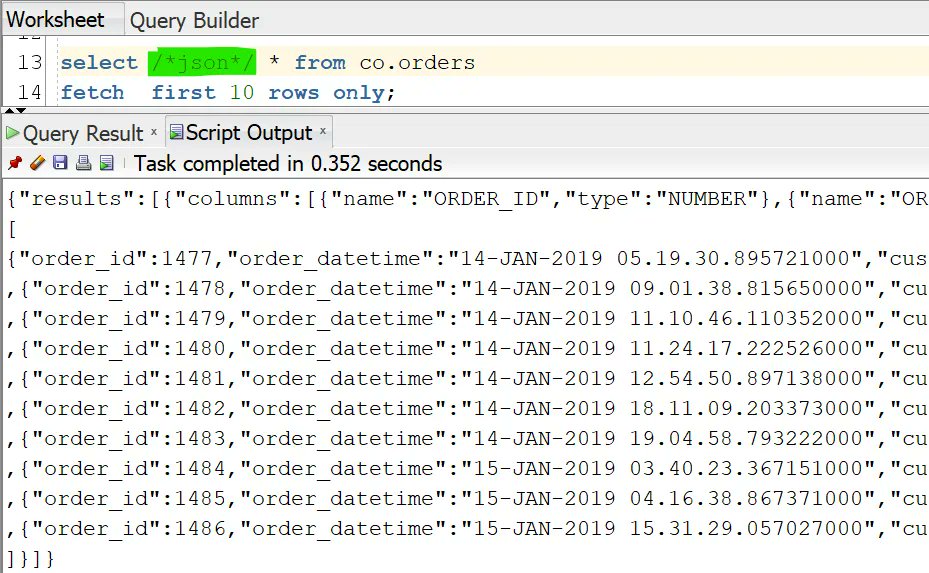
Want to get your #SQL query results as CSV, JSON or INSERT statements?
Do this in @OracleSQLDev by adding the format as a comment to the statement
For example
SELECT /*csv*/ ...
Then run the query in script mode (F5 by default)
This also supports XML, HTML, and fixed-width
Want to find all the DML changes to a table in a period?
Do this in Oracle Database with
select ... from ...
VERSIONS BETWEEN TIMESTAMP
<start> AND <end>
Use the VERSIONS_* pseudo columns to find the what & when
As with flashback query, the default is 15 mins of changes
Get the top or bottom value in an ordered data set with FIRST_VALUE & LAST_VALUE
But beware!
The default window for LAST_VALUE stops on the current row, NOT the last in the results!
To get the final value, set this to
ROWS BETWEEN UNBOUNDED PRECEDING AND UNBOUNDED FOLLOWING
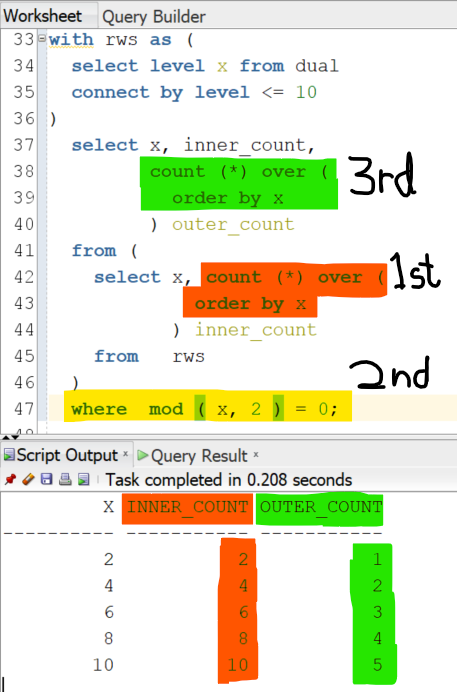
Use window functions to get running totals in #SQL
Just remember: the window is calculated after filtering
So placing the function in a subquery can give different results
e.g. these are not the same
select count () over () ...
from (
select count () over () ...
)
where ...
Turn columns back to rows in #SQL in Oracle Database with
UNPIVOT (
value_col FOR col_names IN ( c1, c2, ... )
)
This turns the IN-list columns into two
value_col => their values
col_names => their names
By default it omits null-valued cols. Add
INCLUDE NULLS
to show them
The official APEX World 2021 conference App (developed with Oracle APEX) is now available in both App Stores!
Apple: https://t.co/EoSDEYLYeE
Android: https://t.co/bcoOOVY8Lg
#APEXWorld2021#orclapex#apexworld#nlOUG