@Microsoft365, @MSFT365Status, @MicrosoftTeams, we're experiencing issues where some attendees can't see the cameo video of the presenter via Teams PowerPoint Live. We have an open ticket that's idling. Keen to expedite support in resolving this business-impacting issue. Thanks
@MSFT365Status@MicrosoftHelps Thanks @MSFT365Status, can you kindly assist @MicrosoftHelps? We're very keen to resolve this issue as cameo video is a key part of our regular all staff meetings, that has been hindering both users and presenters' experiences alike. Kind regards
@AzureSupport Hi @AzureSupport, seems to have been a transient error; I can now see eligible Entra ID, Groups and Azure resource PIM's again without those issues mentioned earlier.
Kind Regards
Hi @AzureSupport, in Australia Southeast we're unable to view, activate or approve any eligible roles, getting 401 errors, MS Graph token validation fail, times out or displays a Gateway authentication failed for 'Microsoft.Authorization'.
Seems to have just started 30 mins ago.
Hi @Office & @MSFT365Status,
Microsoft Authenticator app not opening on iOS:
https://t.co/qS6F86AVVT
I can only open the app to view OTP codes etc when I receive an auth. notification to approve. Seems like others are affected. Any reason why this is happening?
Thanks
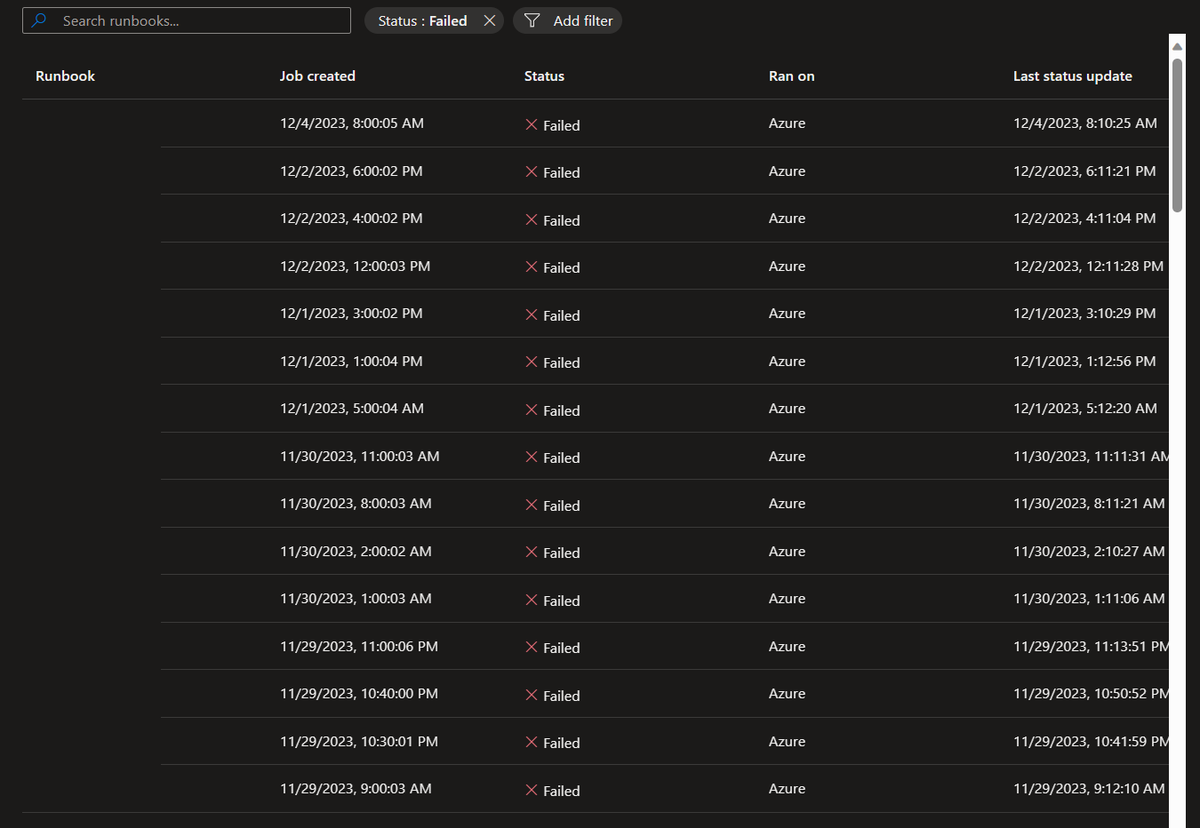
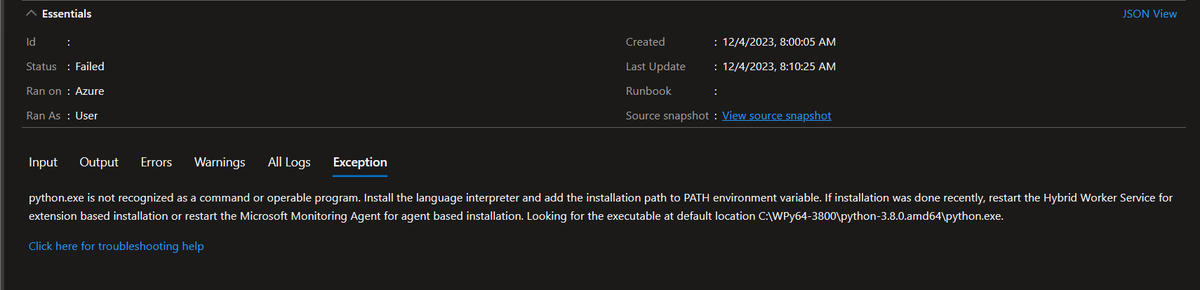
Hi @AzureSupport, I noticed a specific Python 3.8-based runbook experience this error daily. Seems the Automation service occasionally fails to execute python.exe, therefore failing to run the runbook. Other Python 3.8-based runbooks work fine. Any ideas why? Thanks
Hi @Office, @Microsoft, @powerautomate, any reason why neither the Power Automate web portal and iOS app cannot sort Cloud flows by Name/Modified/Type? I'm surprised this simple option isn't present, and others would like this basic feature too:
https://t.co/aOBSV7lB8Y
Thanks
Hi @Office, @Microsoft, @powerautomate, any reason why neither the Power Automate web portal and iOS app cannot sort Cloud flows by Name/Modified/Type? I'm surprised this simple option isn't present, and others would like this basic feature too:
https://t.co/aOBSV7lB8Y
Thanks
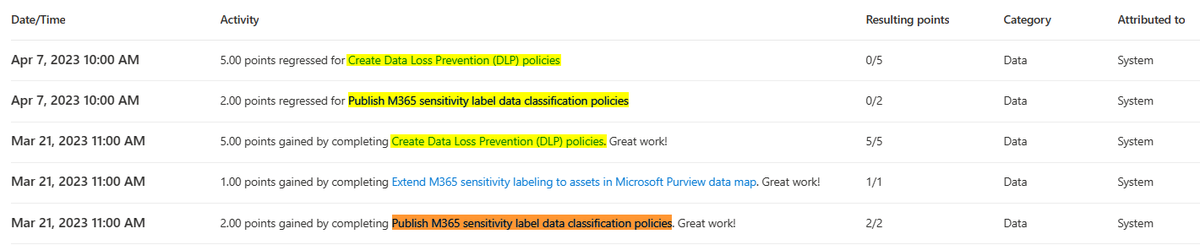
@AzureSupport Hi @MSFT365Status, @AzureSupport, these two data recommended actions:
- Create Data Loss Prevention (DLP) policies
- Publish M365 sensitivity label data classification policies
Regained their true score on the 30/04/23. More information below:
https://t.co/GP5uMUbhFG
@AzureSupport Hi @MSFT365Status, @AzureSupport, these two data recommended actions:
- Create Data Loss Prevention (DLP) policies
- Publish M365 sensitivity label data classification policies
Regained their true score on the 30/04/23. More information below:
https://t.co/GP5uMUbhFG
Hi @MSFT365Status, @AzureSupport, @Microsoft365, re: Cases 35605646 & 36003161, coincidentally I've seen two tenancies regress these two recommended actions from 07/04/23 onwards, both had DLP policies/labels published & have been working months to date. Can you please assist?
@AzureSupport Thanks @AzureSupport, kindly refer to the Microsoft Q & A post as suggested:
https://t.co/1qCs3RCmOb
I'm keen to get Microsoft's awareness on this peculiar issue.
Thanks
Hi @MSFT365Status, @AzureSupport, @Microsoft365, re: Cases 35605646 & 36003161, coincidentally I've seen two tenancies regress these two recommended actions from 07/04/23 onwards, both had DLP policies/labels published & have been working months to date. Can you please assist?
Introducing Windows 365 Frontline—improve productivity with affordable Cloud PCs for your frontline workers. Read the blog: https://t.co/GmZD5eK4Fs #Windows365
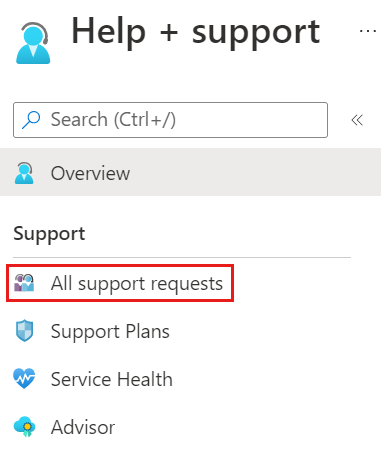
Learn how to manage your #Azure support request with ease! In this article, we show you how to view request details, send messages, change severity levels, upload files, and more. Check it out now: https://t.co/gsP8mcBEph
@AzureSupport Hi @AzureSupport, @MSIntune and @IntuneSuppTeam, I got the Company Portal pinned to the taskbar:
https://t.co/8gBkmSCffL
<taskbar:UWA AppUserModelID="Microsoft.CompanyPortal_8wekyb3d8bbwe!App" />
Thanks
Hi @IntuneSuppTeam, trying to build a custom taskbar pinned icon layout and stuck with getting the right XML syntax for the Company Portal app, e.g.:
<taskbar:UWA AppUserModelID="Microsoft.CompanyPortal" />
I had NP's pinning it to the Start menu in a group. Any tips? Thanks