How do you make an AI-generated music video that gets people talking? 👀🎬
Simon Meyer, Creative Director and Co-Founder of PROMPTR Studios got early access to Kling 4.0 to put its new capabilities to the test. The music video he created went viral, with viewers eager to know how he pulled it off.
In this episode of Creator Off Script, Simon breaks down his creative process, shares how he makes AI footage feel real, and reveals the Kling 4.0 features that impressed him most.
WHO else want to have daily updates for A.I. model releases for free? Check out the telegram channel so you will never miss important News!!
https://t.co/FKgE4AcZFq
These hybrid animals were generated with a model you can actually run LOCALLY...
For transparency: this video is sponsored by @ltx_io but they gave me full creative freedom to create whatever I wanted, so here’s my HONEST opinion!
For this piece, I created a bunch of fictional hybrid animals and tried to keep them consistent across different shots. A goose-turtle. A pig-fish. Creatures that obviously don’t exist. LTX 2.5 handled them surprisingly well, especially when I kept reinforcing in the prompt what the hybrid actually was.
But what I find even more interesting is this: LTX can also run locally on your own machine. I tried it on my MacBook and yes, it works. It was slower, the machine got hot and loud, so for the actual production I still preferred working cloud-based. But the fact that I can generate something like THIS without necessarily relying on a remote data center is pretty crazy.
And I think that is the bigger shift: AI filmmaking might not become fully local. But local is becoming a real production option. Cloud when you need speed. Local when privacy, freedom and cost matter more. That combination feels much more interesting to me than choosing only one.
What about you? Have you tried LTX 2.5 yet? Or other local models? Whats your take? Let me know in the comments!!
thanks Ben Chimoy for your help on this!!
@Sichroteph@car_heroes@Kling_ai That’s true! I think no one believes anything anymore! People also think I just type one prompt and press a button and that’s it (in 2-3 years it will
Be probably like this)
OMG! @Kling_ai 4.0 is OUT TODAY !!!!
I made this musicvideo with it! Here is everything you need to know …
This post is sponsored by Kling AI but they allowed me to create whatever I wanted!
I was one of the first few artists who got early access and used it to make this music video.
What stood out to me most wasn’t just the image quality, but its ability for lipsyncing!
For the lip sync, I used my preferred method: rendering the actual music track with a black frame and combining it with the stills I created.
Same with prompt adherence.
Shaky handheld camera actually felt shaky.
The anamorphic lens look came through.
And with Omni Reference, you can now work with up to 15 references across images, video, voice and elements.
On launch you also get:
• up to 10 keyframes
• 30s generations
• 1080p
• multi-shot support
• improved lip sync
• improved text generation
• much more flexible reference control
Kling 4.0 feels less like “generate me a video” and more like “here are all the ingredients, now direct it.”
oh, and its cheaper than seedance! And 4.0 Flash is A LOT faster too!
Have you tried it? Let me know your thoughts!
Thank you so much for helping me with this one Ben Chimoy!
How to come up with good ideas? Here is my process (maybe it helps you) …
Having good ideas is easy! Selecting the good ones is hard! I have ideas constantly, 5–10 film ideas per day, I would say. But 99% of these ideas are super dumb, make no sense, don’t really touch me personally or are just impossible to make. But it’s super important to not immediately limit yourself when trying to come up with a good idea.
I made a full YouTube video on this (link in the comments) where I go in depth and talk about how I came up with ideas for the contests I recently won.
But the most important advice I can give is: Make it personal, make it yours! Claude and ChatGPT are not really helping, as they might come up with great ideas, but they are not yours, they are not personal and that’s why they feel generic. In all of my work, I put something from my experience, my life, into it and that’s what makes it special (at least for me). Because even if everyone hates my ideas or the scripts or the films that I create, it’s coming from me. And in a world where everyone just uses Claude to come up with ideas, a truly personal story beats all the crazy polished action scenes in the world. (Just my two cents)
What about you? What’s your process? Would love to hear your thoughts in the comments!
Check out the YT video (link in the comments)
I made this video with A.I. with just one prompt in 2 Seconds without any effort for 1,75 USD on my microwave ...
...is what some people are telling you and its NOT true (if you care about what you create). Even though invideo Agent Two is REALLY powerful and helped me creating this sequel to my original "Dieter" film, its not the magical tool that can create exactly what you envisioned on its own!
This video is sponsored by @invideoOfficial though, but i am allowed to create & write what I want so these are my honest thoughts!
The thing is: I write my script first. Of course i brainstorm together with claude, Gemini and ChatGPT but the initial beats always come from me. I also always have my base prompt, my creative direction (how does Dieter look, whats the camera language, whats the lighting etc.) and then it all come together in the editing , that i ALWAYS do myself, as comedy is alot about timing and the right images at the right time.
But everything in between, the brainstorming with the images, the development of the scenes, testing out different beats, all of that is possible with invideo agent two. It really helped me to be faster in iteration. Also its context is amazing, as it will always remember my base prompts, references etc. I made a YouTube Video about my full process (will link it in the first comment) and here are the hard facts:
- made with invideo Agent two
- Seedance 2.0 and Seedance 2.5
- Base image edit with GPT2
- Edited in Resolve
- Credits spend: roughly 300 USD (without the credits that i spent for testing)
Have you tried agents ? Let me know your thoughts about it!!
I'm trying to win $50,000 with this ad for a product that doesn't exist! Here is my workflow + cost breakdown & the tools I used to create it …
If you follow me, you know spec ads are my favorite genre in AI film. Because ads are films people typically don't like watching. They hate them! And honestly? Fair. Most of them aren't worth watching.
That's exactly why I keep entering these contests because I believe advertising should be storytelling with heart & soul!
With this entry, I'm competing together with Fabi Lindemeier in the @runwayml Another Big Ad Contest!
I started by creating the base images with Sora. Sora is just the most realistic model when it comes to authentic character design! Then I upscaled these with GPT2 and made a collage with the characters, location, creative direction, lighting EVERYTHING locked in ONE single base image.
Then I animated it with Kling Turbo. Why? Because Kling is so much better at fine human emotions than Seedance. Also, it's MUCH cheaper and SO MUCH faster.
I've already seen so many great entries, and it's super cool that AI FILMMAKING keeps leveling up 🔥 Thanks, Runway, for hosting this amazing competition again!
#runwaybigadcontest
Meet Agent Two, frontier intelligence for creative work. 4x faster, at half the price.
For the next 12 days, we're dropping one new Agent Two feature every single day.
Day 1: Agent Intelligence. An agent with top-percentile creative expertise, infinite memory, and still working while you sleep. Give it a role and it becomes it.
It never forgets, we mean it and we're giving 5 people 5000 credits for the most creative way to break it.
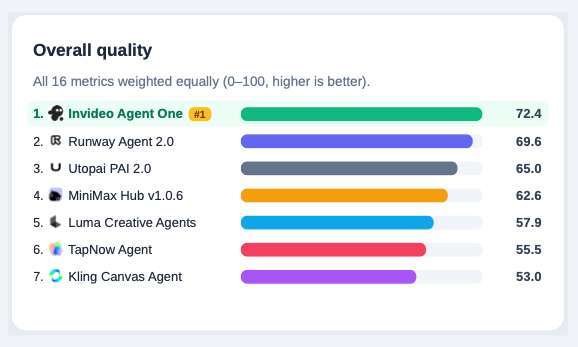
Last week Physion Labs published an independent benchmark of AI video agents. Invideo wasn't in it. We requested them to include us. Results are out. invideo Agent One is #1. We are number #1 on 12 of the 16 individual metrics. Never falling below #2